
PS2 PS2 doing a lot of noise and TV screen flickering after replacing cables

Is thst popstarter compatible with all PS1games, would my PS2 PAL play NTSC PS1 games, would PS2 games stutter and would I be able to save them (I guess I'd need a PS1 Memory Card)?

I don't know if you're talking about this but I want to use the nano router with an HDD attached to it so internet access and connecting the PC to the PS2 is not required. Do you think these two nano routers would work? I don't know if they come with all the required cables but at least since they're being sold in my country's stores I suppose I won't have the power outlet problem. I bought an external HDD to use in my PS4 and it came with many power outlets.

The thing is, the screen flickers if I use the current component cables so I suppose I'll have the same problem if I use them via a component to HDMI converter. I think I may be able to find official Sony composite cables and with them I presume I won't have this problem since I didn't have it when I had it. Do you think I may have it if I use via a composite to HDMI converter?

I use a generic non branded chinese component cable and it works fine.

I bought a GL iNet MT300N v2 recently for like, £8 delivered. It came with a RJ45 ethernet cable and a mini usb cable (for power). It runs off any 5v power source, so phone charger, battery bank, any usb source.
Handy little thing to have, I use it as a VPN network bridge to my home network when away. Among other things
 
I use a generic non branded chinese component cable and it works fine.

I bought a GL iNet MT300N v2 recently for like, £8 delivered. It came with a RJ45 ethernet cable and a mini usb cable (for power). It runs off any 5v power source, so phone charger, battery bank, any usb source.
Handy little thing to have, I use it as a VPN network bridge to my home network when away. Among other things

Weird. I think I use one of those and I have the mentioned problem. I thought it had to be a HD Retrovision or other cables, not generic ones.

I want to buy a new TV (4K) and I was told it looks horrible when playing PS2. What should I use, a component to HDMI converter (will I have the same problem I'm having now?) connected to a HDMI switch because I have other HDMI cables or a PS2 to HDMI converter (also connected to a HDMI switch)?

So, I guess most nano routers should work, I don't have to have internet access or connect the PC to the PS2 by streaming or something like that (or via a cable) and just connect the nano router to the PS2's ethernet port via an ethernet cable and connect an external 1 TB (for instance) HDD to the nano router (I guess most would work) to the nano router's USB port via an USB cable and not only it would work but also the games wouldn't stutter or have other problems? I only want to have this nano router to play the games (nothing more) and so it has to be connected to the PS2 via a cable, right? Would I need more ports/cables?
 
Last edited:
Weird. I think I use one of those and I have the mentioned problem. I thought it had to be a HD Retrovision or other cables, not generic ones.

I want to buy a new TV (4K) and I was told it looks horrible when playing PS2. What should I use, a component to HDMI converter (will I have the same problem I'm having now?) connected to a HDMI switch because I have other HDMI cables or a PS2 to HDMI converter (also connected to a HDMI switch)?

So, I guess most nano routers should work, I don't have to have internet access or connect the PC to the PS2 by streaming or something like that (or via a cable) and just connect the nano router to the PS2's ethernet port via an ethernet cable and connect an external 1 TB (for instance) HDD to the nano router (I guess most would work) to the nano router's USB port via an USB cable and not only it would work but also the games wouldn't stutter or have other problems? I only want to have this nano router to play the games (nothing more) and so it has to be connected to the PS2 via a cable, right? Would I need more ports/cables?

If it's a slim ps2, you have the correct ethernet port. If it's a fat then you will need a Network Adaptor.

Any travel router with openWRT firmware should work. You need to setup an SMB share on the router to allow shares from the USB HDD to the router.
It's not going to be a simple plug and play job though. Best look into openWRT and how to setup SMB shares.

Problem with ps2s usb ports is they are usb 1.1, which is slower than the dvd drive. Hense the slowdowns and cut scene stuttering. Ps2 slim (or fat with network adaptor) using ethernet is much much faster. And the router will have USB 2.0 or better. This will significantly reduce stutter and load times. But not all games are compatible. There are many compatibility lists floating around to reference though
 
If it's a slim ps2, you have the correct ethernet port. If it's a fat then you will need a Network Adaptor.

Any travel router with openWRT firmware should work. You need to setup an SMB share on the router to allow shares from the USB HDD to the router.
It's not going to be a simple plug and play job though. Best look into openWRT and how to setup SMB shares.

Problem with ps2s usb ports is they are usb 1.1, which is slower than the dvd drive. Hense the slowdowns and cut scene stuttering. Ps2 slim (or fat with network adaptor) using ethernet is much much faster. And the router will have USB 2.0 or better. This will significantly reduce stutter and load times. But not all games are compatible. There are many compatibility lists floating around to reference though

Yes, it's a Slim PS2. I thought I only needed to plug and play. What do you mean by saying that not all games are compatibles? I've yet to see those lists. Do you mean that not all are compatible with a jailbroken PS2 or with ethernet?

So, do I need internet access to share the external HDD after all? Can you tell me how to setup an SMB share on the router? Do I need openWRT (whatever that is)? Would the router accept a 1 TB HDD and would it need to be formatted as FAT32? Is NTFS supported? What if there are + 4 GB PS2 games?
 
Last edited:
Yes, it's a Slim PS2. I thought I only needed to plug and play. What do you mean by saying that not all games are compatibles? I've yet to see those lists. Do you mean that not all are compatible with a jailbroken PS2 or with ethernet?

So, do I need internet access to share the external HDD after all? Can you tell me how to setup an SMB share on the router? Do I need openWRT (whatever that is)? Would the router accept a 1 TB HDD and would it need to be formatted as FAT32? Is NTFS supported? What if there are + 4 GB PS2 games?

OpenWRT is an open source router firmware. It runs on many stock routers. It has such features as VPN (Virtual Private Networks), SMB Shares (the native windows sharing protocol) and other such network related applications.
What you will be doing by purchasing a travel router is basically setting up your own network. No internet is needed for this use case.You would setup an SMB share on your USB drive using the openWRT software (you connect via wifi with phone or PC and entering an IP address into a web browser you will get a web GUI), this would then be shared to your Ps2 via the network being hosted by your travel router.
Think of it like how your PC hosts the games to the Ps2, but instead the router is doing that.

As for compatibility, each method of backup loading (HDD, SMB, USB) have their own compatibility. You can find a few links to these HERE.

Lastly, @TnA brought to light this method on PSX-Place. You can find more info on that, along with some videos HERE
 
OpenWRT is an open source router firmware. It runs on many stock routers. It has such features as VPN (Virtual Private Networks), SMB Shares (the native windows sharing protocol) and other such network related applications.
What you will be doing by purchasing a travel router is basically setting up your own network. No internet is needed for this use case.You would setup an SMB share on your USB drive using the openWRT software (you connect via wifi with phone or PC and entering an IP address into a web browser you will get a web GUI), this would then be shared to your Ps2 via the network being hosted by your travel router.
Think of it like how your PC hosts the games to the Ps2, but instead the router is doing that.

As for compatibility, each method of backup loading (HDD, SMB, USB) have their own compatibility. You can find a few links to these HERE.

Lastly, @TnA brought to light this method on PSX-Place. You can find more info on that, along with some videos HERE

Unfortunately, it seems too much difficult for me...

Can't I do it in Windows instead of openWRT and do I really need a PC to do it in the first place?

Like I've told, that's precisely the thread I saw and thought that I only needed to connect the nano router to the PS2 and attach an USB HDD to it.
 
Last edited:
Unfortunately, it seems to be too much difficult for me...

Can't I do it in Windows instead of openWRT and do I really need a PC to do it in the first place?

Like I've told, that's precisely the thread I saw and thought that I only needed to connect the nano router to the PS2 and attach an USB HDD to it.

You could use a NAS (network attached storage), to host the SMB share.
But basically the same thing. Whether you use the router, a NAS or a Windows PC. You'll have to set up SMB shares, as that's how the Ps2 interfaces with it.

I just watched the video myself and noticed the TP-Link router he uses has a "client mode" switch. But he does still go into the routers settings to chage some IP address values.

Also noticed... For something that's so open source, openWRT always looks different from manufacturer to manufacturer. My main Asus router runs MerlinWRT, which is a fork of AsusWRT, which is a fork from openWRT and it still looks super Asus branded in the settings menu. I guess things may be slightly different depending on which router you choose. But the principles are still basically the same. SMB is typically something you have to setup.
 
You could use a NAS (network attached storage), to host the SMB share.
But basically the same thing. Whether you use the router, a NAS or a Windows PC. You'll have to set up SMB shares, as that's how the Ps2 interfaces with it.

I just watched the video myself and noticed the TP-Link router he uses has a "client mode" switch. But he does still go into the routers settings to chage some IP address values.

Also noticed... For something that's so open source, openWRT always looks different from manufacturer to manufacturer. My main Asus router runs MerlinWRT, which is a fork of AsusWRT, which is a fork from openWRT and it still looks super Asus branded in the settings menu. I guess things may be slightly different depending on which router you choose. But the principles are still basically the same. SMB is typically something you have to setup.

I thought I only had to connect the nano router to the PS2 via an ethernet cable, an USB HDD to the former via an USB cable and setup a SMB share on my USB drive via a Windows program.

I've yet to jailbreak the PS2 and what are "Compatibility modes", "VMC (integrated)", "IGR (integrated)", "GSM (integrated)" and "PS2RD (integrated)"?

This is too hard for me and I might as well burn the games to DVD (if they're compatible) even if my PS2 is currently having problems reading them and reading new ones would make it even worse (do burned backups degrade the laser even more than original games?).
 
I thought I only had to connect the nano router to the PS2 via an ethernet cable, an USB HDD to the former via an USB cable and setup a SMB share on my USB drive via a Windows program.

I've yet to jailbreak the PS2 and what are "Compatibility modes", "VMC (integrated)", "IGR (integrated)", "GSM (integrated)" and "PS2RD (integrated)"?

This is too hard for me and I might as well burn the games to DVD (if they're compatible) even if my PS2 is currently having problems reading them and reading new ones would make it even worse (do burned backups degrade the laser even more than original games?).

VMC is virtual memory cards.
IGR is in game reset
GSM is graphic synthesiser mode selector, you can change some games internal resolution to be higher. Sometimes achieving 1080i, but it doesn't oprove things massively.
PS2RD is a cheat system.

SMB is a network protocol, its not something that can be installed onto a USB. That's what the router is providing, the network for the SMB share. The share location being the USB drive.

Also, not all USB HDDs can be powered by a single USB port, I can imagine a nano router only pulling 1 amp (that's what my nano router pulls) will be able to power a 2.5inch drive. So you might need a USB Y cable and power the drive from another souce, say, one of the ps2s usb ports.

I know this is probably a crap ton of info I'm throwing at you here with no prior knowledge of Ps2 "jailbreaking", but it is a pretty hands on thing.

The jailbreak part being your first step. You have a few options. You can go down the route of starting from scratch, using one of the many exploits to install FreeMCBoot (FMCB), these are all typically not super simple. For instance, my route into hacking my ps2 was way back, using a retail game to rip and modify and burn to dvd, then play the game to a certain point, and using a disk swap trick (by blocking the disk tray sensors) swap the retail for my modded copy and boot into a file manager, and then installing the FMCB exploit onto a spare memory card. This card is then used to exploit the system on boot, allowing for homebrew to be launched from ps2s home screen, or OSDSYS as its known.

Or.... You could just buy a pre-made FMCB memory card. Skipping pretty much all of that.

What I'm trying to get at though, is there's alot to learn on the subject of Ps2 "jailbreaking" modding etc etc.
 
VMC is virtual memory cards.
IGR is in game reset
GSM is graphic synthesiser mode selector, you can change some games internal resolution to be higher. Sometimes achieving 1080i, but it doesn't oprove things massively.
PS2RD is a cheat system.

SMB is a network protocol, its not something that can be installed onto a USB. That's what the router is providing, the network for the SMB share. The share location being the USB drive.

Also, not all USB HDDs can be powered by a single USB port, I can imagine a nano router only pulling 1 amp (that's what my nano router pulls) will be able to power a 2.5inch drive. So you might need a USB Y cable and power the drive from another souce, say, one of the ps2s usb ports.

I know this is probably a crap ton of info I'm throwing at you here with no prior knowledge of Ps2 "jailbreaking", but it is a pretty hands on thing.

The jailbreak part being your first step. You have a few options. You can go down the route of starting from scratch, using one of the many exploits to install FreeMCBoot (FMCB), these are all typically not super simple. For instance, my route into hacking my ps2 was way back, using a retail game to rip and modify and burn to dvd, then play the game to a certain point, and using a disk swap trick (by blocking the disk tray sensors) swap the retail for my modded copy and boot into a file manager, and then installing the FMCB exploit onto a spare memory card. This card is then used to exploit the system on boot, allowing for homebrew to be launched from ps2s home screen, or OSDSYS as its known.

Or.... You could just buy a pre-made FMCB memory card. Skipping pretty much all of that.

What I'm trying to get at though, is there's alot to learn on the subject of Ps2 "jailbreaking" modding etc etc.

Could you tell more about that USB Y cable? Are you saying that I need to use an ethernet cable to connect the router to the PS2 but also a USB cable from it to the PS2 and that may not be enough? What about those games (Buzz, I think) which require 2 USB ports?
 
Could you tell more about that USB Y cable? Are you saying that I need to use an ethernet cable to connect the router to the PS2 but also a USB cable from it to the PS2 and that may not be enough? What about those games (Buzz, I think) which require 2 USB ports?

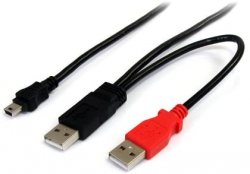
41Xe-n8wk+L._AC_SX466_.jpg

This is a USB Y cable. If a device can't provide enough power to the HDD through the black USB A plug, then you can plug the red into another USB port to provide enough. The red only provides extra power, no data.
This is a typical thing with consoles. I have one for my ps3 and wii U, as they dont provide enough with just 1 port.
This is actually down to the internal HDDs power requirements. I have a 60gb hdd that works on a single USB, and thats the only one out of the 10s of HDDs I've accumulated over the years.

This is purely for powering the HDD BTW.

The hdd is still going to the router via USB and then (via SMB share) then going through ethernet to ps2.
A HDD will probs need extra power. A ps2 USB port was just a suggestion. Any USB port will probably work. Maybe your HDTV has one, this could also be used for power.
 
Last edited:
View attachment 26178

This is a USB Y cable. If a device can't provide enough power to the HDD through the black USB A plug, then you can plug the red into another USB port to provide enough. The red only provides extra power, no data.
This is a typical thing with consoles. I have one for my ps3 and wii U, as they dont provide enough with just 1 port.
This is actually down to the internal HDDs power requirements. I have a 60gb hdd that works on a single USB, and thats the only one out of the 10s of HDDs I've accumulated over the years.

This is purely for powering the HDD BTW.

The hdd is still going to the router via USB and then (via SMB share) then going through ethernet to ps2.
A HDD will probs need extra power. A ps2 USB port was just a suggestion. Any USB port will probably work. Maybe your HD has one, this could also be used for power.

Thanks, but then how would I have enough USB ports on my PS2 to connect other PS2 accessories?
 
Could you send me a tutorial showing how to share a drive using SMB?

I'm currently working on an all in one ps2 guide. It's well overdue, but such methods as travel routers and also a SD card to ps2 memory card adaptor have been recent additions to the scene, so I haven't got round to adding those parts.

Gimme a min and I'll dig out the relevant part and post here. But it will only be relevant to using a Windows PC, not a travel router
 
OK, my bad, that's actually the part I got up to. I sound like a broken record but I will get round to finishing it eventually.
I've recently had a router upgrade and bought a server and have been super preoccupied getting those setup.

In the mean time, @ShaolinAssassin has some good guides on OPL (Open Ps2 Loader) and setting up SMB and permissions on bit bucket, found HERE. Scroll down to part 3. ETH
 
OK, my bad, that's actually the part I got up to. I sound like a broken record but I will get round to finishing it eventually.
I've recently had a router upgrade and bought a server and have been super preoccupied getting those setup.

In the mean time, @ShaolinAssassin has some good guides on OPL (Open Ps2 Loader) and setting up SMB and permissions on bit bucket, found HERE. Scroll down to part 3. ETH

Thanks, although that guide talks about connecting the PC to the PS2 via SMB to play the games, not a router to the PS2, I think. Anyway, I just remembered that there may be some + 4 GB PS2 games and if the USB HDD is formatted as NTFS may it have problems?
 
Thanks, although that guide talks about connecting the PC to the PS2 via SMB to play the games, not a router to the PS2, I think. Anyway, I just remembered that there may be some + 4 GB PS2 games and if the USB HDD is formatted as NTFS may it have problems?

I guess that's down to whether the specific router you choose accepts that format. I think my GL iNet accepts fat32, exfat, ntfs and ext4.
 
I guess that's down to whether the specific router you choose accepts that format. I think my GL iNet accepts fat32, exfat, ntfs and ext4.

How can I know it supports it before buying?

Use a different usb port....
1 USB goes to router for data, the other can go on ANY USB. It doesn't have to be your ps2s usb port, it was just an example

Ok, but there are some games like Buzz which require 2 USB ports, 1 for the camera and another for the controllers so how can I play those via a nano router since I want to attach it to a PS2 USB port?
 
How can I know it supports it before buying?


Ok, but there are some games like Buzz which require 2 USB ports, 1 for the camera and another for the controllers so how can I play those via a nano router since I want to attach it to a PS2 USB port?

Look up the specs, specifically usb and what formats are supported. You you have a usb phone charger? A usb on your TV? Any usb source can be used for power
 

Similar threads

Back
Top