Windows10User
Member
Look up the specs, specifically usb and what formats are supported. You you have a usb phone charger? A usb on your TV? Any usb source can be used for power
My TV has one but it's a FHD which is 10-year old. Does it matter?

Look up the specs, specifically usb and what formats are supported. You you have a usb phone charger? A usb on your TV? Any usb source can be used for power

Check and find out for yourself, that's the quickest and easiest solution.My TV has one but it's a FHD which is 10-year old. Does it matter?
Check and find out for yourself, that's the quickest and easiest solution.

You should not worry about the USB ports, the suggestion about connecting the router to the PS2 by USB is because this way the router is going to be turned ON/OFF at the same time you turn ON/OFF the PS2
If you are going to dedicate the router to the PS2 this is convenient
The filesystem of the hdd is not going to be seen by the PS2, the router needs to have drivers for each filesystem (so is the router who needs to "understand" the different filesystem types)... and after that it sends the data to the PS2
The PS2 receives the data, but it doesnt knows anything about the filesystem where is originally stored that data
No, but i can tell you is pretty much the same than installing a software named "samba" in a standard PC with linuxSorry, but could you tell me how to setup a SMB share on the router?
Not sure, but probably, a router with linux is like a PCCan I use a 1 TB HDD in it?
No, but i can tell you is pretty much the same than installing a software named "samba" in a standard PC with linux
Take a read at how is made in a standard PC with linux, because the router is going to do the same
Not sure, but probably, a router with linux is like a PC
Sure, the SMB is a standarized network transfer protocol, in one side you have the server (a PC, router, etc), and at the other side the client (the PS2), but the client doesnt cares aboout the operative system or the file systems used in the serverCan I do it in Windows?

Sure, the SMB is a standarized network transfer protocol, in one side you have the server (a PC, router, etc), and at the other side the client (the PS2), but the client doesnt cares aboout the operative system or the file systems used in the server
This is a random video i just found (i didnt even watched it, so im not sure how good is it), but it seems to explain how to do it in windows
Sure, the SMB is a standarized network transfer protocol, in one side you have the server (a PC, router, etc), and at the other side the client (the PS2), but the client doesnt cares aboout the operative system or the file systems used in the server
This is a random video i just found (i didnt even watched it, so im not sure how good is it), but it seems to explain how to do it in windows
This guide is fine. Goes over the correct procedure for setting up SMB on a windows pc
Sure, the SMB is a standarized network transfer protocol, in one side you have the server (a PC, router, etc), and at the other side the client (the PS2), but the client doesnt cares aboout the operative system or the file systems used in the server
This is a random video i just found (i didnt even watched it, so im not sure how good is it), but it seems to explain how to do it in windows
This guide is fine. Goes over the correct procedure for setting up SMB on a windows pc
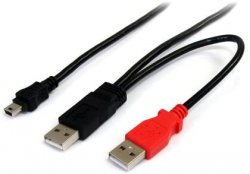
So, I switched the third-party component cables with the PS2 to HDMI converter and it looks like I don't have the flickering problem in my FHD TV but "horizontal" lines show up. It looks like I only notice them when approaching the TV screen. I think my external DVD Drive came with an USB Y cable. At least it looks like that cable.
I installed FMCB on a MC thanks to FreeDVDBoot.
Would the PC need to be turned on when playing PS2 and would I need to change its IP settings (I don't want to do that but I may have no choice), even if only when playing PS2? Just to be sure, could I connect the nano router to the PS2's USB port and attach a USB 1 TB HDD on the router and play the backups? Do I need to connect the PC to the PS2 using an ethernet cable and/or the PS2 to the router using another one?
If your using your PC to host the shares, then yes, the PC has to be on.
If your ps2 is connected to your home router (not the nano one) along with your pc, then no, you don't need to change your PCs IP address (this is only needed if your connected ps2 to pc with ethernet cable)
As for the nano router.
The whole point of using the nano router is to not use the USB ports on the Ps2, otherwise you might as well just plug the 1tb drive straight in there.
The whole point of using a nano router (or any SMB share for that matter) is load times are faster through ethernet than USB (USB 1.1= 1.5mb/s while ethernet=12.5mb/s. In comparison, the Ps2 DVDdrive=5.28mb/s, slower that USB!!)
What I say when I mention plugging the nano router into the USB port, is that is ONLY to provide power to the router, no data is being transfered.

My PS2 Slim is doing a lot of noise (I don't know and I'm afraid of opening it to clean it and/or replace the thermal pads) and after changing the original composite cables for component ones the TV screen flickers (it goes back and returns to normal) for some seconds (it does this a lot of times). I no longer have the original composite cables.
Also, although minor problems, it not always reads a PS2 Memory Card (and I suppose a PS1 one) and a game disc (and I suppose a movie disc) but (I think) if I don't insert the Memory Card the farthest I can it reads it. If I take out a game disc and insert it again it often reads it (maybe I don't even have to take it out sometimes and just click on the Reset button) and there are times (if not always) I simply put my hand on the PS2, the game disc does a "rotating sound" and the PS2 stops reading it (if I simply click on the Reset button it may read it again).
So, just to be sure, I have to connect the nano router to the PS2 (I thought I had to plug it in the PS2's ethernet port but it looks like I can connect it to the PS2's USB port), attach an HDD to it and share the HDD? The problem is that I don't have a single USB port free and it looks like I may need two to power the HDD (hence an user mentioning an USB Y cable before).
Well, I suppose you could use component cables with a composite hookup like you are saying, though it's known to cause video playback issues. Just buy an authentic PS2 composite cable or maybe a heave duty one for noise reduction, they run like $20-30 on the internet, hell, you could probably pick them up at a RadioShack or something, though PS2 Slims do not hold the weight of heavy-duty AV cords so well.
Memcard slots could be worn from 20+ years of use as well as the disc latch or your disc latch is out of place, hopefully not causing any scraping sounds or scatches on the disc. While the old fats eyes wear down the fastest, they all wear down considerably fast and faster than a PS1's laser eye lmao I have 5 PS2's and one of my fats only plays blu-ray games while the other can still play DVDs and then 1 of my 3 slims has a worn eye and sucks at reading discs in general.
Yes, the nano router needs to be connected to ethernet of course.
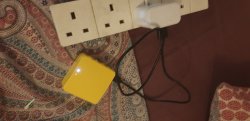
I think we are getting mixed up here. My nano router is powered by USB cable. So, I can use one of the ps2 ports to power the router. You could also use a USB phone charger instead of a ps2 USB port.
Well, I suppose you could use component cables with a composite hookup like you are saying, though it's known to cause video playback issues. Just buy an authentic PS2 composite cable or maybe a heave duty one for noise reduction, they run like $20-30 on the internet, hell, you could probably pick them up at a RadioShack or something, though PS2 Slims do not hold the weight of heavy-duty AV cords so well.
Memcard slots could be worn from 20+ years of use as well as the disc latch or your disc latch is out of place, hopefully not causing any scraping sounds or scatches on the disc. While the old fats eyes wear down the fastest, they all wear down considerably fast and faster than a PS1's laser eye lmao I have 5 PS2's and one of my fats only plays blu-ray games while the other can still play DVDs and then 1 of my 3 slims has a worn eye and sucks at reading discs in general.
But wouldn't the picture quality be worse if using composite cables? But I bought my PS2 on 2012 so how can it have this memory card problem? I didn't know the PS2 could read blu-ray. What do you mean by blu-ray games?
So, I connect the nano router to the PS2 via ethernet and attach a HDD to the nano router's USB port? I thought I'd need an USB port to power the router and I could use the PS2's, for instance. Maybe I might even need 2 USB ports, hence the USB Y cable. And then I'd need to share the HDD.
If your using your PC to host the shares, then yes, the PC has to be on.
If your ps2 is connected to your home router (not the nano one) along with your pc, then no, you don't need to change your PCs IP address (this is only needed if your connected ps2 to pc with ethernet cable)
As for the nano router.
The whole point of using the nano router is to not use the USB ports on the Ps2, otherwise you might as well just plug the 1tb drive straight in there.
The whole point of using a nano router (or any SMB share for that matter) is load times are faster through ethernet than USB (USB 1.1= 1.5mb/s while ethernet=12.5mb/s. In comparison, the Ps2 DVDdrive=5.28mb/s, slower that USB!!)
What I say when I mention plugging the nano router into the USB port, is that is ONLY to provide power to the router, no data is being transfered.
Sorry, but when you say that ethernet is faster than the DVD drive, which in turn is faster than USB, does that affect FMVs (like it affects load times according to what you said), I mean, would I have the opposite the problem that I'd have if playing via USB according to what I've read and would they be too fast if playing them via ethernet?
I'm purely talking about load times and occasionally, FMV stutter. It's a per game bases when it comes to compatibility.
When I talk about speed, I am only talking about data transfer rates, some games will be slow and stutter, but games wont be "faster" in terms of speed.