
atreyu187
Loathsome Dung Eater
And how do they compare to other component cables?
As good an official cables at a third of the cost. Works way better then those HDMI cables/adapters.

And how do they compare to other component cables?

Yes, you can force quite some games to a progressive-mode via GSM, if they don't support it natively!If the game does't support progressive mode can I still use it if I do that?
FMCB works on ~90% of all PS2's... Which Model (SCPH) have you?I don't have it nor I don't know how to make it work. I don't know if I have a compatible mode. Can I use the HDD on the PS2 Slim (like mine)?
That's unfortunate, because I am sure that you would see the difference!Well, like I said, I no longer have the composite cables.
It IS better 'by a long shot' and I am sure more than 90% would agree on that with me!Maybe it's better but not by a long shot.
The LG Flatron's are actually quite good!LG Flatron M2262D-PC
You see?!? As long as it is not the same connection and VMode, that comparison doesn't mean anything...Via HDMI.
Output-Video-mode (1080i/p, 720p, NTSC, PAL, etc.)...What's VMode?
This explains, why the results differ... Try to connect your PS3 via the same component-cable and set it to the same VMode and you will probably get the same result.
Yes, you can force quite some games to a progressive-mode via GSM, if they don't support it natively!
FMCB works on ~90% of all PS2's... Which Model (SCPH) have you?
HDDs work on Slims but either only on 70k or via HDPro.
The LG Flatron's are actually quite good!
I suppose it does such a good work with the FBAS/CVBS-Signal, that the (visual) difference is relatively small compared to 95% of the other devices!
This explains, why the results differ... Try to connect your PS3 via the same component-cable and set it to the same VMode and you will probably get the same result.
Then you can only use progressive scan on those games who support it.And without GSM since I don't have it?
Yes, via FMCB...Can I mod the PS2 with just a 8 MB Memory Card
Yes, there is 'PS3MCA' which has the option to install FMCB from PC to the MC.and a Memory Card Adaptor (the one that works for the PS3)?
Yes, that is a compatible model.SCPH-75004.
Well you have to install something onto the MemoryCard and attach that to the PS2, if you want to run GSM to force progressive on more games.And without having to attach/modify anything in order for it to work?
A lot of HDDs work and it is not model-dependent.Can you give me an Amazon/eBay/other seller link to a supported HDD (and for my model, if it is model specific) and a video showing how to attach an internal and an external HDDs and to make them work?
Yes, but it is USB1.1 so the videos of some games are stuttering.Also, can I use and external HDD
2TB, but not all apps support that size.and if so, what is the maximum capacity one supports (maybe it is determined by a program for modded PS2 installed on it),
Yes!can I play NTSC games when my PS2 is PAL,
1TB should be enough, IMO.which internal/externall HDD should I buy (I want a lot of games)
MBR FAT32 (not a logical partition)and does it need to be MBR or GPT and FAT32 or NTFS
You can, but for what? Most apps will also only recognize the first one...(and can I have more than one partition
Yes, games bigger than 4GB will be splitted (via tools like USB Util).and if so, does it have to have a size limit and the games may be divided?)?
?If I fill it up will I have to delete games or if I don't want to do that I'll have to replace it with another one?
That is your choice. You can have it either way per game.Will the PS2 Game Saves go to the Memory Cards or to the HDD?
Pretty much any USB-HDD should work and internal only works via heavy hardmodding.Which HDDs (internal and external) work on my PS2
Since your Slim has LAN built in, I suggest you to play via LAN/SMB.and since I want a lot of games should I use both an internal and an external HDDs or only one of them?
Yes, that is quite common via USB and some games.Do they lag (during cutscenes and not only)
Yes, there are some but for the most part they work well...and are there PS2 games with problems when played via a modded PS2 and an internal/external HDD?
Weird... Sounds like a magnetisation-issue... Do you have a subwoofer next to the screen, or so?Well, but it is 9/10 years old and since 4 years ago it has a strange problem (the TV screen reflects itself and the color becomes purple/green) that happens for some days once a year.
They won't remove the black 'bars'/borders around the 'fov'-frame... After all, they are just cables...And with other component cables, like those from HD Retrovision (both on the PS2 and the PS3)?
Well you have to install something onto the MemoryCard and attach that to the PS2, if you want to run GSM to force progressive on more games.
A lot of HDDs work and it is not model-dependent.
Your PS2-Version only supports an HDD via very extensive and expensive mods (HDPro).
Yes, but it is USB1.1 so the videos of some games are stuttering.
Since your Slim has LAN built in, I suggest you to play via LAN/SMB.
Weird... Sounds like a magnetisation-issue... Do you have a subwoofer next to the screen, or so?
They won't remove the black 'bars'/borders around the 'fov'-frame... After all, they are just cables...
The problem is, how your TV handles analog signals.
BOTH are considered 'modding'!Windows10User Post: 196815 said:I was talking about modding the PS2, not a Memory Card.
Correct... Just a Plug'n'Play-MemoryCard... Plug it in, the PS2 is softmodded...So, no soldering, right?
Your PS2-Version does NOT support an internal HDD, without a SIGNIFICANT amount of modding (and it's pricey... You can get a FAT PS2 + HDD-adapter + HDD for the same price or even cheaper, than that mod would cost).Sorry, what do you mean by that?
Yes, that works as well.And what if I burn the games?
DVD+/-R, because ESR only supports DVD-based burned discs.And if I so, should I use a CD-R or a DVD-R
Verbatim (Mitsubishi Chemical Corp/MCC-Disc-ID) or Tayo Yuden.and which brand,
Use a 'burning software' which supports 'Laser Power Calibration' (or similar name).burning software
'AWS' (Automatic Write Speed)and burning speed should I select?
But the ideal for me was to play via the PS2's HDD or a CD-R/DVD-R since I don't want to waste the PC's HDD space.
Very well could be the case.No. I thought it has this problem because it is some years old...
Yes, when the problem is not the connection on your TV, it certainly should work well.If it doesn't have the screen blackouts it's fine by me. I noticed the PS3 also has black borders (on HDMI) on mmCM/multiMAN.
BOTH are considered 'modding'!
Installing a Modchip is referred to as 'hardmodding' and chips are 'hardmods'...
Installing FMCB onto an MC is referred to as 'softmodding' and FMCB is a 'Softmod'.
Correct... Just a Plug'n'Play-MemoryCard... Plug it in, the PS2 is softmodded...
Unplug it and the console is in it's original state!
I MIGHT have the perfect solution for you!
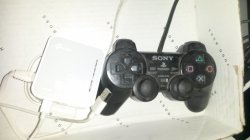
I am actually using a 'TP-Link TL-WR902AC' Nano-Router on a Slim! I will attach a photo later.
I am using it as a WiFi-Bridge for a PS2-Slim and as a way to get a USB-HDD/Stick connected to the LAN-Port of the PS2-Slim and you can access the USB-HDD via LAN/SMB then!
It allows using a USB-HDD with other file systems like NTFS, EXT3/EXT4, etc. as well!
No need to defragment the files!
No need to split big games!
Waaaaay better loading-times and speed!
You can even compress images, AFAIR (and thus save quite some space and install more games).
Yes, I think the Softmod-way is the best choice for everything you want to accomplish + it is cheap and easy to use.I know, but I was thinking on going the softmod way...
For an internal HDD-mod, you would need to solder, regardless of which PS2-Slim!I was talking about an HDD.
Well, you can store the ISOs on a PC, or a NAS or even a USB-Device connected to LAN.Well, maybe it's better to have the games on the PC and play them on the PS2. Do (or can) I have to do that in order to play them from the PC?
Yes, I think the Softmod-way is the best choice for everything you want to accomplish + it is cheap and easy to use.
Well, you can store the ISOs on a PC, or a NAS or even a USB-Device connected to LAN.
Like I said... For portability-reasons, a Nano-Router is very cool!
Here is a picture of my Nano-Router, specifically used on a PS2 (with a few exceptions).
View attachment 19317
That's your choice. A MemoryCard with it pre-installed does not cost much, but it is worth it doing it on your own, for the experience... a la 'yaaai, I got it done.'Do you think I should order an already modded Memory Card or do it myself?
You don't have the adapter? Well, then don't bother (except if you really want to go that route) and rather get a pre-installed MC, or find someone near you with an already modded PS2 or a way to start Homebrew and then you can also install it via a PS2 and a USB-Storagedevice.I don't know how to do it but maybe it isn't too difficult. Can I do it with a PS3 Memory Card Adaptor (I've yet to buy it and according to what I've read I may get a rip-off [just like in the PS2's Memory Card's case] and in that case it wouldn't work) like I've read somewhere?
Not on a properly burned DVD...Yes, but it looks like if I use a DVD/USB it would have lag
Theoretically it can also stutter there, but I cannot even name a game right now, which stutters via LAN.and not if I run the game from a PC/NAS (and in that Nano-Router's case, I think).
Yes both is possible and even simultaneously... But when you want to connect to the PC or HDD (connected to the router), you need to change the setting for the SMB-Server in OPL... OPL only supports listing different shares on one host, but not multiple hosts at once, so you would need to change the IP back and forth to use either of both...Can I use that Nano-Router to play games from the PC or even attach an external HDD (where the games would be) on it (since it doesn't have an HDD) and play them?
That's your choice. A MemoryCard with it pre-installed does not cost much, but it is worth it doing it on your own, for the experience... a la 'yaaai, I got it done.'
You don't have the adapter? Well, then don't bother and rather get a pre-installed MC, or find someone near you with an already modded PS2 or a way to start Homebrew and then you can also install it via a PS2 and a USB-Storagedevice.
Not on a properly burned DVD...
A lot of games and even FMV also works relatively well on a lot of games, with the newer OPL-Versions.
Yes both is possible and even simultaneously... But when you want to connect to the PC or HDD (connected to the router), you need to change the setting for the SMB-Server in OPL... OPL only supports listing different shares on one host, but not multiple hosts at once, so you would need to change the IP back and forth to use either of both...
That's cool, because you will understand how it all works and can update things quite easily.I was planning on doing it myself.
I edited that part, whilst you replied.But you said I should do it myself and I can buy the Adapter (and there are other methods).
You can, if your DVD-Writer produces good results...Not even on cutscenes (when I talk about lagging I'm also including stuttering)? Then maybe I should use DVDs and not the PC/NAS/Nano-Router.
That works very well and is quite comfortable and compatible + easy to use, once it is properly set up.Maybe I should buy a 1 TB HDD and attach it to the Nano-Router.
I edited that part, whilst you replied.
Yes, you can install it with an original Sony-MC-USB-Adapter, or with a Homebrew-booting-method.
You can, if your DVD-Writer produces good results...
However... Once the laser is dead, you would need to repair it.

Yes, that works as well... I wrote so in this thread before and I know exactly what you mean, at the time you mentioned it first...I was talking about this adapter (I've read somewhere I could use it)
What have I said and what have you found?and I searched for the one you said and I found a MHC (not MC) adapter.
Yes, both but especially burned disc and how worse the media/DVD, so more it gets stressed.Does playing burned PS2 games (and even bought ones) contribute to its (PS2's laser) death?
Well... Backup-loading via images instead of discs is the way to go, IMO.I think my PS2's laser might not be ok because the console not always read the disk (there are times I have to click on the PS2's Reset button for it the PS2 to read it) although it doesn't show a disk error message.
Yes, that works as well... I wrote so in this thread before and I know exactly what you mean, at the time you mentioned it first...
Yes, both but especially burned disc and how worse the media/DVD, so more it gets stressed.
Well... Backup-loading via images instead of discs is the way to go, IMO.
Correct... or you use another method to install it, like a cheat-device or Swap Magic or a friend with a modded PS2.Then I have to make sure I don't order a PS3 Memory Card Adapter rip-off (as well as a PS2 Memory Card rip-off) or it won't work.
You can download saves, connect the adapter to a PC via USB and copy them to a MC via PS3MCA...Can I use the PS3 Memory Card Adapter in an unmodded PS2 to transfer downloaded PS2 game saves to a PS2 Memory Card (I have to make sure there are PAL or it won't work since I don't know how to change their region) and load them afterwards?
Yes, these will stress the laser.Well, my legit PS2 games are scratched...
I am not sure about the PS3...And regarding the PS3? Does playing bought (or burned, if possible) games (and even games running from an external HDD) wear out the laser?
That Nano-Router is really versatile, but you have to make sure to get one, that has a normal USB-Connection (not just the Mini). 'TL-WR902AC' is the model I use.Will my PS2's laser read the games that way, then? Then I think I'll have to use that Nano-Router you mentioned.
Correct... or you use another method to install it, like a cheat-device or Swap Magic or a friend with a modded PS2.
You can download saves, connect the adapter to a PC via USB and copy them to a MC via PS3MCA...
However... Once you have FMCB installed, wLE usually comes with it and with that you can simply copy saves back an forth via USB or LAN...
Yes, these will stress the laser.
I am not sure about the PS3...
I say it this way:
This issue is present on all optical media-readers, but it depends on the quality of the drive how fast it will degrade.
That Nano-Router is really versatile, but you have to make sure to get one, that has a normal USB-Connection (not just the Mini). 'TL-WR902AC' is the model I use.
But you don't need to get that Nano-Router, if you already have some kind of router with a USB-Connection!
I had never experienced any stutter with an HDD directly connected (to the Nano-Router)!If I use a Nano-Router (with an external HDD attached to it or not) will the games stutter/lag (in and outside the cutscenes)?
I've got no clue, sorry. All my drives work well, lol.Also, I'm a litte worried since I want to buy a 1.5 TB internal HDD (and also a 2 TB external HDD [since I want to have a lot of games maybe a 2 TB external HDD and a 1 TB internal HDD aren't enough]) for the PS3 but according to many user reviews on Amazon there are a lot of HDDs which start to stutter when playing games (especially in the cutscenes) after some time (days, months, a year or so) and there are other which says those same disks are fine. Which disk (or disks, including the external HDD [maybe any external HDD might be used regardless of the brand, etc., I don't know]) do you recommend me to buy for the PS3 (I don't know how to open it to apply clean the dust, apply the thermal place and swap the disks but I'll have no choice but to do it)?