PS3 PS3 PRO MOD Release/Information Thread

Status
Not open for further replies.
Which firmware? i dunno, i will try to reproduce it
Okay, i got it. I just delete all things following dat video:
dat + reinstall CFW works for me.
First, thx for dat amazing mod :)
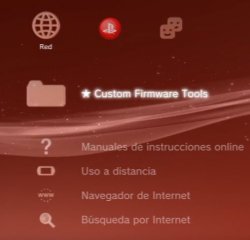
2nd, can u do alternative update removing webman launch and facebook icon on Red column? The last one is because in the new CFW rebug have an options there.

Petition
Webman Launchpad -----> Remove (With the normal webman is fine)
Facebook ---------------> Icon dont include (Becouse the CFW have utilityes there)
File Manager -------> I love dat, dont remove.

If u can do this or explain how can i do it. I will love u forever C: thxxxxxx
 

Attachments

  • asdasd.JPG
    asdasd.JPG
    25.3 KB · Views: 292
  • asdasdsds.jpg
    asdasdsds.jpg
    1.3 MB · Views: 304
  • sd.jpg
    sd.jpg
    558.7 KB · Views: 277
Okay, i got it. I just delete all things following dat video:
dat + reinstall CFW works for me.
First, thx for dat amazing mod :)
2nd, can u do alternative update removing webman launch and facebook icon on Red column? The last one is because in the new CFW rebug have an options there.

Petition
Webman Launchpad -----> Remove (With the normal webman is fine)
Facebook ---------------> Icon dont include (Becouse the CFW have utilityes there)
File Manager -------> I love dat, dont remove.

If u can do this or explain how can i do it. I will love u forever C: thxxxxxx

you'll have to search for it in the xml files provided. you can tell which xml file is being used by the tier it's using (in most cases). add this to negate anything you don't want. in this example, we're removing app_home:

Code:
      <!---<Query
         class="type:x-xmb/folder-pixmap"
         key="seg_gamedebug"
         src="#seg_gamedebug"
         />--->
 
Okay, i got it. I just delete all things following dat video:
dat + reinstall CFW works for me.
First, thx for dat amazing mod :)
2nd, can u do alternative update removing webman launch and facebook icon on Red column? The last one is because in the new CFW rebug have an options there.

Petition
Webman Launchpad -----> Remove (With the normal webman is fine)
Facebook ---------------> Icon dont include (Becouse the CFW have utilityes there)
File Manager -------> I love dat, dont remove.

If u can do this or explain how can i do it. I will love u forever C: thxxxxxx

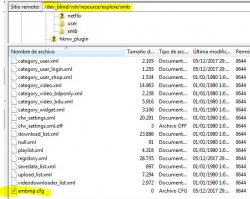
by the way, those xml files are located here in the flash:

Code:
dev_blind/vsh/resource/explore/xmb

I forgot to add that. lol
 
by the way, those xml files are located here in the flash:

Code:
dev_blind/vsh/resource/explore/xmb

I forgot to add that. lol

I dont know too much about codes...
I put the codes on dat CFG?? (Image)
And what codes are for webman launchpad and facebook????
PD: Sorry, dont know how do it. :frown new: Im so new on that...
 

Attachments

  • aasdadasdas.JPG
    aasdadasdas.JPG
    77.3 KB · Views: 300
I dont know too much about codes...
I put the codes on dat CFG?? (Image)
And what codes are for webman launchpad and facebook????
PD: Sorry, dont know how do it. :frown new: Im so new on that...

I'm afraid I don't know what was altered. what's on the screen should be what it's named in the xml file. look for the xml file of the tier you're on, then search with notepad++ for those two things. add <!---<Query to the beginning and />---> to the back. these are at the top of the xml files.. do this for all instances. alternatively, you could erase those sections to make those things disappear or you could erase all instances. I have a tutorial (in my sig) to removve the vita section of the game column.
 
Okay, i got it. I just delete all things following dat video:
dat + reinstall CFW works for me.
First, thx for dat amazing mod :)
2nd, can u do alternative update removing webman launch and facebook icon on Red column? The last one is because in the new CFW rebug have an options there.

Petition
Webman Launchpad -----> Remove (With the normal webman is fine)
Facebook ---------------> Icon dont include (Becouse the CFW have utilityes there)
File Manager -------> I love dat, dont remove.

If u can do this or explain how can i do it. I will love u forever C: thxxxxxx

LOL but the WebMan Launchpad isnt in the mod :O

I checked it right now.

Edit: I included it in the v1.6 by mistake because i took the files from my nand hehe.
Just reinstalling the CFW or replacing the prx with the original one will remove it. MY BAD

To get rid off the FACEBOOK just remove the line in the category_psn.xml

Red column? what do you mean?
I think u are not using the lastest version or even your using a old one you are missing some files.

Because my mod replaces every single RED ICON in REBUG firmware.

And about CFW TOOLS it will not show because i removed it from the xml,

only if the REBUG TOOLBOX option enables it again, the FACEBOOK icon will desapear due to the lack of its entry in their XMLs

and you DONT NEED TO WORRY about CFW TOOLs because its already in the FILE MANAGER

-------------------------------------------------------------------------------------------------------------------------

@chronoss you're welcome, but all the thanks needs to go to @pinky he is the one that taught me everything :P

@kozarovv can you upload the thread?
 
Last edited:
V 1.9 Incoming.....

- System Colors changed To the PSP ones (Man! They are so eye catching, nothing like the Meh PS3 colors)
- Translated the remaining REBUG texts to All Languages


----------------- I NEED HELP FOR THIS THINGS ALREADY EXISTING IN PSP ------------------
* I NEED PPL WHO KNOWS PRX AND SPRX


- Add Smooth Scroll
- Add Animation to the XMB X AND O buttons
- Add Clock Idle Screen Saver

AND MORE U TELL ME
 
@LuanTeles ''Edit: I included it in the v1.6 by mistake because i took the files from my nand hehe.
Just reinstalling the CFW or replacing the prx with the original one will remove it. MY BAD''

I reintall the CFW and still there :C
''replacing the prx'' How i do that??? with FTP??? U can learn me how can i do it?? Plssssss
 
@LuanTeles : possible to make it in French ?

The File Manager?

He'll probably need someone to translate it

Yeap, as long it has so many texts i'lll need for sure :P

The Debug Options and Some Other Like Reboot Icon Menu i translated with Bing and Google LOL but i'm sure that it has many gramatical errors Bings says X Google Y
 
I reintall the CFW and still there :C
''replacing the prx'' How i do that??? with FTP??? U can learn me how can i do it?? Plssssss[/QUOTE]

Are you sure? because the file is being replaced when you reinstall the CFW!
 
The File Manager?


Yeap, as long it has so many texts i'lll need for sure :P

The Debug Options and Some Other Like Reboot Icon Menu i translated with Bing and Google LOL but i'm sure that it has many gramatical errors Bings says X Google Y
Yes, there are just 2 version : English and Spanish :(
 
The Debug Options and Some Other Like Reboot Icon Menu i translated with Bing and Google LOL but i'm sure that it has many gramatical errors Bings says X Google Y
Google & Bing suck for translations, what is funny to me is that a Japan based console has all the Debug options in Enlish
 
Status
Not open for further replies.

Similar threads

Back
Top