
UPDATE 2 (MARCH -2019) HFW (Hybrid Firmware) Released - Allows for PS3Xploit Tools / Hacks (including HAN) to work for 4.84 (OFW) OFFICIAL FIRMWARE (See Here) Also the HAN Exploit was updated to v3.01 for 4.84 HFW support
dThe PS3Xploit Team has done it yet once again with an incredible breakthrough that has now just gone LIVE for everyone and as the recent teaser recently suggested it's for those later Slim & SuperSlim models who are not capable of using CFW (aka NoN CFW Compatible Models). While not a HEN (Homebrew Enabler) it's a volatile dose of "HAN" (short for etHANol). This version of the hack has evolved to offer something to every PS3 model now. All existing models will now have the ability to get PS3 games backup pkg installation and PS1/PS2/PSP emulators support among other features as outlined by developer bguerville who is going to take from here with this introduction of PS3Xploit v3.0 -- Codenamed: "HAN"
-STLcardsWS
-
PS3Xploit Team is pleased to announce the official release of the PS3Xploit Tools v3.0 project nicknamed 'HAN'.
PS3Xploit Tools v3.0 is a suite of 6 tools supporting both official firmware versions 4.81 & 4.82. The only pre-requirement to use HAN is to have an activated PSN user account.
It's recommend not to use your main PSN account but rather a spare one.
Users should create a new secondary user account on the PS3 then activate a new PSN account in it.
This secondary ps3 account should be used to perform all the pkg installations. Then for regular gaming, use the primary user account.
The principle behind HAN is quite simple, due to a vulnerability in the way npdrm content is managed, it is possible to resign game related files with custom keys, patch vsh & install resigned pkg from XMB.
The first tool, on the PC side, ps3xploit_rifgen_edatresign.exe should be used to generate rif files and create new signed_act.dat. You should place the act.dat/idps.hex, previously dumped with HAN ACT/IDPS Dumper, in the resigner directory and drag matching rap file for your game onto the executable file. Then rename the new "signed_act.dat" to "act.dat" and place it on USB drive along with the new rif file. The files are now ready to be pushed to the PS3 using the HAN ACT/RIF Copier.
** It is recommended to resign all the pkgs that require Han enabler with this tool**
** Packages which are converts and packages which needs rif activation **
** keep original act.dat in a safe place **
On the PS3 side, the other 5 ps3xploit tools are:
1. HAN Installer - Copies necessary system files to PS3 to run HAN.
2. HAN Enabler - Enables the HAN patches
3. HAN ACT/IDPS Dumper - Dumps current user profile user act.dat & PS3 IDPS to USB.
4. HAN ACT/RIF Copier - Copies the resigned act.dat & generated rif file from USB to the current user profile.
5. HAN Debug PKG Enabler - Provided optionally for users wishing to install debug pkg. Note that if you run this patch you will not be able to install any pkg resigned with the ps3xploit resigner for HAN anymore until you reboot!
The 'HAN' project is solely relying on userland exploitation to provide digital backups support for the majority of PS3 Games as well as PS1/PS2/PSP Emulators (within the ps3 firmware) and the ability to install PKG files from USB. PS3 PKG Game backups need to be prepared using TABR like technique and only ps3 games having an available "game update" are supported.
PKG files are installed from the Games XMB column, using a version of the Rebug Package Manager tweaked for this project. On USB of course, the FAT32 limitation of 4Gb is still in effect, it's a partition type limitation, nothing we can do about that. However workarounds using a local server can be used to remedy the situation if required.
Important:
To get best results initializing the exploit, remember to load the pages directly from a clean browser session. Never browse to an exploit page from other pages & never use a homepage other than blank or the exploit page you wish to use.
We recommend to:
1. Go to the ps3 browser homepage option & choose blank homepage.
2. Create favourites to HAN Enabler & the other HAN pages you wish to use.
3. Restart the browser.
4. Use the favourites to access any page from complete scratch.
5. Reload the browser between exploits.
-
PS3Xploit Tools v3.0 Overview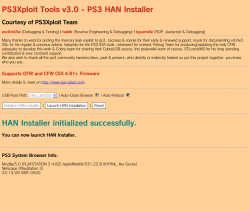
1. HAN style packages allowed (Patched external modules ecdsa)
2. PSX/PSP Free license type allowed (Patched sceNpdrmHeader check)
3. Resigned ACT.DAT & RIF allowed
4. Cinavia protection removed on HDD content
5. OFW Package Manager
6. Debug pkg file support added (optional)
7. reactPSN alternative solution for OFW users -
Instructions for Each Tool in v3.0
PS3 HAN Installer
This tool will copy files from USB to Flash Memory to install OFW Package Manager.
- Extract all files from "han_supportfiles.zip" on target USB drive root
- Load Exploit Page
- Select Root Path where these files are (default /dev_usb000/)
- Click "Initialize HAN Installer" button
- When init ready, click "Launch HAN Installation" button to copy files to flash and reboot
- Once rebooted, you can now use the HAN Enabler and Debug Package Enabler
PS3 HAN Enabler
This tool will enable the HAN patches.
- Load Exploit Page
- Click "Initialize HAN Enabler" button
- When init ready, click "Enable HAN" button to activate patches
- Once browser closes (default option) you can install HAN packages from XMB
PS3 HAN ACT/IDPS Dumper
This tool will dump your activation file (act.dat) and your IDPS.
- Load Exploit Page
- Select Dump Path From Dropdown Box (default /dev_usb000/)
- Click "Initialize ACT/IDPS Dumper" button
- When init ready, click "Dump ACT.DAT & IDPS" button
- The browser will close automatically by default
PS3 HAN ACT/RIF Copier
This tool will write back to the PS3 a modified act.dat and *.rif file
- Load Exploit Page
-
Change RIF File Name to match your target
- example PS2 Placeholder: 2P0001-PS2U10000_00-0000111122223333
- Select Root Path where act.dat/*.rif is located (default /dev_usb000/)
- Click "Initialize AC/RIF Copier" button
- When init ready, click "Copy Files" button to transfer to HDD
PS3 HAN Debug PKG Enabler
This tool will allow Debug Package types to be installed if required. Do not use this tool if you install pkg files resigned with the ps3xploit resigner app.
- Load Exploit Page
- Click "Initialize HAN Debug PKG Enabler" button
- When init ready, click "Enable Debug PKG" button to activate patches.
- Once browser closes (default option) you can install Debug pkg packages from XMB.
-
All files are hosted on ** http://www.**ps3xploit.com >Doma...no Longer owned by team** (ps3xploit.me =new)
(See ScreenShot below)
Official Website: www.**ps3xploit.com >Domain no Longer owned by team** (ps3xploit.me =new) / Official Forum @ www.PSX-Place.com
UPDATE (USEFUL LINKS)
Last edited by a moderator:


 he did a good video







