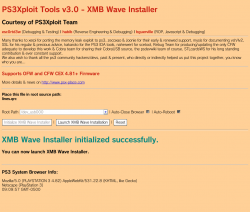
PS3 HAN PS3Xploit v3 HAN/HFW XMB Waves Installer [lines.qrc]

Now Supports 4.88 HFW!
HAN from PS3Xploit v3.0 is evolving and showing some of the possibilities as developer's and the PS3Xploit team continue the progression of this hack for PS3 3/4k models (non-cfw compatible). Recently we seen the PS3Xploit team release the Coldboot Installer (aka boot logo) . The team/devs are not stopping with only that release but a start of many tools that can transfer your XMB. Now the team has just released a new XMB Wave Installer, now we can use custom XMB waves on those ps3 models. The coldboot Installer and now the XMB Wave installer is not all.. esc0rtd3w one of the members of Team Ps3Xploit has already announced RCO Replacer / Image Font Replacer and also the "What's New @PSX-Place" XMB mod will be coming to follow in the near future as well.​
-STLcardsWS​

PS3Xploit Custom Wave.png
(Above image contains a Custom Wave and a Custom ColdBoot Image)​


  • My5XCB5.png
    SUPPORTS OFW, HFW, and CFW

    HAN "DOES NOT" Need Enabled For This!

    UPDATE (2019-08-31): ALL HAN TOOLS HAVE BEEN UPDATED TO SUPPORT 4.85 CEX!
    UPDATE (2019-03-23): ALL HAN TOOLS HAVE BEEN UPDATED TO SUPPORT 4.84 CEX/DEX!
    UPDATE (2018-04-11): ALL HAN TOOLS HAVE BEEN UPDATED TO SUPPORT 4.82 DEX!


    How To Use:
    • 4.82 OFW: Download XMB Wave Installer ZIP archive
    • 4.84/4.85 HFW: Download XMB Wave Installer ZIP archive
    • Extract the files
    • Place lines.qrc on USB flash drive or select one of the internal HDD options**
    • 4.82 OFW: Navigate to this link or use local files above and a webserver
    • 4.84/4.85 HFW: Navigate to this link or use local files above and a webserver
    • Run the exploit from page and allow console to reboot fully
    • Done! Enjoy your new XMB Wave :D

    ** You can also create a package that holds resources or files to copy using Extra Tools and use this instead of USB as source. Default directories are /dev_hdd0/game/PS3XPLOIT/extras/ and /dev_hdd0/game/HANTOOLBX/files/


    For custom files, simply replace with valid files/proper names and they should work!


Hosted on official site: **ps3xploit.com >Domain no Longer owned by team** (ps3xploit.me =new) (v3 HAN Tools -> Extra Tools -> XMB Wave Installer)
Source Code: github.com/PS3Xploit/xmb-wave-installer

Official Forum: psx-place.com/forums/PS3Xploit/
 
Last edited:
the installed waves replaces the ones that are default on the console or they add as more options like the themes itself? and if they replace a wave, how do I choose which color/wave to replace?
 
there are no regional differences when it comes to waves. it was originally thought that there were, but there aren't. differences are due to compression. the wave has steadily increased in size. the images seem to be the same albeit with the proc_iridescent (the particles) appearing in a different location in older waves. there are some differences to the script which could account for the increased size as well. plus, there are two elf files (one for the wave itself and one for the particles). they both seem to use the same script.
 
Last edited:
Is there a way to revert it back to default.
As after installing it am not able to quit game after playing it.
All the option in game meun shows loading circle.
Other menu option are fine.


Sent from my ONEPLUS A3003 using Tapatalk
 
Is there a way to revert it back to default.
As after installing it am not able to quit game after playing it.
All the option in game meun shows loading circle.
Other menu option are fine.


Sent from my ONEPLUS A3003 using Tapatalk

never heard of that problem. an rco mod might do that, but a wave would be unusual. the wave shouldn't exist ingame which is why all the icons ingame are in an rco rather than the icontex.qrc.
 
never heard of that problem. an rco mod might do that, but a wave would be unusual. the wave shouldn't exist ingame which is why all the icons ingame are in an rco rather than the icontex.qrc.
The infinite loadingl in game menu icons was an issue with an older category_game.xml. replacing with new han support files will fix that issue
 
I found a photo of the xmb wave blowing up. it's when I increased the perturbation too much. that option is supposed to make your wave look fluid, but increasing it too much causes this to happen:

DSC062521523039573.jpg

that is an xmb wave. lol it didn't soft brick, but it significantly slowed down the xmb.

and, here's another wave/coldboot hybrid:

DSC063361523039734.jpg
 
I need help, im trying to change it to another Xmb wave but when i try, my ps3 reboots and its still the same as the green and blue, i tryed to do the restore wave and it wont change
 
I need help, im trying to change it to another Xmb wave but when i try, my ps3 reboots and its still the same as the green and blue, i tryed to do the restore wave and it wont change

you're trying to revert back? iirc, the wave is mostly grey in the script. I think it's primarily to allow the background to affect color. are you sure you're using the right lines.qrc? I believe the latest, official one is around the 179-180KB range. it will likely fluctuate in size (barely) if modifying the script, but you'll see drastic changes if the images, such as backgrounds, are changed. an all black background wave is around 110KBs from what I remember.
 
you're trying to revert back? iirc, the wave is mostly grey in the script. I think it's primarily to allow the background to affect color. are you sure you're using the right lines.qrc? I believe the latest, official one is around the 179-180KB range. it will likely fluctuate in size (barely) if modifying the script, but you'll see drastic changes if the images, such as backgrounds, are changed. an all black background wave is around 110KBs from what I remember.
Yea im sure i went on ps3xploit and download the xmb wave file and used the restore folder
 
Yea im sure i went on ps3xploit and download the xmb wave file and used the restore folder

are you trying to put the original wave back on the system? I have no idea what the problem might be. I can tell you about waves, but I don't know anything about the installer itself. I've been on cfw, so I have no experience with han. my guess is that the location is mounted. you didn't mount a folder, did you? 'cause I know with something like multiman, you can mount a nonexistent location with an install .zip. there's no check that you're mounting there. maybe this installer suffers from the same problem? do you have the name correct and you're not mounting a folder, right? with multiman, it doesn't ask for confirmation about replacing files either. it will just replace them, so if you had the name wrong here or were trying to mount a folder, the same may be true here.
 
Back
Top