PS3 PScoverBOX 1.0 - Coverbox Generator for webMAN

(UPDATED - October 20) Over at PlayStationHAX developer 0_obeWAN has released PScoverBOX v1.0, which is a batch tool for Coverboxes for webMAN (& MOD). The cover types that work for this tool are PS1 / PS2 / PS3 / PSP and for some reason SNES is included, even though webMAN does not launch retro games, but the SNES portion could be useful for RetroXMB covers if you like the style of cover (see examples included for a visual). Read all the details provided for proper installation of these covers generated by PScoverbox.​


Update: 0_obeWAN has released version 1.1 view details below:


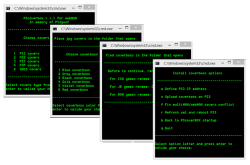
pscoverbox1.0.png


  • PScoverBOX 1.0
    PScoverBOX is a coverboxs generator batch files, compatible with webMAN.
    Covers type : PSX / PS2 / PS3 / PSP / SNES.
    In memory of PS3GunZ.


    Update VERSION 1.1.1


    • Some corrections made.
    • Update composite.exe (x86).
    • Option to set the IP address of the console.
    • Option to ulpload the coverboxs on the console.
    • Option to fix the conflict between Webman and multiMAN.
    • Option to return to PScoverBOX menu.
    • Option to exit. Adding credits to Zar & myself
    Needed :

    • vcomp100.dll, included in archive
    • For Windows 32bit copy to C:\Windows\System32
    • For Windows 64bit copy to C:\Windows\SysWOW64

    Instructions :

    • 1/ Extract folder "PScoverbox1.0"
    • 2/ Run file batch "START.bat"
    • 3/ Follow instructions in command prompt.

  • ScreensShots :

    Finished Examples
    exemple.cover.png


    Colored Boxes


    colorbox.png


    Compare Standard Cover to Coverbox Images
    compare.jpg


  • Know bug:

    • There is a conflict between webMAN coverboxs and multiMAN covers. If multiMAN cover is find, it take priority and does not apply wenMAN coverboxs.

    How to Resolve Bug:

    • connect multiMAN with FTP
    • In USRDIR rename "covers" folder in other name eg "c0vers".
    • Edit \USRDIR\sys\options_default.ini and change the directory to store covers.
    • No more conflict


Last updated 10/19/2015


Download:
PS coverBOX v1.1.1 (Dropbox)
Mirrors: link


Last edited:
Wow thanks for this, just last night i was converting retro games with retroxmb and needed to manage covers,
Thanks
 
Last edited:
Hello psx-place

Just want share with you latest realase PScoverBOX 1.1.1


pscover111.png


[video=youtube;uZGM0yJLf1M]https://www.youtube.com/watch?v=uZGM0yJLf1M[/video]​

Last updated 10/19/2015

Update VERSION 1.1.1
* Some corrections made.
* Update composite.exe (x86).
* Option to set the IP address of the console.
* Option to ulpload the coverboxs on the console.
* Option to fix the conflict between Webman and multiMAN.
* Option to return to PScoverBOX menu.
* Option to exit. Adding credits to Zar & myself


Download
Size 4.90Mo
Virus scan
 

Attachments

  • pscover111.png
    pscover111.png
    78.5 KB · Views: 671
[MENTION=16840]0_obeWAN[/MENTION]
neat little app, would you mind if i made a win32 gui for it instead of a cli ? :D
i dont want any credit, it would just be pretty cool though if you could just drag and drop a directory and it convert all the images to have coverboxes
 
Last edited:
[MENTION=16840]0_obeWAN[/MENTION]
neat little app, would you mind if i made a win32 gui for it instead of a cli ? :D
i dont want any credit, it would just be pretty cool though if you could just drag and drop a directory and it convert all the images to have coverboxes

For sure it 's will be a good idea ;) no matters for credits.
It' s something that I would like to do, but I'm not dev, just beginer with batch.
If you can make a better app for the scene, yes of corse do it.

My dream is to be able to download covers like multiMAN just have to give the content ID. But it 's a dream at the moment...
 
To get the covers from the titleID you have gmaetdb.com. You can use curl.exe to download the file. For example Destiny, it's BLUS31181 so the link is "http://art.gametdb.com/ps3/coverM/US/BLUS31181.jpg"
 
Last edited:
To get the covers from the titleID you have gmaetdb.com. You can use curl.exe to download the file. For example Destiny, it's BLUS31181 so the link is "http://art.gametdb.com/ps3/coverM/US/BLUS31181.jpg"

One more time, many thanks for your help, and for the motivation you give me.
I'm gone to show this as soon as I have time (got my san for holidays) ;)
 
Nice tool [MENTION=16840]0_obeWAN[/MENTION] ,i like new look of my games section :) Getting cover by ID from gametdb will make this app great!
 
I hope is taken as a constructive critic, but imo the images doesnt looks like the original plastic covers, not even the PS3... but specially the ones for PS1 and SNES
 
I hope is taken as a constructive critic, but imo the images doesnt looks like the original plastic covers, not even the PS3... but specially the ones for PS1 and SNES

Appears from quick glance one could put replace images and use the tool. I agree they do not look original but it gives covers a different look. from there its all opinion :) ..
 
I guess is posible to use another set of images... but the "problem" i see is the cover takes some portion of the image in a side, probably that sizes are hardcoded so even using another set of images you need to keep that plastic area visible in a side

The first released PS3 games had that transparent plastic in a side... but the new ones doesnt
New ones looks better imo and could be more realistic... in my oppinion the point of using covers is to try to look realistic (though some color tone variations could be fine to use to categorize them)
 
like this one, which could easily be edited to any preferred color.

ps3-template.png


which a person would prob need to edit out the "playstation 3" along the left side, because the covers that are widely available already have that
 
Last edited:
Yep, something like that, but without the "playstation 3" black logo (because is included in the front cover images that uses it)
Also, the plastic areas should be semi transparent
The problem is when reducing its size to match with the sizes used by ps3 backup managers the width of the right and bottom borders probably is very small (not sure but i calculate not more than 4 or 5 pixels)... is not so easy to make something good looking in 5 pixels

For other formats is needed to use other layouts... as the CD case for original playstation 1

The good thing is his program/script is working, so to make this kind of changes is "only" needed to change some hardcoded sizes and prepare another set of images
 
Last edited:
For PS3 covers @ 260x300 (standard mM size), you can replace PS3coverbox.png and the PS3_Gen1.bat with with the attached ones to look more "authentic"

0_obeWAN hope you don't mind me editing your files.

BLUS31466.PNG
 

Attachments

I have not seen the .bat (so maybe why im going to say is already made) but why dont you replace the sizes and meassures by variables ? (and then asign values to the variables with "if" condtionals)
This way you can add a new option in main menu for the "style", and is posible to prepare different styles without much code changes
One of the styles could be "realistic" (the changes made by [MENTION=63]JonahUK[/MENTION] )... the other the style used originally... and of course is posible to add more in the same way
 
Appears from quick glance one could put replace images and use the tool. I agree they do not look original but it gives covers a different look. from there its all opinion :) ..

I like this new look, like you said, it's a different look and looks neat and fresh on XMB :3
 
0_obeWAN, Thx for nice tool, I'm use it for convert 15k covers for svn :cool:

What about white color (like original) of current boxes ?
 
Here are two models more realistic that you can use just renaming and replacing the file PS3coverbox.png

Original box basic
real0.png

Original box with effect
real1.png
 
can you make it to scan filenames with spaces?(i have alot covers with space in filename), thanks.
 

Similar threads

Featured content

Trending content

Back
Top