PS3 Rebugification - A PS3 Theme By Berion

As many of us like to do with any device from time to time is to spice things up a bit with some visual candy. That is why most of us enjoy a custom firmware PS3. This release is for any PlayStation 3 owner because any consoles running official firmware or custom firmware can install themes. Although judging by the name we can see where it draws it inspiration from. Rebugification is the name of this awesome theme, which I already installed on my PS3, and created by Berion.

rebugification_ps3_preview_3.jpg


  • Rebugification v1.0 (PS3-P3T). I hope You will enjoy it. This cost me many hours and nerves fighting with broken export plugins and broken GIM format.

    (CRC32:9EA401AA)

    • Save to a USB Device (FAT32 formatted)
    • Create a folder called PS3
    • Create a folder called THEME (ALL CAPS)
    • Add the Rebugification (by Berion) v1.0.p3t file into the THEME folder
    • Plug USB into your PS3
    • Go to themes
    • Select install
    • Select USB device
    • Select Rebugification


Download: Rebugification (by Berion) v1.0

Source: PSX-Place
 
Last edited by a moderator:
Because theming system doesn't cover up those icons (and many other unfortunately). The best way to theming Sony consoles is editing system resources. But this is titanic work and no one before complete it (one of the reason is that many resources are duplicated and not used, there are total mess inside...). Also those VFS and "script holders" aren't fully understand by the scene and tools lack of functionality to pack/unpack everything. Very frustrating. ;(
 
ok that why.... damn Sony.... always complicated. So if I understand correctly the only way to change that icon is to change the file manually like the devs do for the cfw (blue or red for example)

Thanks for the info btw
 
ok that why.... damn Sony.... always complicated. So if I understand correctly the only way to change that icon is to change the file manually like the devs do for the cfw (blue or red for example)

Thanks for the info btw

you can change it if you want to. iirc, its icon is in the xmb_normal_plugin.rco.
 
Because theming system doesn't cover up those icons (and many other unfortunately). The best way to theming Sony consoles is editing system resources. But this is titanic work and no one before complete it (one of the reason is that many resources are duplicated and not used, there are total mess inside...). Also those VFS and "script holders" aren't fully understand by the scene and tools lack of functionality to pack/unpack everything. Very frustrating. ;(
I think theoretically are needed 3 steps to be able to replace the PSN icon by instaling a .p3t theme

1- add the icon inside icontex.qrc
2- create a theme with the new icon
3- pray because maybe there is other place in the firmware that indicates the exact list of icontex.qrc contents

To add the icon inside icontex.qrc first is needed to know the exact name identifyer of it, i guess this is not a hard quest, just a minor detail, but is critical for this to work
Also, iirc while doing tests... the official .p3t theme tool refuses to build themes where you included some "unnofficial" icon name in the .xml that works as a representation of the .p3t contets
And because .p3t is basically a .cxml format... to make that unnofficially is needed either to modify the official tool (replacing one of the pointless icons by the one we want to add), or to create an unnofcial .cxml tool able to build .p3t from scratch

The last step is to pray...because what i explained is just how it works officially, but as said, if there is some other place in the firmware where is indicated the list of icons inside icontext.qrc (and that list doesnt allows for the PSN icon)... then we are fucked, lol
If this happens is needed to find this list... and see if is posible to update it (to add or replace a new icon)

Just brainstorming... i was thinking in this time ago :)
 
I think theoretically are needed 3 steps to be able to replace the PSN icon by instaling a .p3t theme

1- add the icon inside icontex.qrc
2- create a theme with the new icon
3- pray because maybe there is other place in the firmware that indicates the exact list of icontex.qrc contents

To add the icon inside icontex.qrc first is needed to know the exact name identifyer of it, i guess this is not a hard quest, just a minor detail, but is critical for this to work
Also, iirc while doing tests... the official .p3t theme tool refuses to build themes where you included some "unnofficial" icon name in the .xml that works as a representation of the .p3t contets
And because .p3t is basically a .cxml format... to make that unnofficially is needed either to modify the official tool (replacing one of the pointless icons by the one we want to add), or to create an unnofcial .cxml tool able to build .p3t from scratch

The last step is to pray...because what i explained is just how it works officially, but as said, if there is some other place in the firmware where is indicated the list of icons inside icontext.qrc (and that list doesnt allows for the PSN icon)... then we are fucked, lol
If this happens is needed to find this list... and see if is posible to update it (to add or replace a new icon)

Just brainstorming... i was thinking in this time ago :)

I have no idea how you;d do that. lol at first, I thought that the psn icon was part of the icontex at some point, but it never has been. in fact, the psn icon didn't exist for a while. also, at some point the icons became 3-dimensional. it's probably not been noticed by most. you can create the same effect with nvidia's 3d plugin in photoshop. it's probably not what sony uses, but the icons will look virtually the same :)
 
Is there at least one Sony official theme that changes the psn icon ? maybe impossible after all.
 
don't know. it's in an rco file which is pretty easy to mod. you have to mod it twice: xmb_normal.rco and xmb_ingame.rco. where those are displayed is self-explanatory.
 
@gosseux There is not because it is impossible for sure using official tools. As @sandungas suggested, in theory it is possible by creating this container from scratch, deassembling original to looks into XML for parrams and filenames but we don't have tools to do this (by we I mean the scene community, I'm not a programmer).

BTW: It will be no more future releases of Rebugification or Metalification P3T. I'm leave the scene and logged just to attach some missing file. ^^ So if ever situation with theming will change, You are all free to do mod (SEN icons match to Rebugification You can find in XMBM+ 2017 R1/R2).
 
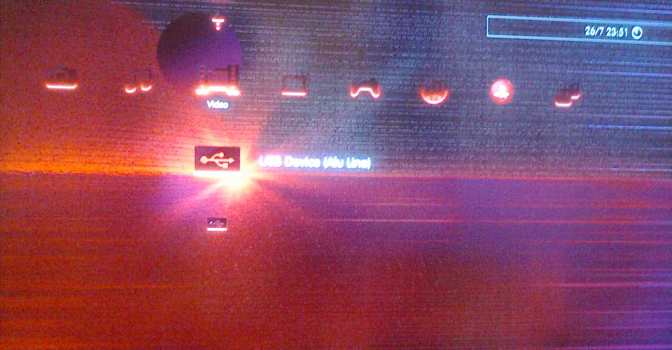
Any chance to upload this theme with reduced brightness.
I mean reduced by 2, 5, 10% for test.

Currently version 1.0\1.0a looks to bright.
Different than in preview images.

EDIT: I mean only main theme\image:
bad.png

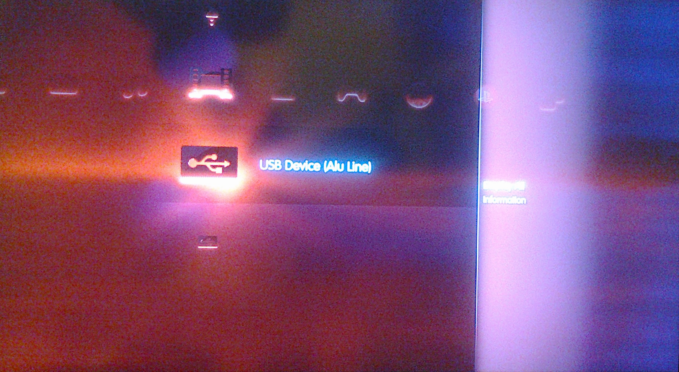
When I press e.g. triangle at USB device everything is fine:
good.png


Sorry for low quality photos...
 
Last edited:
You mean the 10 main icons of the XMB horizontal bar :)
The effect that happens when you press triangle button is they reduces the distance in between them a bit (so they moves horizontally a bit going closer to the icon that is "on focus")
And additionally they changes his alpha and becomes a bit more transparent

So i guess what you like is that alpha reduction (or simply reduce brightness of them a bit instead of alpha) in the 10 main icons.... but all the others have the same light effects, so dunno... incase of doing that change maybe is better to change all them
 
Sorry, zero chance for that. Mostly because those peoples who complain have bad colour etc. settings in TV (or just poor TN matrix). ;) They have to high contrast or chromatic spectrum. It is very time consuming to cut icons into bitmaps (and this cannot be automated because scripts in PS doesn't allow to choose plugin and it's settings, at least in PS CS6).

It is hard to judge form me because screenshots will obviously not show the "problem", and photos from TV have all broken... literally everything. If You know someone with "kolorymetr" (I don't know how this type of devices is named in English) try setup screen. Really, I'm sure it is just bad settings. Many peoples i.e changes contrast to mask a little this damn blurry from upscaling from lower resolutions.

So... You could reduce the "solar flare" by removing it. ;) In example set up Your own wallpaper, then those embedded from theme will be override by it.
 
Last edited:
I was trying this theme on Philips 32PFL6606 TV.
In specification I cannot find what matrix it has got:
https://www.download.p4c.philips.com/files/3/32pfl6606h_12/32pfl6606h_12_pss_enggb.pdf.
I doubt that is is TN, because it has got quite good viewing angles, black color looks really nice...
My TV setting:
brightness at 50\100
color 56\100
contrast 55\100
gamma 0
normal tint.

Wallpaper will be better name than image, not an icons.
Normally wallpaper is too bright, when i press e.g. triangle for advanced setting
colors are really nice. Black is black...

Maybe at least a chance for wallpaper with reduced brightness for test
or a PNG wallpaper without any "modifications"?
Not all theme.

EDIT: I've copied most of images on USB from dropbox and preview from this topic.

I've tried especially these two images:
https://uc08bf4cdbfb0a596c5d96f8d56...Tyk15c2iPXaWoe71iF_MnbeHxrmUKq7mFQM6ca8/p.png,
https://www.psx-place.com/attachments/rebugification_ps3_preview_3-jpg.7698/.

PNG looks really nice, while JPG is too bright.
If no one else have this "issue", than I guess I'll have to live with it...
or change wallpaper.
 
Last edited:
There is no such things like standards across all even the same type of matrix's so all those values are unique per model or even per device. That's why peoples uses special devices to setup colours to match as much as possible to the reality. In other words, i.e Brightness: 50/100 in one TV is not the same in another.

PNG looks really nice, while JPG is too bright.

PS3 using JPG as background from inside of P3T, so all those images in PNG are from vsh screenshots, having JPG in background. And this JPGs was created from those PNGs so quality was dropped again. ^^ Difference between screenshots (png) and this jpeg preview is lose details. And a little plot twist here: all blocks (quantization) from which are jpeg is build are... less bright than on original screenshots (which BTW is also not accurate to the actual screen displaying for some reason, so the quality loose from project to jpg preview is a fourth drop!). Technically. :D

I have attached for You original wallpaper alone, so You could modify it as You fit but this will not solve the problem - as I'm still thinking it is matrix/settings issue in Your side. ;p
 

Attachments

Last edited:
Bummer...
I mean even this lossless PNG did not help.
Hmm, these PNGs seems to work flawlessly:
https://uceeb335848ef2fbf50857143a8...feZjue14hIdn-iYGD_PTEWb68nxMjqxXEWtDKfA/p.png,
https://uc8bb026eb01076f1380875af76...m-pm4pDYXt6BKZ5F0zSEMV9FBCRFAsPHddWxxuI/p.png,
https://uc41362c2b4b2898620e70b56ce...BgihoxHZnv92oThk5cc0vXMZG-GGStBI0sHHoIc/p.png,
https://ucac4fd822f7d9c477a4a9c8ffa...q1t2n54Yzb2KwtawhYHIUUmDhNi6BhH6SLG-NXU/p.png,
https://uc87df17b604149832cbc68efe8...xSsjFoX6Sanfg0W2djnbSoiW46Iqjy2kuuNGvqQ/p.png,
https://uce276b865e617ec241f49f8537...s3rcAyPh_VEgU8oRirvd_DMS_0-XqBBZoVZZhLY/p.png...

Probably there are a bit (more) blurry.

I've changed changed sharpness from 8 to 0.
It seems that it help a bit...

EDIT: You probably do not gonna like it.
I've use gimp to blur your image a bit.
Now it's blurry, some details were gone missing, but... it finally works.
Black is finally black... (in my TV)
zeby.gif
 

Attachments

  • theme_bg_hd-321.png
    theme_bg_hd-321.png
    1.1 MB · Views: 258
Last edited:
Looks horrible but by attaching it I did predicted this consequences. :D Anyway, at the end, it is for You so I'm fine with that. I'm glad You like this theme and use it.
 
Is there a way to install multiple or all themes at the same time instead of one by one?

not sure about installing or just making them appear in the list, but a theme pkg should be able to do this. they can be in p3t format or an edat, or even mixed together.
 

Featured content

Trending content

Back
Top