PS3 [Research] Modifying the Coldboot/Gameboot Sequence (custom_render_plugin.sprx/rco)

Silly little patch I just found. Not sure why I am even posting it, But maybe it will suit somebody. :)

This xmb_plugin.sprx patch makes the little PS Plus logo show in the notification bar. "Fake plus" you could say, so you can pretend to your mates. lol

Just zero out the word "plus".

Before:
upload_2020-12-16_3-32-36.png


After:
upload_2020-12-16_3-34-10.png


Before:
upload_2020-12-16_3-41-32.png


After:
upload_2020-12-16_3-39-30.png


You can also make these other icons appear by zeroing out these entries, so it kind of looks like you are signed in and have messages. Kinda crap, but anyway. maybe someone will use it someday. You can also remove the clock here by zeroing the word "clock"
upload_2020-12-16_3-51-29.png

upload_2020-12-16_3-54-30.png
 
Are the icons from inside xmb_plugin_normal.rco
tex_indi_chat.gim
tex_indi_message.gim
tex_indi_online.gim
tex_indi_plus.gim

And the other named "tex_indi_bg.gim" ?... i guess in the sprx is renamed to "indi_base" ?
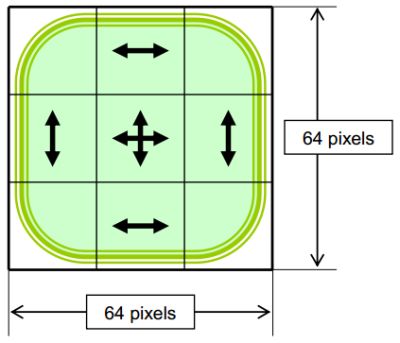
Never realized before, but this image is the frame all around that area of the clock, is just 24x24 pixels, but is streched only at the centers of his sides(preserving the curvature of the corners and the horizontal and vertical degrades)
Im guessing deleting the " "indi_base"" string from the sprx is going to make dissapear the frame, did you try that ?
 
Yes, tried it. that works. But it still loads that outline, but bigger with a space for the scrolling text underneath.

Also you can remove indicator, which is the little clock icon. It still shows up spinning when there is activity.

If icons do not appear by default. Then zeroing them here causes them to appear, if things do appear by default, then zeroing them removes them.
 
Last edited:
I been loking at the frame image a bit more, originally is 24x24 pixels, but here im displaying it at 1600% zoom, and with a "grid" on top, every square of the grid is 1 pixel
By using the color picker in photoshop i can see is intended to be streched this way
The rectangles i painted "outside" of the image are the streched areas, this is intended to preserve the corners
4PejtpJ.jpg

Is pretty much the same that happens with the "notification" icon in the P3T themes
Notification_Window_Frame_-_Stretching_Layout.jpg


But not exactly the same.. this bar for the clock seems to be named "indicator" ?, and maybe is streched this way (only preserving 2 corners instead of 4 corners)
9c79M0v.jpg


Anyway... im just mentioning this as curiosity sake, incase someone is interested to modify that image of the "indicator" background, remember... if we divide the image in "sectors"... the sectors at the borders are 8 pixels
 
Hmmm, and btw, an interesting test that can be made with that image is to replace it by a different custom image of a bigger size
A feature of the PS3 XMB is that it can display images of any size because is scaling them "on run time" to whatever size is written in the xml code (you know, the xml files generated by rcomage, where are mentioned the <plane> objects, and his attributes for sizes X,Y,Z)

The idea is... we have an image of 24x24 pixels that is going to be scaled up to something around... 600x100 pixels
So we could replace the image of 24x24 pixels by other of 24x100 pixels... this way there is no vertical streching
Or... 600x24 to remove the horizontal streching
Or... 600x100 to display the image at max quality, without any streching

The 600x100 i mentioned is just an rought approach, i dont know how much big is it by default (not counting the other effects that makes it bigger temporally to display additional texts etc...)
 
But not exactly the same.. this bar for the clock seems to be named "indicator" ?, and maybe is streched this way (only preserving 2 corners instead of 4 corners)
You were right the first time. The outline is called "indi_base".

But when I zero out indi_base, it does not remove the outline as you would expect, instead it actually gets bigger by adding space under the clock for the scrolling Whats new text. Its possible it is actually removing that version of it, and then it is loading this new bigger outline from the wboard sprx or somewhere else. Not sure.

"indicator" is the little clock icon. See here. Note when I zero out indicator the animated clock icon still appears to show activity. Its just not always there showing the time

upload_2020-12-16_11-54-29.png


Removing "online_num" does nothing, obviously that needs to get the number of friends online from somewhere else. If I was online and signed it removing this probably would have an effect.

The outline seems to be 60 pixels high, then around 600 pixels wide. The width depends on which little icons are loaded.
upload_2020-12-16_12-23-48.png
 
Last edited:
Silly little patch I just found. Not sure why I am even posting it, But maybe it will suit somebody. :)

This xmb_plugin.sprx patch makes the little PS Plus logo show in the notification bar. "Fake plus" you could say, so you can pretend to your mates. lol

Just zero out the word "plus".

Before:
View attachment 29251


After:
View attachment 29252

Before:
View attachment 29254

After:
View attachment 29253


You can also make these other icons appear by zeroing out these entries, so it kind of looks like you are signed in and have messages. Kinda crap, but anyway. maybe someone will use it someday. You can also remove the clock here by zeroing the word "clock"
View attachment 29256
View attachment 29257

also you can edit the xmb_plugin_normal.rco to show them permanently, just change its plane name or object name, it will make them persistent on the xmb.

if you rename the bar name it will disappear.
 
I been loking at the frame image a bit more, originally is 24x24 pixels, but here im displaying it at 1600% zoom, and with a "grid" on top, every square of the grid is 1 pixel
By using the color picker in photoshop i can see is intended to be streched this way
The rectangles i painted "outside" of the image are the streched areas, this is intended to preserve the corners
4PejtpJ.jpg

Is pretty much the same that happens with the "notification" icon in the P3T themes
Notification_Window_Frame_-_Stretching_Layout.jpg


But not exactly the same.. this bar for the clock seems to be named "indicator" ?, and maybe is streched this way (only preserving 2 corners instead of 4 corners)
9c79M0v.jpg


Anyway... im just mentioning this as curiosity sake, incase someone is interested to modify that image of the "indicator" background, remember... if we divide the image in "sectors"... the sectors at the borders are 8 pixels

mine is just the buble image for the psn pkgs renamed.

UzjSiWW.png

PDFnRKV.png
 
Last edited:
I been loking at the frame image a bit more, originally is 24x24 pixels, but here im displaying it at 1600% zoom, and with a "grid" on top, every square of the grid is 1 pixel
By using the color picker in photoshop i can see is intended to be streched this way
The rectangles i painted "outside" of the image are the streched areas, this is intended to preserve the corners
4PejtpJ.jpg

Is pretty much the same that happens with the "notification" icon in the P3T themes
Notification_Window_Frame_-_Stretching_Layout.jpg


But not exactly the same.. this bar for the clock seems to be named "indicator" ?, and maybe is streched this way (only preserving 2 corners instead of 4 corners)
9c79M0v.jpg


Anyway... im just mentioning this as curiosity sake, incase someone is interested to modify that image of the "indicator" background, remember... if we divide the image in "sectors"... the sectors at the borders are 8 pixels


actually the system preserves all the 4 corners, idk why but webman screenshots does not shows it, and on tv, you need to change the view mode to just scan

8em90J2.png


you can see the other corners.

on my old SAMSUNG TV it shows more of it with a gap between the corners to the end of screen of about 50 pixels, but my new LG one just shows without any gap
 
I was not mentioning anything about the clock because what you said is a bit confusing, as far i remember the clock is composed by 3 images, the external circle itself and 2 mages for the needles named "short" and "long"
The needles are linked to an animation to rotate them, the normal rotation is synced with the time
But there is another "loading" animation using the clock that makes the needles rotates fast... also it makes the circle to scale up/down like if it was "tilting"
In the old firmwares that "loading" animation was made with the waterdrop... but at some point they replaced it
In modern firmwares the waterdrop animation is only visible when you enter recovery menu... i guess is because there is no XMB in recovery menu)

The names used in this images is a bit weird, is hard to talk about them because we cant give them a straightforward name :D
I think the whole bar is named "indicator" but at some point they messed up the names

Luanteles, your screenshot is a proof that the streching is made following this pattern, thanks for clarifying it :)
4PejtpJ.jpg
 
yeah the naming is a bit crap, guess they thought no one would ever see it.

Maybe they meant "time indicator" and the fact it switches to indicate "busy" status when they used the tag "indicator" for this little clock icon. :) idk really.

upload_2020-12-17_3-14-53.png
 
Btw, im thinking the string "indi_base" in the sprx is an area reserved to display the text at bottom of the bar
Mostly because when you deleted the string the bar increased his size to make room for that text
 
Maybe, its just some things remove stuff like "clock" when zeroed, removes the date and time, and zeroing "indicator" removes the clock icon. So its hard to know exactly as zeroing stuff here can go either way, remove or add.

Also its the last 2 that seem to remove stuff, first 6 items add stuff. indi_base is in the middle so it is hard to know for sure.
 
Yeh, thats weird, but i agree it should be related with the values used in his alpha attribute when are "initialized"
I dont know where is located that code... either in a xml or embedded inside a sprx, but what seems to be happening is a lot of that images are initialized as visible (because the alpha value used in his attribute)... and are connected to an animation that changes the alpha to hide them
By deleting the string you are breaking the connection with the animation

The clock (with the timestamp text), and the indicator (the clock sphere) are a bit special because are not static images
The clock uses his own object, unique and specific for it ---> https://www.psdevwiki.com/ps3/RCOXML_Objects#.280x816.29_Clock
And the indicator... dunno if there is an object specific for it, but probably
 
Btw @DeViL303 i dont remember if it was you (in the sprx) or me (in the qrc) who did it, i think it was something unintentional because we made a mistake, anyway...
Do you remember at some point we "broke" the paths to the MNU files ?, in that test the firmware was not able to load the setttings from inside the MNU files
The shocking thing is the firmware continued working normally even without MNU files... and the visual effects displayed on screen was very different than the settings of the (broken) MNU files
We was wondering what was happening with that broken paths, how it was posible for the animation to contiue without MNU files, also we made several more test trying to "break" the MNU files in different ways

We deduced that the settings present in the MNU files also exists in the code... so if we break the MNU file the code does a "fallback" to the value of the setting in the code
Probaly in the source code all this settings are "initialized", this is where is needed to indicate his data type (that also appears in the MNU files btw), and a initial value for it (usually zero)

So... pretty much... when we was breaking the MNU paths, we was changing all the settings of the MNU = 0
Unless the value is initialized with something different than zero in the code... dunno, but not much probable

-----------------
Right now there are 3 ways to recreate that effect with Xforge
1) delete the MNU file
2) edit the MNU file and modify all the settings = 0
3) edit the MNU file and delete all the setting lines (but keep the line most at top starting with #)

Remember ?, that line starting with # (only present in some MNU files) is mandatory to exists in the MNU files that uses it originally
Some MNU files doesnt have the line starting with #, in that case dont add it to that specific file, we never tryed to add it so we dont know the results
 
Last edited:
Ohhh, almost forgot, another cool thing we was doing was to redirect the paths of the shader files (fpo/vpo)... but we didnt dedicated much experiments to it sadly... and most of them was unsuccessful for some reason

Now with Xforge this can be made a lot more preciselly.. the rule to follow to know which shader files are compatibles with each others, is to take a look at them in his decompiled format, and compare the names in them, they should match, not sure if completly but mostly in a huge amount, this means the shader is intended to be used by the same code functions, this is why they shares names
I know, is an stupid imprecise rule, but it works :P

Xforge does a "on the fly" decompilation of fpo/vpo files and displays his content in "human readable format" in the preview panel at right, you can compare several fpo/vpo files just by clicking in them consecutively in Xfroge (the "on the fly decompilation" takes a fraction of second everytime you click in a new fpo/vpo file)
Or you could copypaste the decompiled code from Xforge preview panel into .txt files and use notepad++ with the compare plugin to see the differences highlighted in a noob friendly way
 
I was not mentioning anything about the clock because what you said is a bit confusing, as far i remember the clock is composed by 3 images, the external circle itself and 2 mages for the needles named "short" and "long"
The needles are linked to an animation to rotate them, the normal rotation is synced with the time
But there is another "loading" animation using the clock that makes the needles rotates fast... also it makes the circle to scale up/down like if it was "tilting"
In the old firmwares that "loading" animation was made with the waterdrop... but at some point they replaced it
In modern firmwares the waterdrop animation is only visible when you enter recovery menu... i guess is because there is no XMB in recovery menu)

The names used in this images is a bit weird, is hard to talk about them because we cant give them a straightforward name :D
I think the whole bar is named "indicator" but at some point they messed up the names

Luanteles, your screenshot is a proof that the streching is made following this pattern, thanks for clarifying it :)
4PejtpJ.jpg

Yes this is something regarding indication / indi_base etc. i always was curious about how it worked and tried to document how xmb_plugin is actually making it bigger or to display custom text in it. It would be more convenient instead the notification pop ups and messing with xil / xml files.
Yes there are basically some struct fields and just setting them 1/0 on runtime will actually make them appear...no need to modify xmb_plugin. I figured a bit that some parts of it are also happening in explore_plugin. I will have to search for my notes :D
 
Luanteles, your screenshot is a proof that the streching is made following this pattern, thanks for clarifying it :)
I not 100% sure. To me it looks like the corners are also squashed or something. The corner radius seems sharper?


@LuanTeles Are you saying its turning this:
upload_2020-12-17_12-23-39.png


into this:
PDFnRKV.png


Or do you have a custom square bubble added?
 
I not 100% sure. To me it looks like the corners are also squashed or something. The corner radius seems sharper?


@LuanTeles Are you saying its turning this:
View attachment 29284

into this:
PDFnRKV.png


Or do you have a custom square bubble added?


Yeap, exactly this one.

At the time, i didn't know well the rcos, i think i added it on the v1.x version

i was testing to see what are each image, so i changed several images with others already inside the rco, then i changed the bar and the notification to this one, i liked the result, also the xmb resized it automatically for the bar and notifications =)
 
Btw @DeViL303 i dont remember if it was you (in the sprx) or me (in the qrc) who did it, i think it was something unintentional because we made a mistake, anyway...
Do you remember at some point we "broke" the paths to the MNU files ?, in that test the firmware was not able to load the setttings from inside the MNU files
The shocking thing is the firmware continued working normally even without MNU files... and the visual effects displayed on screen was very different than the settings of the (broken) MNU files
We was wondering what was happening with that broken paths, how it was posible for the animation to contiue without MNU files, also we made several more test trying to "break" the MNU files in different ways

We deduced that the settings present in the MNU files also exists in the code... so if we break the MNU file the code does a "fallback" to the value of the setting in the code
Probaly in the source code all this settings are "initialized", this is where is needed to indicate his data type (that also appears in the MNU files btw), and a initial value for it (usually zero)

So... pretty much... when we was breaking the MNU paths, we was changing all the settings of the MNU = 0
Unless the value is initialized with something different than zero in the code... dunno, but not much probable

-----------------
Right now there are 3 ways to recreate that effect with Xforge
1) delete the MNU file
2) edit the MNU file and modify all the settings = 0
3) edit the MNU file and delete all the setting lines (but keep the line most at top starting with #)

Remember ?, that line starting with # (only present in some MNU files) is mandatory to exists in the MNU files that uses it originally
Some MNU files doesnt have the line starting with #, in that case dont add it to that specific file, we never tryed to add it so we dont know the results
Yeah we need to look into that more, it was actually the Ps3 pro mod qrc, luanteles found it online. When I looked in HEX, that one seemed to be corrupted like someone had used paste insert and moved a load of stuff down, breaking some MNU entries. This is still the only lines.qrc with the higgs particles afaik so there is something special about it.

Need to have another look sometime.
Yeap, exactly this one.

At the time, i didn't know well the rcos, i think i added it on the v1.x version

i was testing to see what are each image, so i changed several images with others already inside the rco, then i changed the bar and the notification to this one, and i liked the result, also the xmb resized it automatically for the bar and notifications =)
Nice one, Interesting the way it makes it square.
 

Similar threads

Back
Top