
You are using an out of date browser. It may not display this or other websites correctly.
You should upgrade or use an alternative browser.
You should upgrade or use an alternative browser.
PS3 [Research] Modifying the Gaia Visualization (custom_render_plugin/earth.qrc)
- Thread starter DeViL303
- Start date
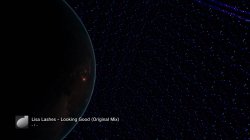
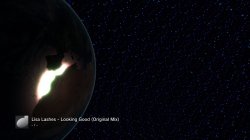

@DeViL303 I added a new web command to the test build attached.
Files should be stored in /dev_hdd0/tmp/earth as 1.qrc, 2.qrc, etc. (until 255.qrc)
Use /earth.ps3?2 to select 2.qrc or use /earth.ps3 to select the next (3, 4, 5, etc.)
On each boot the earth.qrc is mapped to the next qrc.
The web command /earth.ps3 can be used with custom combo R2+SQUARE
It would be nice if the selection could be implemented in open_path_hook of Cobra's mappath.c, so the mapping would be set every time the qrc is loaded by the player.
Files should be stored in /dev_hdd0/tmp/earth as 1.qrc, 2.qrc, etc. (until 255.qrc)
Use /earth.ps3?2 to select 2.qrc or use /earth.ps3 to select the next (3, 4, 5, etc.)
On each boot the earth.qrc is mapped to the next qrc.
The web command /earth.ps3 can be used with custom combo R2+SQUARE
It would be nice if the selection could be implemented in open_path_hook of Cobra's mappath.c, so the mapping would be set every time the qrc is loaded by the player.
-- This is just a sample code... I didn't test it
if(strncmp(path, "/dev_flash/vsh/resource/qgl/earth.qrc", 37) == 0)
{
char new_earth[30];
static uint8_t earth_id = 0;
sprintf(new_earth, "/dev_bdvd/tmp/earth/%i.qrc", ++earth_id);
CellFsStat stat;
if(cellFsStat(new_earth, &stat) == 0)
set_patched_func_param(1, (uint64_t)new_earth);
else
earth_id = 0;
return;
}
if(strncmp(path, "/dev_flash/vsh/resource/qgl/earth.qrc", 37) == 0)
{
char new_earth[30];
static uint8_t earth_id = 0;
sprintf(new_earth, "/dev_bdvd/tmp/earth/%i.qrc", ++earth_id);
CellFsStat stat;
if(cellFsStat(new_earth, &stat) == 0)
set_patched_func_param(1, (uint64_t)new_earth);
else
earth_id = 0;
return;
}
Attachments
Last edited:









Berion
Developer
@DeViL303 @pink1
Binsert in English for Windows and Linux.
changes:
Binaries for Windows are for some reason huge. I wonder if because of "stdlib.h", but I cannot compile without it... It is code for VS from 10 years ago,and I'm not a programmer, so still it is a miracle that I'm be able to do something with it... Maybe can be easily packed by UPX or something like that but is this really necessary as whole toolkit is packing?
Binsert in English for Windows and Linux.
changes:
Code:
printf("Insufficient arguments\n\nbinsert.exe [offset] [infile] [outfile]\n");
printf("Cannot open files.\nIn = \"%s\"\nOut = \"%s\"\n", argv[2], argv[3]);
printf("Remaining: %d\n", remaining);
printf("Operation successfully completed. In \"%s\" on 0x%lx offset", argv[3], offset);
printf("Saved \"%s\"\n", argv[2]);
Binaries for Windows are for some reason huge. I wonder if because of "stdlib.h", but I cannot compile without it... It is code for VS from 10 years ago,and I'm not a programmer, so still it is a miracle that I'm be able to do something with it...
Maybe can be easily packed by UPX or something like that but is this really necessary as whole toolkit is packing?Attachments
Last edited:

Nice one. Thanks @Berion@DeViL303 @pink1
Binsert in English for Windows and Linux.
changes:
Code:printf("Insufficient arguments\n\nbinsert.exe [offset] [infile] [outfile]\n"); printf("Cannot open files.\nIn = \"%s\"\nOut = \"%s\"\n", argv[2], argv[3]); printf("Remaining: %d\n", remaining); printf("Operation successfully completed. In \"%s\" on 0x%lx offset", argv[3], offset); printf("Saved \"%s\"\n", argv[2]);
Binaries for Windows are for some reason huge. I wonder if because of "stdlib.h", but I cannot compile without it... It is code for VS from 10 years ago,and I'm not a programmer, so still it is a miracle that I'm be able to do something with it...
 I will probably use this for lots of things.
@DeViL303 @pink1
Binsert in English for Windows and Linux.
changes:
Code:printf("Insufficient arguments\n\nbinsert.exe [offset] [infile] [outfile]\n"); printf("Cannot open files.\nIn = \"%s\"\nOut = \"%s\"\n", argv[2], argv[3]); printf("Remaining: %d\n", remaining); printf("Operation successfully completed. In \"%s\" on 0x%lx offset", argv[3], offset); printf("Saved \"%s\"\n", argv[2]);
Binaries for Windows are for some reason huge. I wonder if because of "stdlib.h", but I cannot compile without it... It is code for VS from 10 years ago,and I'm not a programmer, so still it is a miracle that I'm be able to do something with it...
I am getting a missing DLL error with the 32 bit version..Do you know anything about that? The 64bit version is working but I am not sure if it will give other people problems if i just include the 64 bit version for everyone?

Cypher_CG89
Senior Member
I am getting a missing DLL error with the 32 bit version..Do you know anything about that? The 64bit version is working but I am not sure if it will give other people problems if i just include the 64 bit version for everyone?
View attachment 23416
32bit works on Win10.
You could see if you can find the missing dll on the internet and include it with your tool in a zip saying something like if you get this error unzip this file and place it in the same dir as the exe or something like that.
I might include the dll...to be honest though having reliance on a dll, having 2 versions for 32/64bit..and making exe 30 times bigger is starting to sound like more hassle than just hex editing the original to english..Sometimes the simplest way really is the simplest.
I am grateful though berion, it just does not seem to be working out as the simplest solution for me.
Also I think I am in love with hex editing....I was even hex editing mp3s the other day lol,
I am grateful though berion, it just does not seem to be working out as the simplest solution for me.
Also I think I am in love with hex editing..
..I was even hex editing mp3s the other day lol,
Last edited:
Cypher_CG89
Senior Member
I might include the dll...to be honest though having reliance on a dll, having 2 versions for 32/64bit..and making exe 30 times bigger is starting to sound like more hassle than just hex editing the original to english..Sometimes the simplest way really is the simplest.
Give me 5 mins, I can compile it and remove the dependency on this dll.
Cypher_CG89
Senior Member
I might include the dll...to be honest though having reliance on a dll, having 2 versions for 32/64bit..and making exe 30 times bigger is starting to sound like more hassle than just hex editing the original to english..Sometimes the simplest way really is the simplest.
I am grateful though berion, it just does not seem to be working out as the simplest solution for me.
Also I think I am in love the hex editing..
Try these out and see if you get the error. I just re-compiled it with compiler linker flags -static-libgcc.
ZIP includes both 32 and 64 bit exe's.
Attachments
That works and is much smaller too, thank you.Try these out and see if you get the error. I just re-compiled it with compiler linker flags -static-libgcc.
ZIP includes both 32 and 64 bit exe's.
Cypher_CG89
Senior Member
Also I think I am in love with hex editing..
There is something in the simplicity of hex editing instead of trolling through the internet looking for an app to do what you need. that works without issues..
I used to hate cmd line tools, bash script and such but now I prefer how simple it is/can be.
MP3's...? Editing the meta data or something..? trimming down file sizes..? Cannot say I have hex edited an MP3 before....
That works and is much smaller too, thank you.
No problem
The 64 bit is smaller than the previous by about 300kb +, but the 32bit is larger than the other 32bit exe by about 100kb or something. But I think they only total about 250kb or so together now instead of 600kb +.
If your going to compile your .bat into an .exe I would say have ago at using CodeBlocks to make a GUI for it, its quite user friendly for making GUIs.
I haven't been doing much QRC editing on this, hence no posts from me on it, been working on something else to do with them and also ripping the VPO's and FPO's apart so we might get 100% control over every aspect of this. It would also work on the lines.qrc and any others where vertex and fragment shaders are used.
@all Forget everything I said before about the possible limits and larger qrcs causing freezes around 10MB..I was talking out of my hoop, That was my own feck up due to not realizing jpegoptim was not not very accurate. The real limit seems to be up around 80MB-100MB so its not something we need to worry about.
I just loaded 30MB of jpegs and 35MB of DDS in one QRC without issues.
We need some reverser type dude to have a look in the qgl app gaia sprx in IDA and see can they find any reference to 512x512 or 1024x1024 and double them them to 1024x1024 and 2048x2048 I know its not that easy...but I think the ps3 can handle a lot more than 512x512 per tile.
Also how about we try to replace all jpgs with dds? We know it supports DDS , so its possible if we just change the extensions and replace the files it will work?
I just loaded 30MB of jpegs and 35MB of DDS in one QRC without issues.
We need some reverser type dude to have a look in the qgl app gaia sprx in IDA and see can they find any reference to 512x512 or 1024x1024 and double them them to 1024x1024 and 2048x2048
I know its not that easy...but I think the ps3 can handle a lot more than 512x512 per tile.Also how about we try to replace all jpgs with dds? We know it supports DDS , so its possible if we just change the extensions and replace the files it will work?
Last edited:
Cypher_CG89
Senior Member
The real limit seems to be up around 80MB-100MB so its not something we need to worry about.
TBH the only limits will come from RAM and HDD space. The QRC was only limited in size because of the limited space in dev_flash, now the qrc can be redirected to dev_hdd0 with webMAN we should be able to use some really high quality DDS files with decent mipmap levels and decent jpgs.
We need some reverser type dude to have a look in the qgl app gaia sprx in IDA and see can they find any reference to 512x512 or 1024x1024 and double them them to 1024x1024 and 2048x2048
There is defo reference to this in the vertex and fragment shaders, ie was something along the lines of "source_tex (or file)_size=1024*1024", don't ask which one's as I cannot remember off the top of my head lol, I just remember seeing this reference.

sandungas
Developer
Good test, so is a cube, same texture applyed to the 6 faces, and the camera allows to see all themI think we can add any size DDS, not sure. I need some big ones.
This means that texture of the starfiled needs to match seamless in his borders with itself, also whatever we paint in it is going to be repeated periodically
Another good thing from that test is we know the distance/scale of the things we can paint in it
Nice no filesize limits, but i guess there should be memory limits, the .jpg textures are still limited to 1024x1024 in your tests?I just made a 57MB earth.qrc and it loads fine.
I added 2 massive 27MB DDS files at 4096x4096. They do not display correctly
What you did with the 2 big .dds files ? one for the starfield and another for the disk ?, or was 2 different tests ?
@Cypher_CG89 Sounds good.
@xf505 and everyone really, If you do not have images for all 3 layers. a handy trick that gives your mods a little extra pop is to inject the same jpgs to all layers. Adds to the colour and 3D effect. If using my bat to do it just make copies of your image with the 3 names, so make *_clouds.jpg , *_ground.jpg and *_specular.jpg the same (tile/face/cubemap) .
For even more effect increase the contrast loads on your specular image and make it black and white.
@xf505 and everyone really, If you do not have images for all 3 layers. a handy trick that gives your mods a little extra pop is to inject the same jpgs to all layers. Adds to the colour and 3D effect. If using my bat to do it just make copies of your image with the 3 names, so make *_clouds.jpg , *_ground.jpg and *_specular.jpg the same (tile/face/cubemap) .
For even more effect increase the contrast loads on your specular image and make it black and white.
Last edited:
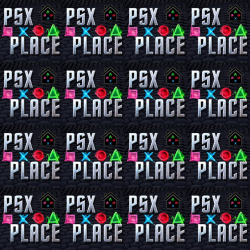
Its more complicated than that with the DDS, its not just 1 DDS put onto each of the 6 faces.. Its like multiplied and mirrored...I have not bothered to try figure it out yet.
If you want to try make a image to use to try figure that we can. But see my images of the psx-place mod. That was using a way simpler texture, it is spread out somehow..
Also its got an effect on it. Darkened a lot. Its like most of the stars dont show up on most of the presets, but on some of them you see lots because the DDS is kinda lit from behind or something like that.
This is the image used. I converted it to DDS. But even at 2048x2048 it is still tiled
If you want to try make a image to use to try figure that we can. But see my images of the psx-place mod. That was using a way simpler texture, it is spread out somehow..
Also its got an effect on it. Darkened a lot. Its like most of the stars dont show up on most of the presets, but on some of them you see lots because the DDS is kinda lit from behind or something like that.
This is the image used. I converted it to DDS. But even at 2048x2048 it is still tiled
Actually I think they were displaying correctly...I just made a 57MB earth.qrc and it loads fine.
I added 2 massive 27MB DDS files at 4096x4096. They do not display correctly
View attachment 23395
View attachment 23393 View attachment 23394
I think the bigger I go , the more tiled the images are...its backwards to how you might think it would be..hmmm.
I need to do some more tests with just 1024x1024 DDS.
sandungas
Developer
At this point probably you noticed it already, but a lot of that .vpo and .fpo files are duplicateds in between the different .qrc filesI haven't been doing much QRC editing on this, hence no posts from me on it, been working on something else to do with them and also ripping the VPO's and FPO's apart so we might get 100% control over every aspect of this. It would also work on the lines.qrc and any others where vertex and fragment shaders are used.
Also, there are some more compatibles (and probably updated versions) inside the "visualizer" app made by q-games
Not sure what you are going to do but im mentioning it because you can make "the complete collection" by grouping them inside the shared path and keeping only the most updated versions of them
As example, note all the .qrc files have a path named "lib/" with some .vpo .fpo files inside, those ones are shared libraries, and are duplicateds
We need to imagine it like if we extract all the files from all .qrc files in the same folder (so we have only a "lib" folder and the files inside it are unique)
Similar threads
-
 PS3 [Research] Modifying the Coldboot/Gameboot Sequence (custom_render_plugin.sprx/rco)
- Started by DeViL303
- Replies: 729
-

-
 PS3 webMAN MOD 1.47.34 - New XMB / Startup enhancements from Aldostools in this update.
- Started by STLcardsWS
- Replies: 87
-
