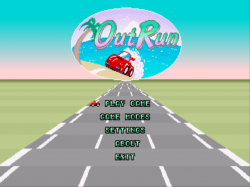
That is how it showing in this video which i assume is the PC version.

but instructions are in Video Description:

This is an OutRun game engine recreation written by Chris White in 2014. It has been ported to the libretro API. We have added a few additional options such as Force AI to play the game, and a 'Free play mode'. Right now, custom soundtrack replacement through wave files has not been implemented yet, however the original game's sound works just fine as of right now. Left analog steering might be implemented later and controls might have to be changed later on.

Note - In order for this core to work, you need to dump the required roms into the directory 'cannonball' inside your System Directory. If you don't know what your System Directory is set to, you can go to Settings | Directory and look at which path it is set to. This core is already starting to appear on various platforms on our buildbot.
 
Cannonball core working...sort of...(read on)

cannonball.png

1. Make a folder called cannonball

2. Dump the contents of OutRun Revision B (outrun.zip) into this folder (I would use a current MAME romset).
The 31 files need to be named as according to this -> https://github.com/djyt/cannonball/blob/master/roms/roms.txt
If you want to play some alternate tracks from the Japanese version you will need 8 files from outruno.zip (see above link for details).
Also a "fixed" audio rom is available and optional -> http://reassembler.blogspot.co.uk/2013/01/outrun-original-game-shipped-with.html
EDIT - Actually, this link might be more useful -> https://github.com/djyt/cannonball/wiki/Cannonball-Manual#fix-corrupted-audio

3. Create a dummy text file (0 byte length), call it cannonball.game and put it in the folder.
This is the file you load via Load Content (don't use Start Core).

Here are the problems:

- If you choose Play Game, it crashes back to the XMB.

- If you change the game mode, it crashes back to the XMB.

- If you go to Settings, you can't cancel back to the main menu. If you choose Save and Return, it crashes back to the XMB.

- retroarch.cfg gets corrupted - it shrinks from ~93 kb to ~6 kb. Make sure you have a backup of this file!

Other stuff

- Don't know if custom tracks work (https://github.com/djyt/layout/wiki)

- Custom audio tracks not supported (yet?)

- Analog controls not supported (yet?) - you can still map controls to analog, they just will function as digital

Sources/more info

https://github.com/djyt/cannonball/wiki/Cannonball-Manual
https://forums.launchbox-app.com/topic/45303-cannonball-outrun-retroarch-and-launchbox-quick-guide/
https://forums.libretro.com/t/cannonball-core-outrun-save-settings/16260
 
Last edited:
2048 and Vecx are now available on the PS3 nightlies site - not sure if they're working, going to test them out later on.

Vecx should that was an official core at one time if not mistaken (maybe v1.0.0.2 ?)
Also i believe 2048 was official and worked as well but disappeared for a bit.

Good to see these back :)
 
2048 and Vecx cores work fine.

Snes9x2005 core is also available (the non-Plus version that previously ran at half-speed). Going to test this one out, too.

EDIT - yep, it works full-speed.
 
Last edited:
This has PC98 and PC Engine CD emulators? If so, can you play with a pad or do you require a mouse and keyboard?

PC Engine CD (aka TurboGrafx CD) is playable via mednafen_pce_fast .
There was an issue in the past that was preventing CD games from working but they worked in the past and i believe that bug may be fixed by now (but i am not certain).
 
N64, PS1, Saturn, PS2, GC, Xbox, Dreamcast, PSP, and DS (maybe some others - 3DO?) will never happen on PS3 RetroArch. Either the hardware is not capable, or it would require a major rewrite to get the core to run on the PS3.
 
What you guys need to understand there is more than "Linux". PS3 is basically PowerPC 64 architecture, so if something work on linux on PC, or even on PS4, or PS2, will not gonna work on PS3 without massive rewrite. No matter that will be under linux, or GameOS from PS3. Of course full access to RSX will help a lot, but there is still not emu that can be ported. So still basically it require to write emu from scratch (at least jit recompiler).

ps3 is much stronger then all of them
Is not matter as much. Look at Saturn, Dreamcast, or even N64 emulation on PC. Is still not perfect with much better hardware than PS3.
Plus read my answer to Ali888.

N64, PS1, Saturn, PS2, GC, Xbox, Dreamcast, PSP, and DS (maybe some others - 3DO?) will never happen on PS3 RetroArch. Either the hardware is not capable, or it would require a major rewrite to get the core to run on the PS3.

  • N64 - No PPC64 recompiler available, but PPC32 exist afaik
  • PS1 - PPC64 dynarec available, standalone HOMEBREW emu exist. But there is no need for including it in retroarch while 99% compatible emu is served by $ony
  • Saturn - No PPC64 recompiler available + Saturn use many processors in different architectures (p.i.t.a)
  • PS2 - No PPC64 recompiler available + $ony emulator is doing really great job, no need for PCSX2 port, as it work very different, and compatibility will be much lower than on PC if someone will ever port it.
  • GC - no PPC64 recompiler, but GC is PowerPC so chances are not bad. But still, it require basically writing new emu
  • Xbox - no PPC64 recompiler, but even on PC is hard to emulate custom GFX. No real chance for PS3 port
  • Dreamcast - Afaik still no PPC64 recompiler exist for SH4 processor
  • PSP - PPSSPP or JPSPC have no PPC64 recompiler. Use build-in emu instead
  • DS - Use 2 ARM processors, PPC64 recompiler is available for one of them (because is chip used also in GBA), require a lot of work, but doable.
 
  • Xbox - no PPC64 recompiler, but even on PC is hard to emulate custom GFX. No real chance for PS3 port

Actually, I don't think there is an X-Box core for RetroArch currently (original or 360).

Another core with little to no hope is the Jaguar one. However, I remember reading something on the libretro forums that the problem is not necessarily hardware-related. The core is based on an emulator (Virtual Jaguar) that is not particularly well-refined, and it has not been updated in about 4 years.
 
no need for an xbox core on the 360, just use the hacked compatibility files. the only downside is that it requires an internal hdd. ;)
 
Back
Top