PS3 SEN Enabler v5.8.3: New VSH Menu , Theme Tool, 4.75 Spoofing & more from Evilnat

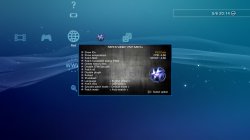
PS3 Hombrew developer Evilnat has released a very impressive update to his popular SEN Enabler Application / Plugin. With this release marked as version 5.8.3 there has been new spoofing abilities for the recent 4.75 Firmware release. Also an option to install themes, while creating a SEN Enabler Theming tool for user's to create their own themes, Also in this update and following the PS3 VSH Menu of 3141card and his own optimazation to the vsh menu he has incorporated a very nice VSH menu for use with the SEN Enabler plugin.[break]ss[/break] As seen in the included pic it provides some nice eye candy and alot of funtionality to your XMB. Checkout all the details for this impresiive and large update by the developer below:



ICON0_1.png

WARNING!

Evilnat said:
Don't enable SEN access on PS3ITA CFW 4.65 DEX, it will brick your PS3 and i don't know why, next release will block this on DEX


I DON'T RECOMMEND USING PUBLIC IDS


Improvements found in version 5.8.3 of SEN Enabler


  • Online works again with OFW 4.75
  • Added support for CFWs 4.75
  • Added option to install themes
  • SEN Plugin updated to v1.7
  • VSH Menu in SEN Plugin from 3141card's POC
  • Added image version from 4.75 in Custom spoof option
  • Added version from 4.75 in Custom spoof option
  • Updated patches on SEN Options
  • Improved code

Thanks to 3141card for PS3 VSH Menu, Alexander for CFW 4.75 to test it, xllBIGGBOSSllx [YOUTUBE STReeT poRKs], GeopByteSs [TWITTER], RevilingDante [WIISOS], franzes80 [GAMESONIC], zrandi [ZRANDISCENE] and Misterkio for his help


Finally i updated SEN Enabler to version 5.8.3, it took me some days of full work because Sony released OFW 4.75, need to update it quickly

This version has the requested option to install custom themes, SEN Enabler only have one default theme installed from memory, if you want to install your custom theme the default one will be omitted and will show your theme when SEN Enabler is starting. This option is in Settings menu in page 4, under the name of Themes options. Here are theme all options:

  • Themes: This option will show all available themes to install, it depends of Source option, if USB is selected will search in an USB device it and if HDD is selected will search in SEN Enabler's themes folder, when a theme is installed will be on SEN Enabler's theme folder
  • Restore original theme: Restores default SEN Enabler theme
  • Delete installed themes: Deletes all installed themes on SEN Enabler's themes folder
  • Source: Select where SEN Enabler need to look for themes, USB or SEN Enabler's theme folder (HDD)

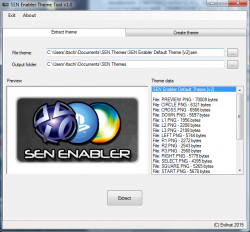
I added two themes along with SEN Theme Tool in the RAR file, SEN Enabler Default Theme [v1].sen and SEN Enabler Default Theme [v2].sen, the first one is old theme and second one is the current theme


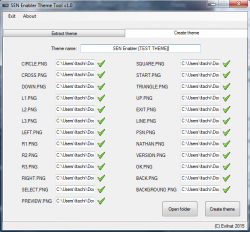
SEN Theme Tool
951e690e48f479e693f941cf2e0990c0.png
a2ac29baf4e2bf311cede8fe17f7048e.png

SEN Theme Tool is the only app to make themes for SEN Enabler, it can create and extract themes, for extract them you need to select theme file and output directory, and to create a theme you need all PNG files from a directory (will search necessary files automatically), put a name and create the theme, you can use one theme as base for your custom theme


SEN Enabler Plugin
9d8b92e33ead8d59cd7233c1e292e487.jpg

Thank so much to @3141card for his POC of PS3 VSH Menu, i improved it to load PNG from memory instead from files on USB/HDD, if you didn't see it here is the Source Code and SPRX, i'm using it as base for my plugin, you can use it and add your tasks or improve it

These are all the options:

  • but_l1.png + but_r1.png: Open/close SEN Plugin options menu
  • but_start.png: Performe selected option
  • Show IDs: Show current MAC/CID/PSID
  • Show temperature: Show current CPU and RSX temperature
  • Patch MAC: Patch current MAC
  • Patch ConsoleID and/or PSID: Patch CID or PSID, depend what you want to patch with patch files
  • Delete history files: Delete files sent to Sony
  • Disable CFW/Syscalls: Disable CFW's syscalls
  • Patch all: Patch CID/PSID, hide syscalls, delete history files and disable plugin
  • Disable plugin: Disable SEN Plugin
  • Reboot: Reboot PS3 system
  • Shutdown: Shutdown PS3 system
  • Language: Select language (English only for now)
  • Patch files: Select source of patch files (USB only for now)
  • Syscalls patch mode: Patches syscalls with mode Default/1/2/3
  • Patch mode: Select option to patch IDs, auto search will find IDs on LV2/LV1 instead use offsets

It has his own configuration file, the old versions used SEN Enabler cfg, now you can use it without SEN Enabler installed on your PS3, and languages will be updated quickly along with other options

To all who spoof CID, be careful because you can be banned quickly now, SPOOF CID AT YOUR OWN RISK

For those who doesn't know how to enable SEN access, go to SEN/PSN Options and select Enable SEN/PSN access (pressing :[]: button three times in main menu) and not Custom spoof, 9.99 Spoof is not created to go online, so if you are using it DON'T LOG IN ON SEN UNDER ANY CIRCUMSTANCES AND NEVER ENABLE PS3'S NETWORK!!

Remember to use Charles Proxy now along with SEN Enabler and block three URLs (you can add more if you want), this software will minimize ban risk, but a ban is not 100% avoided on CFW

URLs to block said:
Block all these URLs on Charles or similar:


IF YOU FIND ANY BUG, PLEASE LET ME KNOW
Download: MEGA || MEDIAFIRE || SENDSPACE || RGHOST


Source: PSX-Place.com

Checkout Evilnat's SEN Enabler Release / Tutorial Thread here @ PSX-Place.com -- > LINK
 
Last edited by a moderator:
Yes, I am in dex ITA cobra, spent in CFW Setup to change the CID >> ps3 regular restarts, activated sen enabler >>ps3 restarts without Functions! , really sad.
I'm RIP? :hmmm:
I have original bkpps here!

I rewrote the NOR and the same thing without functions :bangdesk:


[MENTION=1449]Rancid-o[/MENTION] [MENTION=2]STLcardsWS[/MENTION] [MENTION=76]Evilnat[/MENTION] [MENTION=118]kozarovv[/MENTION]
 
Last edited:
Yes, I am in dex ITA cobra, spent in CFW Setup to change the CID >> ps3 regular restarts, activated sen enabler >>ps3 restarts without Functions! , really sad.
I'm RIP? :hmmm:
I have original bkpps here!

I rewrote the NOR and the same thing without functions :bangdesk:


[MENTION=1449]Rancid-o[/MENTION] [MENTION=2]STLcardsWS[/MENTION] [MENTION=76]Evilnat[/MENTION] [MENTION=118]kozarovv[/MENTION]

Try this, pull out PS3's internal HDD and start it normally and wait some seconds and must show error message about HDD, tell me if that occured

Regards
 
Try this, pull out PS3's internal HDD and start it normally and wait some seconds and must show error message about HDD, tell me if that occured

Regards


Tests - " 7 minutes " --No HD without activity on ps3 t she saw black via hdmi cable cinch.

With HD - without atvidade on ps3 t she saw black via hdmi cable cinch.

With bluray without hd - activity in disk player running black screen ! :confused:
 
Tests - " 7 minutes " --No HD without activity on ps3 t she saw black via hdmi cable cinch.

With HD - without atvidade on ps3 t she saw black via hdmi cable cinch.

With bluray without hd - activity in disk player running black screen ! :confused:

Your NOR dump is clean? I mean if it is a valid working NOR and you didn't dumped it after enable access

Regards
 
Your NOR dump is clean? I mean if it is a valid working NOR and you didn't dumped it after enable access

Regards


Yes my original NOR cex 3:55 and original dex 3.55.

and I have original 4.65 NOR cex and dex. ALL WITHOUT PATCH AND CONTAINS NO SEN ACCESS ABOUT THEM!

:PS Button: A PAPER WEIGHT BEAUTIFUL NOW!:rofl:
 
Yes my original NOR cex 3:55 and original dex 3.55.

and I have original 4.65 NOR cex and dex. ALL WITHOUT PATCH AND CONTAINS NO SEN ACCESS ABOUT THEM!

:PS Button: A PAPER WEIGHT BEAUTIFUL NOW!:rofl:

Can you use E3 Flasher NOR chip instead PS3's internal NOR? To see if start fine, you will need to restore your valid NOR dump to E3 Flasher NOR

If NOR restore didn't worked (the guy who had this problem fixed it with E3 Flasher) the only thing i have in mind is delete PS3's HDD from a PC to see if starts in Recovery Mode to make partitions, etc... and install CFW, but that is the last solution

Where are you from? If you want and you are close to my country (Spain) you can send it to me and i will repair it for free

Regards
 
Can you use E3 Flasher NOR chip instead PS3's internal NOR? To see if start fine, you will need to restore your valid NOR dump to E3 Flasher NOR

If NOR restore didn't worked (the guy who had this problem fixed it with E3 Flasher) the only thing i have in mind is delete PS3's HDD from a PC to see if starts in Recovery Mode to make partitions, etc... and install CFW, but that is the last solution

Where are you from? If you want and you are close to my country (Spain) you can send it to me and i will repair it for free

Regards

You say my replace NOR chip ps3, and writing the new with my backup NOR ? :BRAZIL: <<<my country!
 
You say my replace NOR chip ps3, and writing the new with my backup NOR ? :BRAZIL: <<<my country!

No no, i mean use 3E Flasher's NOR chip (there is one in there), restore NOR dump on it and set E3 Flasher to start from it instead PS3's NOR

You are too far from my country... :(

Regards
 
No no, i mean use 3E Flasher's NOR chip (there is one in there), restore NOR dump on it and set E3 Flasher to start from it instead PS3's NOR

You are too far from my country... :(

Regards

Well if you explain me better how to do it , I can try!

Would have a tutorial.

I appreciate your help ;)
 
Well if you explain me better how to do it , I can try!

Would have a tutorial.

I appreciate your help ;)

Here it is some info from [MENTION=29]Joonie[/MENTION]'s tutorial in E3 Flasher for Dual Boot, thanks amigo ;)

1b1vs8dawyq2zgufg.jpg

Joonie said:
Explanation of switches on TF Cover board.


OB FLASH = On board Flash which mean "Spansion" Nor chip on E3 Flasher.
PS3 FLASH = Nor chip on PS3 motherboard

1 :
FLASH FUN = Halt PS3 Boot mode [mostly used for unbrick]
PS3 MODE = Normal PS3 Boot mode

2 :
CFW : PS3 Boots from E3 NOR
OFW : PS3 Boots from PS3 NOR

3rd , 4th and 5th switches determent where you flash your nor dump from and to so these allow your flashing location

for ex) SD card to PS3 Nor or E3 Nor, PS3 Nor to E3 Nor and vice versa, etc.

3 : Choice of either back up or Flashing
BACKUP
PROG

4 : Choice of location of your nor flash dump
OB FLASH : E3 Nor Chip
MicroSD [bkpps3.bin or bkpe3.bin files]

5 : Choice of location where you want to flash to
OB Flash
PS3 Nor Flash

6 : Always "LOCK"

So you need to put your E3 Flasher like this: DOWN | UP | DOWN | DOWN | UP | DOWN

Then put your SD card with your valid and working NOR image and start to flash it to E3 NOR, then try to start the PS3 and tell me if shows something

Regards

PS: Did you put the first one in FLASH FUN before while trying to restore it? If yes this will halt your PS3 and void to start it
PS 2: If nothing of this works, the last option is delete PS3's HDD on PC and put it back to see if works
 
Last edited:
Here it is some info from [MENTION=29]Joonie[/MENTION]'s tutorial in E3 Flasher for Dual Boot, thanks amigo ;)

1b1vs8dawyq2zgufg.jpg


So you need to put your E3 Flasher like this: DOWN | UP | DOWN | DOWN | UP | DOWN

Then put your SD card with your valid and working NOR image and start to flash it to E3 NOR, then try to start the PS3 and tell me if shows something

Regards

PS: Did you put the first one in FLASH FUN before while trying to restore it? If yes this will halt your PS3 and void to start it
PS 2: If nothing of this works, the last option is delete PS3's HDD on PC and put it back to see if works


Ok lot of work to do.

I will prepar all, then I will put the result to the community!

PS : My first restoration was all down arrow = work without the ps3 !
 
Last edited:
[MENTION=76]Evilnat[/MENTION]
:box: Trying to make the time to follow the tutorial ...
I realized something today, ps3 starts without activity on the processor (yellow light does not work does not show the processor work) Any ideas.?
I was thinking of using the SBE welding mode for Tristate the flasher e3!
 
[MENTION=76]Evilnat[/MENTION]
:box: Trying to make the time to follow the tutorial ...
I realized something today, ps3 starts without activity on the processor (yellow light does not work does not show the processor work) Any ideas.?
I was thinking of using the SBE welding mode for Tristate the flasher e3!

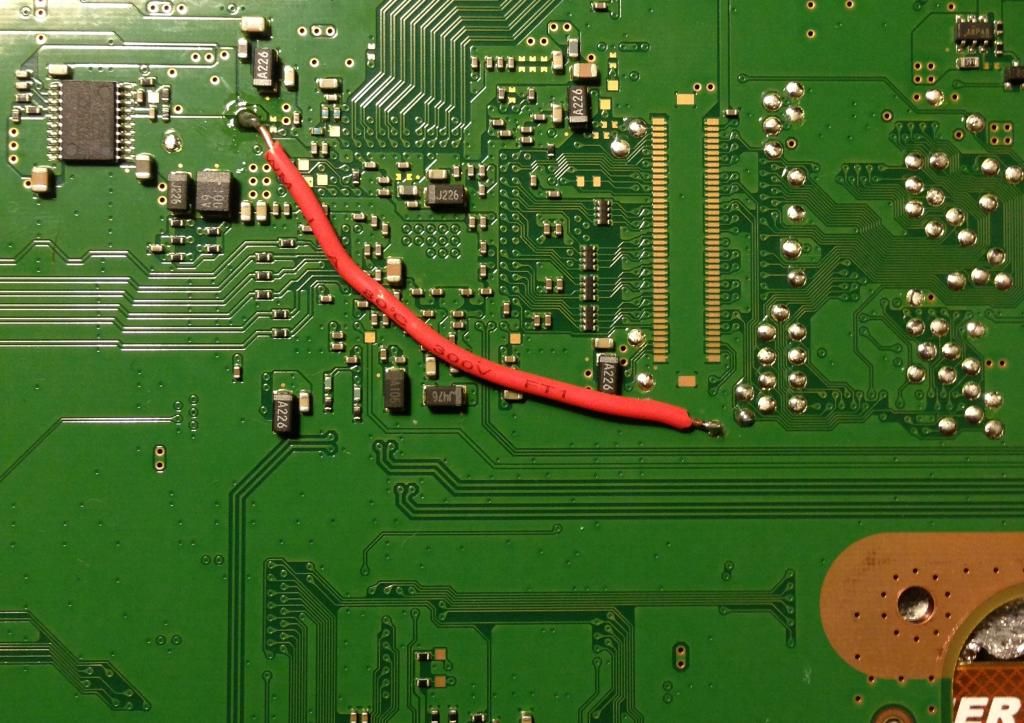
Using NOR Tristate if for a hard bricked PS3 and your PS3 doesn't show YLOD right? If you want to use NOR Tristate, weld NOR Tristate to motherboard's GND instead welding to E3 Flasher ribbon, is more easy to do, here is an image:

d6bf03b0-fd1e-47f2-b6fb-4bef38285371_zpsc8e5616f.jpg~original


I don't understand about "ps3 starts without activity on the processor" and "yellow light does not work does not show the processor work", do you mean PS3 starts and doesn't show anything?

Regards
 
Tests - " 7 minutes " --No HD without activity on ps3 t she saw black via hdmi cable cinch.

Usually screen will show up and asking for hdd storage not found

With HD - without atvidade on ps3 t she saw black via hdmi cable cinch.
Seems like your stage2 of COBRA is corrupted and causing semi brick on boot from the kernel level [lv2]

With bluray without hd - activity in disk player running black screen ! :confused:

I have no idea what you're doing with

My final suggestion :

Try using different hdd or format the current hdd to remove the dev_flash [CFW] from the hdd. and try to boot again.
 
Using NOR Tristate if for a hard bricked PS3 and your PS3 doesn't show YLOD right? If you want to use NOR Tristate, weld NOR Tristate to motherboard's GND instead welding to E3 Flasher ribbon, is more easy to do, here is an image:

I don't understand about "ps3 starts without activity on the processor" and "yellow light does not work does not show the processor work", do you mean PS3 starts and doesn't show anything?

Regards

Exactly ps3 is solid green light, HDD activity and blueray and black screen on TV and nothing happens!
 
Usually screen will show up and asking for hdd storage not found

Seems like your stage2 of COBRA is corrupted and causing semi brick on boot from the kernel level [lv2]


I have no idea what you're doing with

My final suggestion :

Try using different hdd or format the current hdd to remove the dev_flash [CFW] from the hdd. and try to boot again.


I will do everything in my power to not RIP my PS3 ! :PS Button:
 
Last edited:
I will do everything in my power to not RIP my PS3 ! :PS Button:

If NOR tristate didn't work, do what [MENTION=29]Joonie[/MENTION] says, use another HDD, pull it back (again but wait more time to see if show data on tv) or format it on a PC (this is the last option) and put it back, it take some time to show data about missing HDD, about 20 seconds or more

Regards
 
:x:
Several unsuccessful attempts.
No HDD - Black Screen
Formatted HDD (FAT32) - Black Screen
NOR Tristate - Write NOR, but black screen (either via HDMI and RCA cable)

:bangdesk:
Other attempts I do- I will use a HDD with OFW!
Try the tutorial e3 dual boot!
Scan for hardware failures, such as: changing of thermal paste processor

[MENTION=76]Evilnat[/MENTION]
 
Last edited:
:x:
Several unsuccessful attempts.
No HDD - Black Screen
Formatted HDD (FAT32) - Black Screen
NOR Tristate - Write NOR, but black screen (either via HDMI and RCA cable)

:bangdesk:
Other attempts I do- I will use a HDD with OFW!
Try the tutorial e3 dual boot!
Scan for hardware failures, such as: changing of thermal paste processor

[MENTION=76]Evilnat[/MENTION]

In fact deleting HDD must fix the issue because it have dev_flash files but didn't work in this case... Remember to remove all welds before starting PS3 because it will hang it at startup

Regards
 
[MENTION=3406]KaozHG[/MENTION] are you tried simplest solution, chinch cable?

Yes my original NOR cex 3:55 and original dex 3.55.

Sen Enabler can brick DEX ITA but can't kill your console. Arte you checked dumps (specially dex) in some dump checkers? There is no way that Sen Enabler make your console death like this (IMO). Can you flash any of your thrusted dump and backup it again and compare md5 checksum?
 

Featured content

Trending content

Back
Top