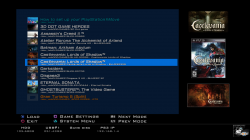
We have seen developer @deank cooking up some nice brew lately, the latest creation of sLaunch has now evolved into a new plugin called sMAN, bringing the original vision of the developer to this single plugin containing webMAN & sLaunch, rather then having two separate plugins loaded at boot time (like the preview releases) deank uses a single plugin slot while making sLaunch an even faster sprx loaded dynamically. For simplicity, he concatenated into just one file called sman.sprx the various sprx parts of the app (rawseciso/netiso/slaunch/sman) as well as the html parts of the XMB "Sman Games" feature. If you like to use this alternative UI for loading games, then you should use the sMAN plugin going forward, if you like the traditional way (w/ My Games) then you can use the XMB feature or simply switch to the webMAN plugin as both version will still available for users.

sMAN Release Quote via deank
Additional Notes/Comments from deank
Video/Screenshot (preview version "sLaunch")
-
Now, let's move forward to the next step...
Later todayI'll release the "sMAN" - which is webMAN + sLaunch in one plugin. The reason - this is what webMAN was supposed to be - the way I wanted to be since day one:
- Use only one plugin slot
- Use about 128KB less vsh memory (about 384KB total vsh memory)
- Support for /dev_usb000 to /dev_usb128
- No need for boot delays for scanning usb drives
- No need for XML generation, "refresh xml" or other complicated tasks
- No need for the "My Games" entry in XMB (no need for custom category_game.xml)
- Simplified setup page, eject/unmount/rescan/grouping options available within sMAN's front-end (sLaunch)
- Support for over 1000 games
- FTP/WEB/NTFS/NETISO support by the sMAN's back-end (webMAN)
- Simple use in any cobra compatible CFW by adding sman.sprx to boot_plugins.txt without modifying other files
- The front-end (menu) is not using resources when not active (opposed to slaunch.sprx)
- Updated - it now supports switching groups/content-type (ALL/PS1/PS2/PS3/PSP/VIDEO) - press the [SQUARE] button.
sMAN: http://deanbg.com/sman.sprx
Dean
p.s. The features in bold will be gradually introduced for easier transition for the users who decide to switch to sMAN.
Edit: eventually deank decided to add the XMB "Webman Games" feature to sMan as many end users were asking for it.
It brings back the old XML creation problem he originally wanted to get rid of however it works quite well.
The only real glitch in sMan 1.11n (& in the latest wMM actually) is found with a limited number of ntfs hdd where the partition cannot be read using the libntfs_ext library port. Hopefully this bug should get fixed after investigation...
The XMB Game list remains optional however, to be toggled in the sMan settings page.
-
Random Comments about sMAN from deank
- The good thing about sMAN is that it doesn't require large amounts of memory no matter how many games you have. It can handle 2000, 3000, 5000 games even.
- sMAN is working a bit faster than sLaunch (at least it looks that way).
- If you decide to use sman.sprx - remove webftp_server.sprx and slaunch.sprx from your boot_plugins.txt. It is not possible to use them at the same time.
- Yes, fan-control is still there, because it is "webMAN" in the background. For languages - there is nothing different to webMAN - you'll have to compile it yourself with proper gui.h.
-
Video (POC Version)ScreenShot (from preview version)--------------------------------------------------------------------
Last edited by a moderator: