We have seen developer @deank cooking up some nice brew lately, the latest creation of sLaunch has now evolved into a new plugin called sMAN, bringing the original vision of the developer to this single plugin containing webMAN & sLaunch, rather then having two separate plugins loaded at boot time (like the preview releases) deank uses a single plugin slot while making sLaunch an even faster sprx loaded dynamically. For simplicity, he concatenated into just one file called sman.sprx the various sprx parts of the app (rawseciso/netiso/slaunch/sman) as well as the html parts of the XMB "Sman Games" feature. If you like to use this alternative UI for loading games, then you should use the sMAN plugin going forward, if you like the traditional way (w/ My Games) then you can use the XMB feature or simply switch to the webMAN plugin as both version will still available for users.

sman.jpg

  • Now, let's move forward to the next step...

    Later today I'll release the "sMAN" - which is webMAN + sLaunch in one plugin. The reason - this is what webMAN was supposed to be - the way I wanted to be since day one:
    • Use only one plugin slot
    • Use about 128KB less vsh memory (about 384KB total vsh memory)
    • Support for /dev_usb000 to /dev_usb128
    • No need for boot delays for scanning usb drives
    • No need for XML generation, "refresh xml" or other complicated tasks
    • No need for the "My Games" entry in XMB (no need for custom category_game.xml)
    • Simplified setup page, eject/unmount/rescan/grouping options available within sMAN's front-end (sLaunch)
    • Support for over 1000 games
    • FTP/WEB/NTFS/NETISO support by the sMAN's back-end (webMAN)
    • Simple use in any cobra compatible CFW by adding sman.sprx to boot_plugins.txt without modifying other files
    • The front-end (menu) is not using resources when not active (opposed to slaunch.sprx)
    • Updated - it now supports switching groups/content-type (ALL/PS1/PS2/PS3/PSP/VIDEO) - press the [SQUARE] button.

    sMAN
    : http://deanbg.com/sman.sprx

    Dean

    p.s. The features in bold will be gradually introduced for easier transition for the users who decide to switch to sMAN.

    Edit: eventually deank decided to add the XMB "Webman Games" feature to sMan as many end users were asking for it.
    It brings back the old XML creation problem he originally wanted to get rid of however it works quite well.
    The only real glitch in sMan 1.11n (& in the latest wMM actually) is found with a limited number of ntfs hdd where the partition cannot be read using the libntfs_ext library port. Hopefully this bug should get fixed after investigation...

    The XMB Game list remains optional however, to be toggled in the sMan settings page.


  • Random Comments about sMAN from deank
    • The good thing about sMAN is that it doesn't require large amounts of memory no matter how many games you have. It can handle 2000, 3000, 5000 games even.
    • sMAN is working a bit faster than sLaunch (at least it looks that way).
    • If you decide to use sman.sprx - remove webftp_server.sprx and slaunch.sprx from your boot_plugins.txt. It is not possible to use them at the same time.
    • Yes, fan-control is still there, because it is "webMAN" in the background. For languages - there is nothing different to webMAN - you'll have to compile it yourself with proper gui.h.


  • Video (POC Version)
    ScreenShot (from preview version)
    --------------------------------------------------------------------
    slaunch_preview.jpg


Last edited by a moderator:
Yeah I got LG 29" 21:9 Ultrawide Monitor, I didn't buy this for console gaming as none of them including current gen ones supports this (2560x1080) and it looks ugly for PS3 games (720p and 1080p)

However I love watching movies on this monitor, otherwise I just use my 55" Samsung Curved UHD TV :)


Btw this is how It looks on PC gaming

1327bf60629ee55e02c885dc47b13a98.jpg

Ahh Nice, Yeah... the triple monitor was awesome, but hard to keep things like the hud on a single screen etc.
Ultrawide monitor would be a nice compromise.

I'd love to try 3 of em together anyway just for a laugh.

This is the only pic I can find of my old setup... I had to buy a bigger desk to suit though, lol.
SJfa7wP.jpg


Even found a video I attempted to record gaming on it.
Took some grunt to play and record using fraps at 6048x1200 at the time! :)

Glad my video card at the time was such a stellar overclocker. (Reference 7970 @ a touch over 1400Mhz)


Note: Sorry for off-topic. :)
 
One last suggestion: if it makes sense to you, is it possible to implement the game's ID [bles/blus/Bljs] next to the games' titles while browsing them in sMAN? It is the thing I am missing the most from wMM in terms of keeping an organised collection.

Can you check the latest sman.sprx - it should display the title_id if it is not present in the game name. You'll have to rescan your games if content scan is disabled at startup.
 
Can you check the latest sman.sprx - it should display the title_id if it is not present in the game name. You'll have to rescan your games if content scan is disabled at startup.

It is working perfectly! It accurately displays the ID of every single game, including the ones in dev_hdd0.

I've just noticed that the titles for the games in dev_hdd0 are displaying their *.iso file names instead of their param.sfo title (supposing that's how it is done by sMAN), though.

Godspeed, Deank!
 
sMAN (as webMAN did) displays the filename when there is no param.sfo extracted. If you launch such game at least once it will extract the icon and param.sfo. I'm adding automatic extraction for internal/usb games so it show the proper names.

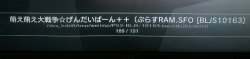
I found a black sheep among the herd...

This one is the only one I found with the title mixed up ("ram.sfo" part barged in)
 

Attachments

It is fixed now. :)

Interestingly, all homebrew apps work with 64 bytes for game titles when the standard is 128 bytes (which is 64 symbols for UTF-8 names like yours). Most other apps will have problems with this particular title. :)

You can check if it working ok for you - sman.sprx is updated.
 
Last edited:
@deank could you "lock" content-type modes, so say sman starts on ps3 games/iso page and at the last game/page instead of switching to next content-type it starts back in first ps3 game
 
sman.sprx is updated to extract icon0.png/param.sfo for /dev_hdd0 and /dev_usb PS3 ISO games. It is useful when no mM cover is available and no external coverart is saved along with the iso (i.e. bare .iso files should get icons).

If you have a lot of games be patient until the radar icon in XMB stops spinning. It usually takes less than 1 min for 100-200 games if none of them have icons/covers.
 
Last edited:
@deank
I hope that this tip can be useful: "sprintf returns the number of characters that have been written".

So this can avoid the usage of strlen is many cases. Example:
Code:
sprintf(icon, WMTMP "/%s", entry.d_name);
if(icon[strlen(icon)-2]=='.') icon[strlen(icon)-2]=0;
if(icon[strlen(icon)-4]=='.') icon[strlen(icon)-4]=0;

can be written as:
Code:
size_t len = sprintf(icon, WMTMP "/%s", entry.d_name);
if(icon[len-2]=='.') icon[len-2]=0;
if(icon[len-4]=='.') icon[len-4]=0;
 
Just downloaded the latest sman about half an hour ago to test out.

I tried running my fat32 based hdd through every hub / port I could and even daisy chained a few hubs together with no issue. It only seemed to show as high as usb008 when daisy chained and a few extra drives chucked in for good measure... but I'll call that a solid win.

I did notice though that after mounting a game, the extracted icons were overriding my jpg covers I have saved in the same folder as the ISO files on the next boot.

Slightly off topic, I reinstalled rebug 4.81.2 DEX earlier and bloody petitboot is back and coming up everytime I try to restart the console via webman. It wouldn't be that bad, but petitboot crashes more often that not and 90% of the time I cant even use the keyboard to boot gameos and have to resort to hitting the power switch.
Using rebug toolbox to set the gameos boot flag fixed that, but does anyone know how to remove it completely? or at least make it remotely stable? or is it a lost cause? :(
 
Last edited:
So where can I find now the sman on the plate around the xmb icon change?
Because the "my games folder" is so ugly

In the webman mod I could always under wm_icons and the icon icon_wm_root!

Only I find since nothing to the sman.

What I find is the rest of the webman, which runs further in the background underm sman!
 
sman.sprx is updated to extract icon0.png/param.sfo for /dev_hdd0 and /dev_usb PS3 ISO games. It is useful when no mM cover is available and no external coverart is saved along with the iso (i.e. bare .iso files should get icons).

If you have a lot of games be patient until the radar icon in XMB stops spinning. It usually takes less than 1 min for 100-200 games if none of them have icons/covers.

Deleted the covers of the corresponding dev_hdd0/PS3ISO games for testing purposes.

- The icon0.png is correctly displayed in the absence of a cover.
- The game title is still listed as the *.iso filename while browsing games in sMAN.
- Checked dev_hdd0/PS3ISO and no param.sfo was extracted (assuming it was supposed to be extracted).

Everything else is flawless.

Many thanks!
 

Featured content

Trending content

Back
Top