PS3 [TUT]Mounting PS2 SingStar on PS3 using webMAN MOD mount_ps2 feature

Since @aldostools was nice enough to include this feature in the official builds of webMAN MOD, here is simple guide how to use extracted SingStar PS2 backups on SingStar PS3 version using the mount_ps2 webMAN MOD command.

PS3_Peripheral_Hero_WirelessMics_vf3.jpg

Personally I am using the mount_ps2 command, not sure if mount.ps2 does the same now. I will update wMM this weekend, currently still have 1.43.36 installed but it should work on the latest version unless aldo removed or edited this feature again.


  • What you will require:
    • An original PS2 game disc (any should work). Couldn't get it to work with a burned copy
    • PS3 with webMAN MOD accessible via home network (look up IP in network settings)

    How to:

    1.Create a directory on internal/external and extract/copy the loose Singstar files to it.
    Example: "dev_usb001/Singstar/SingStar Pop/Pack_EE.PAK" etc.
    2. Load up any PS3 SingStar game
    3. In the song selection, press SELECT to open the change disc dialogue
    4. Eject your disc if there's one inside the PS3
    5. Now if you want to load the SingStar Pop from above, you should use this command:
    6. Then insert any PS2 disc. It should automatically load the mounted SingStar game.

  • Additional Info:
    • You can change discs as often as you want, but you always need to eject -> mount -> then insert physical disc again. Only do it on the change disc screen or the game will quit.
    • Maybe aldo already included a mounting feature within the webMAN MOD webpage, but I always did it manually this way.
    • I made myself a simple html landing page with links to mount all of my SingStar games, probably easier than typing in the urls every single time.
    • If you can't access webMAN MOD via web/browser or are unable to mount, try reinstalling the full version (hold L1 while launching the webMAN MOD installer). I had to do this after upgrading to 4.81.1 Rebug.
 
Last edited by a moderator:
Since @aldostools was nice enough to include this feature in the official builds of webMAN MOD, here is simple guide how to use extracted SingStar PS2 backups on SingStar PS3 version using the mount_ps2 webMAN MOD command.

View attachment 7858
Personally I am using the mount_ps2 command, not sure if mount.ps2 does the same now. I will update wMM this weekend, currently still have 1.43.36 installed but it should work on the latest version unless aldo removed or edited this feature again.

What you will require:

  • An original PS2 game disc (any should work). Couldn't get it to work with a burned copy
  • PS3 with webMAN MOD accessible via home network (look up IP in network settings)

How to:

1.Create a directory on internal/external and extract/copy the loose Singstar files to it.
Example: "dev_usb001/Singstar/SingStar Pop/Pack_EE.PAK" etc.
2. Load up any PS3 SingStar game
3. In the song selection, press SELECT to open the change disc dialogue
4. Eject your disc if there's one inside the PS3
5. Now if you want to load the SingStar Pop from above, you should use this command:
6. Then insert any PS2 disc. It should automatically load the mounted SingStar game.

Additional Info:
  • You can change discs as often as you want, but you always need to eject -> mount -> then insert physical disc again. Only do it on the change disc screen or the game will quit.
  • Maybe aldo already included a mounting feature within the webMAN MOD webpage, but I always did it manually this way.
  • I made myself a simple html landing page with links to mount all of my SingStar games, probably easier than typing in the urls every single time.
  • If you can't access webMAN MOD via web/browser or are unable to mount, try reinstalling the full version (hold L1 while launching the webMAN MOD installer). I had to do this after upgrading to 4.81.1 Rebug.
the requirements should be obvious because its covered in webman mod source
as a extra feature ->/#define PS2_DISC 1 // uncomment to support /mount.ps2 (mount ps2 game folder as /dev_ps2disc) requires a physical PS2 disc to swap discs (thanks to WuEpE)

also auto eject on mount and swap works fine while mounting through webman url launcher
------------------------------------------------------------------------------------------
its all covered in the main src of webman mod
plus the headers for supported functionality
 
the requirements should be obvious because its covered in webman mod source
as a extra feature ->/#define PS2_DISC 1 // uncomment to support /mount.ps2 (mount ps2 game folder as /dev_ps2disc) requires a physical PS2 disc to swap discs (thanks to WuEpE)

90% (or even more) webMAN MOD users are never saw source code of wMM. So requirements is not so obvious like you saying for most users.
 
90% (or even more) webMAN MOD users are never saw source code of wMM. So requirements is not so obvious like you saying for most users.
well that depends devs release open source so ppl can actually get in their head and pre process for themselves how everything is done
------------------------------------------------------------------
90% (or even more) webMAN MOD users are never saw source code of wMM. So requirements is not so obvious like you saying for most users.
the statement wasnt intended to atack the user providing the tutorial
however it would save ppl a lot of time of tinkering and experimenting if they just browsed what is made directly available by the devs in the first place. so they dont have to go thru any headaches of fixing things .
you save time.you save a headache.
----------------------------------------------------------------------------------
if ppl study what is released. and watch how the system reacts and operates there is more much you can gain besides getting something to run .
there are many things that can be fixed
studying src alone if ppl just take the time to do something a little bit out of the norm.
use everything to your advantage... and a whole lot more than learning is accomplished.
 
Last edited by a moderator:
the statement wasnt intended to atack the user providing the tutorial
however it would save ppl a lot of time of tinkering and experimenting if they just browsed what is made directly available by the devs in the first place. so they dont have to go thru any headaches of fixing things .
you save time.you save a headache.
Sometime is hard to read and follow all releases, included instructions, etc, if you are not strictly interesed in PS3 scene. I have few friends that asked not so long time ago that they still need to use 3.55, because they saw that some people saying is possible to get higher custom firmware. :) That's why we are here, to help people find answer for uncommon (for them) questions.

Basically You are right, but like I said before. Not everyone is keeping eye on scene, some users just want to use final result of developer work.

And final word as a moderator. Please not post under your posts (there will be merged like above), use edit button instead. Also please stay on topic, this is thread about Tutorial, so.. How to use, etc. Any future posts not related directly to tutorial will be moved to different thread.
 
@PSX_Koto thank you for the tutorial!

The most difficult thing for me personally was actually understanding what "mount.ps2 command" was supposed to mean =)

A couple of notes:
XMB Singstar 4.0 (the latest update imho) doesn't show the switch option on startup and the select button doesn't seem to work. The game is just waiting for any disc to be inserted. After the first content is loaded (a disc or a song from singstore) to let you browse the list of songs - then you can choose to switch discs.

I never could test it myself, but I remember that back in the days when the feature was introduced to MM I saw a couple of complaints that the thing will work only with the original PS2 singstar disc, not just any original ps2 game disc.
 
Last edited:
First of all, thank you for this tutorial! I could not get it to work though, when I insert an original ps2 disc (fifa 08) i get the message "This is not a singstar disc". Mounting works as far as i can tell (have webMAN 1.46.02 MOD full version). Any ideas?
 
First of all, thank you for this tutorial! I could not get it to work though, when I insert an original ps2 disc (fifa 08) i get the message "This is not a singstar disc". Mounting works as far as i can tell (have webMAN 1.46.02 MOD full version). Any ideas?
Is possible that new mounting games features in webMAN MOD broken signstar feature. Try https://github.com/aldostools/webMAN-MOD/releases/tag/1.45.11 if it fail, then try https://github.com/aldostools/webMAN-MOD/releases/tag/1.45.10

1.45.10 is confirmed to work fine.
 
Still does not work, tried 1.45.11 and 1.45.10. I am on the latest rebug firmware. What I do:

mount PS3 Singstar (first Singstar game, latest update 6.00) with webman.
Play game, use the switch disc function
use http://192.168.100.52/mount_ps2/dev_hdd0/PS2DISC/80s (Mount extracted Singstar 80s)
Get "Game loaded successfully. Start the game from the disc icon
or from /app_home XMB entry.
"
Put original ps2 disc (fifa 08) into the ps3.

--> this is not a singstar disc

Edit: Thanks for your previous answer btw

Edit2: Does anyone else have other ideas? I tried everything...
 
Last edited:
Hello, thanks for the tutorial, It works to me perfectly!!

I use this post to ask too, there is a way to do this with Multiman? I tried the tutorials but I can't make it works.
 
Still does not work, tried 1.45.11 and 1.45.10. I am on the latest rebug firmware. What I do:

mount PS3 Singstar (first Singstar game, latest update 6.00) with webman.
Play game, use the switch disc function
use http://192.168.100.52/mount_ps2/dev_hdd0/PS2DISC/80s (Mount extracted Singstar 80s)
Get "Game loaded successfully. Start the game from the disc icon
or from /app_home XMB entry.
"
Put original ps2 disc (fifa 08) into the ps3.

--> this is not a singstar disc

Edit: Thanks for your previous answer btw

Edit2: Does anyone else have other ideas? I tried everything...

Hello, I get that error with the names of the files inside the folder in lower case letter.

Example: PAK.PAK works. pak.pak doesn't work (with all the files, this is only a example).

EDIT: For more clarification, Pak.Pak doesn't work to me neither. Just all the letters in capital letters work for me, like in the example.
 
Last edited:
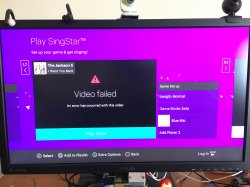
Hi, after i load the PS2 game successfully, i can see the songs available (but i cannot ear the preview song) and when i select the song, i get a error:
"Video failed; An error has occurred with this video"

But even let me setup the microphone, but when i start to play, i just get a black screen.
I try this method with original PS3 game and also with the app Singstar that come by default in PS3.

PS3 Super Slim
4.85 HEN 3.0.1
webMAN MOD 1.47.25.9
Need For Speed Underground 2 - PS2 Original Game
SingStar New Generation - PS3 Original Game

PS2 Games in dev_hdd0/Singstar:
http://192.168.1.158/mount_ps2/dev_hdd0/Singstar/90s
http://192.168.1.158/mount_ps2/dev_hdd0/Singstar/SSLEGENDS

Both PS2 games can be loaded by webMAN I can see all the songs using this method, but I cannot preview the song, see the video-clip, or even play.
 

Attachments

  • 2020-04-07 16.15.09.jpg
    2020-04-07 16.15.09.jpg
    2 MB · Views: 267
I already solve the problem.
The app SingStar (default in the system didn't work for me with this method), I just have a PS3 game that works with this method, but I need to use a USB microphone.

I used the game: SingStar Portuguese Hits (without do the update), and 2 xbox 360 microphones from Guitar Hero. And I mount the virtual drive in:
http://192.168.1.158/mount_ps2/dev_hdd0/PS2ISO/SingStar90s

Also I update the PS3 Super Slim to 4.86 HEN 3.0.1, and webMAN MOD 1.47.25.9.

With this way works great, unfortunately I cannot use the app "SingStar Mic" for smartphone.
I will try with other PS3 SingStar games to find a compatible one with this function.
 
Hi, thanks for the Tutorial and the hints, but I still can't seem to get it to work no matter what I tried.

I tried it with both the SingStar App from the XMB and a PS3 Singstar game from an External HDD at USB 001 (I Used SongStar Intro). And It tried mounting the PS2 game (I tried Singstar Pop and Singsat Anthems) with the Folder placed as A Subfoler within Singstar Intro, within its own Singstar Folder on USB 001 (/dev_usb006/GAMES/Singstar/SingStar Pop) and even placing it within hdd000/PS2ISO. And I tried both mounting it with Mount.ps2 and mount_ps2. (e.g. http://192.168.178.[myps3]/mount_ps2/dev_usb001/GAMES/Singstar/SingStar Pop.

Nothing Works. I always get a "404 Not Found" error message followed by the location ( /dev_hdd0/mount_ps2/dev_usb001/GAMES/Singstar/SingStar Pop or /dev_hdd0/mount_ps2/dev_hdd0/PS2ISO/SingStar Pop - note that the result is the same whether I use a folder structure without spaces or use %20 or + in lieu of the spaces.) Needless to say, inserting a original PS2 disc only results in a "Not a Singstar disc" message. Mounting and using PS3 SingStar games on the swap disc prop works without a hitch.

I'm on:
WebmanMOD 1.47.31
Ferrox Cobra CFW 4.87 (also tried it with 4.86 before, same result)
PS3 FAT CECHL04

I would be thankful for any pointers.
 

Featured content

Trending content

Latest posts

Back
Top