
PS3 **UPDATE** PS2 Classic GUI v2.2.3 (by Aldostools): Adds PS2 CONFIG Support

Developer Aldostools has updated one of his popular utilities to be better suited for PS3Xploit HAN (& CFW) user's, PS2 Classic GUI has been updated to version 2.1 and this update provides support for PS2 CONFIG files.The config's improves the game compatibility of the Ps2 emulator allowing for additional PlayStation 2 games to be played. So, this is a great update to make adding those config that much easier, thanks to the work in @Zar ManaGunZ (PS3 Homebrew) we have a database of PS2 Config Database already, that Aldostools has included in this download and the tool will easily be able to add available CONFIG for your PS2 Games. There is alot of great discussion on PS2 Configs in this thread about PS2 Compatibility in the psx-place forums
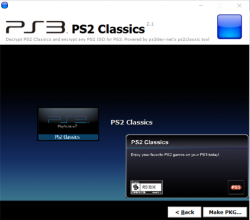
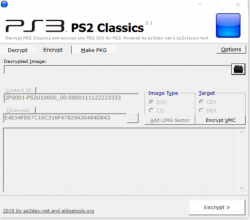
ps2classicd.png ps2classsic.png

  • New build of PS2 Classics GUI 2.2.3 to add the CONFIG.

    A set of CONFIG files taken from ManaGunZ repository are included in the archive.

    To make a PKG, simply select the ISO.BIN.ENC and the optional CONFIG file from the CONFIGS folder (included in the rar).
    The tool will auto-encrypt the CONFIG file and include it in the PKG next to ISO.BIN.ENC.
    If the game doesn't require a CONFIG, just cancel the dialog and the PKG will be made without it.

 
Last edited by a moderator:
Ok thanks. Can I use this tool also for ps1 and psp games?
No. These are other 2 different tools.

The psp mini/remaster tool is included in my PS3 tools collection.

For PSX Classics I published somewhere in this forum an archive that includes the tools needed to convert the psx iso to PKG. It includes my _fix_eboot.pbp_.exe
 
Take out a tool or software to copy all the data from the internal HDD of the PS3 to the new HDD to and that this ps3 does not ask us to format the cloned HDD.
 
Is there one for SLUS_214.47 guitar hero II? The controls are a little buggered up.

UPDATE: JUST USED THE GUITAR HERO III one hopefully fixes it up...Out of curiosity would these issues be present on a fully homebrew ps3?
 
Last edited:
me and friend both have same config and same game, he is on 4.81.2 REBUG REX, and im on ofw with han, he can load game from main menu just fine while mine is not working, mine just freezes if i try to load a save why is it like that?

We both booted same iso and same config
Yet i can only play but cant load save state and he can

Crash Twinsanity
Ty in advance
 
me and friend both have same config and same game, he is on 4.81.2 REBUG REX, and im on ofw with han, he can load game from main menu just fine while mine is not working, mine just freezes if i try to load a save why is it like that?

We both booted same iso and same config
Yet i can only play but cant load save state and he can

Crash Twinsanity
Ty in advance
You know if there is any way to use PSN games without having to activate HAN ENABLE every time you reboot the PS3 console? If so, provide a link or tutorial.
 
@aldostools First thanks to new ps2classic new release
second i want to ask question how i can edit SCEVMC0.VME to save file in it to put rom in it to use in ps2 emulator such as pgen need rom in mc:1 i need to put the rom in it.
 
@aldostools First thanks to new ps2classic new release
second i want to ask question how i can edit SCEVMC0.VME to save file in it to put rom in it to use in ps2 emulator such as pgen need rom in mc:1 i need to put the rom in it.

IDK... I guess you have to use uLaunchELF to inject the roms, then download the modified VME from your PS3 to the PC.
 
@aldostools First thanks to new ps2classic new release
second i want to ask question how i can edit SCEVMC0.VME to save file in it to put rom in it to use in ps2 emulator such as pgen need rom in mc:1 i need to put the rom in it.

I have a tutorial on this - either using the ps2's launch.elf or using the ps2 emulator on the pc. you need mymc. there's no reason to update hashes anymore that I'm aware of, so if you use that tutorial, try to do so without that part.
 
I have a tutorial on this - either using the ps2's launch.elf or using the ps2 emulator on the pc. you need mymc. there's no reason to update hashes anymore that I'm aware of, so if you use that tutorial, try to do so without that part.
As far as I know hashes need to be updated for ps2classic.
 
oh, I meant that the gui app does it automatically afaik. if it doesn't, I have the hash app in my tutorial.
 
Hello all! on my first post I want to thank all of the amazing devs for all their hard work! Tried my first ps2 package with Castlevania: Curse of Darkness (<3) installed fine with the RIF.pkg, unfortunately it is unplayable due to heavy glitches. Is this the right forum to report this? Would like to make at least a little contribution lol thank you!
 
Hello all! on my first post I want to thank all of the amazing devs for all their hard work! Tried my first ps2 package with Castlevania: Curse of Darkness (<3) installed fine with the RIF.pkg, unfortunately it is unplayable due to heavy glitches. Is this the right forum to report this? Would like to make at least a little contribution lol thank you!
Use config files to fix those glitches.
THE PS2 PLACEHOLDER.PKG...
IS THE RAP FILE THE ONE ON THE EXDATA FOLDER...

TRIED DNT WORK
Your caps lock is broken.
oh, I meant that the gui app does it automatically afaik. if it doesn't, I have the hash app in my tutorial.
I'm not sure that app do this. I think I needed to do this manually for Tales of the Abyss.
 
Exist a form to export the savedata from internet in a game converted?
I was triying this but any save data works on the game
Try to export the savedata in a memory virtual card (on ps3) and all works, but in the game dont open
 
Exist a form to export the savedata from internet in a game converted?
I was triying this but any save data works on the game
Try to export the savedata in a memory virtual card (on ps3) and all works, but in the game dont open

yes. I believe it's a similar process as converting them from the ps2 itself. I think ps2 memory cards are in .ps2 format. I can't recall if you need to convert saves themselves first though. I have a tutorial on doing this, but it assumes that the saves are in a specific format. afaik, there's no format that you can't use to convert the save, so that shouldn't be an issues. :)
 

Similar threads

Featured content

Trending content

Back
Top


