PS3 **UPDATE** PS2 Classic GUI v2.2.3 (by Aldostools): Adds PS2 CONFIG Support

Developer Aldostools has updated one of his popular utilities to be better suited for PS3Xploit HAN (& CFW) user's, PS2 Classic GUI has been updated to version 2.1 and this update provides support for PS2 CONFIG files.The config's improves the game compatibility of the Ps2 emulator allowing for additional PlayStation 2 games to be played. So, this is a great update to make adding those config that much easier, thanks to the work in @Zar ManaGunZ (PS3 Homebrew) we have a database of PS2 Config Database already, that Aldostools has included in this download and the tool will easily be able to add available CONFIG for your PS2 Games. There is alot of great discussion on PS2 Configs in this thread about PS2 Compatibility in the psx-place forums
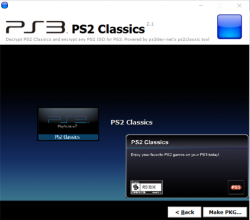
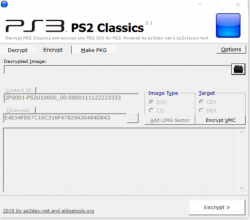
ps2classicd.png ps2classsic.png

  • New build of PS2 Classics GUI 2.2.3 to add the CONFIG.

    A set of CONFIG files taken from ManaGunZ repository are included in the archive.

    To make a PKG, simply select the ISO.BIN.ENC and the optional CONFIG file from the CONFIGS folder (included in the rar).
    The tool will auto-encrypt the CONFIG file and include it in the PKG next to ISO.BIN.ENC.
    If the game doesn't require a CONFIG, just cancel the dialog and the PKG will be made without it.

 
Last edited by a moderator:
i need help the gui dont work for me i tried in windows xp, windows 7, windows 10 home single languaje, windows 10 pro, windows 10 enterprises and every single time give me an error on psn_package_npdrm on windows xp and 7 the error its on msvcrt.dll help me please

forgive my bad english

Firma con problemas:
Nombre del evento de problema: APPCRASH
Nombre de la aplicación: psn_package_npdrm.exe
Versión de la aplicación: 0.0.0.0
Marca de tiempo de la aplicación: 4c063627
Nombre del módulo con errores: msvcrt.dll
Versión del módulo con errores: 7.0.7600.16385
Marca de tiempo del módulo con errores: 4a5bda6f
Código de excepción: c0000005
Desplazamiento de excepción: 000143df
Versión del sistema operativo: 6.1.7601.2.1.0.256.1
Id. de configuración regional: 2058
Información adicional 1: 0a9e
Información adicional 2: 0a9e372d3b4ad19135b953a78882e789
Información adicional 3: 0a9e
Información adicional 4: 0a9e372d3b4ad19135b953a78882e789

This is the error...
 
Last edited:
Thanks for the tutorial, looks very detailed

But isnt very simple, and i cant read english very well (and google translator dont works well) if you can make a video with the indications to export a save data from gamefaqs to ps3 for ps2 classics will be fantastic

not too detailed. I've tried to make things as simple as possible. my notes throughout my tutorials are meant to give additional information on what the user may encounter based on my own experiences. unfortunately, I neither have a video tutorial nor the means to make one. :(
 
Last edited:
Hi I'm getting error when I try to add iso file in encrypt it says PS2 GUI has stopped working

Sent from my Lenovo K33a42 using Tapatalk
 
Last edited:
Hello everyone, tried to put the config for Harry Potter 2, with all the black screen and crash, what can I do? han 4.82
 
Does anyone else get a Trojan warning when trying to download this? My download is automatically failing because Microsoft Security Essentials keeps saying it's some "severe" threat -- this to be exact: Trojan:Win32/Tiggre!plock

I'm guessing this is just a false positive?
 
Can anyone help me withwcrash twinsanity with config i don't know how to do it
This game is basically unplayable, there is issue with delay slots. It will freeze sooner or later, or became unplayable due to freeze after loading save game.
 
This game is basically unplayable, there is issue with delay slots. It will freeze sooner or later, or became unplayable due to freeze after loading save game.
No it works fine for me US version got some issues try to run the EU version with ManaGunZ but if you want to save your game and load it without freeze save the game in the "farm"
 
This game is basically unplayable, there is issue with delay slots. It will freeze sooner or later, or became unplayable due to freeze after loading save game.
But sadly you can't play after that part
 

Attachments

  • Screenshot_20180623-181156.jpg
    Screenshot_20180623-181156.jpg
    719.2 KB · Views: 451
I was playing around with this program and decided to try it with an ISO of Yakuza 2 I made from my original PS2 game disc. It decrypted and created the package fine from the the ISO.BIN.ENC file (Yazuka 2 [PS2 Classics] [SLUS21769].pkg_signed.pkg) and I placed it in my PKG Linker 2.0 program, signed it, and I'm ready to transfer it to my PS3. Now forgive me if this is a dumb question but where is the RAP file that also needs to be signed (presumably)? Does this program create one or do I need another app to do that?
 
I anyway to transfer ps2 saves extracted from the ps2 memory card to my ps3??

yes, see my tutorials. however, in them, I use ulaunch.elf. you just need a way to get the saves from a playstation 2 memory card onto a flash drive. then, everything else is the same.
 

Similar threads

Back
Top