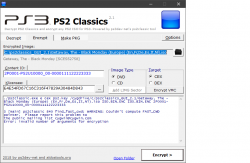
PS3 **UPDATE** PS2 Classic GUI v2.2.3 (by Aldostools): Adds PS2 CONFIG Support

Developer Aldostools has updated one of his popular utilities to be better suited for PS3Xploit HAN (& CFW) user's, PS2 Classic GUI has been updated to version 2.1 and this update provides support for PS2 CONFIG files.The config's improves the game compatibility of the Ps2 emulator allowing for additional PlayStation 2 games to be played. So, this is a great update to make adding those config that much easier, thanks to the work in @Zar ManaGunZ (PS3 Homebrew) we have a database of PS2 Config Database already, that Aldostools has included in this download and the tool will easily be able to add available CONFIG for your PS2 Games. There is alot of great discussion on PS2 Configs in this thread about PS2 Compatibility in the psx-place forums
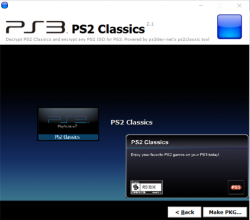
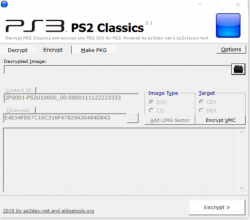
ps2classicd.png ps2classsic.png

  • New build of PS2 Classics GUI 2.2.3 to add the CONFIG.

    A set of CONFIG files taken from ManaGunZ repository are included in the archive.

    To make a PKG, simply select the ISO.BIN.ENC and the optional CONFIG file from the CONFIGS folder (included in the rar).
    The tool will auto-encrypt the CONFIG file and include it in the PKG next to ISO.BIN.ENC.
    If the game doesn't require a CONFIG, just cancel the dialog and the PKG will be made without it.

 
Last edited by a moderator:
I have a QUESTION. I've been trying to install a second PS2 game onto my PS3 but it keeps replacing the previously installed game . What do I do to install multiple PS2 games?
 
In make pkg tab, right click on title, and select "Edit Title ID" There change id to different than you already use.

PS. Anyway you shouldn't need it, something is wrong. But above workaround should work for you.
 
Hey Everytime I Try To Resign a ps2 pkg file after I get done creating it in ps2 classic gui I always get stuck on "decrypting debug pkg " And I legit let it sit there while I was sleeping and I woke up and it still had that screen can anyone help!
7d374574c2932d54e2a39e5234a6d449.jpg


Sent from my SM-G935T using Tapatalk
 
Can you Help me. when i want to convert i get an error
ps2classic 840 find_fast_cwd: WARNING: Couldn't compute FAST_CWD pointer. Please report this problem to
the public mailing list [email protected]
Error: invalid number of arguments for encryption
PLS HELP
THX
 

Attachments

  • Unbenannt.png
    Unbenannt.png
    42.5 KB · Views: 598
Personally I'm new here, I would like to ask your help, I'm trying to convert this PS2 game and it gives error (BRITNEY'S: DANCE BEAT). With this update will it be possible?
 
Can you Help me. when i want to convert i get an error
ps2classic 840 find_fast_cwd: WARNING: Couldn't compute FAST_CWD pointer. Please report this problem to
the public mailing list [email protected]
Error: invalid number of arguments for encryption
PLS HELP
THX
https://www.psx-place.com/threads/p...ed-w-auto-suggest-configs-dvd9-support.18748/

Version 2.2.2 Changelog:

  • Added support for DVD9 (thanks to kozarovv)
  • Fixed "Invalid number of arguments for encryption"
  • Auto-suggest CONFIG (detect first maching file in CONFIGS folder)
 
Thanks for this @aldostools I have been using it since upgrading my HDD's again for my HEN system and works great and looks much nicer then just the ISO with webMAN MOD.
 
Dear All,

I have a problem i cannot select any file on ps2 GUI. It keeps turning off immediately and i tried to turn off my firewall but still the issue is there.

can anyone help me.
 
Is this tool available for ARMHF? (Raspberry pi)
I really need it but I don't have a windows x86_64 machine to run it.
The tool could be in command line format too if no GUI is available for ARMHF.
 
This will work, do you know how to compile it thou?
I'm trying in termux right now as I know it can compile stuff with makefile but termux wiki says to check for a readme file to get specifics on compiling said source, and I didn't find any on the package.

I don't have a Raspberry Pi, but I'd try executing:
Code:
make

If it has 'make' and a gcc compiler, perhaps it works out of the box.
 
I don't have a Raspberry Pi, but I'd try executing:
Code:
make

If it has 'make' and a gcc compiler, perhaps it works out of the box.


I managed to compile both on Termux in Android and Raspbian.

But I don't know what to type to use it.
I tried
./ps2classics e Half-Life.bin
says invalid number of arguments.
Why is it always like that to me? Always so close and so far at the same time.
 
I managed to compile both on Termux in Android and Raspbian.

But I don't know what to type to use it.
I tried
./ps2classics e Half-Life.bin
says invalid number of arguments.
Why is it always like that to me? Always so close and so far at the same time.

indeed, you're not supplying the right parameters. Just check by running it without arguments:
Code:
ps2classic-ps2classic % ./ps2classic

ps2classic
http://gitorious.ps3dev.net/ps2classic
License: GPLv3

usage:
        iso:
              ./ps2classic d [cex/dex] [klicensee] [encrypted image] [out data] [out meta]
              ./ps2classic e [cex/dex] [klicensee] [iso] [out data] [real out name] [CID]

vmc:
              ./ps2classic vd [cex/dex] [vme file] [out vmc] [(eid root key)]
              ./ps2classic ve [cex/dex] [vmc file] [out vme] [(eid root key)]

image tools:
              ./ps2classic prepare [image file]
              ./ps2classic info [image file]
 
indeed, you're not supplying the right parameters. Just check by running it without arguments:
Code:
ps2classic-ps2classic % ./ps2classic

ps2classic
http://gitorious.ps3dev.net/ps2classic
License: GPLv3

usage:
        iso:
              ./ps2classic d [cex/dex] [klicensee] [encrypted image] [out data] [out meta]
              ./ps2classic e [cex/dex] [klicensee] [iso] [out data] [real out name] [CID]

vmc:
              ./ps2classic vd [cex/dex] [vme file] [out vmc] [(eid root key)]
              ./ps2classic ve [cex/dex] [vmc file] [out vme] [(eid root key)]

image tools:
              ./ps2classic prepare [image file]
              ./ps2classic info [image file]


Yes, however I don't know where to obtain how to put it present the asked data it asked...


The klicencee thingy and CID I found 2 numbers online I tried to add those numbers, didn't worked.

Said something about not being able to open file with the name of the klicencee string.
So I figured it should be an archive.
I made a txt file with that string in it and used, it encrypted the iso all right.
But nonetheless the placeholder can't read it.
 
Is the klicencee string exclusively for each console?
Where do I find more instructions to this tool?
I'm completely lost here, please!!!!!
 

Similar threads

Featured content

Trending content

Back
Top