
webMAN MOD

PS3 webMAN MOD - General Information Thread 1.47.48q

I just did a fresh CFW (Rebug 4.80.1) on a new PS3. Installed webMAN_MOD_1.43.36_Updater_20161002.pkg full afterwards (That and Movian is the only thing installed). I can not FTP files to the PS3.

I can create/delete folders though. Tried a lot of different FTP settings, using FlashFXP but it just hangs on MLST for every file.

So I downgraded WebMan MOD to webMAN_MOD_1.43.33_Updater.pkg and it works fine again...

Weird.

Code:
[R] 257 "/"
[R] CWD /dev_hdd0/PS3ISO/
[R] 250 OK
[R] PWD
[R] 257 "/dev_hdd0/PS3ISO/"
[R] PASV
[R] 227 Entering Passive Mode (192,168,101,252,234,153)
[R] Opening data connection IP: 192.168.101.252 PORT: 60057
[R] MLSD
[R] 150 OK
[R] 226 [/dev_hdd0] [ 99145 MB free CPU: 53 °C | RSX: 59 °C]
[R] List Complete: 173 bytes in 0,08 seconds (0,2 KB/s)
[R] TYPE I
[R] 200 TYPE OK
[R] MLST PS3_DISC.SFB
[R] Connection Lost: 192.168.101.252 (Duration: 1 minute 0 seconds / Idle: 1 minute 0 seconds)
Transferred 0 Files (0 bytes) in 3 minutes 5 seconds (0,0 KB/s)

Edit: I also tested webMAN_MOD_1.43.35_Updater.pkg and it also hangs on MLST on FTP transfers...

When I run 1.43.33, I get an error on MLST, which I guess is valid, but then it continues anyway.
It also does not report tempratures and similar, so I guess the ftpd was replaced?

Working:
Code:
[12:39:00] [R] 257 "/dev_hdd0/GAMES/SomeLegalGame/PS3_GAME/USRDIR"
[12:39:00] [R] PASV
[12:39:00] [R] 227 Entering Passive Mode (192,168,101,252,250,28)
[12:39:00] [R] Opening data connection IP: 192.168.101.252 PORT: 64028
[12:39:00] [R] MLSD
[12:39:00] [R] 150 OK
[12:39:00] [R] 226 [/dev_hdd0] [ 65645 MB free ]
[12:39:00] [R] List Complete: 953 bytes in 0,06 seconds (0,9 KB/s)
[12:39:00] [R] TYPE I
[12:39:00] [R] 200 TYPE OK
[12:39:00] [R] MLST ENGLISH.PSARC
[12:39:00] [R] 425 Error
[12:39:00] [R] PASV
[12:39:00] [R] 227 Entering Passive Mode (192,168,101,252,250,28)
[12:39:00] [R] Opening data connection IP: 192.168.101.252 PORT: 64028
[12:39:00] [R] STOR ENGLISH.PSARC
[12:39:00] [R] 150 OK

Edit2: If I, in FlashFXP, go to Options / File Transfer Rules and uncheck "Request file size/date prior to transfer", it works of course, but not sure if that is such a good idea. I'll need to add specific File Transfer Rules only for my PS3s if that is by design in newer webman MOD versions...
exactly the same thing happens to me
and I had already reported this, but without specifying.
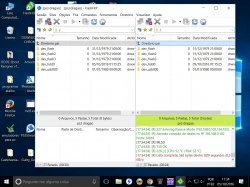
Flashfxp is an excellent program, I can easily manage the ps3, creating folders, renaming files, making copies of usb00x to hdd0 as irisman or multiman, all controlled by the pc, with FILEZILA I couldn't, I'm not used to FILEZILA
 

Attachments

  • FlashFXP 5.jpg
    FlashFXP 5.jpg
    269.2 KB · Views: 699
Weird, I am also using Rebug 4.80.1 and the latest WebMAN Mod 1.43.36 (October 2nd build), I am having NO problems with using FTP/Filezilla at all, always works for me on default settings, and I use FTP a lot.
 
Weird, I am also using Rebug 4.80.1 and the latest WebMAN Mod 1.43.36 (October 2nd build), I am having NO problems with using FTP/Filezilla at all, always works for me on default settings, and I use FTP a lot.
the problem being with Flashfxp, FILEZILLA is ok.
Flashfxp has great resource as if it was multiman or irisman. an excellent file manager for ps3, as showed in the image above, you can place to transfer files from ps3 to ps3 with filezila I couldn't. If you give to do with FILEZILLA and can teach me
 
Last edited:
Guys, I have been tweaking the ftp server to support FlashFXP again. Please try this pkg:
https://github.com/aldostools/webMAN-MOD/releases

I also tweaked the icons... I hope that this build also solves the issue reported where only .PNG was shown.

In this build I added a new parameter to select the cover mode during content scanning in XML and HTML :
/resfresh.ps3?cover=<mode>
/index.ps3?cover=<mode> (if other parameters are used, add ?cover=<mode> as the last parameter)

Where the cover modes are: icon0, disc, mm, online (any other value will use mm as default). Only the first letter is necessary.

The issue with FlashFXP happened in pasive mode. Active mode was working fine and it is the suggested mode.

BTW Windows 7 and later has a FTP client integrated in Windows Explorer. Just type: ftp://ip-address-of-ps3 on the address bar of Windows Explorer and the PS3 will be listed as a regular folder. It's very easy to use, works fine with webMAN and it's FREE.

Also Chrome, Firefox, Edge and MSIE can be used to navigate the PS3 through FTP.
 
Last edited:
Guys, I have been tweaking the ftp server to support FlashFXP again. Please try this pkg:
https://github.com/aldostools/webMAN-MOD/releases

Thanks! I can verify that it works without specific rules again =) I've been using FlashFXP for so many years that its just stuck with me.

Edit: After upgrading now though, it seems to have duplicated all games. I added one new game and it also shows up twice with the same path. Any clues what to do? I know I saw another thread on this but can not find it now.
 
Last edited:
Thanks! I can verify that it works without specific rules again =) I've been using FlashFXP for so many years that its just stuck with me.

Edit: After upgrading now though, it seems to have duplicated all games. I added one new game and it also shows up twice with the same path. Any clues what to do? I know I saw another thread on this but can not find it now.

Thank you for your feedback.
Could you provide more details about how the duplicated items? Unfortunately I haven't been able to reproduce this issue.

Where are stored the games? ntfs, usb00x, net, hdd0?
Are all the games duplicated or only a few? Which type (PS3ISO, PS2ISO, JB games, PSP, PSX)?

If the duplicated items are only PS2ISO or PSPISO stored on ntfs or on /net, then that is normal.
These games are cached locally on hdd0 when mounted. When the game list is refreshed again, both games will be listed.
The cached game is just a copy and it can be deleted from hdd0 if you don't want to play it again.

How do you refresh the list? prepNTFS, SELECT+R3 combo, XMB link, browser link?

Is it possible to show a picture of the issue? And the settings in /setup.ps3 (don't show the idps part)?
 
Edit: After upgrading now though, it seems to have duplicated all games. I added one new game and it also shows up twice with the same path. Any clues what to do? I know I saw another thread on this but can not find it now.
Delete the contents of the /dev_hdd0/tmp/wmtmp folder, you can do that in various ways like FTP, mmOS... But the easiest way is to use the Delete wmtmp link beside the profile combo box in the wMM setup page.
Then refresh XML or launch prepNTFS as required & reboot.
The duplicates should be gone if your problem is identical to what was reported so far... If not please report.
 
Last edited:
@aldostools
Is there a particular reason for Refresh XML/prepNTFS not to delete the contents of wmtmp folder before populating it again?

prepNTFS is supposed to delete all the *.ntfs[*] files in wmtmp (if any button is holded down after prepNTFS launched).

Refresh XML does not delete the cached content in wmtmp, because that folder is scanned only for .ntfs[*] (which is deleted by prepNTFS).
 
prepNTFS is supposed to delete all the *.ntfs[*] files in wmtmp (if any button is holded down after prepNTFS launched).

Refresh XML does not delete the cached content in wmtmp, because that folder is scanned only for .ntfs[*] (which is deleted by prepNTFS).


I was afraid it may be the case...
Another thing that could be changed for the better if we manage to use libntfs...
 
Ok, this is what I've done, just to be clear.

PS3 was on 4.60. I reset all settings to default and downgrade it to 3.55 (E3 Flasher). Install Rogero Downgrader 9.99, OFW 3.55 and then Rebug 4.80.1.

I install Rebug Toolbox and enable Webman and Cobra, that is all.
I installed webMAN_MOD_1.43.36_Updater_20161002.pkg and held down L1 for a FULL install.
Moved over a few games to HDD0 (Local harddrive) in GAMES, PS3ISO and PSXISO
(
4 PS3ISO
1 GAMES
1 PSXISO
)

I open WebMan setup/PS3 Webman setup. Click on Refresh XML (let it finish), Click on Refresh HTML. All games show up fine (as they should, once).
Restart PS3. Looks good in XMB as well.
I then set a custom fan setup in Webman setup as well. That is all I touched in there I think.

Then I read your update here and downloaded webMAN_MOD_1.43.36_Updater_20161005.pkg and installed it, also holding down L1 for a FULL install.

Restart again. All games duplicated. And I do mean all. It says I have 8 PS3ISO games, 2 GAMES and 2 PSXISO games. All showing the same path twice.

I am 95% sure that is the exact procedure I used. I might have installed 1.43.33 but I don't think I did on this machine..

Settings and examples. I could not use VSH menu to take screenshots since the browser opens "[Add to Bookmarks]" when I press Select in the browser (to open VSH menu..).

http://grandis.nu/images/Dups1.jpg
http://grandis.nu/images/Dups2.jpg
http://grandis.nu/images/Dups3.jpg
http://grandis.nu/images/Dups4.jpg

(I have no idea why the links does not work in firefox for me.. Works in Edge. Just copy/paste ém if they do not open.)

I have not deleted the contents of the /dev_hdd0/tmp/wmtmp folder (Thanks bguerville) yet in case you want to try something else =)

Thanks!

Thank you for your feedback.
Could you provide more details about how the duplicated items? Unfortunately I haven't been able to reproduce this issue.

Where are stored the games? ntfs, usb00x, net, hdd0?
Are all the games duplicated or only a few? Which type (PS3ISO, PS2ISO, JB games, PSP, PSX)?

If the duplicated items are only PS2ISO or PSPISO stored on ntfs or on /net, then that is normal.
These games are cached locally on hdd0 when mounted. When the game list is refreshed again, both games will be listed.
The cached game is just a copy and it can be deleted from hdd0 if you don't want to play it again.

How do you refresh the list? prepNTFS, SELECT+R3 combo, XMB link, browser link?

Is it possible to show a picture of the issue? And the settings in /setup.ps3 (don't show the idps part)?
 
Last edited:
I had a look at /dev_hdd0/tmp/wmtmp/

Only one file in there: last_games.bin

It only has one line in it:
/dev_hdd0/GAMES/FIFA 16 Multi8 [BLES02161]

So that'll probably not help to remove =(
 
Thank you for your feedback. The images are deleted :(

I appreciate the detailed procedure, but I don't see nothing wrong in it, if it is precise. It's even more weird that after backup a dvd the duplicates are gone.

If it happens again, please report me back and include your wmconfig.bin found in /dev_hdd0/tmp and some screenshots (pictures with a smartphone could help too).
 
The pictures are not gone. I'm not sure why they pop us as empty when clicking the link. Just copy the text into a new tab or similar =)
 
The pictures are not gone. I'm not sure why they pop us as empty when clicking the link. Just copy the text into a new tab or similar =)

Thanks. Now I can see the pictures. Dups2.jpg seems to have the clue to the cause of the issue.

As I mentioned in this post, webMAN 1.43.36 stores the data in a different way compared with earlier versions.

As result, when webMAN 1.43.36 is installed over an existing installation, some settings maybe be corrupted until the wmconfig.bin is saved again with the proper values.

In Dups2.jpg we can see that the net server #0 is configured with the loop back address 127.0.0.1. Although the check box appears unchecked, internally the variable could have a value that evaluates as true. Thus the content scanning is listing the content of your hdd0 twice (one from hdd0 and the other from /net0).

Why I suspect the wmconfig.bin was corrupted? See the other ports in net1..net4. The default value normally is 38008, but they have other values.

The issue now is gone because you saved the settings at some point and now the values are being read properly.

In summary: After install 1.43.36 or later, it's required to go to /setup.ps3 and *SAVE* the settings (even if the settings are correct).

This is only needed once, if version 1.43.35 or earlier was already installed.

EDIT: webMAN MOD 1.45.xx uses a totally new settings file to avoid this corruption and conflict with 1.43.35 and earlier builds (including vanilla edition).
 
Last edited:
I had the same issue (each game listed twice) but i'm not sure if i used net0 before updating to 1.43.35. / 1.43.36.
Anyway, i am sure i didn't use 127.0.0.1 before, but it was set.
I found out because it showed the path as net0 though.
I didn't delete the config, just changed IP to current net server and it's working just fine.
 
The issue now is gone because you saved the settings at some point and now the values are being read properly.

That explains it, thanks =) Yes, I changed the minimum fan level from 20% to 30%, as well as ripping a game, so that could have been the fix. Easy.

Thanks again for all your work.
 
STLcardsWS updated webMAN MOD with a new update entry:

webMAN MOD v1.45.00

webMAN MOD 1.45.00 - Changlog
  • New settings file: /dev_hdd0/tmp/wm_config.bin
    !!!!!!! webMAN settings must be configured again in /setup.ps3 !!!!!!!
  • PS3 Web browser now closes faster after mount from XMB
  • Added prevention of 'Auto power off' (only when USB polling is enabled)
  • Added SYSCON as option for fan controller
  • FTP port now can be defined in /setup.ps3 (default port: 21)...

Read the rest of this update entry...
 
Back
Top