
PS3 Developer Aldostools does it again with yet another impressive update to webMAN MOD (+ wM VSH menu), as we celebrate the 9th anniversary of the PS3. The homebrew dev has been detailing his progress and supplying the users in the forums here at psx-place.com with his latest update and progresses of this update in recent days. With this update a number of impressive features and changes have been applied to the plugin. The VSH Menu continues to evolve adding a fully functional File Manager and also a new Plugin Manager from the VSH Menu [break]ss[/break]. Which is a very cool feature to see added to wM VSH Menu by aldostools.. Additional details about the update and its progress that took place in recent days here in the psx-place.com can be seen below in the information provided below:

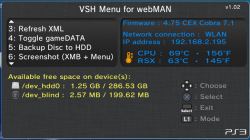
via Github (Matsumot0 said:Changelog for webMAN MOD v1.43.16
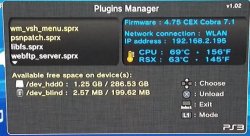
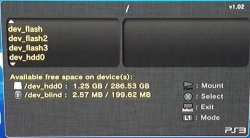
- Added File Manager & Plugins Manager to VSH Menu
- Added Cut/Copy/Paste to File Manager
- File manager & /cpursx.ps3 now show if progress of copy
- Added support to copy additional file types (including coldboot, .rco and others)
- Syscall 8 is now disabled if webMAN is unloaded and syscalls were disabled
- /dev_bdvd now shows the mounted file
- icon0 is shown in file manager when possible
Aldostools (via psx-place.com forums on 11/4/15) said:Build 1.43.16 is on my server with the following changes:
- VSH Menu now uses http network interface to execute webMAN commands (it must be faster & some commands must be now compatible with vanilla edition)
- Added option to browse URL on PS3 to the slider menu (mobile.html)
- webMAN.xml now open the web pages using webKit, except "CPU & RSX temperatures" that uses silk mode.
- Unmount & Insert Disc now auto-closes
- In Lite Edition: Added: remove syscalls. Removed: fix game & support for fake isos generated by IRISMAN: ntfs[FILE]. Binary is now smaller.
- Video Recording now can use custom settings for audio & video formats/size/bitrate.
- Use R2+SELECT+L3 to change the settings values
- Use L2+SELECT+L3 to choose the settings to be changed
- Current recording video & audio formats now are displayed in the popup
- The video & audio formats can be configured via /setup.ps3
- Removed video_rec.sprx from updater
- Added option to disable custom syscalls 200, 201, 203, 204 (ccapi) through syscall.ps3mapi.
- Syscall 1022 (prx loader) is now disabled by [online] tag and R2+/\ combo.
- SRC: Moved some files to cobra/unused
- SRC: Changed 8 to constant SC_COBRA_SYSCALL8 in Cobra modules. So it can be changed easily to another syscall number in the future.
- [BGM] toggler is now shown in /cpursx.ps3 if a game is running. (Only available in the test build. It may hang the console returning to XMB)
- Test build: Added /sysbgm.ps3 and swap kernel (not included in the updater)
In a side note: I have been trying to add ntfs library to the project (to support FTP transfers to/from NTFS). But the project throws errors when I compile it. Maybe some dev could assist me in make it compile.
Now the question is: should I also add syscalls 200, 201, 203, 204 (ccapi) to the combo that disable the syscalls?
IMO they should be disabled too for safer access to PSN... but if I do it probably I'll have more haters than usual... especially the cheaters.
 |  |
Downloads:Aldostools (via psx-place.com forums on 11/11/15) said:BTW It's party time!!:peek: :present: :dcheese: :dancestraw: :chewy: :dchick: :ttree dance:
Today is 9th PS3 Anniversary and the birthday of a great MAN that did a lot for us... in celebration I'm releasing this gift for everyone
http://aldostools.org/temp/test/wm_vsh_menu.sprx
It's a test build of VSH Menu for webMAN 1.02...
What's new? It has a plugin manager and a file manger that let you browse the file system, mount files and folders, copy to/from hdd0/usb000 and delete files.
To delete files/folders use L2+SQUARE.... some files like .rco and coldboot are flashed directly, instead of copy them to usb0.
Enjoy it!... and please report any issue


 in the Plugins Manager of VSH Menu will save a new /dev_hdd0/boot_plugins.txt with the plugins currently loaded (the ones listed in yellow).







