PS3 webMAN MOD v1.47.14 - New Script Commands /Disable PS3 Beeps /boot_plugins_nocobra.txt Support /....


Since the release of webMAN MOD v1.47.12 developer @aldostools has progressed the plugin with 2 additional updates, providing additional support and features for the plugin, New options to execute script commands at any time,. The developer note's that it now possible to execute multiple web commands using this new feature. Also support for /boot_plugins_nocobra.txt (on 4.84 Starbuged CFW). A variety of other inclusions have also been added to get the full low down on the updates on this plugin checkout the changelogs included below from developer @aldostools

T5Q3zMc-520x245.png

  • webMAN MOD 1.47.14
    • Added option to /setup.ps3 to disable the beeps on reboot/shutdown/disable syscalls/pkg install/play disc
    • Ftp server now writes to /dev_blind in safe mode
      • Rename the existing file before overwrite it, deletes the backup if the upload was successful and restore the original if the upload failed)
      • Upload to /dev_blind now sets permissions to 0644 instead of 0777
    • Added support for /boot_plugins_nocobra.txt (4.84.3 Starbuged)
    webMAN MOD 1.47.13
    • Added option to execute script commands at any time. Use /play.ps3/script-path (must be .txt or .bat)
    • Added new script commands (logfile, log, if/elseif/else/end, swap, lwait, beep, mute coldboot)
      • Now it's possible to execute multiple web commands directly from the script
      • /edit.ps3 now shows an EXEC link for .bat files
    • Improved mouse/touch/wheel support in /games.ps3
    • Added 2 seconds startup delay on cobra 8.x to allow network initialization
    • Signed wm_proxy for DECR (thanks @Joonie86)

  • webMAN-MOD.jpg
    Feature Overview
    .
    webMAN "vanilla features" (Original Project by deank, webMAN MOD also containes these features)
    • FTP server with remote control functions (shutdown/restart)
    • WWW server with remote control functions (scroll down for the complete list of shortcuts)
    • Support for loading and browsing of [local] PS3 games in ISO and folder format, DVD videos in ISO format, Blu-ray movies in ISO format, PS1/PS2/PSP games in ISO format with cover display
    • NETISO support for network loading and browsing of PS3 games in ISO and folder format, * DVD videos in ISO format, Blu-ray movies in ISO format, PS1 and PSP games
    • NTFS support for PS3 and PS1 games in ISO format, Blu-ray movies in ISO format and DVD Video in ISO format
    • Dynamic Fan Control and in-game temperature monitoring
    • PAD shortcuts
    • Keep USB device awake
    • Mount last game or AUTOBOOT.ISO to system startup
    • Support direct access to NTFS devices through web & ftp (1.45 / 1.45.11)
    • XMB integration XMB proxy (1.46 / 1.46.00)
    • Integrated prepNTFS

    webMAN MOD additional features (by Aldostools)
    • webMAN MOD contains all the feature of webMAN above then also
    • Easy installer/updater
    • VSH Menu integration (hold SELECT to show the menu)
    • sLaunch GUI integration (hold START or R2+L2 on XMB to show the GUI)
    • New folder icons (by Brunolee & Berion)
    • It can mount PS2 Classics games on PS2 Classic Launcher (.BIN.ENC)
    • It can auto-mount any custom folder or ISO. Official only can mount AUTOBOOT.ISO
    • Title ID can be displayed on XMB menu
    • Covers are shown using the Title ID on the file name of the ISO. Official needs to mount the game to show the covers.
    • It can rip a game from disc to hdd0 or copy from hdd0 to usb000 or from usb00x to hdd0.
    • FTP server includes new SITE commands to allow copy/paste files locally, unmount game, toggle external gamedata, turn on/off dev_blind, change file attributes
    • Integrated external gameDATA
    • Web Debugger (remote peek/poke/find bytes)
    • Support for automatic or manual removal of CFW syscalls and spoof console id (IDPS/PSID)
    • Translated to 23 languages
    • Extended support up to 5 remote network servers
    • Several shortcuts to toggle Cobra, swap Rebug files, mount net0/ or net1/, show IDPS/PSID, etc.
    • Support for user defined combos
    • Enable screen capture on CFW that don't has the feature.
    • Various improvements on File Manager (links to navigate faster, mount ISO, mount net0/ or net1/, preview images, copy/paste/delete files & folders)
    • MIN+ memory profile (same as MIN but uses 512K and 2.5X more buffer for PS3 games)
    • MAX+ memory profile (same as MAX 1280K for PS3 games, others buffer is reduced, eg: 2X less buffer for ftp and 4X for DVD etc...)
    • Copy operations use shadow copy on hdd0 for faster copy
    • Scan for games on the stealth folder "/video"
    • Support last_game.txt / autoboot on nonCobra edition
    • "Offline" mode (blocks some PSN/tracking servers). Game updates still work in this mode. (v1.33.03)
    • XMBM+ integration when grouping of XMB content is disabled (v1.33.03)
    • Extended Content Profile Grouping (v1.33.07)
    • PS3 Manager API Support (PS3MAPI)
    • Integrated Mysis video_rec plugin and get klicensee
    • Support for .ntfs[BDFILE] (fake ISO created by IRISMAN)
    • Support to mount NTFS games using raw_iso.sprx (rawseciso by Estwald)
    • Support for auto-fix games that require higher FW version (4.20 and later)
    • Optional Video subfolder to "Bluray™ and DVD" folder (Display RetroXMB videos, videos on USB devices and Data Disc icon)
    • "slider" webGUI (mobile friendly).
    • Extended system information (Title ID, APP Version, IDPS/PSID, CFW version, last played game)
    • Display of Play time & startup time to SELECT+START and /cpursx.ps3 (Use SELECT+START+R2 to display Game ID, Title, play time and more in-Game info)
    • Include a virtual pad feature, you can control your console via http://pad.aldostools.org on web browser or with webPAD software (windows only)
    • dev_bdvd/PS3_UPDATE now is redirected when the plugin is loaded (and when a game is mounted) [This is intended to prevent an accidental update if a game disc is inserted in the drive]
    • Added /play.ps3 to launch XMB Functions (e.g: /play.ps3?col=network&seg=seg_premo) this will start Remote Play server from XMB.
    • Once a game is mounted via html, if you click on the displayed icon the game will be launched on the PS3. This is nice to start the game once it's mounted from your mobile This option uses the new command /play.ps3
    • Support for auto-play any supported ISO, game folder or auto-open an URL link
    • Support for change BD/DVD region
    • NETISO server on PS3 (ISO only)
    • Support for local web chat
    • Support for edit small text files
    • Download files & install PKG remotely or with shortcut
    • "Auto CONFIG" support for PS2ISO
    • Support for "boot_init.txt" automation script
    • and various other additions not listed

Download @: github.com/aldostools
Source (news): psx-place.com


Last edited:
I am not getting anything like that, working perfect here. This console is freshly formatted though. I only have a few PS3 Extra collection on there, no other plugins running.

Users with freezes, could try things like renaming their PS3ISO folder and rescanning, and then PS2ISO, etc etc. Try to trace what area the freeze is coming from. Remove all other plugins, etc. It's probably something simple.
 
Yep no matter which options you choose console freez after save
Having the same freezing issue
My problem is that when I want to change dynamic fan control from 68 to 66 and save it in settings, console is freezing:

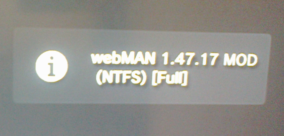
Also with new version (1.47.17) I've new "bubble":
web-full.png

Previously (1.47.16) It was "saying" webMAN loaded (webMAN załadowany).

BTW I don know why but after Rebuilding Database, I've corrupted data (Uszkodzone dane) 1598 KB
in Game (Gra).

Oh that popup is new too, I forgot to include it in the change log... Instead of show "webMAN loaded" I think it's more useful to show which version+edition you have installed ;) So now you don't have to go to File Manager or /cpursx.ps3 to know it.

Apparently there is something in common, all reports are related to /setup.ps3
I will check that code tonight... I suspect it could be related to system language. I normally test in English or Spanish.

Could you please try this?
1-Change the system language to English
2-Uninstall webMAN
3-Reinstall it.

If that doesn't work, please try changing VSH to rebug mode in Rebug Toolbox.
Please report back... I really want to solve this bug.
 
Last edited:
Oh that popup is new too, I forgot to include it in the change log... Instead of show "webMAN loaded" I think it's more useful to show which version+edition you have installed ;) So now you don't have to go to File Manager or /cpursx.ps3 to know it.

Apparently there is something in common, all reports are related to /setup.ps3
I will check that code tonight... I suspect it could be related to system language. I normally test in English or Spanish.

Could you please try this?
1-Change the system language to English
2-Uninstall webMAN
3-Reinstall it.

If that doesn't work, please try changing VSH to rebug mode in Rebug Toolbox.
Please report back... I really want to solve this bug.

Tried all the above, still freezes when trying to refresh My Games or save in Webman setup. 1.47.14 and .15 works though, .16 when it was first released, but then I saw that some changes were made, updated and the freezing started from there.
 
Tried all the above, still freezes when trying to refresh My Games or save in Webman setup. 1.47.14 and .15 works though, .16 when it was first released, but then I saw that some changes were made, updated and the freezing started from there.

Is webMAN showing it's labels in English?

Anyway I'll check myself tonight when I go back home.
 
Tested on my CECHL 4.84.1 Rebug, 1.47.17 working perfectly fine here. Experienced some freeze up/blank webman folder problems on updated 1.47.15, but it seems like 1.47.17 have solved all the problems. Changing settings on PS3/PC, scanning games and launching games with FTP session open, all working without freezing.
 
Oh that popup is new too, I forgot to include it in the change log... Instead of show "webMAN loaded" I think it's more useful to show which version+edition you have installed ;) So now you don't have to go to File Manager or /cpursx.ps3 to know it.

Apparently there is something in common, all reports are related to /setup.ps3
I will check that code tonight... I suspect it could be related to system language. I normally test in English or Spanish.

Could you please try this?
1-Change the system language to English
2-Uninstall webMAN
3-Reinstall it.

If that doesn't work, please try changing VSH to rebug mode in Rebug Toolbox.
Please report back... I really want to solve this bug.
Tried everything you say, still freezes

EDIT: can you build a test build with logging enabled? That'd be way more helpful than reporting and guessing IMO
 
Last edited:
Could you please try this?
1-Change the system language to English
2-Uninstall webMAN
3-Reinstall it.

Tried everything you say, still freezes

Same as the above.

+ I've restored my system to factory settings, so nothing after that was on it except of a CFW.
After I've installed webMAN, run rebuild database I have Corrupted data in Game (1598 KB)?
 
Last edited:
cechc on noBD 4.84.1 rex,english (i think uk)

other than wmM i have rebug toolbox,movian and retroarch.

uninstalled 1.47.16 from the menu in webman,installed full version of latest 1.47.17,on bootup it displays it's full version,going to webman setup and trying to refresh XML freezes the system.

edit:

it displays correctly my backups for some reason and they can be launched as usual.
 
Last edited:
I have a problem with the new update. Some control shortcuts do not work: Select + O and L2 + Start
Please check that you're using full edition and that these shortcuts are enabled in /setup.ps3

@kadorna2 @DeViL303 @jolek @umart666
Sorry for the delay... @Joonie86 has been helping me identifying the issue. BIG THANKS TO HIM!!
It seems to be related to a new thread created during save settings.
Attached there are 3 test versions... please report if some of them work or if the 3 versions still freeze.

https://github.com/aldostools/webMAN-MOD/files/3106065/webMAN-MOD_test_versions.zip
 
Last edited:
Please check that you're using full edition and that these shortcuts are enabled in /setup.ps3

@kadorna2 @DeViL303 @jolek @umart666
Sorry for the delay... @Joonie86 has been helping me identifying the issue. BIG THANKS TO HIM!!
It seems to be related to a new thread created during save settings.
Attached there are 3 test versions... please report if some of them work or if the 3 versions still freeze.

https://github.com/aldostools/webMAN-MOD/files/3106065/webMAN-MOD_test_versions.zip

test 1 works great! haven't tried the other 2
 
test 1 works great! haven't tried the other 2
Test 1 solves the issue for me as well

Thank you for your feedback!

I want to thanks again to @Joonie for his patience and great tips that helped me to find the issue.

I have uploaded the fixed version to Brewology and Github.
Removed metalification and rebugification themes until I release .18 + src ;)

My most sincere apologies for all the inconveniences that this bug had caused.
 
Last edited:
Please check that you're using full edition and that these shortcuts are enabled in /setup.ps3

@kadorna2 @DeViL303 @jolek @umart666
Sorry for the delay... @Joonie86 has been helping me identifying the issue. BIG THANKS TO HIM!!
It seems to be related to a new thread created during save settings.
Attached there are 3 test versions... please report if some of them work or if the 3 versions still freeze.

https://github.com/aldostools/webMAN-MOD/files/3106065/webMAN-MOD_test_versions.zip
Yes it is in full edition, they are saved in the options too. In the version of webman 1.47.14 works normally, only in the new ones that have this small shortcut bug
 
Thank you for your feedback!

I want to thanks again to @Joonie for his patience and great tips that helped me to find the issue.

I have uploaded the fixed version to Brewology and Github.
Removed metalification and rebugification themes until I release .18 + src ;)

My most sincere apologies for all the inconveniences that this bug had caused.
downloaded the fixed version from the GitHub, fixed the problem, thank you
 
My most sincere apologies for all the inconveniences that this bug had caused.

wow.gif

This is something new for me.
You're making this software in free time...
New (fixed) version was released after some bug reports (feedback),
currently with webMAN_MOD_1.47.17_Installer.fixed.pkg everything should be fine.
It is free homebrew stuff, sometimes mistakes can be done,
hopefully it ends with happy end.

All I can add Is that I'm grateful for all your projects, once again thanks.

EDIT: One thing that I cannot understand is that why PS3 is giving me corrupted data in Game
after rebuilding database.
It happens after I'll launch webMAN (X+L1) from games to initialize it.
 
Last edited:
Back
Top