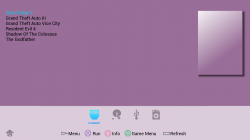
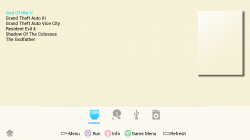
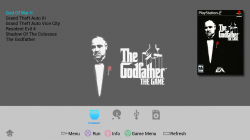
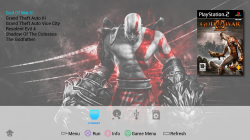
PS2 Would be possible a theme like this? and some ideas

@sandungas I like those icons . But feel like the HDD needs less detail somehow. And i'm a bit lost... those icons you mention as actual OPL icons, are not the actual ones in the Berion's theme right?

 
They are not. If have in mind Korium, then my icons are flat (besides category icons). Oh, and the theme is not only mine but also @Krah's.
 
  • Like
Reactions: TnA
@sandungas I like those icons . But feel like the HDD needs less detail somehow. And i'm a bit lost... those icons you mention as actual OPL icons, are not the actual ones in the Berion's theme right?
They have been in OPL git since months ago, at the time i was making ManaGunZ icons i was taking a look at OPL icons because i figured they was related (because both are backup managers)

Im not following the development of OPL though... at the time i grabbed that icons from OPL git that was 100% of the OPL icons (together with a small OPL logo + some frames for an animated loading icon that does a rotation)
Now i realized they are in process of adding the korium theme... anyway, this "old" icons im talking about (that existed since months ago) are still there

I guess there is some compilation flags that are going to generate the .elf only with the "old" icons (not the ones from korium)... with the purpose of making an .elf the most smaller posible
 
LOxU7QA.png

KGnObO1.png
 
Last edited:
Every texture gets at least 4KB allocated... Every smaller texture therefore is a waste of VRAM... ^^
 
Every texture gets at least 4KB allocated... Every smaller texture therefore is a waste of VRAM... ^^
Lets say i make the icons 4KB... problem solved, right ?

My main interest is to know what some of you OPL developers thinks about replacing the dualshock icons that already exists, and are made at 32x32 pixels (except 2 of them, L1, and R1 at 64x64)

You have 16 dualshock icons in OPL, though i noticed 6 of them are ignored in the makefile, still i guess all you want to have them ready to be used in the project code just incase are needed to be used at some point
I have already made that 16 dualshock icons at 32x32 so by now looks like a direct replacement
The others im posting in my last messages in white tones are already 64x64... and the originals are 64x64 too, so are another direct replacement

If you are telling me that you need the dualshock icons also at 64x64 i could do it too (but i think are going to be oversized for uneeded reason, just to fill the memory and make us feel better for not contaminating the planet)
Incase of using dualshock icons at 64x64 i guess you are going to need to scale them down on real time for displaying them

-------------
Additionally to all this doubts i have... there are several other things i dont understand
What is going to happen with this 16 dualshock icons and the other 8 for "devices" and "system" i been talking about in my latest posts ?... are you going to remove them from OPL (replaced by korium theme style?)
 
Last edited:
@sandungas
Some of those icons aren't actually used in OPL anymore; exit, save & home (whatever that config looking icon is called) seem to just be left over from really old builds (0.7, 0.8) not sure which.

They aren't compiled into the ELF nor rendered at any point, just left over images no one bothered to remove from the repo.

The device icons you're showing are no longer in the repo either; HDD, USB, SMB, APPS have all been replaced with Korium device icons, even the disc icon is different now (to match Korium colours).

L1 & R1 being 32x64 or whatever dimensions is a bit meh though, but I like all the other icons and would like them all to match so just replacing L1 & R1 with the ones from managunz won't match the rest.. personally not a fan of those L3 & R3 icons, they look a bit strange just because all the other buttons have a top down view but those icons have a side view; I prefer the current ones.

You're correct about the makefile, currently L1 L2 L3 R1 R2 R3 are not compiled in because there was no point increasing the ELF size since they aren't rendered at any point in the GUI and custom themes can't force render them either so they are just in the repo for completeness in case someone wants to use them in the future.

The easiest/best option might be to just fix the dimensions of the current L1 & R1 icons in the repo and that way they will all be 32x32 and will all match.

The shape of most of your DualShock buttons I like though.

The face buttons are from here
https://www.deviantart.com/txusmetal4ever/art/Vector-PlayStation-buttons-441793653

The bloke supplies a PSD with the gradients etc so if the L1&2 R1&2 & DPad Buttons we're remade to be the same shape as the ones you're showing but with those gradients etc then they would all match. I do prefer the shape of the L3 & R3 currently but maybe that's just me?
 
Last edited:
Lets say i make the icons 4KB... problem solved, right ?
Nope... They (the resolution of the textures) also need(s) to be "powers of 2" (currently)! ;)

My main interest is to know what some of you OPL developers thinks about replacing the dualshock icons that already exists, and are made at 32x32 pixels (except 2 of them, L1, and R1 at 64x64)
I have nothing against it! :)
Those higher resoluted icons however need to be scaled in the theme, though...!

You have 16 dualshock icons in OPL, though i noticed 6 of them are ignored in the makefile, still i guess all you want to have them ready to be used in the project code just incase are needed to be used at some point
I have already made that 16 dualshock icons at 32x32 so by now looks like a direct replacement
The others im posting in my last messages in white tones are already 64x64... and the originals are 64x64 too, so are another direct replacement
Since they are polygon-based project-files, would you post them along some 32x32 and some 64x64 and some 128x128 resoluted textures at 8Bit and 4Bit?

If you are telling me that you need the dualshock icons also at 64x64 i could do it too (but i think are going to be oversized for uneeded reason, just to fill the memory and make us feel better for not contaminating the planet)
Incase of using dualshock icons at 64x64 i guess you are going to need to scale them down on real time for displaying them
Yes, you are right about the scaling!
As long as you attach the project-files as well, the resolution does probably not matter!

Additionally to all this doubts i have... there are several other things i dont understand
What is going to happen with this 16 dualshock icons and the other 8 for "devices" and "system" i been talking about in my latest posts ?... are you going to remove them from OPL (replaced by korium theme style?)
They should be kept for the "clean theme"...

I also think that the Korium-Merge should PARTIALLY be reversed and rather be implemented in another way... I think it would be great to have a makefile-flag to build in a theme, rather than the hard-coded Korium-Implementation...!!!

@sandungas
Some of those icons aren't actually used in OPL anymore; exit, save & home (whatever that config looking icon is called) seem to just be left over from really old builds (0.7, 0.8) not sure which.
Yerp, pretty old... 0.7 AFAIR...!

They aren't compiled into the ELF nor rendered at any point, just left over images no one bothered to remove from the repo.
Nah, they are meant to be available as placeholders, IF someone wants to use them!

The device icons you're showing are no longer in the repo either; HDD, USB, SMB, APPS have all been replaced with Korium device icons, even the disc icon is different now (to match Korium colours).
While I like Korium, you know that I am not a fan of a static/forced direct implementation!
I would really like to see a "makefile-flag" to chose a theme to compile into the ELF!

That is technically and logic-wise a better approach IMO!
 
Which software are you using to create the PNG's at 4Bit and 8Bit ?
I made several versions of the "apps" icon using indexed colors incase you want to try them, i would like to know whats the target requirements. In other words, the quality
Based on that quality i could make some adjustments to squeeze the max quality from OPL graphic libraries

Btw, keep in mind with the white icons i made like this one (a total of 8 icons actually at 64x64 with 4K bytes size)... we can go to the lower modes and very low number of colors, because are grayscale
But the dualsock icons are going to be very damaged incase of going to very low number of colors

Edit: ooops, almost forgot the link
DOWNLOAD ---> http://s000.tinyupload.com/index.php?file_id=06744787670239546935
 
Which software are you using to create the PNG's at 4Bit and 8Bit ?
Make them in whatever you want then use Pngquant to convert.


Btw, keep in mind with the white icons i made like this one (a total of 8 icons actually at 64x64 with 4K bytes size)...
All icons when rendered are down scaled to 20x20 so imo it looks best for all vmodes using 32x32 textures for the icons.. this is because when 64x64 icons are downscaled they can look bad in SD vmodes.


grayscale
I think greyscale is expanded to RGBA in OPL so you'd be better off using indexed.

Oh, and the theme is not only mine but also @Krah's.
Other than the SD version of Korium I haven't done anything with it, @Tupakaveli made it compatible with HiRes and also made a lot of code changes to OPL in order for Korium to be the default theme. So really, he's done more for it than I have :)
 
@Tupakaveli well, I'll upload this and then you tell me what you need with more resolution, because I did the icons initially with only this resolution for the concept. I'll be doing in this days bigger ones if you need them. And the SMB, USB, HDD, APPS icons got semitransparency (I don't know if that is a problem). So I'm going to upload both, with the transparency configuration that I'm using in the theme and without it.
http://s000.tinyupload.com/index.php?file_id=99506806687269570577
 
Guys, how you doing? hope you all are OK. I've been thinking about some features for OPL, more themes...etc.

First, I thought have the games in one section instead of a list for all the devices it's better. One list for Games and other for Apps. And what do you guys think about a page for the recent played games/apps, like a Home section.

More, this could be a minor thing for some people, but could be an awesome feature for OPL. Would be possible a way to add trophies to games? Example: When you beat the giant in Rhodes at the begining in GOW2, when the cinematic start, unlock the trophie. Maybe using a Hex editor and see the file the console is reading at that moment and make a .cht for OPL (when file "x" is readed or when you reach an stage, unlock that trophy). And add it to a .txt file for all your trophies you unlock.

The possibility of create an user, for the trophies and even could be used for personal virtual MC. If my user is "david1995w", the OPL creates all the VMC like "username-generic_0" or "username-SLES_XXXX".
I made this concept and took references from the PS4 menu:

OPL-THEME3-4-3.png

This is the Home section (The covers is just something personal, could be used with their original form) showing your trophies and user at top and down your 4 recently Games/Apps played. At right, toggles for the SMB, USB and HDD for start the device you want. In the taskbar you can see R1, for going to your full list of Games and Apps.

Tell me what you guys think.
 
Could you provide a link for the OPL glowing logo as .psd/.png?
I'm not an expert at opl themes but i was looking for a long time for something like that.
I could do something similar...
about the device order... i'm not sure it can be changed (USB/SMB/HDD/APPS/POPS)
 
Could you provide a link for the OPL glowing logo as .psd/.png?
I'm not an expert at opl themes but i was looking for a long time for something like that.
I could do something similar...
about the device order... i'm not sure it can be changed (USB/SMB/HDD/APPS/POPS)
Yes! I will upload it tomorrow.
 

Similar threads

Back
Top