
PS3 4.81 FERROX COBRA (7.3) CFW by Alexander [UPDATED v1.01+ Released]

Update [November 20 2016] Version 1.01+ Released (Bug Fix Cobra now fully operational)

Following the release 4.81 FERROX Standard Edition CFW, Alexander has now put the finishing touches on 4.81 FERROX COBRA (7.3) CFW. This firmware comes with all the features of the Standard Edition plus has Cobra v7.3 and all the features like plugin support on boot, ISO support for PS3/PS2/PSP ect, NetISO Support (network loading/streaming of games and movies with ps3netsrv) . Checkout out the full details from Alexander..


FERROX_COBRA_4.81.PNG

Official Support Forum for FERROX CFW: cybermodding.it


  • (Google Translation)

    UPDATE v1.01 & v1.01+

    After considering the reports of some users, alexander updated version 1.01. Console on some fact was not syncing the controller to 'start, if you turn on the console via the Wireless Controller in the same mode. In fact, using the cable, or turning on with POWER button, the problem would not show up. Well, the problem was solved. This problem had previously seen on some firmware. The problem was in the TAR. On the advice of Developer Habib, and Evilnat collaboration, here we give the revision 1.01+

    CHANGELOG v1.01 +
    • Fixed the Controller to sync Boot via the Wireless Controller for PS button.
    • Fixed XMB InGame.

    We thank the users and developer who helped Test. If you aiutassimo more often at each other in the PS3 scene, between Developer and Tester, it would be a different story. Special thanks to Atreyu and Kozárov by PSX-Place site, for testing on older FAT Console. A big thank you also to our @mizio90 for the 'Installer. It must be said that the new version of the CFW was ready already for a while, but I did make late because of the 'Installer
    Thanks Habib and Evilnat for your cooperation to fixed the Controller's question.


  • This version does NOT have the Mod Graphics you saw in FERROX 4.80. However it will be added later, releasing a separate version, or a simple package.

    The Developer Alexander tells us that the Source Code of its Porting COBRA will be available soon in its Github.​


    FEATURES:
    • Built on the basis of 'OFW 4.81 SONY.
    • PSN / SEN Enabled.
    • Update from any possibility of CFW (CEX).
    • Ability to Upgrade from OFW 3.55.
    • Ability to Downgrade from any CFW with QA active Flags.
    • QA Flags active if previously enabled.
    • FEATURE - Added COBRA PATCH 7.30!
    • FEATURE - Compatibility PS2 games.
    • FEATURE - Compatibility with the 'latest version of ReactPSN.
    • FEATURE - RSOD Bypass Screen Console sufferers RSOD.
    • FEATURE - 4.81 Key to start games signed with 4.81 keys.
    • FEATURE - app_home / PS3_GAME.
    • FEATURE - XMB Support In-Game Screenshots.
    • FEATURE - Support Remote Play.
    • FEATURE - Integrated Package Manager, replaces the classic Install Package Files.
    • PATCH - LV1: Patched to remove the LV2 protection.
    • PATCH - LV1: Patched the CoreOS Hash Check to prevent Brick Console Downgradate non-Dehashed.
    • PATCH - LV1: Peek & Poke.
    • PATCH - LV2: Peek & Poke.
    • PATCH - PS3 BT Remote Patch.
    • PATCH - PS3 BluRay Disc Patch.
    • PATCH - Disabled Epilepsy Message to Boot.
    • PATCH - Disabled Cinavia protection.
    FEATURES COBRA:
    • Loading Plugin to Boot automatically, through boot_plugins.txt File to 'internal dev_hdd0
    • Support for ISO PS3
    • Support for ISO PS2
    • Support for ISO PSX
    • Support for ISO PSP
    • Support for ISO DVD
    • Support for ISO BluRay
    • Support for ISO Splittate on Fat32 Devices
    • Support for NTFS formatted devices (dear External Hard Disk)
    • NetISO support (Ps3netsrv) PS3-BD-DVD-PSX ISO / CUE / BIN


  • TEST PERFORMED:
    These are the tests carried out by us on the console in our possession.


  • INSTALLING THE CFW:
    • Download the CFW at the bottom. Rename the File .pup exactly: PS3UPDAT.PUP and confrontatene the 'MD5 with what you find at the bottom! You can use the Tool md5sums.

    • Take a USB FAT32 formatted, and create a new folder called PS3, inside this create another 'other still called UPDATE, and inside latter' inseriteci the PS3UPDAT.PUP File, which would be the custom firmware.

    • Insert the USB in the far right of the PS3 port.

    • Be sure to: Remove any disc from the player Ps3, Remove any games loaded with any Manager, Disable Internet Connection.

    • Ok. You can choose to install the CFW from the XMB or from Recovery.

    • On the XMB will just go into 'Settings' column, then 'System Upgrade' and choose 'With storage media'. Select the CFW and will start the process.

    • To enter Recovery Instead, turn off the console. Turn it back on by holding down the Power button until the console is turned off again. Now turn it back on by holding down the Power button until you hear two beeps very close. Then release the Power button! Recovery time from the menu, select 'System Update' and follow the instructions.

    • For a clean installation, you can install 2 times the CFW. You can also go back into Recovery and click Options for Rebuilding the Database and Restore the System File. So you'll have a setup more than clean and safe.

Download (v1.01+): 4.81 FERROX [COBRA v7.3) CFW
Md5: a90225408ba549db8102177100e3083c​
DOWNLOAD v1.00 4.81 FERROX COBRA 7.3 CFW
v1.00 MD5:
cfa9e3e52c164251c3d96dc1cc6e8d17


Source: cybermodding.it/
 
Last edited:
Yeah at certain boots it will go to 100% fan until webman loads.

Really annoying in the early hours, even if it only does it for maybe 5 seconds at a time.

Recovery mode is constant 100% if you need to reflash. Just turn the ps3 off and try fix it in the morning when that happens. :D

Sent from my Nexus 5 using Tapatalk
Ok but does it go mental during normal usage?
 
maybe an issue with the syscon rather than wmm? wmm can't tweak fan percentage, can it?
wMM changes the fan percentage.
In manual mode it sets it at a certain rate, the one chosen in the setup page.
In dynamic mode, wMM polls the temperature every 5 seconds or whatever & either increments or decrements the fan speed value by 1. The fan speed values are hexadecimal values, not percentages anyway.
 
Once it's going it's fine. It slowly ramps up a fair bit to start with then eventually settles as you would expect.

Just at boot time it may jump to 100% for a bit. (These fans are damn loud even at 40%)

Also, I think shifting my auto fan temp up ~5'C made it ramp up the fan speed a lot less aggressively.

Sent from my Nexus 5 using Tapatalk
 
wMM changes the fan percentage.
In manual mode it sets it at a certain rate, the one chosen in the setup page.
In dynamic mode, wMM polls the temperature every 5 seconds or whatever & either increments or decrements the fan speed value by 1. The fan speed values are hexadecimal values, not percentages anyway.

u certainly know ur stuff especially when it comes to wmm.
 
Once it's going it's fine. It slowly ramps up a fair bit to start with then eventually settles as you would expect.

Just at boot time it may jump to 100% for a bit. (These fans are damn loud even at 40%)

Sent from my Nexus 5 using Tapatalk
Ok. So that's normal behaviour. No random stuff.. I was beginning to wonder....
Yes the fans are noisy but then again all fans are. A PC or the ps4 is not silent either.

Still if the console is in good condition, on average as it varies a lot according to individual situations, the fan should run under 37/38% to keep your CPU under 65C. And 37% should be the maximum acceptable noise at night...
Note that a 7+ years old fan that's been used everyday is likely to get noisier with time. More so if there is dirt inside the console and/or on the blades.
The thermal paste could start to dry up as well which why in kiwon445's case I suggested some tests...
 
iirc, both the cell and the rsx chip can run under hotter temps than say the 360's cpu and gpu, so a higher temp than my temp threshold of 60 degrees C should be tolerable by the system. from my experience, the ps3 with temp thresholds - the noise is comparable to both my 360 and my ps4. personally, I'd rather have a somewhat noisy fan than hearing no fan at all. the latter is what would scare me especially if my ps4 had that issue.
 
u certainly know ur stuff especially when it comes to wmm.
It's not a massive project but still it's a lot of code doing lots of different things to cover. I really love the project + Aldo is great & accessible.
I started learning about the wMM code when I worked on pkg handling 6 months ago. I had to understand a good section of the source code to add the modifications back then.
Since then, if ever I have enough time, when a user has a question about wMM on a section of the code I am not yet familiar with, I search the code on my smartphone, thanks to agrep, & l learn the part(s) relevant to the question. This way I can give precise answers to help & at the same time, my knowledge of the source increases. I must know my way well for around 75% of the whole project now. Planning to go slowly but surely to 100...[emoji6]

The only other existing PS3 project that I find as exciting as wMM is Managunz...
 
iirc, both the cell and the rsx chip can run under hotter temps than say the 360's cpu and gpu, so a higher temp than my temp threshold of 60 degrees C should be tolerable by the system. from my experience, the ps3 with temp thresholds - the noise is comparable to both my 360 and my ps4. personally, I'd rather have a somewhat noisy fan than hearing no fan at all. the latter is what would scare me especially if my ps4 had that issue.
The ps3 is meant to run hotter than 70 with syscon iirc
 
It's not a massive project but still it's a lot of code doing lots of different things to cover. I really love the project + Aldo is great & accessible.
I started learning about the wMM code when I worked on pkg handling 6 months ago. I had to understand a good section of the source code to add the modifications back then.
Since then, if ever I have enough time, when a user has a question about wMM on a section of the code I am not yet familiar with, I search the code on my smartphone, thanks to agrep, & l learn the part(s) relevant to the question. This way I can give precise answers to help & at the same time, my knowledge of the source increases. I must know my way well for around 75% of the whole project now. Planning to go slowly but surely to 100...[emoji6]

The only other existing PS3 project that I find as exciting as wMM is Managunz...

it definitely shows. I figure myself as a bridge between normal user and dev as I try to make things as basic as possible with my tutorials, so the person doesn't feel overwhelmed. I'm the tutorial guy. :-P I'm a jack of all trades, sorta, but not being a master at any. I'm still learning about every system I write tutorials for. :)
 
that sounds about right. that's 198 degrees F, so the temps r similar to the 360's auto shutdown.
 
it definitely shows. I figure myself as a bridge between normal user and dev as I try to make things as basic as possible with my tutorials, so the person doesn't feel overwhelmed. I'm the tutorial guy. :-P I'm a jack of all trades, sorta, but not being a master at any. I'm still learning about every system I write tutorials for. :)
It's all a matter of time dedicated to it.
You could learn this stuff too if you really wanted. You should think about it especially if you have time you can dedicate to it.
Do 2 or 3h of self teaching in C programming, 5 times a week. In one year, you can read the source as well as an can.
Then... In programming, the sky is the limit...
 
but in most cases, the problem is either lack of time or being intimidated by it. the reason I haven't written a tutorial in a while is due to the fact that they take a lot of time since I go through the entire process manually as not to leave anything out instead of basing it on memory. and, I find it easier just to answer questions rather than writing a tutorial about the process.
 
that sounds about right. that's 198 degrees F, so the temps r similar to the 360's auto shutdown.
Look at this about temps.
http://www.psdevwiki.com/ps3/Thermal

If I am not mistaken, syscon at the highest setting is 73C for a fan speed of 0x50 which is roughly 30%...
At 67C the fan runs at 0x48 which is 28%...
Sure there is no noise but when you play it must heat like crazy... Obviously it stays under 85C!
 
Last edited:
Good. Am happy you got it sorted as you wished. [emoji6]
Of course you don't want huge noise, who does? However, when trying to keep the CPU at 70C, the fan should not be noisy. If it is, there is a problem somehow & that would worry me greatly actually if I were you.
You should find out whether or not by staying on syscon fan setting, you are not actually ignoring a more serious hardware problem or simply that your fan is dying hence the noise when it runs.... It will take half an hour for you to get at least some answers.

I recommend that you test this again.
Use dynamic control at 70C & minimum fan at 30%.
Do 2 tests:

1. Leave the xmb idle for 10mn then test.
2. Launch a demanding high res game & play for 10/15mn (not less). Then test.


As test, check both the CPU temp & the RSX temp by using the temp info combo or the PS3 browser hxxp://localhost/cpursx.ps3 and very important, take note of the fan percentage in both situations.
You can also test from another device on the LAN like your smartphone, open a browser & type hxxp://ps3-local-ip-address/cpursx.ps3 for the address. The local address usually uses this format 192.168.x.xxx.

Report these results to us & we will get a better idea of the problem if there is one.

To stay under 70C, the fan should not need to run at more than 40-42%. The fans on my 2 current consoles run under 40% to stay under 68C. If yours runs faster than 42%, depending on the value there is probably something wrong.

FYI, people started using dynamic fan control because of the high number of ylod consoles. Look at ebay, they sell for 10 bucks or less due to the number of them..,
Some noise is a drawback but consoles can last decades without maintenance this way as long as they're not enclosed in a cabinet & well kept.
Ok im testing what you said as i type this. my fan is already getting louder & louder at bootup. My Ps3 has been quiet all day under Syscon setting. By the way when i used Control Fan Utility on Rebug it would automatically be on payload 55C & i pretty much kept it there or i would tap square & move up to level 2 & change the temperature from 50-60 depending on how hot it was & how i wanted my fan to act, but not too much difference from the Syscon setting in webman. My fan is slowly getting quieter right now. I assume that is what you were trying to tell me was surpose to happen haha. The fan now is gradually getting louder again as i move around the XMB menu

My CPU temperature turned out to be around 68-70C while RSX was 48-50C with fan speed at 47% (0x7A) at end of 15 minutes

I then went on a powerful game & the fan noise pretty much stayed the same, low ended & calm. The CPU & RSX temperatures were the same with the fan speed at 49% (0x7E).

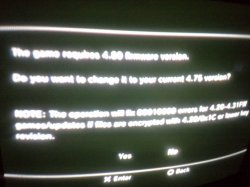
i also came across an odd screen when booting up my game from multiman i was wonding could you help me figure out. If you cant see the image it says "the current game requires 4.80 firmware version. Do you want to change it to your current 4.75 version?" Why does it say im on 4.75 when in system settings it says im on 4.81? Also i had installed a fix for this game earlier on that i think could be the problem. Do you know where can i find the folder to all my 4.21+ fixes & how to remove them?
 

Attachments

  • C360_2016-12-01-06-46-47_org.jpg
    C360_2016-12-01-06-46-47_org.jpg
    1.5 MB · Views: 388
Ok im testing what you said as i type this. my fan is already getting louder & louder at bootup. My Ps3 has been quiet all day under Syscon setting. By the way when i used Control Fan Utility on Rebug it would automatically be on payload 55C & i pretty much kept it there or i would tap square & move up to level 2 & change the temperature from 50-60 depending on how hot it was & how i wanted my fan to act, but not too much difference from the Syscon setting in webman. My fan is slowly getting quieter right now. I assume that is what you were trying to tell me was surpose to happen haha. The fan now is gradually getting louder again as i move around the XMB menu

My CPU temperature turned out to be around 68-70C while RSX was 48-50C with fan speed at 47% (0x7A) at end of 15 minutes

I then went on a powerful game & the fan noise pretty much stayed the same, low ended & calm. The CPU & RSX temperatures were the same with the fan speed at 49% (0x7E).

i also came across an odd screen when booting up my game from multiman i was wonding could you help me figure out. If you cant see the image it says "the current game requires 4.80 firmware version. Do you want to change it to your current 4.75 version?" Why does it say im on 4.75 when in system settings it says im on 4.81? Also i had installed a fix for this game earlier on that i think could be the problem. Do you know where can i find the folder to all my 4.21+ fixes & how to remove them?

If your tests are trustworthy & more tests would probably be required, your CPU is overheating.
It should never be 20C higher than the GPU, a CPU at 70C on idle XMB with a fan that needs to run betwen 47/50% to keep a it at 70C...?? No way this is normal.
The GPU under 50C seems ok & the CPU should actually run at the same temp more or less.
Imo there is a problem as I suspected.
Using syscon is currently hiding the issue actually because the fan may run low but it is set to its maximum setting (30%) already, given the super high temp of your CPU.
Am surprised it has never reached 85C & emergency shutdown yet.. Imo it will though...

Multiman has not been updated for 4.81 so it recognises the CFW as 4.75 due to similar offsets. Don't pay attention to the msg. You should wait for multiman update & use another manager for now.

Don't make any changes to game files like resigning & don't use fixes or patches, there is no need in 4.xx CFW. If you install a patch, you modify files like param.sfo or eboot.bin. You must replace the patched version back with the originals if the files have changed. However if the patched only changed the minimum version in param.sfo, that does not matter, you can leave it as-is.
The only situations where you need to resign an eboot.bin in a 4.xx CFW is with games released before 2009 that can't be updated. If you update, it works fine with original files but if you don't want to update those games or simply no update was released for the game then you would need to resign the eboot file otherwise you would mount it ok but get an error on launch.
The best & only tool to resign on the PS3 is Managunz, otherwise it has to be done on PC with PS3 Tools Collection, Trueancestor Self Resigner & Pkg Rebuilder or E/S/S/E Resigner. All apps can be downloaded from our resources section.
 
Last edited:
Look at this about temps.
http://www.psdevwiki.com/ps3/Thermal

If I am not mistaken, syscon at the highest setting is 73C for a fan speed of 0x50 which is roughly 30%...
At 67C the fan runs at 0x48 which is 28%...
Sure there is no noise but when you play it must heat like crazy... Obviously it stays under 85C!
My CECHL sits happily just shy of 80'C. Never glitched or shutdown etc when playing a game.

Default Fan:
b08c8215fe904e1ea4f9ea453e138940.jpg


Webman Fan (Auto, default settings)
951fcfadfbb8706fe55d89e08010f649.jpg


Sent from my Nexus 5 using Tapatalk
 
If your tests are trustworthy & more tests would probably be required, your CPU is overheating.
It should never be 20C higher than the GPU, a CPU at 70C on idle XMB with a fan that needs to run betwen 47/50% to keep a it at 70C...?? No way this is normal.
The GPU under 50C seems ok & the CPU should actually run at the same temp more or less.
Imo there is a problem as I suspected.
Using syscon is currently hiding the issue actually because the fan may run low but it is set to its maximum setting (30%) already, given the super high temp of your CPU.
Am surprised it has never reached 85C & emergency shutdown yet.. Imo it will though...

Multiman has not been updated for 4.81 so it recognises the CFW as 4.75 due to similar offsets. Don't pay attention to the msg. You should wait for multiman update & use another manager for now.

Don't make any changes to game files like resigning & don't use fixes or patches, there is no need in 4.xx CFW. If you install a patch, you modify files like param.sfo or eboot.bin. You must replace the patched version back with the originals if the files have changed. However if the patched only changed the minimum version in param.sfo, that does not matter, you can leave it as-is.
The only situations where you need to resign an eboot.bin in a 4.xx CFW is with games released before 2009 that can't be updated. If you update, it works fine with original files but if you don't want to update those games or simply no update was released for the game then you would need to resign the eboot file otherwise you would mount it ok but get an error on launch.
The best & only tool to resign on the PS3 is Managunz, otherwise it has to be done on PC with PS3 Tools Collection, Trueancestor Self Resigner & Pkg Rebuilder or E/S/S/E Resigner. All apps can be downloaded from our resources section.
i had the NPUB version of this game & had a dlc fix for it & it worked fine. Then a 1.02 update came out for the game & i updated then it said i needed go buy a licsense to play, assuming i needed a fix, but when i tried to reinstall the same fix it said it was already installed. I thought maybe if i delete the game & reinstall it updating it first then add the dlc &
its patches that it would work, but it didnt cause the patch said it was already installed again (although i deleted the game) The DLC content reinstalled but not the patch. That is why im wondering if the patch is stored somewhere else on my ps3 or is automatically resigning over my original Eboot files when i install the game. Anyway i then tried to take matters into my own hands & edit the patch myself using ps3tools HxD, but all ireally did was edit a file called "access.edat". I saw that it was coded for update 1.01 "UP_1001" so all i did was change the 1 on the end to a 2 & saved. I had no idea how to edit the other files which were "Reboot.self" & EBOOT.BIN" & since i didnt know how to turn the files into a pkg i just overwrote the original files in multiman then i rebuild database. The game actually booted up without the liscense issue but then it was just a black screen & that was that. I figured i messed up everything so i deleted the NPUB version altogether & downloaded the disc version (BLUS), mounted the game (which where i got that 4.75 error) & i clicked No, then updated to 1.02, then started the game. It loaddd up, but was still on the black screen just like the NPUB version was doing after editing the access.edat file although i deleted all the dlc along with the NPUB version. Please can you help me make sense of whats going on?

Also i downloaded Irisman & mounted the BLUS version with, but when it kicked me back to the XMB menu no disc shows up like in multiman. How can i get irisman to display a disc when mounting. Im using my external USB to mount my game.
 
Last edited:

Featured content

Trending content

Back
Top


