
PS3 Custom Firmware developer @Alexander has now released his 4.84 FERROX COBRA (7.55) CFW adding a new flavor to the 4.84 Custom Firmware mix. This Cobra CFW comes equipped with the latest Cobra 7.55 payload (which should perform like 4.83 FERROX Cobra) and allows for all the usual Cobra (v7.55) CFW features. Some of those features include Plugin Support (like webMAN), as well as ISO Support (Ps1/PS2/PS3/PSP/BD/DVD) are just a few abilities that Cobra adds to a firmware. Also developer Alexander includes an optional MOD Installer for some extra features and eye candy (see tab for more info). For full feature set and details checkout the included (translated) release notes provided
if you have any feedback you can find @Alexander at his home site of Cybermodding.it and also here in our psx-place forums.

Checkout other 4.84 related releases in this thread here.
Checkout other 4.84 related releases in this thread here.
-
Features of 4.84 FERROX COBRA (v7.55)
- Built on the base of OFW 4.84 SONY.
- PSN / SEN Enabled.
- Ability to Update from any CFW (CEX).
- Possibility of Update from OFW 3.55 "And from original firmware 4.82 [PS3Xploit exploit - compatible consoles only]"
- Possibility of Downgrade from any CFW with active QA Flags.
- QA Flags active if previously enabled.
- FEATURE - COBRA Patches 7.55 added
- FEATURE - New Look of the XMB (See FERROX Mod Installer (next tab)).
- FEATURE - PS2 Games compatibility.
- FEATURE - PSP Games compatibility in ISO / Minis / Remaster format.
- FEATURE - Compatibility with the latest version of ReactPSN.
- FEATURE - RSOD Screen Bypass for Consoles affected by RSOD.
- FEATURE - Keys 4.84 to start Games signed with keys 4.84
- FEATURE - App_home / PS3_GAME.
- FEATURE - XMB In-Game Screenshot - find the option in the Photos column of the XMB In-Game.
- FEATURE - Remote Play support.
- FEATURE - Integrated Package Manager replaces the classic Install Package Files.
- FEATURE - Addition of Temperature display in XMB In-Game on PS2 Games. Thanks to 3141card.
- PATCH - LV1: Patch to remove LV2 protection.
- PATCH - LV1: Patched the coreOS Hash Check to prevent the Brick on a non-Dehashed Downgraded Console.
- PATCH - LV1: Peek & Poke.
- PATCH - LV2: Peek & Poke.
- PATCH - PS3 BT Remote Patch.
- PATCH - PS3 BluRay Disc Patch.
- PATCH - Disabled Epilepsy Message at the Boot.
- PATCH - CINAVIA protection Disabled completely.
-
FERROX Mods Installer
If you like our Homebrew Store, or the Graphic Mods seen in the FERROX 4.80, this Installer is for you.
This Installer was created on the basis of the XMBM + Team installer and inside it you will find the possibility to install or uninstall the Mods and the Homebrew Store. The installer was introduced into the Custom Firmware. This means that you will always have it available, without having to use a USB stick.
To install the PKG, simply go to the "Package Manager", and navigate to Install the File Package - Internal Storage of the PS3 system. The installer will always be there, but if you want you can delete it via File Manager from the dev_blind / ferrox / pkg directory.
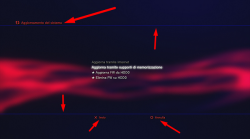
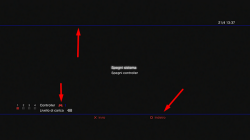
Below are some screens:
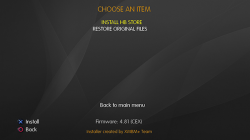
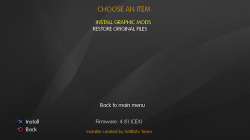
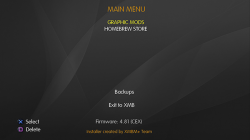
Use is really simple, there is not much to explain. You can install the Mods, and you can always reinstall the original files from the installer at any time. Ditto for the Store.
Below I leave a video demonstration
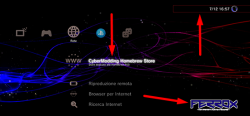
Mod Graphics by MiZiO90
.
CyberModding Homebrew Store
.In addition to the Graphic Mods you see, the installer integrated into the CFW gives us the possibility to install the Cybermodding homebrew Store. I think now all of you Cybermodding users know our store. We have recently added and updated lots of mods for GTAV.
If you want to take a look at our post on the latest version of the Store, here is the Link: Click HERE!
Downloads: 4.84 FERROX COBRA (7.55) v1.00 CFW
MD5: BEEFC45ADD365E6DA5C12976AA802F19
Source: cybermodding.it
Last edited:







