PS VITA / PS TV AntiBlacklist - Advanced whitelister homebrew

Developer Rinnegatamante bringing PSTV users another useful homebrew
AntiBlacklist - Advanced whitelister homebrew

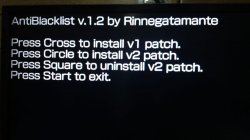
This tool is supporting both V1 and V2 patches and also have ability to remove v2 patches. All this packed with well known vpk file format for henkaku users.

startup.png


  • AntiBlacklist is an homebrew-tool for PSTV that will remove the blacklist for games and apps inserted by Sony allowing you to play any game you want on your console.
    Differently to the other tools, AntiBlacklist support both v1 and v2 patches and is also capable to remove v2 patch (if you want to update a game blocked by it and then re-enable it.

    Update:
    Just a little update (v.1.1), now the v1 patch is permanent too like the v2 one. (Requires VitaRW for the permanent patch)

  • - xyzz for his vfs implementation for sqlite.
    - All the people on #vitasdk that helped me to figure out what was wrong in SceSqlite.


So the keys are at the heart of the problem for the remaining games?
Those particular titles just can't be played at all for now? No workarounds?

Sent with Tapatalk

white list v1 is basically a list of games that r allowed to work on the pstv. the white list can be updated by sony without an official system update. u just have to refresh the live area iirc. as long as u don't do that, white list v1 won't be replaced. the official white list lists the games from companies that paid to have their game(s) work on the pstv. just like they paid with the vita, they have to pay a second time with the pstv. that's what sucks.

white list v2 is governed by an sfo flag. the app.db contains sfo keys (not encryption keys) which designate various functions like app version, language, etc. the sfo flag is also one of these. using a separate key, u can disable the sfo flag. that's the key used with white list v2. I believe the sfo is encrypted, so we need the encryption keys to disable something - what I don't know.
 
And whitelist v1 doesn't work with which games exactly? New games released after changes s#ny made? Or just random?

Sent with Tapatalk
 
And whitelist v1 doesn't work with which games exactly? New games released after changes s#ny made? Or just random?

Sent with Tapatalk

that's a question for @atreyu187 . I know he knows some games that require whitelist v2. I'm assuming the sfo flag may be for games that rn't completely compatible, but that's just a guess.
 
Its a flag set by the SFO upon install or first insertion of the cart. I have tried to add edited SFO after install even editing the registry but it doesnt take. Its on a portion of the cart we can't write to and we cant alter the PSN PKG file yet. I only have one game that doesn't work at all Hyper Neptune and it has no updates. I think one that do have an updste we can hijack the SFO after install to work kinda in the same fashion as the undubs we can do as the updates are unencrypted
 
that would explain a lot. retail games r installed when inserted into the vita/pstv. its information is logged to the app.db as well.
 
I think I'd recommend backing up ur app.db for anyone just in case u have to rebuild the database. I'd also recommend backing up the system.dreg and system.ireg. afaik, the system.ireg, however, is only needed to decode the system.dreg. u can't decode it with the registry fixer without the .ireg which I found out by fooling around with the files a while back. I'm not sure if the .ireg is .dreg-specific or not which is y I'd back both up even though u only need to replace the .dreg when manipulating the file for say changing the confirm button or cma id.
 
I have a PSTV in the OFW 3.68 H-Encore
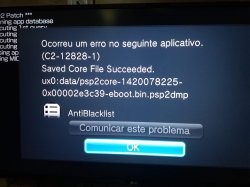
I installed AntiBlacklost but it is not permanent would be version 1.1
In my research it has 2.1 but here it presents an error when installing the patch 2.0

http://vitadb.rinnegatamante.it/#/info/11

I don't know if this app does this, but ur0 is where the first whitelist is store. it gets its information from vs0, so rebooting the system causes the one in ur0 to be recreated. do this to make it permanent: http://www.psx-place.com/threads/make-whitelist-permanent-even-after-coldboot.10687/
 
I've seen that error for people installing henkaku for the first time. I think it's related to the database. you can do this manually bypassing the app. it's very easy. the custom whitelists are readily available. the app.db can be modified with sqlite. iirc, dlc doesn't work with whitelist v2 to the app.db due to the categories being changed.
 

Featured content

Trending content

Latest posts

Back
Top