PS2 FMCB/FHDB v1.9 series release thread

Theoretically more info is needed.
What tool was used to format HDD?
What content is on HDD (e.g. games, HDDOSD 2.0...).
What tool was used to add games...

All I can add is that currently I'm on FHDB 1.966 from 13\04\2019 connected through genuine NA
and everything seems to work quite fine.
My console do not have modchip.

I've also checked my PS2 HDD with HDD checker v0.964 from 13\04\2019...
It takes some time to initialize (~10 sec) when I want to check for errors, but everything seems to be also well.

BTW It doesn't mean that everything is working in my config, it cannot be any errors on other consoles...
Sometimes more test need to be made.
 
Ok, I have no friggin idea how, but for now (modchip enabled because turning it off is impossible) FHDB 1.966 + HDDOSD turns on, veeeeeery slow, veeeeeeeeeeeeery but before it tries FMCB 1.8c doesn't have skip MC and HDD updates.

@sp193 seems you're right - I've formatted HDD using today's wLE and right after that I used the newest HDDChecker and oddly (and finally) all tests have passed.

Now I am confused af because all of this. I'll try to test without MC with FMCB 1.8c attached.

And no, my friend has original european NA with no SATA or any other mods. Vanila NA. I'm waiting for his response if HDDOSD will boot for him because he told me (just now) his HDDs are old enough that jumpers allow all 3 HDDs to set how much cylinders so must be veeeeery old and maybe this is the problem as well.

Elaborate? Nah, now, after format, I believe these errors meant real issues that didn't prevent me from using OPL at all.

@jolek content is (now) FHDB + HDDOSD because icons was freaking out without HDDOSD, __POPS, PP.FHDBAPPS, +OPL and games.

Well, as for now it works and I hope it'll be with or without FMCB 1.8c attached.

Edit: Nope, it hangs right before FHDB menu, after restart it works, next time it doesn't... after all FMCB 1.8c works well no matter what.
 
Last edited:
Regarding your statement about the skip-functions in 1.8c:

SkipMC and SkipHD have been available before and certainly where in every 1.8x-release!
 
I know, when I have skip HDD uptate FMCB 1.8c works great, when I don't, FHDB hangs however few hard restarts and FHDB 1.966 + HDDOSD load fine and apps don't hang on black screen, just these few hard restarts.
 
@Haker120, I've no idea what is going on in your post (#219)?!

You've formatted your HDD in wLe...
Now almost everything is fine.
What FHDB 1.966 + HDDOSD 2.0?
To install HDDOSD 2.0 you've to use WinHIIP?
Why after formatting disk in wLe and installing FHDB you needed to install HDDOSD 2.0
What icons...
 
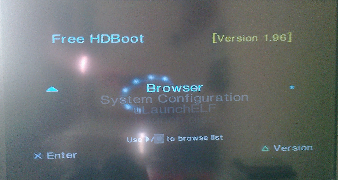
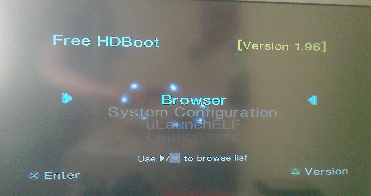
Huh? @jolek I didn't use winhiip to install HDDOSD, I used SUDC4 CD to install region patched HDDOSD v1.10. FHDB version from build [190413]FMCB-1966-bin and I installed HDDOSD because of these icons:
markers_FHDB.png


And honestly not everything, mostly FHDB doesn't load, hangs on dots before menu appears. I really need not modchipped unit.
 
Okay, but there is one thing that I cannot understand.
You want to test why FHDB is not working with your\others consoles, right?
So why the ... you constantly installing HDDOSD?
I can understand that these markers can be frustrating, but hell...
When something is not working, why you are adding "new problem"?

Anyway markers can be changed in Configurator.
Configure OSDSYS options...\Configure Scrolling Options.
From:
scroll_1.png

To
scroll_2.png


That is how these markers should looks like after these changes:
new_markers_FHDB.png


When something will be sorted out, why installing FHDB can cause troubles,
you can undo these changes and install HDDOSD.
It could be modchip, bad blocks on HDD, etc.
 
Last edited:
HDD checked in victoria and MHDD, no bad blocks, I know it's modchip, and why HDDOSD (that runs no matter what) can collide with FHDB? And your method to fix markers is infomplete. ;) Look at left-right markers in 'Use >/< to browse list'.
 
Last edited:
HDD checked in victoria and MHDD, no bad blocks

Thanks for confirmation.

I know it's modchip,

Currently you & your friend have the same problem.
You've modchip, your friend do not have it.
Both of you cannot boot console after installing FHDB.
In my setup everything is perfectly fine...
Hmm, We all have genuine NA without any (SATA) mods.
We all installed FHDB after formatting HDD in wLe (not WinHIIP)...

and why HDDOSD (that runs no matter what) can collide with FHDB?

IMO You're installing additional software that is working only with HDD.
It is not another shortcut in FHDB configurator.
Even FHDB after installing need some "resources", so why HDDOSD do not want any?

And your method to fix markers is infomplete. ;)
Look at left-right markers in 'Use >/< to browse list.

My bad I have forgot about:
Code:
OSDSYS_menu_bottom_delimiter = c0 r0.60 y+99Use o006/ o007 to browse list y-00 r0.00
 
Last edited:
FHDB is NOT 'Browser 2.0'...
It is NOT dependent on it...
It has support for it, just like for the ROM-OSDSYS...
 
You make it seem via various statements, that 'Browser 2.0'/HDD-OSD and FHDB are 'connected' regarding the issue (+ your modchip being the main-cause), whereas I am not yet sure if the modchip has a problem with either FHDB or 'Browser 2.0' or both.

What happens, if you have a 'clean' install of just either FHDB or the HDD-OSD?


Have you tried installing FHDB AFTER the HDD-OSD has been installed?
If you did it vice versa, the installed 'MBR' might not be appropriate for the rest of FHDB's installation (I suppose it doesn't boot it at all... so I think you did that already, but it is worth asking.).


On another note: The 'icon-issue' (even tho' easy fixable) only arises, because you use the HDD-OSD.
If it were not installed, FHDB would use the internal OSDSYS from ROM and it's font.


FHDB can still load apps from HDD, regardless of the HDD-OSD being installed or not.
You just can't use the updated font or the things which can be done via the HDD-Symbol in the 'inner Browser' ...
 
For my acquaintance FHDB didn't work (oddly games worked) because of smashed pin in NA, on other NA everything works great for him on all of his 3 ATA HDDs.
image0.jpg


I never mentioned FHDB and HDDOSD are related in any way but for me (and my friend) FHDB had glitched marks without HDDOSD installed in any way (nor even installed after format) so why? My friend sees no point of HDDOSD having FHDB that finally works for him after he found a reason why it didn't.

Yes, actually I have FHDB installed after HDDOSD installation. and it does boot just hang right after FHDB menu should appear.
 
I just ordered ps2 50004 without any modchips and warranty sticker on it so when I'll get it I'll swap HDD to it. ;) And because I do not solder at all...
 
You make it seem via various statements, that 'Browser 2.0'/HDD-OSD and FHDB are 'connected' regarding the issue (+ your modchip being the main-cause), whereas I am not yet sure if the modchip has a problem with either FHDB or 'Browser 2.0' or both.

I do not made any statements?
I only wanted to know what is going on and why Haker120 is constantly installing HDDOSD,
when he had a problem with FHDB...
There was some kind of a chaos in his posts, that is why I was confused...

So I suggested via PM to format HDD in wLe and only install FHDB (without HDDOSD).

Anyway, mystery is almost solved.
There is broken pin in one console, in other modchip may cause some problems with FHDB.
 
My friend told me with new NA (literally new) everything works for him just great. As for me, I have installed HDDOSD all the time because FHDB was showing odd markers and after all I prefer combo FHDB + HDDOSD, not manual editing from joypad. :D Aaaaaaand for now I'm using unit that correctly and fully allows me to disable modchip while I am waiting for not modchipped ps2 50004. :)
 
I had FHDB v1.966 and Browser 2.0/HDDOSD installed to my test HDD when I was messing around with HDL Game Installer.

If I boot with modchip enabled the console would freeze on the orbs.
If I boot with modchip disabled all is fine.

100% modchip problem.
 
I know, I have the same issue, just one of my 2 (I'm waiting for third not modchipped unit) can correctly disable modchip - Modbo750, other unit can't - Modbo2.0. What's your modchip @Tupakaveli? :)
 
I have a Modbo 5.0, I installed it for one single purpose which is now redundant so I'm just going to desolder VCC and GND because it's super annoying having to disable it every time lol.
 
Back
Top