
PS3 HAN HAN Toolbox (v0.3) - A very functional XMB MOD for PS3Xploit HAN (by Devil303 / Pink1)

Version 0.3 of HAN Toolbox has now been released by developer's @DeViL303 & @pink1 (whom also released PKG Linker recently as well) leaving the BETA tag behind and now this is considered the first STABLE release. HAN Toolbox is a XMB Modification for PS3Xploit HAN ( the unofficial companion) and provides some extra features like the XMB File Explorer to name one of several features, Checkout all the details provided by the developer;s for this XMB Mod for PS3Xploit HAN user's.

Untitl444ed.png


  • Here is the latest update to the HAN Toolbox - v0.3


    Thanks to Team PS3Xploit we have got lots more features at our disposal and we also added some of our own to the toolbox this time around.​

    New features in this version

    • Soft Reboot added
    • Hard Reboot added
    • Shutdown Added
    • File Explorer Added (browse and delete (unlink) files)
    • New auto running links for all Xploit options (no buttons to push)
    • Moved all Xploits except "HAN Enabler" into sub categories
    • Submenu added for DEX Firmware Xploits (NOT for Normal HAN users)
    • Original manual start Xploits still available under legacy menu
    • Built in Toolbox Updater (Update from the XMB in future)
    Features from v 0.1
    • HAN Installer
    • HAN Enabler
    • License Dumper
    • License Injector
    • Debug Package Enabler
    • Support Forum
    • Install Packages From Webserver (PKG Linker Required)

    Important Note:

    • It doesn't matter which order you do this in, but you should run HAN Installer again with freshly downloaded han support files to add support for Toolbox v0.3 either before or after installing the pkg, after installing the pkg you can go to Game Data Utility and delete the v0.2 data. If you don't do this things, v0.3 will not show, and you will still have 0.2 showing. Its ok if you have v0.2 and v0.3 showing at the same time, just delete v0.2 Game Data and reboot to clear it.

    We are now removing the "beta/poc/wip" tags for v0.3 of the Toolbox. Still lots of work to do before a v1.0 release though.

    Auto Running Xploits
    • Now the main HAN Enabler button will link up to the official page for the Auto running version of the Xploit, So its a quicker process. The original versions of the Xploits with webpages are still accessible through a subcategory along with Auto running versions of all. Also added is a File Explorer feature feature that allows the PS3 file system to be browsed to check if files exist, and you can also delete files of folder by pressing the triangle button and selecting Unlink/Unlink Folder, Use the delete function carefully and don't delete important files or else you might need to reinstall FW or format HDD.

    Future Toolbox Updates
    • Also you will no longer need to update HAN Toolbox via pkg anymore after installing this update, when the next updates comes out you will be update it fron the XMB just like a game.See the new setting item inside the HAN Toolbox.
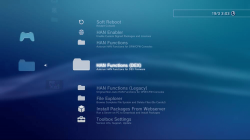
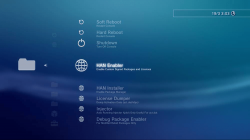
    Untitled11.png Untitled3333.png

    Package Linker
    • Since the last release we have also released PKG Linker v1.0 For Windows that serves as an all in one package server, Its going to become more important over the next while, So make sure to check that out too HERE.

    More updates to come soon from @pink1 and @DeViL303, we have not forgotten about Demo Downloader either. ;) Special thanks to @esc0rtd3w from Team PS3Xploit for his extra help with everything. Thanks to all the staff and devs at PSX-Place too.


Last edited:
Thanks, I love the tool and i would like it if u guys made a version of the file explorer that we could copy things to the usb and things from the usb to the ps3, that would help me(us) alot, cause the only other way ofw can mod the hdd0 is the ps3xport and it deletes the games and stuff after we do a backup. I would really appreciate that, thanks. The reason i ask this is cause i mod red dead on ofw as a hobby, its rpf and the game is mainly made of xml, the game is completely experimental. and tbh it is a pain in the ass cause i install my games and stuff on HAN then when i want to mod rdr i cant cause it removes all my games and stuff cause of ps3xport being the only way to mod the hdd0.
 
Last edited:
Sorry and if u dont mind me asking, whats the main issue with copying? Im sorry im one of those people who if they dont know it will always be in my mind. Try to get the people who made multiman and other file explorer devs to help u.
 
Sorry and if u dont mind me asking, whats the main issue with copying? Im sorry im one of those people who if they dont know it will always be in my mind.
Basically this is like a glitch that allows deleting, this unlink menu shows no where in official firmware normally, but a very small xml change can make it show, nobody knows what it is for or why its there.

The problem we have on HAN is that we cant run our own code on the XMB. We can only manipulate functions that are already there in the FW. On CFW with plugins you can do simple copy operations from the XMB, but its not like a file manager like people want, it requires hard coded lines for every copy operation with paths and file names written into the xmls.

So basically its just a tough one, with other file managers on CFW like multiman it was always probably much easier to do it in an app from a coding point of view.

Its very unlikely that we find a way to copy files from the XMB without being able to run our own code, and even then it probably wont happen as you can just use multiman then so there is no incentive to develop it.
 
Black screen issue

I installed my backup copy of NFS HP and NFS MW 2012 via HAN Pkg linker, but when I start the games, I get a black screen. I can still get the PS menu by pressing the button, and quit it, but it does not work , even after restart.

What gives ?
 
Black screen issue

I installed my backup copy of NFS HP and NFS MW 2012 via HAN Pkg linker, but when I start the games, I get a black screen. I can still get the PS menu by pressing the button, and quit it, but it does not work , even after restart.

What gives ?
This will not fix broken packages.
 
Okay, so after following your advice, I downloaded the PSN version (official) and also got a rap file.

Even then, these 2 games fail to work.

What gives?
This will not fix your packages. Its not meant to fix your packages. We never claimed it would fix your packages.
 
This will not fix your packages. Its not meant to fix your packages. We never claimed it would fix your packages.

For F%$# sake mate, I said they are official packages from the fucking store. And they are not damaged. I have downloaded them twice.

I have however read through the internet thoroughly and came to the conclusion that the problem is with the game trying to sync trophies and when it fails to do so, it just goes to infinite loop.

So, can anybody here tell me a workaround for this bug. Took me a week to narrow down the bug. Any help would be great.
 
For F%$# sake mate, I said they are official packages from the fucking store. And they are not damaged. I have downloaded them twice.

I have however read through the internet thoroughly and came to the conclusion that the problem is with the game trying to sync trophies and when it fails to do so, it just goes to infinite loop.

So, can anybody here tell me a workaround for this bug. Took me a week to narrow down the bug. Any help would be great.
Well this did not damage your packages did it? I can install official packages no problem I don't even need HAN Toolbox for that or HAN even, so how come you have managed to break official packages, I don't know how that is even possible..

This will not fix trophy errors.
 
Well this did not damage your packages did it? I can install official packages no problem I don't even need HAN Toolbox for that or HAN even, so how come you have managed to break official packages, I don't know how that is even possible..

This will not fix trophy errors.

Installation is not the issue. It installs fine. It just cant do a firat run, it seems.

I will get the update pkg and see if the update fixes the black screen issue.
 
Hi, i followed all steps, i even installed some small pkg games but when i tried to install han toolbox it says installation complete but no folder han toolbox showed up.
I used v0.3/0.4 and 0.5 same thing.
Help please.
 
Hi, i followed all steps, i even installed some small pkg games but when i tried to install han toolbox it says installation complete but no folder han toolbox showed up.
I used v0.3/0.4 and 0.5 same thing.
Help please.
What fw are you on? HAN Toolbox is only for ofw with the latest HAN support files installed. It will also work on Rebug 4.82.2.
 

Featured content

Trending content

Back
Top


