PS3 [IDEA] Enabling Individual Gameboots for each emulator/system/homebrew

webMAN checks that the rco is larger than 300KB to prevent potential freeze due missing animations in early versions of the RCO.
It will not show the gameboots if you're still using one of the early versions of the RCO that are 50KB~60kB.

Download the latest build of webMAN and the Multi Gameboot MOD 1.10

I just deleted tmp, xmlhost and xmbplus folder, installed rebug fw again and installed the webman from the previous post.

I recorded some videos to prove it.

Video 1- Placing the files on flash and HDD0
*The video was interrupted so i recorded it again, that's why it already had the custom render.rco


Video 2 - Rebooting the console after video 1 and trying to boot up games.
 
Last edited:
@aldostools @DeViL303

I think i know the cause of it, maybe its cobra related?

I just realized that i was running a custom REBUG 4.84 with Cobra v5.2 when it was working, but after a softbrick due to a incomplete ftp transfer i installed the oficial one Rebug 4.84 with Cobra 5.1 that i had in my USB drive. Since after switching to the original one the gameboot logos stopped to gets remapped.
 
Last edited:
Also, Why do you get a "sLaunch mod" pop up and no wMM pop up. Is that just a mode change?

If you do not sort it, try remove any auto exec/ boot.ini stuff too. Maybe you have used up all your remaps or something, only so many are allowed at once.

And obviously using custom Rebug and cobra is just complicating matters, I thought you were using standard CFW. I am on Evilnat 4.87.2 here mostly.
 
The sMAN pop-up is due to my boot_plugins.txt i have its path in there, because i added it to the plugin manager to easily disable it without needing to go to webman settings (it renames the sman to .back, so even webman can't load it back and the user can disable webman and have sman itself).

The webman pop-up is disabled in it's settings, and i already deleted all my custom stuff before this tests, so no auto exec and boot.init.txt
 
Also, Why do you get a "sLaunch mod" pop up and no wMM pop up. Is that just a mode change?

And obviously using custom Rebug and cobra is just complicating matters, I thought you were using standard CFW. I am on Evilnat 4.87.2 here mostly.

But in this case it is not working on Standard CFW and workin in the Custom one :P


@DeViL303 i installed Evilnat 4.87.2 and the same thing, but after a 2 reboot it is working LOL

I will go back to REBUG 4.84 to see if it still don't work

EDIT:
I went back to Official Rebug 4.84 and stopped to work again.

The only thing that i can think is that it needs at least cobra v8.2 otherwise it won't work.
 
Last edited:
The sprx that references the animation and sound names is the custom_render_plugin.sprx, this is what we are patching in RAM to change the animation and sound, but the game_ext_plugin.sprx also needs to be patched to enable the sound. Not exactly sure of how these 2 sprx files interact with each other TBH.

The game_ext_plugin.sprx patch enables the sound and also makes the custom_render_plugin.sprx use anim_gameboot instead of anim_otherboot.

No CFW has the game_ext_plugin.sprx patched by default afaik, it normally has to be applied by the user manually.
 
The game_ext_plugin.sprx patch enables the sound and also makes the custom_render_plugin.sprx use anim_gameboot instead of anim_otherboot.
Ok, i was aware of the patch but i didnt knew it was "forcing" the firmware into loading anim_gameboot instead of anim_otherboot
Btw, that patch was published by @mysis and as far i remember from the talks of that days he had other alternative patches that was intended to enable gameboot too, and at some point he decided that "the best one" is the patch published in wiki
Im mentioning this because there could be other alternative ways to do it

But my question is mostly related with who is applying that patch ?... as far i know is not an standard patch applyed statically to all CFW's... so i guess is applyed dinamically by webman ? (or cobra ?)

Incase is applyed by webman... at which point is applyed ?... and is something that happens when webman is loaded for first time (at the PS3 boot), or has been implemented some days ago in relationship with your gameboot mods discussed in this thread ?
 
In this mod from this thread, we are including a patched game_ext_plugin.sprx in the dev_hdd0/tmp/gameboot/ folder, If this file exists on hdd, it is remapped by webMAN MOD during start up and this enables the audio.

I have also tested applying this patch in RAM, and that works too. See here. https://www.psx-place.com/threads/i...ator-system-homebrew.33052/page-2#post-282751

But aldostools decided to go with the patched file remap instead, its all the one really.
 
Im reading your post again https://www.psx-place.com/threads/i...ator-system-homebrew.33052/page-2#post-282751
... Without this patch the logo will show up, but it will not have the animation like shown in my video, it will just be a static logo with no fade or zoom effects.
Here (without the sprx patch) it was loading anim_otherboot, right ?

EDIT: I can confirm that DVD and BD gameboot can be replaced using the same method. The only difference is that the patch to anim_gameboot needs to be applied to anim_otherboot instead. It's in the same area of RAM, just a few bytes down.
And here are you talking about the patches applyed to the rco dinamically in RAM ?
 
Here (without the sprx patch) it was loading anim_otherboot, right ?
Yes, but as the page for the gameboot in the rco has an image included (and its name patched in RAM) it just shows up as a static image when its not controlled by the animation script.

So normally there is no image in the OFW gameboot, as the anim_otherboot has this line making it transparent:
Code:
<Fade object="object:ps3logo" time="0" accelMode="0x0" colorScaleA="0" />

However the patch we are applying to custom_render_plugin,sprx in RAM changes the name of the image object, and also its page name, so without the game_ext_plugin.sprx patch applied, it is loading anim_otherboot but with xxx__gameboot page, and xxxlogo object, for example ps1__gameboot page, and ps1logo object. So this means without the game_ext_plugin.sprx patch we just get a static image that is always visible as the default anim_otherboot animation script does not include any lines affecting that object.

And here are you talking about the patches applyed to the rco dinamically in RAM ?
Yep, the DVD and BD always call on anim_otherboot, even when the game_ext_plugin.sprx is patched. So the custom_render_plugin.sprx RAM patch for those 2 needs to be applied in a different place.

EDIT: This "issue" is now fixed in the very latest version of webMAN MODs RAM patch, as now it patches both animation script names in the custom_render_plugin.sprx, so now even without the game_ext_plugin.sprx patch, it always shows the animation properly.
 
Last edited:
I think this project is really interesting and important from a research point of view, as it opens up a whole new level of abilites when it comes to rcos/qrcs. Being able to dynamically call different rco pages, planes, text and images can be really powerful IMO.

For example, we could use this same RAM patching method to add whole new override folders to lines.qrc. So we could make complex animations using completely new sets of MNU presets that to not exist in OFW normally. That is just the tip of the iceberg though. This allows for unlimited rco entries to be added and called up depending on circumstances.

Another example, not a very good example but just to give an idea of what we could do, the system information page could have multiple extra text entries included, Lets say one that says "Cobra enabled", another that says "Cobra Disabled". Then based on cobras status it could show the correct information dynamically.
 
Last edited:
@aldostools I wanted to try some more experimental patches

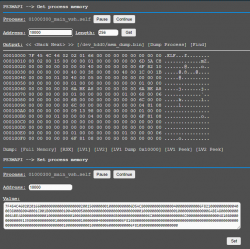
The issue I have is that I need to patch a completely different area, this section only seems to allow me to work on a specific area or maybe I do not fully understand it.

upload_2021-3-4_18-1-37.png


Is there a way to patch other areas on this screen?

Ideally if possible I could see and patch any area in the full 256MB of RAM using the same offsets as I can see in a full RAM dump when viewed on PC in a HEX editor.
 
@DeViL303 Maybe you're aware of this: In Ultimate Toolbox the option that disables the blur effect disables removes the game boots.
BTW The next update to Ultimate Toolbox has this issue fixed. I applied the patch in the sprx instead of the rco. This has the disadvantage that it will not work on HEN, but the advantage that the blur patch is now compatible with these custom gameboot animations.
 
@aldostools I wanted to try some more experimental patches

The issue I have is that I need to patch a completely different area, this section only seems to allow me to work on a specific area or maybe I do not fully understand it.

View attachment 31917

Is there a way to patch other areas on this screen?

Ideally if possible I could see and patch any area in the full 256MB of RAM using the same offsets as I can see in a full RAM dump when viewed on PC in a HEX editor.

There are various debuggers in webMAN MOD:
1- /getmem.ps3mapi shows the memory relative to a process (VSH or current game/application)
2- /peek.lv2?<address> shows the memory relative LV2 area
3- /peek.lv1?<address> shows the memory relative LV1 area (basically full RAM)
4- /poke.lv2?<address>=<hex or text value> sets a value in the specified memory address relative LV2 area
5- /poke.lv1?<address>=<hex or text value> sets a value in the specified memory address relative LV1 area
6- /find.lv2?<start-address>=<hex or text value> finds a value in LV2 starting from the address indicated
7- /find.lv1?<start-address>=<hex or text value> find a value in LV1 starting from the address indicated
8- /hexview.ps3<path> shows a file (e.g. a mem dump, EBOOT.BIN, text file in binary mode, etc.)

Today I added a find option to /hexview.ps3 so you can make a full RAM dump, then use the find option in /hexview.ps3 to find a text or binary code.

The /getmem.ps3mapi has more find options than the others.

The most basic are /find.lv1 and /find.lv2 that are the older features.

All the viewers let you browse the memory using LEFT/RIGHT keys on the PC.

NOTE: /peek.lv1 allows to peek virtual memory address (memory area above 0x10000000 = 256MB). However some peek/poke may cause a panic in hypervisor and need a hard reboot pressing the power button for 15 seconds.

NOTE2: The searches now support wild card bytes like /***_home/***_GAME or 0xAA22**44****77

 
Last edited:
Nice one.

I'm having a little bit of trouble figuring this out though. Can I do the equivalent of what I was doing before to any location in RAM?

I mean using this type of window like I was using for patching custom_render_plugin.sprx? Maybe this already possible. I am just having trouble finding things that I can see in HEX when I look through a full dump on PC, and then when I can find them I'm not sure how to apply a patch. I guess I need to use the URL box to apply patches.

upload_2021-3-5_0-58-10.png


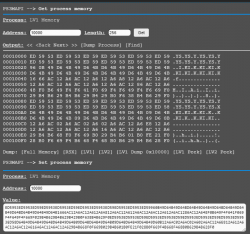
I wonder would it be possible to have an option on this drop down menu for full lv1, then I could press "Get", then "dump", then "find", then use the window like above with the "Set" button to apply patches? Or I wonder what is this drop down menu for when it only seems to have one option. Sorry for all the noob questions.

upload_2021-3-5_1-1-48.png
 
Here is v1.11 of the Multi Gameboot Mod.

I think I must have repacked the sprx in v1.10 and forgot to resign with 3.55 keys, so ended up breaking HEN compatibility again. :oops: Maintaining compatibility with something I do not use is difficult.
This has no other changes, so any CFW users on v1.10 do not need to update.

EDIT: Updated to v1.12 now as there was another issue with bluray and DVD gameboots, now solved too. Thanks @aldostools for the report.
 

Attachments

Last edited:
Nice one.

I'm having a little bit of trouble figuring this out though. Can I do the equivalent of what I was doing before to any location in RAM?

I mean using this type of window like I was using for patching custom_render_plugin.sprx? Maybe this already possible. I am just having trouble finding things that I can see in HEX when I look through a full dump on PC, and then when I can find them I'm not sure how to apply a patch. I guess I need to use the URL box to apply patches.

I wonder would it be possible to have an option on this drop down menu for full lv1, then I could press "Get", then "dump", then "find", then use the window like above with the "Set" button to apply patches? Or I wonder what is this drop down menu for when it only seems to have one option. Sorry for all the noob questions.

I've implemented the LV1 in the drop down as you requested... Just be aware that some LV1 memory addresses when accessed will shutdown the console completely in an ugly way. Probably the Hypervisor entering in panic mode or Cobra getting confused due the payload uses the syscall for peek_lv1.

BTW All these functions can be done too through /peek.lv1, /poke.lv1, /find.lv1.

EDIT: Added also LV2 to the drop down menu.

** Download the lastest build from github, brewology or using the built-in update.
 

Attachments

  • upload_2021-3-4_22-57-7.png
    upload_2021-3-4_22-57-7.png
    68.5 KB · Views: 127
Last edited:
I've implemented the LV1 in the drop down as you requested... Just be aware that some LV1 memory addresses when accessed will shutdown the console completely in an ugly way. Probably the Hypervisor entering in panic mode or Cobra getting confused due the payload uses the syscall for peek_lv1.

View attachment 31926

BTW All these functions can be done too through /peek.lv1, /poke.lv1, /find.lv1.
Awesome stuff.

@aldostools @DeViL303

I think i know the cause of it, maybe its cobra related?

I just realized that i was running a custom REBUG 4.84 with Cobra v5.2 when it was working, but after a softbrick due to a incomplete ftp transfer i installed the oficial one Rebug 4.84 with Cobra 5.1 that i had in my USB drive. Since after switching to the original one the gameboot logos stopped to gets remapped.

I will do some tests on 4.84.2 Rebug when I get a chance. I think it should work, nothing really special here that requires the latest Cobra afaik.
 
Last edited:
Ok you are right @LuanTeles It seems that only the sound remaps are working on Rebug 4.84.2 REX.

@aldostools My guess is that the memory is laid out a little differently on REX/DREX and maybe the area that wMM searches for this string needs to be a little larger to account for this. I'm not exactly sure how you implemented it on your end but that is my guess.

Here is where it showed up for me in a full ram dump, this is a good bit further down than on CEX CFW.


upload_2021-3-6_19-59-54.png
 
Back
Top