ManaGunZ

PS3 ManaGunZ - PS3 Backup Manager by Zar v1.41

[MENTION=34]Zar[/MENTION] I noticed an odd behavior while in Flow mode, if you select the theme to None and press X, the graphics get messed. BTW You've done a great job with this manager.

 
[MENTION=34]Zar[/MENTION] first of all ..good job and thx for awesome and simple backup manager
currently my slim ps3 using habib 4.70 1.01 cobra ,I have 1 problem if I played the game from external disk that have a split big data example like Gran Turismo 6 [BCES-01893]
(I have fat32 2tb seagate desktop full old backup game) I used MMCM it before so already install in internal cache
now whenener I load the Gran Turismo 6 [BCES-01893] from ManaGunZ
with this setting
Payload: multiMAN
Ext. Game Data: no
Emulation : none

when u played the game it loading but stuck and hang must turn off ps3 manually it happened frequent..sometime it load work and it can be play..strange..like if u load the game five time it can give u 3 time failed 2 time work ..anyway it only happened with the game with split big data..the other game work perfect because I used cobra payload..gran turismo 6 if I used cobra payload only blanck screen...

I dont know why..so at the moment I always used MMCm to load game that have already split big data .6666

anyway thx for tools..realy apreciate it
 
Last edited:
splitted file 666 aren't supported at all, the best way to play this kind of game (i mean with big files) with a fat32 is to convert ur game to splitted iso.

I'll add a suuport to 666 later... i'll try support them without joinning files...
 
[MENTION=5333]nijhawank[/MENTION]
sha-1 is already included so it will be easy for me to add it in file properties and i'll do it.
But to do it for all files inside a folders this will be complicated to display everything (some games have more than 10K files) and the memory is limited. Let me some time to think how I can do it....

Perhaps, It will be better for both of us to do an option : "Force Copy". It will check both sha1 (source and destination) and then if it's different it will overwrite the file. What do you think ?


[MENTION=3729]chevalierxx[/MENTION] it's already in the todo list. I just don't know when i'll do it.
The record in number of files inside a PS3 game as far i know belongs to "Arcania. The complete tale" with more than 250.000 files (yes, the number is not a typo)
Is not only the number of files, the total size of the game is also a reason of why calculating the hashes for all files in PS3 is not efficient, it can take hours, but well... it can be done and is usefull to check the integrity of a game backup

Personally, if you are going to add something like that, i suggest to use the IRD files from 3k3y ODE ---> http://www.3k3y.com/ird_files/ (official database, is offline now) and ---> Index of /3k3y_ird_files (from a guy that keeps a backup of IRD files from 3k3y database)
The point is they have a largue database of IRD from most of PS3 games, and these IRD files contains all the hashes from all the files of a specifc game, so his purpose is exactly what you guys are talking about

The bad things.... is IRD files uses some kind of encryption (im not sure if is documented or if needs some reversing).... and the hashes inside them are MD5
 
Last edited:
splitted file 666 aren't supported at all, the best way to play this kind of game (i mean with big files) with a fat32 is to convert ur game to splitted iso.

I'll add a suuport to 666 later... i'll try support them without joinning files...

Is there any modification with 666 files? IE: If a file is split into two 666 files, and I did a binary copy output to a single file, would it be the same file? :)
I'm actually ignorant on split files IE: HOW they are split/joined. :)
 
[MENTION=872]sandungas[/MENTION]
Perhaps, we can try to feed this section : ODE - PS3 Developer wiki

They are not encrypted but compressed (magic is 0x1F8B0800). So, you just have too change extention to "zip" et extract the file with winrar for exemple.

Once is uncompressed, the file is build like this :

u32 Magic = 0x33495244 // Magic
u8 size_TILTLE_ID ;
char *TITLE_ID;
u8 size_TITLE;
char *TITLTE;
char PS3_SYS[4]; // X.XX
char VERS[5]; // XX.XX
char APP_VERS[5]; //XX.XX

//// DATA, used to build the iso

u32 zip1_size; // reversed byte, endian
u8 *zip1; // ISO header

u32 zip2_size; //reversed byte, endian
u8 *zip2; // ISO header

// UNK

u8 UNK[35];

// MD5 table

u64 sector_file_1 ; //endian
u64 md5_file_1[2] ;
...
...

// UNK

...


I don't know yet if i'm going to support ird with ManaGunZ.
 
[MENTION=872]sandungas[/MENTION]
Perhaps, we can try to feed this section : ODE - PS3 Developer wiki

They are not encrypted but compressed (magic is 0x1F8B0800). So, you just have too change extention to "zip" et extract the file with winrar for exemple.

Once is uncompressed, the file is build like this :


I don't know yet if i'm going to support ird with ManaGunZ.
The support is for the .ird format... what to do with the hashes inside them is a different question that can have several purposes

As example... to help solve the problem [MENTION=5333]nijhawank[/MENTION] was talking about (a posible corruption of game files caused by PS3 crashes or freezes) is needed to check all the game files
But for the copy/move operations of one of the files in the game to other device is posible to use the hash in the ird for verification purposes (only is needed to calculate the hash of the target file and compare with the .ird)

And there is another use i can imagine... To identify the posible "fixed" game files... (eboot.bin .self's .sprx's)
Backup managers could have modifyed this files automatically when the user was in an old cfw, or maybe they applyed the fix in PC and they forgot, etc...
 
Last edited:
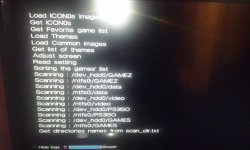
OK just now really testing since the initial v1.00 which worked fine. Now this build just shows the bullet going across the screen with the Hide Logs and Boost but I can't get it to progress past this screen. When I press select it shows a bunch of options.
 

Attachments

  • 1429581053963-1370014594.jpg
    1429581053963-1370014594.jpg
    1 MB · Views: 1,766
OK just now really testing since the initial v1.00 which worked fine. Now this build just shows the bullet going across the screen with the Hide Logs and Boost but I can't get it to progress past this screen. When I press select it shows a bunch of options.

Which USB port is your external HDD plugged into
 
Don't use an external HDD but I have one that has video on it I sometime use but it always the one closest to the BD reader.
 
[MENTION=7]atreyu187[/MENTION] [MENTION=123]boxbundy[/MENTION]
plz,
Can you try to uninstall and reinstall the homebrew ?
Can you tell me what are the folder&file inside your device & hdd0 (inside scanned folders) ?
Can you tell me if it's working without the usb device ?
Can you try a debug version with more detailed log to figure out exactly what's going on ? (if yes, i'll give you the link in PM)

thanks again.
 
No HDD plugged in still get this error and only folder I have games in is hdd0:/PS3ISO but ill try a reinstall tonight when I'm home and sure ill try anything to help out any dev.
 
[MENTION=872]sandungas[/MENTION]

Hi, I would like to know if you know how to "extract" the file tree from the ISO header.
Because in the IRD, there is the "ISO Header" and a table of "MD5's + Sector offset of the file (inside the ISO)"

So, I need to get the path of the file from the sector. Do you have any idea how I can do it ?

It's look like the MD5 tree is the same as the File tree from the iso header but i'm not sure even if it's not realy important because i can match sectors...

I don't know if i'm understandable :s
 
Last edited:
[MENTION=872]sandungas[/MENTION]

Hi, I would like to know if you know how to "extract" the file tree from the ISO header.
Because in the IRD, there is the "ISO Header" and a table of "MD5's + Sector offset of the file (inside the ISO)"

So, I need to get the path of the file from the sector. Do you have any idea how I can do it ?

It's look like the MD5 tree is the same as the File tree from the iso header but i'm not sure even if it's not realy important because i can match sectors...

I don't know if i'm understandable :s

Still no go after reinstall. Anyone able to give me a hash of the pkg? I have downloaded the file again just to be sure. Also would still try your debug variant as well if you wish.

Also you can use ISObuster to gain the file tree of the ISO. I used to do this for hacking my Dreamcast games to keep the original sort order of the GDI I dumped for optimal playback when ripping a game from the 1.1gb GD-ROM to a 700/800/870/900mb CDR. Just open with ISOBuster and right click it will export the file tree to a txt file. Not sure if this is what you want.
 
Last edited:
[MENTION=34]Zar[/MENTION] i think you are talking about toc (table of content) but im not sure what kind of extraction you mean. Toc have that "file tree. You looking for Toc offset or similiar? Or you know where data is but don't know how to read this data?
 
[MENTION=7]atreyu187[/MENTION] [MENTION=118]kozarovv[/MENTION]
I wanted to have all the path of files inside the ISO but finally I will just use the function "extract_ISO" from iris and i'll mod it to do what I want

atreyu187 Thanks, I'll send you the debug version in PM.
 
[MENTION=7]atreyu187[/MENTION] [MENTION=118]kozarovv[/MENTION]
I wanted to have all the path of files inside the ISO but finally I will just use the function "extract_ISO" from iris and i'll mod it to do what I want

atreyu187 Thanks, I'll send you the debug version in PM.

ISOBuster will give you all paths, subdirectory and files. Some of the games I have done have thousands of files but only one or two main folders. Not a PS3 app but I'll text it out on a PS3 ISO. One may need to use ISOFix first.
 
yeah, i know but i wanted it in open source in C or C++ to include it in ManaGunZ but now i have it, I was just too tired/lazy yesterday...

I sent you the link, you'll just have to send me a screenshot of the log then i'll be able to know what is causing this issues
 
Back
Top