
There has been a PS4 developer's known as Znullptr who has ported several emulators to the PS4 (jailbroken) already with systems like the Sega Saturn, Dreamcast & PS1 to name a few of the ps4 homebrew ports present on the GameOS side of the console (ps4). We know already that emulation via PS4 Linux is capable of running many more emulators like RetroArch (Linux) for example, but lets be honest ps4linux can be a bit of process to get up and running when you power on your console for some quick convient play. So when we see new things on the PS4's main menu that is exciting to see, when its in regards to emulation especially.
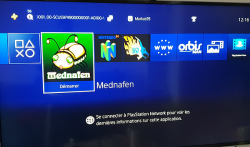
This time around the dev decided to port a popular multi-system emulator, no not RetroArch but Mednafen, originally the port was released some weeks ago by port developer Znullptr and presented to us by Markus95 and since @Markus95 has seen presented some improvements with regards to the cfg file that has fixed several broken platforms (Virtual Boy, WonderSwan & WonderSwan Color) due to the control scheme that was not compatible with the DualShock 4 layout, with a re-configured "mednafen.cfg" file those issue are eliminated. There has been 4 player support added also and a few new tweaks Markus95 plans on addressing via future tweaks of the cfg file.

This time around the dev decided to port a popular multi-system emulator, no not RetroArch but Mednafen, originally the port was released some weeks ago by port developer Znullptr and presented to us by Markus95 and since @Markus95 has seen presented some improvements with regards to the cfg file that has fixed several broken platforms (Virtual Boy, WonderSwan & WonderSwan Color) due to the control scheme that was not compatible with the DualShock 4 layout, with a re-configured "mednafen.cfg" file those issue are eliminated. There has been 4 player support added also and a few new tweaks Markus95 plans on addressing via future tweaks of the cfg file.
-
Mednafen v0.3 (PS4 Port)
Changelog v0.3:
- Addition of the Virtual Boy (button A = L1 and button B = R1)
- Added the Wonderswam and Wonderswam color emulators
- 3/4 players available
- Addition of rapid-fire
- 2 players available for all home consoles
- Functional L2, R2, L3 and R3 keys for Playstation emulation
- Functional X, Y and Z keys for Megadrive emulation (L1 = X _ Triangle = Y _ R1 = Z)
- Added button select (L2) and inversion buttons A and B for Nes emulation
Emulators that are working full speed:
(Also Full Screen Support/ Scanline Support)
- Nintendo NES/Famicom,
- Sega Master System,
- Sega Genesis / Megadrive ,
- Super Nintendo /Famicom,
- NEC PC Engine/ TurboGrafX-1
- NEC PC Engine FX.
- Following does not support full screen (full screen maybe possible to adjust it in the .cfg file, but I personally preferred to simply enlarge the image because the full screen sting your eyes ... -( via Markus95 @logic-sunrise)
- Nintendo Gameboy
- Nintendo Gameboy Color
- Sega Game Gear
- SNK Neo Geo
- Atari Lynx
- Bandai WonderSwan / Color
- Nintendo VirtualBoy
Emulator with issues:
- PlayStation 1: Some games are playable and some are not, also there is differences if you have a PS4 PRO or Slim models more info on PS1 can be seen in the PS1 Tab of this post.
- Saturn: is not working at all
-
PS1 emulation. (via @Markus95 @ logic-sunrise (translated))
- There are some points to clarify, before all the full screen is only oddly possible on some games, and made a black screen on others, so I had to find the right setting of screen to run ALL games without black screen.
- Another important point, the fullspeed is only effective on PS4 Pro , indeed on Slim and Fat, the games are playable but jerk a little, as well as the sound. (Comparison of the 2 videos below to see the difference)
- Last info, you must have a .cue of your .iso, .img or .bin to launch your game, you create them yourself.
PlayStation 1 Emulation Comparison on PS4 FAT/SLIM and PRO models
PS4 FAT/ SLIM
PS4 PRO
-
- PS4 Pro (only) Mednafen works on Pro BUT only in 1080p or less .
- Kernel Panic - Unfortunately the concern of KP is always present, more rare than with the .self version but always there. Once on average 10 when you leave the emulator you will have this famous KP (Kernel Panic). (via @Markus95 )
-
Assuming you have a jailbroken console on 5.05 firmware (or 5.07 for some regions)
- Install the fpkg (via pkg installation in debug settings of your exploited PS4)
- Copy the Mednafen Folder to the root of a USB storage device from the download.
- Transfer roms (via USB or FTP) to "data/....". folder of your PS4 internal drive (they can be group in console folders if you like from there).
- Some platforms will need BIOS files (don't ask here), they are placed on your USB storage device in the Mednafen folder then from there "firmware/...."
- Now to install the update. (note v0.3)
- To install this new update, download (v0.3 update) unzip the archive and copy the mednafen.cfg file to your USB key in the mednafen / ... folder.
-
Useful Links
- https://mednafen.github.io/ (Learn more about the Mednafen project and usage of emulators) (Main project site, not PS4 sperfic)
- Znullptr (Port Developer), https://www.patreon.com/znullptr
Download:
- PKG Download: Mednafen (PS4 Port) - (version 0.1 - apply update below see installation tab)
- Update file v0.3 (cfg): Mednafen v0.3 (PS4 Update cfg file )
Source: logic-sunrise.com
Last edited:







