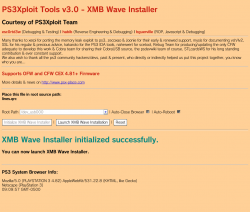
PS3 HAN PS3Xploit v3 HAN/HFW XMB Waves Installer [lines.qrc]

Now Supports 4.88 HFW!
HAN from PS3Xploit v3.0 is evolving and showing some of the possibilities as developer's and the PS3Xploit team continue the progression of this hack for PS3 3/4k models (non-cfw compatible). Recently we seen the PS3Xploit team release the Coldboot Installer (aka boot logo) . The team/devs are not stopping with only that release but a start of many tools that can transfer your XMB. Now the team has just released a new XMB Wave Installer, now we can use custom XMB waves on those ps3 models. The coldboot Installer and now the XMB Wave installer is not all.. esc0rtd3w one of the members of Team Ps3Xploit has already announced RCO Replacer / Image Font Replacer and also the "What's New @PSX-Place" XMB mod will be coming to follow in the near future as well.​
-STLcardsWS​

PS3Xploit Custom Wave.png
(Above image contains a Custom Wave and a Custom ColdBoot Image)​


  • My5XCB5.png
    SUPPORTS OFW, HFW, and CFW

    HAN "DOES NOT" Need Enabled For This!

    UPDATE (2019-08-31): ALL HAN TOOLS HAVE BEEN UPDATED TO SUPPORT 4.85 CEX!
    UPDATE (2019-03-23): ALL HAN TOOLS HAVE BEEN UPDATED TO SUPPORT 4.84 CEX/DEX!
    UPDATE (2018-04-11): ALL HAN TOOLS HAVE BEEN UPDATED TO SUPPORT 4.82 DEX!


    How To Use:
    • 4.82 OFW: Download XMB Wave Installer ZIP archive
    • 4.84/4.85 HFW: Download XMB Wave Installer ZIP archive
    • Extract the files
    • Place lines.qrc on USB flash drive or select one of the internal HDD options**
    • 4.82 OFW: Navigate to this link or use local files above and a webserver
    • 4.84/4.85 HFW: Navigate to this link or use local files above and a webserver
    • Run the exploit from page and allow console to reboot fully
    • Done! Enjoy your new XMB Wave :D

    ** You can also create a package that holds resources or files to copy using Extra Tools and use this instead of USB as source. Default directories are /dev_hdd0/game/PS3XPLOIT/extras/ and /dev_hdd0/game/HANTOOLBX/files/


    For custom files, simply replace with valid files/proper names and they should work!


Hosted on official site: **ps3xploit.com >Domain no Longer owned by team** (ps3xploit.me =new) (v3 HAN Tools -> Extra Tools -> XMB Wave Installer)
Source Code: github.com/PS3Xploit/xmb-wave-installer

Official Forum: psx-place.com/forums/PS3Xploit/
 
Last edited:
ah, a restore folder. I was thinking that the file was ftp'd to the console. shows how much I know about han. :-p
The han exploit basicly injects the files to the same place you ftp it with cfw.Han injection works on cfw too,except for the han installer which is obviously pointless on cfw anyway,but the other injection tools come in handy if you ftp somthing to the system and soft brick it to launch games which would mean you get locked out of rebug toolbox
 
The han exploit basicly injects the files to the same place you ftp it with cfw.Han injection works on cfw too,except for the han installer which is obviously pointless on cfw anyway,but the other injection tools come in handy if you ftp somthing to the system and soft brick it to launch games which would mean you get locked out of rebug toolbox

I actually use installable zips. I've installed to the wrong place before due to a typo, mostly by misspelling resource, though. ;)
 
are you trying to put the original wave back on the system? I have no idea what the problem might be. I can tell you about waves, but I don't know anything about the installer itself. I've been on cfw, so I have no experience with han. my guess is that the location is mounted. you didn't mount a folder, did you? 'cause I know with something like multiman, you can mount a nonexistent location with an install .zip. there's no check that you're mounting there. maybe this installer suffers from the same problem? do you have the name correct and you're not mounting a folder, right? with multiman, it doesn't ask for confirmation about replacing files either. it will just replace them, so if you had the name wrong here or were trying to mount a folder, the same may be true here.
Yea im trying to put it to default and try installing another one...
But... i just installed a new one, then i tryed installing a dark red one and it still is the new one i got about 5 min ago idk
 
Yea im trying to put it to default and try installing another one...
But... i just installed a new one, then i tryed installing a dark red one and it still is the new one i got about 5 min ago idk
Weird, maybe is not writing ?

Btw, have you tryed to change the theme settings in XMB ?... test the different options, from there you can choose the wave style
 
Yea im trying to put it to default and try installing another one...
But... i just installed a new one, then i tryed installing a dark red one and it still is the new one i got about 5 min ago idk

weird. might want to try what @sandungas suggested. those background colors in the theme section are a part of the lines.qrc as well. though, I'm thinking that the one you're trying to use has black backgrounds.

technically speaking, the system doesn't have to be restarted with a custom wave. all that needs to happen is opening up an app, then closing it to refresh the system's memory. it's probably easier to do this by restarting the system though.
 
So does this mean that I can grab any custom lines.qrc file and install it to my SuperSlim without any hex editing or similar? Is this safe or theres a chance of bricking my console? Thanks in advance for the answers!
 
So does this mean that I can grab any custom lines.qrc file and install it to my SuperSlim without any hex editing or similar? Is this safe or theres a chance of bricking my console? Thanks in advance for the answers!

no hex editing. it should work. unlike the coldboot, if something is wrong with the lines.qrc, it will soft brick. if that happens, all you have to do is reinstall the current firmware. the hdd will remain untouched.
 
no hex editing. it should work. unlike the coldboot, if something is wrong with the lines.qrc, it will soft brick. if that happens, all you have to do is reinstall the current firmware. the hdd will remain untouched.
Maybe this question doesn't belong to this thread but how to I reinstall the firmware in the case of a soft brick? Is it via the recovery menu and the PS3UPDAT.PUP or it involves using tools such as the E3 Flasher?
 
Maybe this question doesn't belong to this thread but how to I reinstall the firmware in the case of a soft brick? Is it via the recovery menu and the PS3UPDAT.PUP or it involves using tools such as the E3 Flasher?

recovery menu. iirc, a corrupted wave will cause the xmb to freeze.
 
I got a CFW PS3 on 4.84 Rebug Rex and just want the black Wave color back no other waves just the old black finished color sheme. is there a way to add mor colors ?
 
I got a CFW PS3 on 4.84 Rebug Rex and just want the black Wave color back no other waves just the old black finished color sheme. is there a way to add mor colors ?
If you modify the lines.qrc,you can recreate the original Noir colour scheme for the XMB, i am not sure if can replace just one colour in the script.

After that replace your original lines.qrc with the modified version and reboot your console.

Be careful when fiddling with dev_flash files, one wrong move and you'll guarantee yourself a Soft-Brick, or even much worse a Hard-Brick, but with the lines its mostly Soft-Brick,nothing a firmware reinstall shouldn't resolve,keep in mind if you are going to create one.

Sent from my G8141 using Tapatalk
 
Back
Top