1. not sure yet, but not really, i am up to over 10MB now im my test qrc.
2. yes
3. yes. well kind of, if you load a flat full 360 map of mars into the online cubemap generator is is perfect as far as i can see. no pinch effect at poles.
4. i think jpg only, changing file extentions has not been tried and not sure how many places we would need to change it..
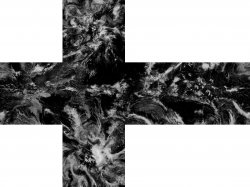
Here is seamless 215kb texture from genetica viewer injected into all cloud slots and all ground slots.. I am doing specular now, this will give me a template of approx 15MB to use with my bat.
the textures from genetica viewer seem to work best from my trial and errors, otherwise you gotta spend the time making all the edges seamless yourself which can be a pain depending on the patterns
We have a few things we still want to get added I just have to stop being lazy & get to work. Hopefully we'll have something good enough to release soon.
I was thinking about maybe having three buttons, one for each layer. For replacing the images I was thinking about having a xml or something that would have a list of the images you're replacing and the file name of your new images. I thought doing it that way we can get it the way we like and everyone else can change it if they want.
I'm open to ideas that's just some thoughts I had.
You can use whatever names you want really so not sure if xml is needed unless its easy to do. I did not know how easy it was to write a bat that renames the whole file set so i am good now with whatever as i only need to fix it once.. For me it would have been a nightmare trying to write the bat to handle 18 images with the same name and not mix them up... this is complicated enough for my skill level , so trying not to make it extra difficult.
Luna Base earth.qrc!! I'm gonna be honest I'm not seeing a whole lot of response from people on Twitter so I'll be taking a little break from this as well. Hopefully people start catching wind of what's going on and start creating some so we can see what is all capable of being done!! I tried and hopefully these will help with figuring it all out and what needs to be done, added, or changed!! Goodluck
Dont worry about what twitter thinks anyway . Less than 5% of the world is on twitter, and most of the people on it dont use it a lot or are bots.. For somewhere like the US Twitter is about 1% of people you will meet on the street.
Is a bit long to explain, and depends of what you want to do
If you find a texture that is already made for a planet in relationship width=2*height (like the images from NASA) and from some videogames and space simulators and things like that where all them are planets... is going to adjust perfectly
There are some tutorials to create that kind of images btw (lets say intermediate level of photoshop to achieve a decent result)
That applyes to the "base" surface of a planet sphere, the problems happens if you want to draw something on top of that texture
(by now) there are only 2 points of the sequence of actions where we can "paint" on top of them, and everyone of them have his limitations
If you paint following strict geometrical rules on top of the original image width=2*height (like the photos from NASA) your lines are going to follow the same distortion geometry than the real meridians and paralells used in the earth maps
For an example of this take a look at the images i made with the paralells and meridians, and the other test with hexagons
There is a big distortion a bit out of control (specially notable at the poles) :/
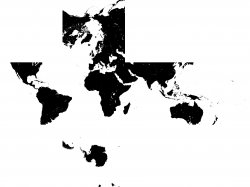
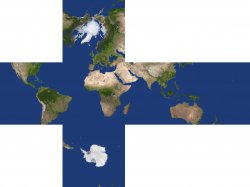
The other point where is convenient to "paint" (either a clean drawing or on top of the planet surface textures) is when you crop the image into 6 "cube faces" (the officials are 1024x1024 pixels each)
The cube faces has a very small distortion at the center, if your drawing only needs to paint at the centers of the cubefaces is going to resist well the distortion, also if you are painting on top of a planet surface (with mountains whatever) you should align the center of the cube faces to the areas more convenient for you (like what i mentioned in a previous post, having mountains in the center of a cubeface is an annoyance because i dont know how many things can be painted in the tip of a mountain and could make sense... unless you really want to do that, lol)
Lets say... if we have an image of mars using the same format than the images from NASA and we just need to paint an small city in it, the most convenient thing to do would be to rotate the textures enought to make it match a desert with the center of a cubeface, thats an idealistical scenario, because your mars base/city/superstructure is going to be something relativelly small (aligned with a clean area of the desert) and located at the center of the cubeface is going to be displayed (almost) without distortion
but the truth is it would have some distortion
Anyway... we dont have full control of distortion, and the root of the problem is we dont know how to generate one of that spherical images of width=2*lenght (like the photos of the NASA)
If at some point we find how to do that we are going to have 3 points of the sequence of actions where we can "paint" on top of the images
Original (no distortion) ---> spherical map at width=2*height (distorted) ---> 6 cubefaces (distorted)
By now we can only paint in the distorted versions
I really need an zlib tool i can use from command line, the one i have is not good for bigger files... fair annoying, signed up to multiple forums now to try get exes and all of them are being cunts.
How the F%$# is something so simple so hard to find
@DeViL303 What about packing to ZIP64 Deflate and cut the header? Isn't the same as just using zlib?
@sandungas Oh, that's why I planning to do. Colourizing original Mars to fill it with water and some grass. Damn. My 3D knowledge is very basic. I have making some textures before but never for a ball which looks quite confusing.
Maybe..i dont know anything. This is my first bat with more than 5 lines... I am at 1200 lines now.
I really just need a simple way to compress with zlib from command line..
I already have a decompressed template built in. It is already expanded to 12MB ...but the cool thing is it is as big as you need it to be now due to compression. So If you add small jpgs you get small qrc , if you add big jpgs you get big qrc etc. Its kind of perfect.
What about GUI which @sandungas link? CLI binary is bind with GUI? Because if it is separated or just inside app resources, can be easily used for Your purpose.
You would save Yourself a lot of headache if You switch to bash scripts. Windows CMD is a piece of shit, and PowerShell have very complex syntax so for me it is also junk. But bash is easy and readable.
F%$#.. I have 3 layers of earth pics in 8k injected. from these maps, my QRC is 7.5MB , it looks amazing and it works.... but my ps3 is crashing after about 3 minutes of listening to music...
Seems like some kind of RAM issue maybe... I am fairly sure I have built the QRC correctly. I will have to try find the real limit.
I will try load it from hdd directly, maybe it will be different...I really hope so.
What about GUI which @sandungas link? CLI binary is bind with GUI? Because if it is separated or just inside app resources, can be easily used for Your purpose.
BTW here is something crazy...NASAs official satellite photos of earth show the USA about 4 times as big in 2012 as 2013...I have checked this out on the official Site, its not bullshit. Now I do not believe the earth is flat or any of that, but shit like this does not help
Also I find it hard to believe when I zoom in on the UK in an 8k Day map of earth, there is not even one trace of cities like London..but then on a nighttime map the whole country is lit up like a christmas tree... Thoughts anyone? Has NASA not figured out the proper distortion either?



 I tried and hopefully these will help with figuring it all out and what needs to be done, added, or changed!! Goodluck


 fair annoying, signed up to multiple forums now to try get exes and all of them are being cunts.