
You are using an out of date browser. It may not display this or other websites correctly.
You should upgrade or use an alternative browser.
You should upgrade or use an alternative browser.
PS3 [Research] Modifying the Gaia Visualization (custom_render_plugin/earth.qrc)
- Thread starter DeViL303
- Start date
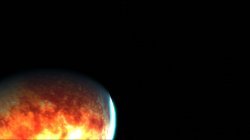
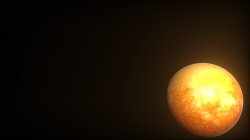


Tiny Black Earth!
This one might be handy for people who don't really use the music player or Gaia and want to save some flash space. Its got all back 1KB textures injected in all layers. (Thanks sandungas for the super small jpg). Its only 437KB compared to the official earth.qrc that is 2MB.
It still loads and works perfectly, so its the next best thing to dummying the file while still keeping everything working normally.
It actually looks kind of cool too.

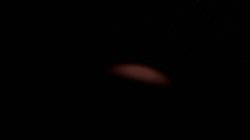
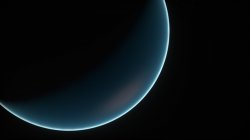
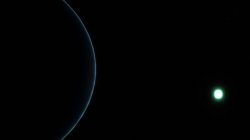
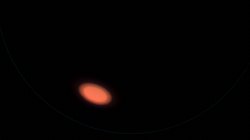
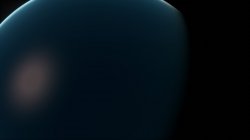
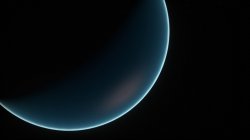
This one might be handy for people who don't really use the music player or Gaia and want to save some flash space. Its got all back 1KB textures injected in all layers. (Thanks sandungas for the super small jpg). Its only 437KB compared to the official earth.qrc that is 2MB.
It still loads and works perfectly, so its the next best thing to dummying the file while still keeping everything working normally.
It actually looks kind of cool too.
Attachments


Wow, you're a star.@DeViL303 I made you a zlib tool for this.
If you wanna try it out.
CompressZlib = -c infile outfile
CompressZlib with qrc header = -c infile outfile -h
DecompressZlib = -d infile outfile
DecompressZlib = -d will remove qrc header
That works really well.

sandungas
Developer
I was thinking in this... is like a black holeTiny Black Earth!
This one might be handy for people who don't really use the music player or Gaia and want to save some flash space. Its got all back 1KB textures injected in all layers. (Thanks sandungas for the super small jpg). Its only 437KB compared to the official earth.qrc that is 2MB.
It still loads and works perfectly, so its the next best thing to dummying the file while still keeping everything working normally.
It actually looks kind of cool too.
View attachment 23331
View attachment 23325 View attachment 23326 View attachment 23327 View attachment 23328 View attachment 23329 View attachment 23330
But there are some details missing, we dont know if it allows to use textures with smaller sizes, maybe allows to use 256x256 or 128x128 or 64x64 etc... i guess is going to reduce bytes size in a good amount in percentage (but the actual i made at 512x512 pixels is tiny anyway, there is no much room to recover)
Also, for a black hole it would be needed to disable that reflection on the sphere surface (not sure how, but incase there are several ways available to do it the most weird probably is going to look better)
And finally, the atmosphere all around the sphere is a circled "ring" in .dds format as far i remember... the black holes have an external ring that creates distortions... not sure how to simulate that effect with a static image though
Yeah, I am not sure about smaller textures, I did try a 1x1 jpg at one point trying to get the wireframe to show again. I thought it might just render the image from coordinates 0,0 and would not care about amount of pixels... but no luck...kicks to recovery.
My test of 1024x1024 for each tile did load, but was still was rendered 4 times too big and only 512x512 was showing properly. It might be possible to use higher resolution textures but some math would need to be changed, that is probably not possible with the access we have.
I have not even looked at the DDS files yet but I bet there is some nice mods to be had there, I also want to try mod the stars. I know nothing about DDS apart from the small bit of work I did on lines.qrc backgrounds and iconstex.qrc main icons so a lot to learn there.
Still working on this bat for now. I have it automatically injecting 3 layers now. it can handle either:

My test of 1024x1024 for each tile did load, but was still was rendered 4 times too big and only 512x512 was showing properly. It might be possible to use higher resolution textures but some math would need to be changed, that is probably not possible with the access we have.
I have not even looked at the DDS files yet but I bet there is some nice mods to be had there, I also want to try mod the stars.
I know nothing about DDS apart from the small bit of work I did on lines.qrc backgrounds and iconstex.qrc main icons so a lot to learn there.Still working on this bat for now. I have it automatically injecting 3 layers now. it can handle either:
- tile_clouds.jpg, tile_ground.jpg and tile_specular.jpg
- face_clouds.jpg, face_ground.jpg and face_specular.jpg
- cubemap_clouds.jpg, cubemap_ground.jpg and cubemap_specular.jpg
sandungas
Developer
If i remember right, the minimal for dds is 4x4 pixels, there is some kind of technical reason for it but i dont remember... anyway maybe that same limitation to minimal 4x4 applyes here with jpg images
For the .dds images probably most of you took a lok at them but im going to post them here just as a sample for people that cant see them
This is earth/flashrom/disk.dds
Is a pathetic ring of 128x128 pixels with pixelation all around, i wonder how something that small and simple could create an atmosphere
It could be nice to increase the thickness of the atmosphere ring, this would give us some room to paint some detailed stuff on it (like archs for the sun and spikes for the black hole)

And earth/flashrom/face_neg_z_ul.dds seems to be the the starfield at 1024x1024 pixels... actually maybe is mapped like a "skybox" (another type of cubemap) https://en.wikipedia.org/wiki/Skybox_(video_games)
What i dont get from this image is it contains thousands of "dots" (well are starts but painted as monochrome single white pixels), but the animation only displays a few of them (very few in comparison)
Anyway... i guess modifying this image it would be posible to add some eyecandy... like the milky way... of for sci-fi that clouds of gases and starts, nebulous, etc... there are some nice images of space

For the .dds images probably most of you took a lok at them but im going to post them here just as a sample for people that cant see them
This is earth/flashrom/disk.dds
Is a pathetic ring of 128x128 pixels with pixelation all around, i wonder how something that small and simple could create an atmosphere
It could be nice to increase the thickness of the atmosphere ring, this would give us some room to paint some detailed stuff on it (like archs for the sun and spikes for the black hole)
And earth/flashrom/face_neg_z_ul.dds seems to be the the starfield at 1024x1024 pixels... actually maybe is mapped like a "skybox" (another type of cubemap) https://en.wikipedia.org/wiki/Skybox_(video_games)
What i dont get from this image is it contains thousands of "dots" (well are starts but painted as monochrome single white pixels), but the animation only displays a few of them (very few in comparison)
Anyway... i guess modifying this image it would be posible to add some eyecandy... like the milky way... of for sci-fi that clouds of gases and starts, nebulous, etc... there are some nice images of space
Last edited:
I am fairly sure that the stars image is stretched to make a full sphere that we are inside, rather than tiled like I initially thought .What i dont get from this image is it contains thousands of "dots" (well are starts but painted as monochrome single white pixels), but the animation only displays a few of them (very few in comparison)
We might be able to add a higher resolution star image depending on how the stretching is handled.
Yeah i will try 4x4 for the jpgs, never thought of that.
sandungas
Developer
But even if we strech the starfield image the amount of "stars per inch" is huge, there are many screenshot posted by you and others where there are only 10 or 20 starsI am fairly sure that the stars image is stretched to make a full sphere that we are inside, rather than tiled like I initially thought .
We might be able to add a higher resolution star image depending on how the stretching is handled.
Yeah i will try 4x4 for the jpgs, never thought of that.
If we try to make a rectangular selection containing only 20 starts is going to be something very small in comparison with the image, so dunno but it smells like some magic trick
Im looking at it at huge zoom levels, and i can see there are some small areas with blue colors, and the stars has been created or post processed with some kind of filter... in general is a bit dirty, i think the quality can be improved at that same size, maybe is not going to be good enought to paint things like the milky way but at least we can add some color to the stars (in the official image all them are white, maybe realistic but a bit meh... i would paint some in yellow or red tones)
And im thinking in something pretty cool of the disk.dds, all this time i been thinking from that image the only thing displayed was the external ring (but not the center area)
But now i think is displayed entirelly... and the fact that is a plane 2D image (and is not intended to be applyed as a testure in a shpere)... it means is a trick
Right now i think the disk.dds is located in front of the camera, aligned to the sphere, but not really "applyed" to the sphere
If thats true... it would mean that it moves along with the camera and stays aligned with it at all times (so the image always looks the same and always have the same orientation)
In other words... if we paint "pikes" externally, that pikes should be always visible and well oriented (out of the sphere)
And if we paint some distortion inside (for the blackhole), then that distortion should be visible at all times too... and it will look like if the sphere have an additional layer applyed on top
sandungas
Developer
Lulz i just realized, the name indicates what is it earth/flashrom/face_neg_z_ul.dds
Is a cube face that belongs to the negative Z axis of an sphere, also, the fact that is 1024x1024 seems to match with this theory
*in openGL/PS3 the camera is usually aiming at positive Z axis if i remember right... increasing units in Z axis moves the object far away from the camera
The "problem" is that sphere doesnt have more cube faces
So... i think the only explaination posible is that sphere moves together with the camera... this way the camera is going to be always aiming at the starfield cube face
Either that.... or the starfield cube face is repeated 6 times
The next thing related with this that would be interesting to find is how big is that sphere... i bet is huge but how much ?
Is a cube face that belongs to the negative Z axis of an sphere, also, the fact that is 1024x1024 seems to match with this theory
*in openGL/PS3 the camera is usually aiming at positive Z axis if i remember right... increasing units in Z axis moves the object far away from the camera
The "problem" is that sphere doesnt have more cube faces
So... i think the only explaination posible is that sphere moves together with the camera... this way the camera is going to be always aiming at the starfield cube face
Either that.... or the starfield cube face is repeated 6 times
The next thing related with this that would be interesting to find is how big is that sphere... i bet is huge but how much ?
It is stretched a lot, the sphere we are in might be 1000 times the size of earth. idk, thats how it looks to me anyway.But even if we strech the starfield image the amount of "stars per inch" is huge, there are many screenshot posted by you and others where there are only 10 or 20 stars
If we try to make a rectangular selection containing only 20 starts is going to be something very small in comparison with the image, so dunno but it smells like some magic trick
It would make sense if it was 1 side of the cube repeated,,,as there seems to be too many stars to be just the one all the way around the whole sphere.
So i figured out something...it is possible to have a corrupt qrc that works sometimes... due to the whichever random preset is shown it might not load the jpgs that are messed up, so it can work sometimes..
For example the cloud layer is not always loaded, and I think even the ground layer might not be loaded in some of the dark presets, hard to know exactly... but be warned, you really need to test your QRCs on a selection of presets to be sure its all working ok.
I mean for more complicated 3 layer mods. The qrcs posted up until now made with my bat will be fine.
For example the cloud layer is not always loaded, and I think even the ground layer might not be loaded in some of the dark presets, hard to know exactly... but be warned, you really need to test your QRCs on a selection of presets to be sure its all working ok.
I mean for more complicated 3 layer mods. The qrcs posted up until now made with my bat will be fine.
Last edited:
Cool, I'm glad it works it could help out. I had to swap hdds in my main pc & all I had was the old laptop I used when we made pkg linker. Not sure if you remember how awful that thing was lolWow, you're a star.
That works really well.
Oh yeah I remember now.Cool, I'm glad it works it could help out. I had to swap hdds in my main pc & all I had was the old laptop I used when we made pkg linker. Not sure if you remember how awful that thing was lol
Its really great, and the ability to add the header back is just icing on the cake.
I had started just making it for zlib. Right off I tried to open a qrc & it failed because the header so I thought I'd just make it easier to use..Oh yeah I remember now.
Its really great, and the ability to add the header back is just icing on the cake.
I had figured out a way to inject the compressed qrc back into a 8 byte file with just the header using binsert.exe. (very cool little app thanks for the suggestion @Berion) but it was not a great way to do it really, pasting a 10MB file into a 8 byte file.
That binsert is great for static patching though, really easy to use from command line, and super light weight at only 18.2kb
I will attach it here again for anyone that does not know about it, the usage is simple. Just like this:
This was copy and pasting the file earth.qrc into file earth_header.qrc at offset 0000000008.
That binsert is great for static patching though, really easy to use from command line, and super light weight at only 18.2kb
I will attach it here again for anyone that does not know about it, the usage is simple. Just like this:
Code:
binsert 0x0000000008 earth.qrc earth_header.qrcThis was copy and pasting the file earth.qrc into file earth_header.qrc at offset 0000000008.
Attachments
Similar threads
-
 PS3 [Research] Modifying the Coldboot/Gameboot Sequence (custom_render_plugin.sprx/rco)
- Started by DeViL303
- Replies: 729
-

-
 PS3 webMAN MOD 1.47.34 - New XMB / Startup enhancements from Aldostools in this update.
- Started by STLcardsWS
- Replies: 87
-
