PS3 [Research] Modifying the Gaia Visualization (custom_render_plugin/earth.qrc)

TBH the only limits will come from RAM and HDD space. The QRC was only limited in size because of the limited space in dev_flash, now the qrc can be redirected to dev_hdd0 with webMAN we should be able to use some really high quality DDS files with decent mipmap levels and decent jpgs.
There is a technical restriction caused by how much bytes are used in the cxml file structure to store the offsets and lenghts of the files, and the total filesize table, and things like that
Are stored in 4 bytes, this gives us around 4.3GB max ...so no need to worry about that
But @pink1 is going to add a check in the code of the QRC editor to prevent exceeding that value... you know is a "monkeyproof safety check", just incase someone does something weird the tool is going to refuse to build it :D
 
but i guess there should be memory limits, the .jpg textures are still limited to 1024x1024 in your tests?
What you did with the 2 big .dds files ? one for the starfield and another for the disk ?, or was 2 different tests ?
Yeah, 512x512 for each jpg. 1024x1024 for each face. I did try replace all tiles with 24x 1024x1024 jpgs just in case it needed ALL to be the same, but no luck, just kicks to recovery.

The math is wrong I guess.

I replaced both of the DDS files with big ones I made. Could not see much difference with the atmosphere, not sure if it is used.
 
Its more complicated than that with the DDS, its not just 1 DDS put onto each of the 6 faces.. Its like multiplied and mirrored...I have not bothered to try figure it out yet.

If you want to try make a image to use to try figure that we can. But see my images of the psx-place mod. That was using a way simpler texture, it is spread out somehow..

Also its got an effect on it. Darkened a lot. Its like most of the stars dont show up on most of the presets, but on some of them you see lots because the DDS is kinda lit from behind or something like that.

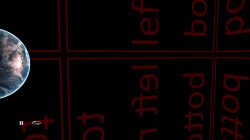
This is the image used. I converted it to DDS. But even at 2048x2048 it is still tiled

View attachment 23422
I think i got it after looking again at your images, the stars texture is applyed 24 times like in the sphere, every face have 4 textures
And it looks like the distance in between the center of one of the faces of the external cube and the center of the sphere should be = 2 * radius of he sphere (in other words, the external cube is double the size of the sphere)
Is so simple in maths that i think what im saying is very probable

And the flipping of the textures seems to be made from the center of the cube face.. i bet it should match pretty well if you take one of the images we was using with the paralells and meridians in the pole faces
 
Last edited:
I think i got it after looking again at your images, the stars texture is applyed 24 times like in the sphere, every face have 4 textures
And it looks like the distance in between the center of one of the faces of the external cube and the center of the sphere should be = 2 * radius of he sphere (in other words, the external cube is double the size of the sphere)
Is so simple in maths that i think what im saying is very probable

And the flipping of the textures seems to be made from the center of the cube face.. i bet it should match pretty well if you take one of the images we was using with the paralells and meridians in the pole faces
I still have some images from previous tests, i mean something like this, if you paint something following this kind of geometry it should match with the others seamessly (or thats what i hope)
6gMfn72.jpg


*but without distortion... this external cube used by stars doesnt seems to have distortion
 
Yes, you are right. It is the same image flipped over 4 ways. Wow they did a lot of tricks to save on filespace. It looks like they used different tools on the jpgs trying to compress them too.. Sony must have put them on a 2MB limit or something like that.

I used this as the DDS, I will try your image now.
1024x1024.png

cube4.jpg


cube1.jpg cube2.jpg cube3.jpg
 
Not sure what you are going to do but im mentioning it because you can make "the complete collection" by grouping them inside the shared path and keeping only the most updated versions of them

As I said before, I am ripping them all apart file by file lol :-p : ( literally )

fpo_vpo_destruction.png


As example, note all the .qrc files have a path named "lib/" with some .vpo .fpo files inside, those ones are shared libraries, and are duplicateds

We need to imagine it like if we extract all the files from all .qrc files in the same folder (so we have only a "lib" folder and the files inside it are unique)

Graphics is my thing, I know what I am doing and what to look for lol. And I have finally found some of my other tools I used at work on one of my HDDs that can rip them to bits. And I prefer the Official folder structure as it also represents the file id within the qrc itself.

Only fpos and vpos in " earth\lib\glutils " will be similar to others, but the params and such coded inside most likely will be different as the vertex and fragment shaders are being applied to two different things in different ways. The true shared files are the libs in the FW, the FPO and VPOs are just telling them, the CELL and RSX what to do basically.

There is a technical restriction caused by how much bytes are used in the cxml file structure to store the offsets and lenghts of the files, and the total filesize table, and things like that
Are stored in 4 bytes, this gives us around 4.3GB max ...so no need to worry about that

Also helps if you have certain " tools " and " py scripts "......:rolleyes:

It looks like they used different tools on the jpgs trying to compress them too..

Yep there is> Bicubic filtering, tone filtering etc etc also applied by FPO's and VPOs

We should be able to get more out of it though, Most function's within the RSX clock at 500Mhz, ROP's etc, but the internal shaders clock at 550Mhz. It's most likely going to take a " Lot " of poking around inside files.
 
It would not surprise me if this was part of the quality downgrade, in the way how is made is imposible to paint things like the milky way :crybaby:
Btw, there is a .dds format that allows to store cubemaps in a single .dds ... i guess by default it stores the complete cubemap as 6 separated cubefaces in different layers... but maybe there are other modes
 
Last edited:
guess by default it stores the complete cubemap as 6 separated cubefaces in different layers... but maybe there are other modes

Off the top of my head its something like that for single DDS cubemaps, and if I remember correctly there are a few different "modes" as it were, different layouts with different rendering tricks applied depending on how it is rendered:

eg D3D, OpenGL, OpenGL LOD < this is the one I am certain is used on the gaia visualisation.
 
Just an idea (not posible to test yet because the qrc editor doesnt allows to build qrc files from scratch)
We know inside earth.qrc there is a "earth/flashrom/face_neg_z_ul.dds" used for the starfield
And im thinking maybe in old or pre-retail versions of the firmware existed other files to complete it
earth/flashrom/face_pos_x_ul.dds <--- missing in action
earth/flashrom/face_neg_x_ul.dds <--- missing in action
earth/flashrom/face_pos_y_ul.dds <--- missing in action
earth/flashrom/face_neg_y_ul.dds <--- missing in action
earth/flashrom/face_pos_z_ul.dds <--- missing in action
earth/flashrom/face_neg_z_ul.dds <--- this is the only one left

Can you take a look at the dissassembled vpo/fpo files and search for that strings ?


---------------------------
Incase the strings exists, it would mean the firmware is ready to load the .dds files ... and if at some point is implemented a feature in pink1 QRC editor to create .qrc files from scratch we are going to be able to add that new paths/files (and the firmware should load them)

Yeah... too much, but who knows ?, by now seems to make sense and maybe works
 
I wonder is it possible the atmosphere DDS is not used and was dummyed with the tiny DDS and really they are doing the atmosphere a different way.

I will do some more tests.. but swapping that DDS seems to have no effect...or its very very subtle.
 
Oh, so there were probably 24 DDS for the stars?..hmmm cool.

earth/flashrom/face_pos_x_ul.dds <--- missing in action
earth/flashrom/face_pos_x_ur.dds <--- missing in action
earth/flashrom/face_pos_x_dl.dds <--- missing in action
earth/flashrom/face_pos_x_dr.dds <--- missing in action

earth/flashrom/face_neg_x_ul.dds <--- missing in action
earth/flashrom/face_neg_x_ur.dds <--- missing in action
earth/flashrom/face_neg_x_dl.dds <--- missing in action
earth/flashrom/face_neg_x_dr.dds <--- missing in action

earth/flashrom/face_pos_y_ul.dds <--- missing in action
earth/flashrom/face_pos_y_ur.dds <--- missing in action
earth/flashrom/face_pos_y_dl.dds <--- missing in action
earth/flashrom/face_pos_y_dr.dds <--- missing in action

earth/flashrom/face_neg_y_ul.dds <--- missing in action
earth/flashrom/face_neg_y_ur.dds <--- missing in action
earth/flashrom/face_neg_y_dl.dds <--- missing in action
earth/flashrom/face_neg_y_dr.dds <--- missing in action

earth/flashrom/face_pos_z_ul.dds <--- missing in action
earth/flashrom/face_pos_z_ur.dds <--- missing in action
earth/flashrom/face_pos_z_dl.dds <--- missing in action
earth/flashrom/face_pos_z_dr.dds <--- missing in action

earth/flashrom/face_neg_z_ul.dds <--- IN USE
earth/flashrom/face_neg_z_ur.dds <--- missing in action
earth/flashrom/face_neg_z_dl.dds <--- missing in action
earth/flashrom/face_neg_z_dr.dds <--- missing in action
 
BTW if anyone does not want to mess around with software, and just wants to convert one DDS for the starfield, this site is handy. https://www.aconvert.com/image/png-to-dds/

Can do big ones too, I have texted a 20MB PNG to 4096x4096 DDS at 30MB.
The .dds files can be generated in command line with this:
http://s000.tinyupload.com/index.php?file_id=77321824544740538952

Is the core program of the https://developer.nvidia.com/legacy-texture-tools
I installed the whole thing time ago, and kept only the nvdxt.exe


And this program can be used to preview .dds files, it have some limitations and i dont even remember where i found it
http://s000.tinyupload.com/index.php?file_id=20366513162063539211
 
Oh, so there were probably 24 DDS for the stars?..hmmm cool.

earth/flashrom/face_pos_x_ul.dds <--- missing in action
earth/flashrom/face_pos_x_ur.dds <--- missing in action
earth/flashrom/face_pos_x_dl.dds <--- missing in action
earth/flashrom/face_pos_x_dr.dds <--- missing in action

earth/flashrom/face_neg_x_ul.dds <--- missing in action
earth/flashrom/face_neg_x_ur.dds <--- missing in action
earth/flashrom/face_neg_x_dl.dds <--- missing in action
earth/flashrom/face_neg_x_dr.dds <--- missing in action

earth/flashrom/face_pos_y_ul.dds <--- missing in action
earth/flashrom/face_pos_y_ur.dds <--- missing in action
earth/flashrom/face_pos_y_dl.dds <--- missing in action
earth/flashrom/face_pos_y_dr.dds <--- missing in action

earth/flashrom/face_neg_y_ul.dds <--- missing in action
earth/flashrom/face_neg_y_ur.dds <--- missing in action
earth/flashrom/face_neg_y_dl.dds <--- missing in action
earth/flashrom/face_neg_y_dr.dds <--- missing in action

earth/flashrom/face_pos_z_ul.dds <--- missing in action
earth/flashrom/face_pos_z_ur.dds <--- missing in action
earth/flashrom/face_pos_z_dl.dds <--- missing in action
earth/flashrom/face_pos_z_dr.dds <--- missing in action

earth/flashrom/face_neg_z_ul.dds <--- IN USE
earth/flashrom/face_neg_z_ur.dds <--- missing in action
earth/flashrom/face_neg_z_dl.dds <--- missing in action
earth/flashrom/face_neg_z_dr.dds <--- missing in action
Yeah, but it looks the order is different, it seems what they did is to nuke all them except the last of the list (neg_z_ul)
Dunno about the others, but "ul" seems to be the last of every group of 4


Edit:
Hmmm... based on that... we can deduce the first of every group of 4 is "dr" ? (in other words, the opposite corner of "ul")... not sure if this deductive process is right... the coordinates are a bit weird :P
 
I was just trying to figure it out

Basically due to the way their whole render is upside down compared to the way the images are. When they say UL, they mean this quarter of a square, which to us looking at it is bottom right. I think..its very confusing as its 75% not displayed the way it is, and also upside down ... :)

upload_2020-1-30_18-56-9.png
 
I think "ul" matches with the files named 001_001.jpg

Think in what i said in my previous post... you have a long list of files and you need to keep only one of them, how many ways there are to do this ?

Option 1) Keep only the first of the list
Option 2) Keep only a file in the middle of the list
Option 3) Keep only the last of the list


I really think they did option 3... is not just because the order of that "tiles" as you like to name them, but just because the order of x,y,z, and pos,neg

"z" is last (from the 3 posible options, x,y,z)... and "neg" is last too (from the 2 posible options pos,neg)... so "ul" should be last too
In the filename all the values are last of the posible ones face_neg_z_ul.dds
 
And im thinking maybe in old or pre-retail versions of the firmware existed other files to complete it
earth/flashrom/face_pos_x_ul.dds <--- missing in action
earth/flashrom/face_neg_x_ul.dds <--- missing in action
earth/flashrom/face_pos_y_ul.dds <--- missing in action
earth/flashrom/face_neg_y_ul.dds <--- missing in action
earth/flashrom/face_pos_z_ul.dds <--- missing in action
earth/flashrom/face_neg_z_ul.dds <--- this is the only one left

Can you take a look at the dissassembled vpo/fpo files and search for that strings ?

Yeah I'll keep a look out for anything like that.
not posible to test yet because the qrc editor doesnt allows to build qrc files from scratch

You need the CXML Compiler source code and "py" scripts, along with the libs cxmlacces.a, cxmlutils.a and a few other things I cannot remember the names of.....:rolleyes:o_O:-p

And this program can be used to preview .dds files, it have some limitations and i dont even remember where i found it
http://s000.tinyupload.com/index.php?file_id=20366513162063539211

That's another Nvidia Tool, its part of the Legacy Tools.
 
"z" is last (from the 3 posible options, x,y,z)... and "neg" is last too (from the 2 posible options pos,neg)... so "ul" should be last too
That makes sense as its the last quarter of a circle if you go from left to right.

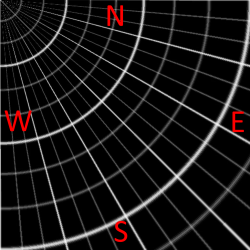
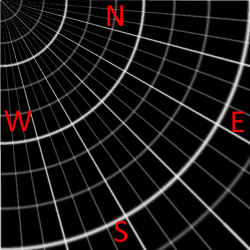
I realise now using N,W,S,E was a bad choice, as most of them look the same or similar when flipped. :D

22002-231659051aee90aa46b4e39681ee673c.jpg


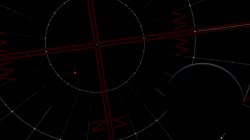
Red dot on the one that is not flipped:
starsor4.jpg
 
Last edited:

Similar threads

Back
Top