
PS3 [ sMAN v1.06n & v1.07 ] - Lots of Improvements & Some new features from deank for this PS3 Plugin

sMAN is progressing into a "Super Hero" type of plugin as fellow PS3 developer Joonie dubs these latest updates the "SuperMAN" plugin due to the evolution and responsiveness as developer deank continues to polish the plugin that combines the original webMAN project with the newly developed sLaunch feature (a new UI for launching games from the XMB) into this single project dubbed sMAN, while not officially standing for "SuperMAN", we have to agree with Rebug developer @Joonie that @deank is creating yet another masterpiece before our eyes as this new UI continues to mature and evolve. Since the last checkup up on this plugin, it was residing at version 1.05 since then deank has made several new updates, making v1.07 the latest release (as of writing this article) for this new ps3 plugin experience .

These updates includes new rewrites of the plugin for a improved and optimized user experience, in comparision to some of the early version & original POC's prior to the formation of sMAN, plus a new layout of game with 10 games or 40 game display options as seen in the included screenshot, to toggle these layouts simply press down on the R3 stick on your Controller.

sman_40.jpg


Latest Updates

  • sMAN 1.06n ( http://deanbg.com/sman.sprx | http://deanbg.com/sman_1.06.zip )
    • Some important parts of the plugin are rewritten and optimized to reduce stack usage
    • Returned another 112KB back to fg vsh :) (2316KB free - was 1920KB a month ago without ntfs :) so about 396KB less used)
    • Changed sman.bin to support longer game names/paths/icons - a rescan will be initiated
    • Cleaned some code (about 1000 lines gone after the optimization)
    • Loading games speed improved (at least the perceived speed)
    • sMAN will show the name of the loaded game as popup message (not the filename)
    • sMAN is now properly unloaded when requested (no zombie or dead threads should remain)
    • It supports up to 2000 titles (games/bd/dvd) now
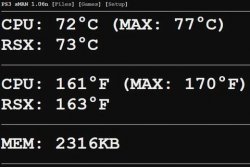
    sman_mem.jpg

    Thinks look really stable at the moment.

    Dean

  • sMAN v1.07
    • It can be either 10 or 40 games per page. Both layouts can be switched with [R3].


    :) http://deanbg.com/sman.sprx | http://deanbg.com/sMAN_1.07.zip

Download(s):
 
Last edited:
If you're on Rebug you must disable wMM from the toolbox (or delete it from dev_flash/dev_blind). In your boot_plugins.txt you must have a line with the path to sman.sprx.
 
If you're on Rebug you must disable wMM from the toolbox (or delete it from dev_flash/dev_blind). In your boot_plugins.txt you must have a line with the path to sman.sprx.
Got it! And thank you again for all the work you put in to make a truly wonderful program!
 
Problem with the fan in sman. Auto doesn't work, it does the exact same thing as manual. Also since installing sman, my controller randomly doesn't sync when I turn the PS3 on until I plug it in with the usb. Never had the problem before I installed sman. Using Rebug 4.81.2 with cobra.
 
Hi everyone.

I have some problems with install sMAN on Rebug 4.81.2
I put the sman.sprx in dev_hdd0/plugins/sman.sprx
I have boot_plugins.txt in dev_hdd0/boot_plugins.txt
in boot_plugins.txt ----- dev_hdd0/plugins/sman.sprx

I delete webMAN MOD http://myIPAdersse/delete.ps3?uninstall

If I disable the webman from rebug toolbox. Then reboot system but sMAN not displayed.
I have to do something else in rebug. In habib I had no problems but I like sman and I want to have it in rebug

Regards
 
Hi everyone.

I have some problems with install sMAN on Rebug 4.81.2
I put the sman.sprx in dev_hdd0/plugins/sman.sprx
I have boot_plugins.txt in dev_hdd0/boot_plugins.txt
in boot_plugins.txt ----- dev_hdd0/plugins/sman.sprx

I delete webMAN MOD http://myIPAdersse/delete.ps3?uninstall

If I disable the webman from rebug toolbox. Then reboot system but sMAN not displayed.
I have to do something else in rebug. In habib I had no problems but I like sman and I want to have it in rebug

Regards
Sman is not displayed where?
Can't you launch sman with the L2+R2 combo?

Btw remember that Xmb integration is not on by default.
 
Sman is not displayed where?
Can't you launch sman with the L2+R2 combo?

Btw remember that Xmb integration is not on by default.

Not shown in the XMB
On habib only sman.sprx in plugins folder and works and displayed automatic.
I will try to install it again from scratch in rebug. What steps must be followed for a correct installation?
Regards
 
Not shown in the XMB
On habib only sman.sprx in plugins folder and works and displayed automatic.
I will try to install it again from scratch in rebug. What steps must be followed for a correct installation?
Regards
Like I said it's normal.
Sman xmb integration is off by default.
No idea why you had a different experience on habib because it should be the exact same thing.
Use the L2+R2 combo, that will launch the GUI then go to setup.
Check the xmb integration checkbox & whatever other setting you need.
Save. Reboot.
 
Like I said it's normal.
Sman xmb integration is off by default.
No idea why you had a different experience on habib because it should be the exact same thing.
Use the L2+R2 combo, that will launch the GUI then go to setup.
Check the xmb integration checkbox & whatever other setting you need.
Save. Reboot.
Ok I try But I have to disable webman from toolbox?

Thanks
 
Cant seem to get sman to work. I have Rebug 4.81 cex cobra 7.52 enabled. I disabled webman using rebug toolbox. Copied sman.sprx to dev_hdd0. Edited "boot_plugins.txt" so only the line "/dev_hdd0/sman.sprx" is there. Rebooted PS3, and it stil doesn't load using the L2+R2 button combination. Is there something else that was supposed to be done?
 
Cant seem to get sman to work. I have Rebug 4.81 cex cobra 7.52 enabled. I disabled webman using rebug toolbox. Copied sman.sprx to dev_hdd0. Edited "boot_plugins.txt" so only the line "/dev_hdd0/sman.sprx" is there. Rebooted PS3, and it stil doesn't load using the L2+R2 button combination. Is there something else that was supposed to be done?
sometimes you've got to keep L2+R2 pressed for a bit
 
sometimes you've got to keep L2+R2 pressed for a bit
Yes, I've read that somewhere earlier, and tried that. I've held them down for at least half a minute (which seemed too long, but i still did it).

I just keep thinking i might have something either enabled or disabled on my system that shouldn't be.
 
Yes, I've read that somewhere earlier, and tried that. I've held them down for at least half a minute (which seemed too long, but i still did it).

I just keep thinking i might have something either enabled or disabled on my system that shouldn't be.
Re download the latest sman build from http://deanbg.com/sman.sprx.
Make sure Cobra is enabled & webman disabled in the Rebug Toolbox if you use Rebug.
Place sman.sprx in /dev_hdd0/plugins. Don't rename the file.
Edit /dev_hdd0/boot_plugins.txt.
Make sure you have /dev_hdd0/plugins/sman.sprx. Delete any path with webftp_server.sprx, slaunch.sprx or wm_vsh_menu.sprx..
Reboot.
On Reboot you should be greeted with a pop-up message on top right of the screen saying sman 1.08n loaded!
The combo L2+R2 will launch the sman GUI.
 
Yeah only time I've really had problems with the L2+R2 combo is if I'm too keen and hit it as / before sman+psnpatch has fully loaded.
Seems to glitch the combo out for a few minutes.

Also in latest versions of sman.sprx the xmb integration seems to be on by default now which is handy dandy stuff. :)
Can launch sman from there, and the shortcut actually mentions the L2+R2 combo on screen to avoid confusion. Clever thinking.

Older versions the combo was different, so you might even be running an old copy causing the confusion.
 
Re download the latest sman build from http://deanbg.com/sman.sprx.
Make sure Cobra is enabled & webman disabled in the Rebug Toolbox if you use Rebug.
Place sman.sprx in /dev_hdd0/plugins. Don't rename the file.
Edit /dev_hdd0/boot_plugins.txt.
Make sure you have /dev_hdd0/plugins/sman.sprx. Delete any path with webftp_server.sprx, slaunch.sprx or wm_vsh_menu.sprx..
Reboot.
On Reboot you should be greeted with a pop-up message on top right of the screen saying sman 1.08n loaded!
The combo L2+R2 will launch the sman GUI.

Re download the latest sman build from http://deanbg.com/sman.sprx.
(CHECK)

Make sure Cobra is enabled & webman disabled in the Rebug Toolbox if you use Rebug.
(Yes, I use Rebug and CHECK)

Place sman.sprx in /dev_hdd0/plugins. Don't rename the file.
Edit /dev_hdd0/boot_plugins.txt.
(I had sman.sprx in root folder, and plugins pointed to that, now I added sman to plugins folder, and edited boot_plugins.txt to that location now...CHECK)

Make sure you have /dev_hdd0/plugins/sman.sprx. Delete any path with webftp_server.sprx, slaunch.sprx or wm_vsh_menu.sprx..
(Nothing else there... CHECK)

Reboot.
On Reboot you should be greeted with a pop-up message on top right of the screen saying sman 1.08n loaded!
The combo L2+R2 will launch the sman GUI.
(YEP, STILL NOTHING. I waited for the popup message, but it never shows up. L2+R2 still have no response. I even checked to make sure those buttons are functioning and they are good. Not working for me)
 
On Reboot you should be greeted with a pop-up message on top right of the screen saying sman 1.08n loaded!
The combo L2+R2 will launch the sman GUI.
(YEP, STILL NOTHING. I waited for the popup message, but it never shows up. L2+R2 still have no response. I even checked to make sure those buttons are functioning and they are good. Not working for me)
But do you get the pop-up message on boot?
1. If you don't, sman does not get loaded!
That would mean that either Cobra is disabled or you have made a mistake in your setup!
2. If you do get the pop-up then it would mean that somehow the combo does not get detected for whatever reason.
 

Featured content

Trending content

Back
Top


