PS3 webMAN MOD v1.43.07 + NEW webMAN VSH Menu

Here is an exciting update to webMAN MOD with the release of version 1.43.07 by developers Aldostools & Matsumot0 . One of the big highlights in this update is the new inclusion of the webMAN VSH Menu. Recently you may of recalled the Unofficial version of littlebalup's VSH menu that aldostools released with a few changes and tweaks from the official build. Well the developer since decided to rename his unofficial version and include support for webMAN MOD and thus renamed the menu. [break]ss[/break]. Below you can see various information from the two developer's in the release quotes found below:


webMAN MOD Blue.png

v1.43.07 + webMAN (Mod) VSH Menu
Matsumot0 (via github) said:
There are some minor tweaks and fixes, but the major change is the integration with the VSH Menu.

VSH Menu for webMAN now can be installed optionally (Holding R1 when launching the Updater)

The source code for the VSH Menu project is included under the folder "vsh_menu".

webMAN MOD now supports http requests through a local file interface (/dev_hdd0/tmp/wm_request)
Example: "GET /mount.ps3/dev_hdd0/PS3ISO/MyGame.iso" (sans quotes)

Now it should be easier for devs to integrate their homebrews with webMAN MOD.

Special thanks to littlebalup, Mysis, 3141card and Orion for the VSH Menu.


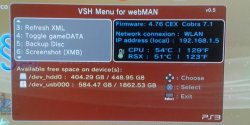
webMANVSH.jpg

aldostools (via PSX-Place.com) said:
I have renamed the plugin (littlebalup v0.4 Unofficial) to "VSH Menu for webMAN" and increased the version to 0.5. Although it says "for webMAN" it means "webMAN MOD" (I found that adding "MOD" to the title was too long)

This new menu requires to have webMAN MOD 1.43.07 installed.

Features of webMAN VSH Menu:

  • [*=1]Shows system info (CFW version, Cobra version, IP address, CPU/RSX temperatures)
    [*=1]Shows free space on hdd0, usb devices and dev_blind
    [*=1]Unmount current game
    [*=1]Eject disc / Insert disc
    [*=1]Mount /net0, /net1 or /net2
    [*=1]Change fan speed & mode
    [*=1]Shows System Info
    [*=1]Refresh XML (/dev_hdd0/xmlhost/game_plugin/mygames.xml)
    [*=1]Toggle gameDATA
    [*=1]Backup disc to HDD
    [*=1]XMB screen capture - (Note: Screenshots are saved to /dev_hdd0.)
    [*=1]Shutdown PS3
    [*=1] Reboot PS3 (soft* & hard methods). *lpar reboot


How to use webMAN (MOD) VSH Menu:


  • [*=1]Press :select: button for 3 seconds from XMB to open/close the Menu.
    [*=1]Use Up and Down D-pad to navigate the options and scroll.
    [*=1]Use Left and Right D-pad to change options and X button to select.

Changelog:

v0.5 (by Aldostools):
Renamed to VSH Menu for webMAN
Integrated with webMAN MOD 1.43.07
Serveral changes since 0.4 :)

v0.4 (by littlebalup):
Added "Eject Disc" and "Insert Disc" options (for physical disc, not disc images)
Scrolling menu with arrows.
Changed code of the the storage devices size info:
- Now displays size of the storage device in add of the available free space
- Now displays size in MB if less than 1GB (size and/or free space)
- Added free space and size detection for connected flashcards (/dev_sd, /dev_ms and /dev_cf)
- Added free space and size detection for /dev_blind (if mounted)
- Added icons for each device type (hdd, usb, flashcard, internal flash)
Added thermometer icon for temperatures:
- Icon is color blue if CPU and RSX below 50°C
- Icon is color green if hotter of CPU and RSX between 50°C and 65°C
- Icon is color orange if hotter of CPU and RSX between 65°C and 75°C
- Icon is color red if CPU or RSX over 75°C
Some font size slightly reduced.
Layout modifications (again...).

v0.3 (by littlebalup):
Added Firmware version info (spoofed if it is). Thanks @Zar.
New layout, background and icons.
(Only one english version for the moment...)

v0.2 (by littlebalup):
Fixed bug about IP adress not shown in some cases (thanks again to @3141card )
Added "Network connexion" type info (LAN or WLAN)

v0.1 (by littlebalup):
first beta release
Thanks to littlebalup, Mysis, 3141card, Orion and all the others that forgot to mention

UPDATE

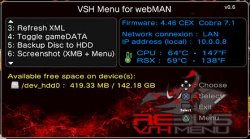
vsh_menu_rebug_theme.jpg
aldostools said:
Version 0.6 (of webMAN VSH Menu) now includes almost all the missing features from Rebug VSH menu (Credits to @Orion ). Also a new background for Rebug fans is included.
Download(s):
Mirror: link


I may be quoting you, but I want to thank everyone involved with webman mod. This latest version is really cool.

I do have a request/suggestion/question:

Webman mod has a box we can check to disable the xmb notification of it being loaded, Is it also possible to disable the xmb notification of the vsh menu plugin as well?

I always grab the latest source and remove the beeps from webman mod so when I select shutdown or reboot I hear no beeps, I also removed the beeps from the vsh menu plugin too, But I have no clue how to disable the notification.

Comment here with // https://github.com/Matsumot0/webMAN-MOD/blob/master/vsh_menu/main.c#L871 & 870 too :)
 
Last edited:
I have no clue how to disable the notification.

To remove the notification comment out the following lines: 870-871
Code:
  [color=red]//[/color] sys_timer_sleep(13);
  [color=red]//[/color] vshtask_notify("VSH Menu loaded.\nPress [Select] to open it.");

great tool.. many thanks :dcheese:
A little bit more space for ip address need it...

View attachment 4023

You can also try changing the system font. Removing the string "(local)" in the line 765 and compiling the sprx should help too.
 
vsh_menu_rebug_theme.jpg


Yes the pkg comes with a rebug version... but Joonie's build on rebug is a lighter version with less features.
Thank you neighbor! :D So Joonie's build is even lighter than the included in the updater.pkg. I will wait if Joonie can provide an update or I will grab the rebug included in pkg. Also how do you setup webMAN to have the temperature around 60's C. You know this country is hot all year long and my console gets over 70 very easily.

BTW, I see a typo on VSH Menu: Network connexion instead of Network connection
 
lol Network connexion is in French :P
Thanks for report, i will fix this typo later.
 
Last edited:
Love this plugin. However with the new VHS menu install option (R1) I think its soon time to implement a simple menu/UI for the WebMan installer app.

I almost missed the big red text lol
 
Thank you neighbor! :D So Joonie's build is even lighter than the included in the updater.pkg. I will wait if Joonie can provide an update or I will grab the rebug included in pkg. Also how do you setup webMAN to have the temperature around 60's C. You know this country is hot all year long and my console gets over 70 very easily.

BTW, I see a typo on VSH Menu: Network connexion instead of Network connection

find your PS3 IP address (mine is 192.168.0.7) type it in the address bar of your favorite internet browser and you should see a bunch of options you can change. I set mine to dynamic with a 65c target
 
Last edited:
find your PS3 IP address (mine is 192.168.0.7) type it in the address bar of your favorite internet browser and you should see a bunch of options you can change. I set mine to dynamic with a 65c target

Or just go to setting thru xmb :p I think that [MENTION=4984]ghostreader[/MENTION] asked about min speed and auto fan setting. If yes then is important which PS3 model you have. On early fat models temps under 60 are almost impossible but for 21XX-25XX is very easy to reach that.
 
find your PS3 IP address (mine is 192.168.0.7) type it in the address bar of your favorite internet browser and you should see a bunch of options you can change. I set mine to dynamic with a 65c target

your favorite browser connected to the same network as your ps3. :) .
 
Hi. How are you?

Thanks for all your hard work, is great.

I have a problem since update to this last version. When I choose last game option in the webman configuration, in the first seconds after my ps3 (2501A with last rebug lite w/ cobra) reboot, webman load directly to that game without touching anything, without selecting that game from xmb menu. So I have to exit that game everytime.

what can i do? Thks!

P.d: I only have this plugin with the new menu with webman enabled from rebug toolbox.
 
Last edited:
You need to find auto start disc setting in ps3 setting not in webman setting. This happen becuse you have auto boot disc enabled. And your ps3 think that mounted disc is a game disc so starting it.
 
Hi. How are you?

Thanks for all your hard work, is great.

I have a problem since update to this last version. When I choose last game option in the webman configuration, in the first seconds after my ps3 (2501A with last rebug lite w/ cobra) reboot, webman load directly to that game without touching anything, without selecting that game from xml menu. So I have to exit that game everytime.

what can i do? Thks!

P.d: I only have this plugin with the new menu with webman enabled from rebug toolbox.

Go to Settings column on XMB, scroll down to System Settings and set the option Disc Auto-Start to Off
 
You need to find auto start disc setting in ps3 setting not in webman setting. This happen becuse you have auto boot disc enabled. And your ps3 think that mounted disc is a game disc so starting it.
Cool!

Thanks a lot. Problem solved.

I dont understand why never happen before without changing ps3 native configuration. Always use last game option.

Anyway. Thanks again!
 
Or just go to setting thru xmb :p I think that [MENTION=4984]ghostreader[/MENTION] asked about min speed and auto fan setting. If yes then is important which PS3 model you have. On early fat models temps under 60 are almost impossible but for 21XX-25XX is very easy to reach that.

Yes, I asked Aldo about min speed and auto fan settings because he lives in the same environment. I noticed in the screenshot the temperature of his console is CPU 64 RSX 59, and I was surprised because mine reach 70 (CPU/RSX) quickly. Maybe he has the PS3 in an air conditioner room. My PS3 model: 2101B.
 
My setting on 210x was: min 32% and auto on 58. I know that is hot where you live but same model for me reached max 56-58c in 28-30c envrovement.

So your temps are too high imo.
 
I can tell u that in the 360 scene 40C (140F) is what's generally suggested. I would expect the same with the ps3. I'm not sure of how the syscon has changed with each model, but I can say that with the 360, the temps (i.e. increased fan speed) is about the same with every model phat or slim. it can be checked with the 360 actually. the ps3 is probably no different which is likely the reason for ylod. both companies were cheap and stupid when it comes to that.

edit: the cutting off temp for the 360 is around 190-200, so the system will shut off if that temp is reached. that's about 87 degrees celcius. if ur in the 80s, u've got a serious problem with ur console.
 
Last edited:

Featured content

Trending content

Back
Top