PS3 webMAN MOD v1.47.23 / .24 / .25 (by Aldostools) - Improving the Ps3HEN experience & more

Check it out more PS3 Homebrew, this time around developer @aldostools is back with some updates to webMAN MOD improving the plugin experience for both CFW and Ps3HEN user;s in the latest update labeled as version v1.47.23. In this update there has been a fix to some blackscreen issues on homebrew that was being launched during the Content Scanning process, Also keys have been fixed and adjusted for Ps3HEN for the add-on pkg/rom launcher feature of wMM. The webMAN MOD installer and updater has new and updated detection mechanism in place for Ps3HEN. These are just some of the new features in this update but the developer has been busy with several updates in the recent, so be sure to checkout the previous changelogs if you have not been keeping up to date on this PS3 Plugin that is a must have for many Ps3 Owner's on either Custom firmware or Ps3HEN.​

webMAN-MOD.jpg

  • Update 2 - webMAN MOD 1.47.25
    ⭐️ Added icons to common file types in File Manager
    ⭐️ Home URL setting now can set default /app_home/PS3_GAME icon on start up
    ⭐️ Added support for external wm_custom.xml in webMAN's game list on XMB
    ⭐️ PS2 Classics: Added support for PIC1/PIC2 and SCEVMC0.VME per game
    ⭐️ .BIN.ENC extensions now are case insensitive
    ⭐️ Added 3 missing EBOOT keys (0x5D) to psp_extra_keys array (tags 07, 18, 27)
    Restored support for VSH Menu & sLaunch for Russian language (issues #174 #180 #237)
    Fixed autoplay when PS2 Classics are mounted
    Fixed bug parsing title id of PS2Classics & PS2ISO
    Fixed issue #236 blank checks in /setup.ps3 when Sylk engine is used.
    Fixed fan control issues #227 #228 #233
    Fixed detection of rom extensions: .GB, .GG, .SG, .WS, .VB (issue #232)
    Fixed Refresh XML when remote net host is offline / not responding
    ⭐️ Merged @NvrBst's fork of ps3netsrv: now supports encrypted ps3 isos (3k3y / redump)
    ⭐️ Updated Mamba 8.2 with support for CD sector sizes: 2328 & 2340 and non-PLAYSTATION CDs
    ⚠️ Removed encoded PS2 config files from installer. Use PS2CONFIG.pkg for 946 ENC files converted by @kozarovv

    Update 1 = webMAN MOD 1.47.24
    ⭐️ Added option to select VSH memory container [MC] by id [4 - bg is recommended]
    ⭐️ Added combo R2+START to launch /app_game/PS3_GAME/
    ⭐️ Use home url in /setup.ps3 to config a default app to launch with R2+START
    ⭐️ sMAN GUI now has access to home url if enabled in /setup.ps3
    ⭐️ Added detection of last number in name/title to sort games (XML/HTML)
    ⭐️ Added 3 new web commands: /idps.ps3, /psid.ps3, /consoleid.ps3
    Fixed L2+START and L2+R2 (left disabled by mistake during a test)
    Fixed conflict with patch applied by PS3HEN for in-game screenshot. Thanks @Joonie86
    Improved FTP server receiving small files (Fix for issue #209). Thanks @Joonie86
    ⭐️ Increased to 10 the max number of ftp threads
    ⭐️ Faster start of FTP session now check for ntfs volumes once (not every new 1st session)
    ⭐️ Added FTP command: SITE TIMEOUT
    • Added display of plugin edition to error pages (HTML)
    • Added support for PSXISO with CD sectors=2368 in prepNTFS (internal & standalone)
    • Increased buffer of wm_proxy from 512 to 2048 bytes
    • PS3MAPI options now are not shown if Cobra/Mamba is not enabled
    • Added COPYBK command to batch scripts (rename source to .bak after copy)
    • Make packages & iso folders on hdd0 at startup
    • Removed advanced poke used on PS3HEN for fan permission

    webMAN MOD 1.47.23

    • Fix blackscreen on homebrews launched during content scanning (MC disabled by default)
    • Fixed keys used in EBOOT of PKG/ROM Launcher that caused error 80010009
    • Added new dynamic fan control algorithm
    • Speed up file manager load of root after first load
    • Improved performance of rendering html forms
    • Errors now are more descriptive
    • Updated PS3HEN detection in installer/updater
    • Added support for PSXISO with sector size 2368 to Mamba 8.2
    • Added proper PSXISO sector size detection to raw_sec.sprx
    • Added support for additional formats of title id for select config of PS2 Classics
    • Added caching of iso-file-name.SFO for improved display of names on /net
    • Restored safe offset check in peek.lv1/peek.lv2/poke.lv1/poke.lv2
      (add # to the address to peek/poke unchecked offsets)
    webMAN MOD 1.47.22
    • Added support for subfolders in XMB section for ROMS (feature requested in 2017 by LuanTeles #103)
    • The numbers of roms supported per subfolder has increased significantly
    • sMAN GUI buttons now are localized
    • Limited explicit support to 4.82-4.84 (previous FW versions are still supported by heuristic functions)
    • Fixed HTML site resize bug reported by @DEX357 #204

    [ ROMS section requires to have PKG/ROM Launcher & RetroArch installed ]

    The PKG/ROM Launcher and other addons can be found in http://127.0.0.1/install.ps3$

    webMAN MOD 1.47.21

    • Improved support for PS3HEN
      • Reduced wait time on startup when notifcation message is enabled
    • Added support for auto-config of PS2 Classics using encrypted CONFIG files
      • The TITLE ID of the PS2 game must be included in the file name of the .BIN.ENC (encrypted PS2ISO).
      • ENC files provided by @Joonie86
    • Speedup improvement generating XML and HTML for scanned content
    • Added CORS headers to HTTP response (suggested by @xps3riments)
    • Added support for display PIC1 when PSPISO is mounted
    • Bug fix generating XML with content group enabled Thanks @ Joonie86 for the bug report
    • Fix navigation to parent folder in /net folders
    • Fixed bug in links of sMAN GUI theme
    • Added dynamic lookup for syscall table offset for future firmware
    • Added breadcrumb trail to paths listed in PS3MAPI
    • CD sector size detection of PSXISO not longer use temp file

    If you like webMAN MOD, then feel free to contribute with a *small donation*, I'd really appreciate it!
    https://www.paypal.me/aldostools

Download Page / Source Code @: github.com/aldostools/webMAN-MOD/

Source: twitter.com/aldostools
 
Last edited:
@aldostools I've discovered another bug, now in XMB PS1 games folder. For some reason in XMB it shows me that I have only 58 PSX ISOs, but via web it shows correctly all my 81 ISOs.

I can't tell from what version of wMM this problem had appeared, but as far as I remember version 1.47.20 or so didn't had this problem, I believe.

Maybe I should try and completely uninstall and then reinstall wMM?
 
@aldostools

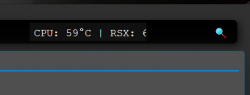
Found a small bug with webMAN 1.47.25 in displaying the CELL and RSX temps - RSX temp has been cut short.

View attachment 19185
It depends of the screen resolution. It looks fine in the screens that I have tested.

You can adjust the parameters in /dev_hdd0/xmlhost/game_plugin/sman.css

@aldostools I've discovered another bug, now in XMB PS1 games folder. For some reason in XMB it shows me that I have only 58 PSX ISOs, but via web it shows correctly all my 81 ISOs.

I can't tell from what version of wMM this problem had appeared, but as far as I remember version 1.47.20 or so didn't had this problem, I believe.

Maybe I should try and completely uninstall and then reinstall wMM?

If at the moment that you scanned the XML there was not enough memory or if memory profile does not allow more games in the section, the scanning will stop.

The HTML list can produce different results due the games are not grouped in sections like XML.

I recommend you that re-scan the XML again manually and disable the content scanning at startup. Also try changing the memory profile to allow more games in PSX section.
 
Aldo, how do you play Sega CD via wMM? BIOS_CD_x.bin and the game (Sonic CD) are copied into the ROMS/GEN/ folder but not detected.
I have installed pkg_launcher and retroach 1.7.7
Thanks.

Reference:

I haven't tried Sega CD lately... I think the BIOS goes in a directory of RetroArch.
I don't recall the name of the folder.

With the "item priority", as far as I know, it cannot be grouped again.
It becomes independent.
I have tried it, but it didn't work... did you manage to make it work as you suggested?

By the way, why am I unable to update webMAN MOD via built-in update option on PS3? It returns with error 80029567 at 1% downloading an update. I am on FERROX 4.84 Cobra 7.55 firmware now if it matters.
Try with Rebug 4.84.2... I just tested it again and it's working in Rebug.
 
Thank you for the file. I installed it on Rebug 4.84.2 and the icon didn't stay in a static place as required. If I press SQUARE the icon gets hidden in the albums or in the folders by format.

As I mentioned earlier, a workaround would be to modify category_game.xml and add a new query for PS2U10000. The problem is that many users won't like this "solution" and it would cause more issues/complains than benefits just to be able to auto-play PS2 Classics from sLauncher or from VSH menu.

The auto-play works when the game is mounted from "webMAN Games" menu. So for now I recommend to use that method of launch PS2 Classics.
 
It is suggested to add a set of combination key:Select + X to dismount game(same function as Select + O)
Because on the Japanese version PS3,the cross button is cancel function
So hopefully developers can add this functionality

Just use xregistry to make the button swaps for X/O permanent. Makes life much easier.


With the "item priority", as far as I know, it cannot be grouped again.
It becomes independent.

When item priority is used the app etc exist outside of any folders. I use this for multiMAN and keep the rest in folders.
 
Just use xregistry to make the button swaps for X/O permanent. Makes life much easier.

Yes. The issue with that solution is that many people get used a layout and it's hard to change when you have ages using it. webMAN MOD now supports both layouts to solve this issue..

When item priority is used the app etc exist outside of any folders. I use this for multiMAN and keep the rest in folders.

Yes I used it years ago. But for some reason, the item priority has no effect on my Rebug. I would have been a good option, since it's easy to detect if that package is installed. As the pkg is not behaving as expected on my system, I do not plan to support it.
 
@aldostools

Aldo I came up with another idea probably already somewhere in this forum exchanged "maybe"?
Auto-add covers ps3/ps2/psp/psx ISO to folders like config for ps2 is it possible? after installing multiman cover pack? Well, unless there's a function like that that I do not know about.
 
If at the moment that you scanned the XML there was not enough memory or if memory profile does not allow more games in the section, the scanning will stop.

The HTML list can produce different results due the games are not grouped in sections like XML.

I recommend you that re-scan the XML again manually and disable the content scanning at startup. Also try changing the memory profile to allow more games in PSX section.

Thank you! Mem option was set to Min (320 KB) for some reason. Changed it to Standard (864 KB), rescanned XML, rebooted PS3 and problem had gone.
 
@aldostools

Aldo I came up with another idea probably already somewhere in this forum exchanged "maybe"?
Auto-add covers ps3/ps2/psp/psx ISO to folders like config for ps2 is it possible? after installing multiman cover pack? Well, unless there's a function like that that I do not know about.

multiMAN and IRISMAN auto download covers, so when you run them the games get the covers automatically in webMAN.

Additionally, you have the online covers (a service provided by @DeViL303) that will show on XMB the covers for the games with missing covers.

And you have offline covers packs
https://www.psx-place.com/threads/multiman-cover-pack-v7-30.23748/

I think all covers options are already covered :)
 
I don't know if this is a bug, but sometimes when I uninstall webMAN MOD, install new version.
After PS3 will reboot while I'm holding L1 buttom, I cannot enter
webMAN Games -> webMAN Setup -> PS3 webMAN [Setup].
I'm getting:
setup-webman.png


When I'll power off, power on PS3, settings seems to work.
 
@aldostools I found a small problem that repeats itself from a few versions. I permanently removed all wmm files from the disk and reinstalled it. And now the problem after setting all the options on the one that suits me for saving and restarting ps3, wmm crash and deactivates. To make it work again I have toggle cobra on/off. Probably too big change of settings at once crash wmm.
 
Hi to everyone, thanks to accept me, web man its awesome, and i update webman mod to 1.43.25, and all its fine just the fan on my ps3 cech-3011a, when turn of the console, the fan keeps on all the time, i had to unplug de power cord to.shutdown, anyone had the same thing?
 
@aldostools I found a small problem that repeats itself from a few versions. I permanently removed all wmm files from the disk and reinstalled it. And now the problem after setting all the options on the one that suits me for saving and restarting ps3, wmm crash and deactivates. To make it work again I have toggle cobra on/off. Probably too big change of settings at once crash wmm.

Hello DEX357,
I have tried to reproduce your issue selecting all the options in /setup.ps3 but I couldn't reproduce the bug. Maybe if you post the exact options that you selected I could reproduce it and check what is crashing the plugin.

I don't know if this is a bug, but sometimes when I uninstall webMAN MOD, install new version.
After PS3 will reboot while I'm holding L1 buttom, I cannot enter
webMAN Games -> webMAN Setup -> PS3 webMAN [Setup].
I'm getting:
setup-webman.png


When I'll power off, power on PS3, settings seems to work.

When you uninstall and re-install webMAN, the settings are removed, then restored to the default values. These include scan for content at startup which may delay the startup of the http server. You will get the error if access the page and the service is not ready yet. If you retry few seconds later the /setup.ps3 should be available.
 
@aldostools ,

Don't know if this is a bug or not but when I unistalled webMAN mod from the option it also removed the installer icon and entry from the XMB but not the actual installer folder from the HDD, so it was on the HDD but not seen on the XMB.

I had to manually delete the folder from the HDD using MultiMAN File Manager then reinstall the installer pkg then reinstall webMAN MOD.

I did this because for some reason webMAN MOD was not showing the current IDPS being used, it kept constanlty showing the EID0 IDPS even though I had converted back to CEX so it should of shown the EID5 IDPS. So ithought that maybe something didn't install coreectly, so I removed all traces of webMAN MOD then re-installed it. The previsous version I used which was 1.47.09 didn't do this.

I wasn't using anything to spoof my IDPS or PSID at the time but I normally use CCAPI to do this anyways and it wasn't installed at the time.
 
Last edited:
Don't know if this is a bug or not but when I unistalled webMAN mod from the option it also removed the installer icon and entry from the XMB but not the actual installer folder from the HDD, so it was on the HDD but not seen on the XMB.

I had to manually delete the folder from the HDD using MultiMAN File Manager then reinstall the installer pkg then reinstall webMAN MOD.

I did this because for some reason webMAN MOD was not showing the current IDPS being used, it kept constanlty showing the EID0 IDPS even though I had converted back to CEX so it should of shown the EID5 IDPS. So ithought that mayby something didn't install coreectly, so I removed all traces of webMAN MOD then re-installed it. The previsous version I used which was 1.47.09 didn't do this.

I wasn't using anything to spoof my IDPS or PSID at the time but I normally use CCAPI to do this anyways and it wasn't installed at the time.

The installer is not deleted intentionally...
1- The installer can be used to re-install the plugin if you need it again.
2- The installer is independent. It can be removed at any moment, before or after uninstall.

However, the issue with IDPS could be a bug.
Currently the IDPS/PSID are cached in the recent versions. I need check this.
 
@aldostools i rec video for you step by step what i did, and after video i cobra off and on and wmm work witch new settings :/


Edit1. Also I notice the option to remove singstar icon disappear
 
Last edited:
Back
Top