
You are using an out of date browser. It may not display this or other websites correctly.
You should upgrade or use an alternative browser.
You should upgrade or use an alternative browser.
PS2 wLaunchELF Release Thread
- Thread starter sp193
- Start date
-
- Tags
- launchelf;


jolek
Senior Member
Seems links are dead.
Where can i find the latest version ?
Thanks for bringing this up.
Alternatively you can also get it here from resources:
https://www.psx-place.com/resources/wlaunchelf.713/.
I'll try to update 1st post by adding link to latest version & changelog.
jolek
Senior Member
For test you can create file "SYSTEM.CNF".
Add to it:
Download uncompressed wLe 41e4ebe (14\01\2019) from here:
https://www.psx-place.com/threads/ps2-linux-live-dvd.25145/#post-193798.
For better compatibility create at least 1 GiB dummy file.
You can use this dummy creator for that:
https://www.psx-place.com/resources/dummy-file-creator.861/.
Create ISO from these three files.
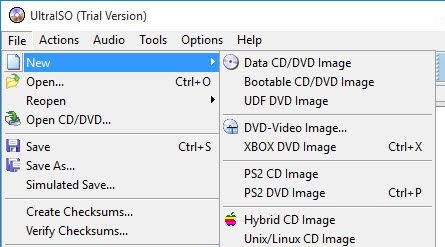
You can use UltraISO, it should have a profile for that (PS2 DVD Image):
I don't know if this gonna work, so other uLe (not wLe) versions can be found here (uLe to be burn** tab):
https://www.psx-place.com/resources/fmcb-fhdb-noobie-package.721/.
EDIT: Test version can be downloaded from attachment.
Add to it:
Code:
BOOT2 = cdrom0:\ULE_0114.ELF;1
VER = 1.00
VMODE = PAL
Download uncompressed wLe 41e4ebe (14\01\2019) from here:
https://www.psx-place.com/threads/ps2-linux-live-dvd.25145/#post-193798.
For better compatibility create at least 1 GiB dummy file.
You can use this dummy creator for that:
https://www.psx-place.com/resources/dummy-file-creator.861/.
Create ISO from these three files.
You can use UltraISO, it should have a profile for that (PS2 DVD Image):
I don't know if this gonna work, so other uLe (not wLe) versions can be found here (uLe to be burn** tab):
https://www.psx-place.com/resources/fmcb-fhdb-noobie-package.721/.
EDIT: Test version can be downloaded from attachment.
Attachments
Last edited:
jolek
Senior Member
tranks
Any progress?
Does this version works with your PS2?
Do have any modchip?
Can you also try uLE v4.38 boot DVD ISO from here:
http://psx-scene.com/forums/f113/unofficial-launchelf-v4-42-a-37242/.

Zwei
Member
Yes, it worksAny progress?
Does this version works with your PS2?
Do have any modchip?
Can you also try uLE v4.38 boot DVD ISO from here:
http://psx-scene.com/forums/f113/unofficial-launchelf-v4-42-a-37242/.
Thanks a lot for the help
PS2 FAT 50001 Matrix 1.88

chronoss
Member
Why with the last uLaunch, we haven't these line :
LK_Left_E1 =
LK_Right_E1 =
Last edited by a moderator:
chronoss
Member
Yes, it don't work and there is no option (line) in LAUNCHELF.CNFDo Left-/Right-Button-Binds not work?
CNF_version = 3
LK_auto_E1 =
LK_Circle_E1 = MISC/FileBrowser
LK_Cross_E1 =
LK_Square_E1 =
LK_Triangle_E1 = MISC/About uLE
LK_L1_E1 =
LK_R1_E1 =
LK_L2_E1 =
LK_R2_E1 =
LK_L3_E1 =
LK_R3_E1 =
LK_Start_E1 =
Misc = MISC/
Misc_PS2Disc = PS2Disc
Misc_FileBrowser = FileBrowser
Misc_PS2Browser = PS2Browser
Misc_PS2Net = PS2Net
Misc_PS2PowerOff = PS2PowerOff
Misc_HddManager = HddManager
Misc_TextEditor = TextEditor
Misc_JpgViewer = JpgViewer
Misc_Configure = Configure
Misc_Load_CNFprev = Load CNF--
Misc_Load_CNFnext = Load CNF++
Misc_Set_CNF_Path = Set CNF_Path
Misc_Load_CNF = Load CNF
Misc_ShowFont = ShowFont
Misc_Debug_Info = Debug Info
Misc_About_uLE = About uLE
Misc_OSDSYS = OSDSYS
GUI_Col_1_ABGR = 00808080
GUI_Col_2_ABGR = 00404040
GUI_Col_3_ABGR = 00000060
GUI_Col_4_ABGR = 00000000
GUI_Col_5_ABGR = 00006060
GUI_Col_6_ABGR = 00006000
GUI_Col_7_ABGR = 00E0E0E0
GUI_Col_8_ABGR = 00000000
SKIN_FILE =
GUI_SKIN_FILE =
SKIN_Brightness = 50
TV_mode = 0
Screen_Interlace = 1
Screen_X = 632
Screen_Y = 50
Popup_Opaque = 0
Menu_Frame = 1
Show_Menu = 1
LK_auto_Timer = 0
Menu_Hide_Paths = 1
Init_CDVD_Check = 0
Init_Reset_IOP = 1
Menu_Pages = 1
GUI_Swap_Keys = 1
USBD_FILE =
NET_HOSTwrite = 0
Menu_Title =
Init_Delay = 0
USBKBD_USED = 1
USBKBD_FILE =
KBDMAP_FILE =
Menu_Show_Titles = 1
PathPad_Lock = 0
CNF_Path =
USBMASS_FILE =
LANG_FILE =
FONT_FILE =
JpgView_Timer = -1
JpgView_Trans = -1
JpgView_Full = 0
PSU_HugeNames = 0
PSU_DateNames = 0
PSU_NoOverwrite = 0
FB_NoIcons = 0
PathPad_Lock = 0
LK_auto_E1 =
LK_Circle_E1 = MISC/FileBrowser
LK_Cross_E1 =
LK_Square_E1 =
LK_Triangle_E1 = MISC/About uLE
LK_L1_E1 =
LK_R1_E1 =
LK_L2_E1 =
LK_R2_E1 =
LK_L3_E1 =
LK_R3_E1 =
LK_Start_E1 =
Misc = MISC/
Misc_PS2Disc = PS2Disc
Misc_FileBrowser = FileBrowser
Misc_PS2Browser = PS2Browser
Misc_PS2Net = PS2Net
Misc_PS2PowerOff = PS2PowerOff
Misc_HddManager = HddManager
Misc_TextEditor = TextEditor
Misc_JpgViewer = JpgViewer
Misc_Configure = Configure
Misc_Load_CNFprev = Load CNF--
Misc_Load_CNFnext = Load CNF++
Misc_Set_CNF_Path = Set CNF_Path
Misc_Load_CNF = Load CNF
Misc_ShowFont = ShowFont
Misc_Debug_Info = Debug Info
Misc_About_uLE = About uLE
Misc_OSDSYS = OSDSYS
GUI_Col_1_ABGR = 00808080
GUI_Col_2_ABGR = 00404040
GUI_Col_3_ABGR = 00000060
GUI_Col_4_ABGR = 00000000
GUI_Col_5_ABGR = 00006060
GUI_Col_6_ABGR = 00006000
GUI_Col_7_ABGR = 00E0E0E0
GUI_Col_8_ABGR = 00000000
SKIN_FILE =
GUI_SKIN_FILE =
SKIN_Brightness = 50
TV_mode = 0
Screen_Interlace = 1
Screen_X = 632
Screen_Y = 50
Popup_Opaque = 0
Menu_Frame = 1
Show_Menu = 1
LK_auto_Timer = 0
Menu_Hide_Paths = 1
Init_CDVD_Check = 0
Init_Reset_IOP = 1
Menu_Pages = 1
GUI_Swap_Keys = 1
USBD_FILE =
NET_HOSTwrite = 0
Menu_Title =
Init_Delay = 0
USBKBD_USED = 1
USBKBD_FILE =
KBDMAP_FILE =
Menu_Show_Titles = 1
PathPad_Lock = 0
CNF_Path =
USBMASS_FILE =
LANG_FILE =
FONT_FILE =
JpgView_Timer = -1
JpgView_Trans = -1
JpgView_Full = 0
PSU_HugeNames = 0
PSU_DateNames = 0
PSU_NoOverwrite = 0
FB_NoIcons = 0
PathPad_Lock = 0
Last edited:
chronoss
Member
Yeah, it dont workHm... Have you tried just placing the lines in the config?
chronoss
Member
Yes, it's used for next/previous config but in config file, there are no line for thatI am not quite sure, if uLE/wLE ever supported that...!
I only know that FMCB/FHDB supports these binds and I think left/right was used for next/previous config (in wLE) or so...


sp193
Developer
It sounds like you are manually editing the file. Why not go through LaunchELF itself?
There was this once when a button binding was removed, but I think that was done because the binding could block another feature. Unfortunately, I have long forgotten whether that was really about this.
There was this once when a button binding was removed, but I think that was done because the binding could block another feature. Unfortunately, I have long forgotten whether that was really about this.
chronoss
Member
I edit anything and here is the proper file for the last LAUNCHELF.CNFIt sounds like you are manually editing the file. Why not go through LaunchELF itself?
There was this once when a button binding was removed, but I think that was done because the binding could block another feature. Unfortunately, I have long forgotten whether that was really about this.
Yes, it don't work and there is no option (line) in LAUNCHELF.CNF
CNF_version = 3
LK_auto_E1 =
LK_Circle_E1 = MISC/FileBrowser
LK_Cross_E1 =
LK_Square_E1 =
LK_Triangle_E1 = MISC/About uLE
LK_L1_E1 =
LK_R1_E1 =
LK_L2_E1 =
LK_R2_E1 =
LK_L3_E1 =
LK_R3_E1 =
LK_Start_E1 =
Misc = MISC/
Misc_PS2Disc = PS2Disc
Misc_FileBrowser = FileBrowser
Misc_PS2Browser = PS2Browser
Misc_PS2Net = PS2Net
Misc_PS2PowerOff = PS2PowerOff
Misc_HddManager = HddManager
Misc_TextEditor = TextEditor
Misc_JpgViewer = JpgViewer
Misc_Configure = Configure
Misc_Load_CNFprev = Load CNF--
Misc_Load_CNFnext = Load CNF++
Misc_Set_CNF_Path = Set CNF_Path
Misc_Load_CNF = Load CNF
Misc_ShowFont = ShowFont
Misc_Debug_Info = Debug Info
Misc_About_uLE = About uLE
Misc_OSDSYS = OSDSYS
GUI_Col_1_ABGR = 00808080
GUI_Col_2_ABGR = 00404040
GUI_Col_3_ABGR = 00000060
GUI_Col_4_ABGR = 00000000
GUI_Col_5_ABGR = 00006060
GUI_Col_6_ABGR = 00006000
GUI_Col_7_ABGR = 00E0E0E0
GUI_Col_8_ABGR = 00000000
SKIN_FILE =
GUI_SKIN_FILE =
SKIN_Brightness = 50
TV_mode = 0
Screen_Interlace = 1
Screen_X = 632
Screen_Y = 50
Popup_Opaque = 0
Menu_Frame = 1
Show_Menu = 1
LK_auto_Timer = 0
Menu_Hide_Paths = 1
Init_CDVD_Check = 0
Init_Reset_IOP = 1
Menu_Pages = 1
GUI_Swap_Keys = 1
USBD_FILE =
NET_HOSTwrite = 0
Menu_Title =
Init_Delay = 0
USBKBD_USED = 1
USBKBD_FILE =
KBDMAP_FILE =
Menu_Show_Titles = 1
PathPad_Lock = 0
CNF_Path =
USBMASS_FILE =
LANG_FILE =
FONT_FILE =
JpgView_Timer = -1
JpgView_Trans = -1
JpgView_Full = 0
PSU_HugeNames = 0
PSU_DateNames = 0
PSU_NoOverwrite = 0
FB_NoIcons = 0
PathPad_Lock = 0

