PS3 4.86 OFW Released + 4.86 Custom Firmware / PS3HEN / Apps / Tools Updates

How to acces debug menu and activate QA Flag for nopn ?
What's nopn?

With publicly available tools, QA flag cannot be toggled without lv1 peek/poke so it cannot be toggled on HEN, only on CFW.
If you are running a CFW & your only goal is to toggle QA, you can do that from the Rebug Toolbox or using a QA toggler app (downloadable from store.brewology.com).

To get the Debug menu you need to run some dex files so if you are on Rebug REX in CEX mode, you can use the Rebug Toolbox, set the Rebug Mode (that will install dex vsh in cex mode) & the Debug menu type (cex qa or dex).

There is also a combo that can display the QA menu once QA is enabled. It's one of the ways to confirm that the toggle enabled QA.
https://www.psdevwiki.com/ps3/Button_Combos#Getting_the_QA_Flag_Menu
 
Last edited:
I meant np environment, sorry.
My objective is to connect to internet but avoid PSN connections: https://www.reddit.com/r/ps3homebrew/wiki/np_environment
Thank you @bguerville
PSN connections are only made IF you provide the console with PSN creds & logging in is either done manually or automatically on user profile login.
All this is controlled by you!
The console will never connect to PSN unless you want it to.
Using the Internet is 100% unrelated to PSN, there is no setting to use the Internet without PSN connection.

PSN connections are required for certain apps like Netflix etc.. Those can be patched & made into nopsn versions.
PSN connections are also required for online gaming.
 
Last edited:
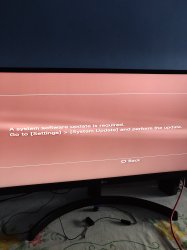
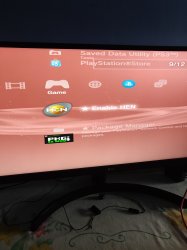
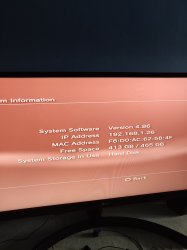
Hi there, new here. Just wanted some help, I'm starting to unblock my second Ps3 Super Slim, just installed hen 4.86.1 and pkgi but when I try to sign up to PSN to activate Games, it always says that I need to update the system software. Any suggestions? Thanks in advance.
 

Attachments

  • 16075315141721376818567476296146.jpg
    16075315141721376818567476296146.jpg
    5.9 MB · Views: 66
  • 16075315275952393929957389086681.jpg
    16075315275952393929957389086681.jpg
    3.1 MB · Views: 75
  • 16075315378072940702403054988778.jpg
    16075315378072940702403054988778.jpg
    3.7 MB · Views: 71
  • 16075315654418707230281983148222.jpg
    16075315654418707230281983148222.jpg
    3.6 MB · Views: 71
Hi there, new here. Just wanted some help, I'm starting to unblock my second Ps3 Super Slim, just installed hen 4.86.1 and pkgi but when I try to sign up to PSN to activate Games, it always says that I need to update the system software. Any suggestions? Thanks in advance.
HEN is now available for 4.87.

The easiest thing you can do is update to 4.87.1 HFW and then reinstall HEN from the official site http://**ps3xploit.com >Domain no Longer owned by team** (ps3xploit.me =new)/
 
I am unable to open this link to download the file. PLEASE HELP!

https://playstationscenefiles.com/r...a2c79919cafdbb50ccb5ee9589245380_PS3UPDAT.PUP

Can someone please upload the file for me.

View attachment 25008
This will details things that have been updated for 4.86 Support in the following catagories. Note some things like homebrew do not need updates for support (some do or just need minor cosmetic adjustments) and only those that do need updates will be listed in the categories below.​


d Updated Note about 4.86 OFW Released on March 30. Like previous updates of recent there has been kernel changes and no exploits patched, Just homebrew and exploits need to make small maintenance updates to support 4.86. Below i merged @naked_Snakes1995 thread announcing 4.86 was Live to keep all info here in one thread.​
 
Last edited by a moderator:
It should be as it's displayed on the page, i.e. a2c79919cafdbb50ccb5ee9589245380

There are multiple free MD5 hash checker programs. I personally use WinMD5Free and find it very reliable :)
i like HashTab now. it adds a tab to the windows file property dialog box with whatever hash types you choose.
 
It should be as it's displayed on the page, i.e. a2c79919cafdbb50ccb5ee9589245380

There are multiple free MD5 hash checker programs. I personally use WinMD5Free and find it very reliable :)

I verified and all was ok, copied the files, installed as per instructions, did system update from the USB drive, system rebooted and started with error 'The data is corrupted. (8002F169).

I have been battling my **** off since I loaded 4.87 and mistakenly deleted MultiMan. Rebox Toolbox also gives an error.

I NEED HELP PLEASE - DO NOT WANT TO LOOSE ANY GAMES OR DATA!
 
i like HashTab now. it adds a tab to the windows file property dialog box with whatever hash types you choose.
I like to use a context menu that uses PowerShell to calculate hashs:

Windows Registry Editor Version 5.00
; Created by: Shawn Brink
; Created on: March 5th 2017
; Tutorial: https://www.tenforums.com/tutorials/78681-file-hash-context-menu-add-windows-8-windows-10-a.html
[HKEY_CLASSES_ROOT\*\shell\hash]
"MUIVerb"="Hash"
"SubCommands"=""
; SHA1
[HKEY_CLASSES_ROOT\*\shell\hash\shell\01menu]
"MUIVerb"="SHA1"
[HKEY_CLASSES_ROOT\*\shell\hash\shell\01menu\command]
@="powershell -noexit get-filehash -literalpath '%1' -algorithm SHA1 | format-list"
; SHA256
[HKEY_CLASSES_ROOT\*\shell\hash\shell\02menu]
"MUIVerb"="SHA256"
[HKEY_CLASSES_ROOT\*\shell\hash\shell\02menu\command]
@="powershell -noexit get-filehash -literalpath '%1' -algorithm SHA256 | format-list"
; SHA384
[HKEY_CLASSES_ROOT\*\shell\hash\shell\03menu]
"MUIVerb"="SHA384"
[HKEY_CLASSES_ROOT\*\shell\hash\shell\03menu\command]
@="powershell -noexit get-filehash -literalpath '%1' -algorithm SHA384 | format-list"
; SHA512
[HKEY_CLASSES_ROOT\*\shell\hash\shell\04menu]
"MUIVerb"="SHA512"
[HKEY_CLASSES_ROOT\*\shell\hash\shell\04menu\command]
@="powershell -noexit get-filehash -literalpath '%1' -algorithm SHA512 | format-list"
; MACTripleDES
[HKEY_CLASSES_ROOT\*\shell\hash\shell\05menu]
"MUIVerb"="MACTripleDES"
[HKEY_CLASSES_ROOT\*\shell\hash\shell\05menu\command]
@="powershell -noexit get-filehash -literalpath '%1' -algorithm MACTripleDES | format-list"
; MD5
[HKEY_CLASSES_ROOT\*\shell\hash\shell\06menu]
"MUIVerb"="MD5"
[HKEY_CLASSES_ROOT\*\shell\hash\shell\06menu\command]
@="powershell -noexit get-filehash -literalpath '%1' -algorithm MD5 | format-list"
; RIPEMD160
[HKEY_CLASSES_ROOT\*\shell\hash\shell\07menu]
"MUIVerb"="RIPEMD160"
[HKEY_CLASSES_ROOT\*\shell\hash\shell\07menu\command]
@="powershell -noexit get-filehash -literalpath '%1' -algorithm RIPEMD160 | format-list"
; Allget-filehash -literalpath '%1' -algorithm RIPEMD160 | format-list
[HKEY_CLASSES_ROOT\*\shell\hash\shell\08menu]
"CommandFlags"=dword:00000020
"MUIVerb"="Show all"
[HKEY_CLASSES_ROOT\*\shell\hash\shell\08menu\command]
@="powershell -noexit get-filehash -literalpath '%1' -algorithm SHA1 | format-list;get-filehash -literalpath '%1' -algorithm SHA256 | format-list;get-filehash -literalpath '%1' -algorithm SHA384 | format-list;get-filehash -literalpath '%1' -algorithm SHA512 | format-list;get-filehash -literalpath '%1' -algorithm MACTripleDES | format-list;get-filehash -literalpath '%1' -algorithm MD5 | format-list;get-filehash -literalpath '%1' -algorithm RIPEMD160 | format-list"

Copy those lines and paste inside a file called "myFile.reg". After that, double click on the file and add the entries to windows register. Every time you right click on a file, you will be able to see a new context menu entrie: "Hash".
 
Last edited:
I verified and all was ok, copied the files, installed as per instructions, did system update from the USB drive, system rebooted and started with error 'The data is corrupted. (8002F169).

I have been battling my **** off since I loaded 4.87 and mistakenly deleted MultiMan. Rebox Toolbox also gives an error.

I NEED HELP PLEASE - DO NOT WANT TO LOOSE ANY GAMES OR DATA!
check the md5 of the pup on usb AFTER you copy it to usb. the error code seems to say the file is bad.
 

Similar threads

Back
Top