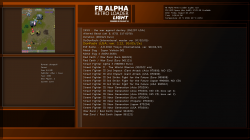
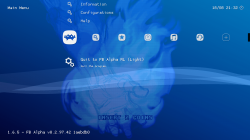
PS3 [Coming Soon] FB Alpha Retro Loader (Light) v1.0 [Powered by PSL1GHT]

Check it out as @CaptainCPS-X has made a return to the PS3 Homebrew Community recently and the developer has some plans and a bit of a preview of an upcoming release. A new version of his popular project FBA RL (Final Burn Alpha Retro Loader). This arcade emulator is based off the PS3 version of RetroArch/Libretro, but being CaptainCPS-X is an official contributor to the Windows FBA project and also a PS3 dev there was no better person to bring the original feel of the arcade emulators to the PS3 from windows. Now the developer is deciding to ditch the Sony SDK used to create the original version and has decided to o the pslight route for various reasons outlined in the Coming Soon Announcement you can view from CaptainCPS-X below:
-STLcardsWS

ICON0.PNG

  • FB Alpha Retro Loader (Light) v1.0 [Powered by PSL1GHT v2]
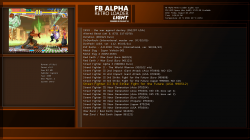
    FB_Alpha_Retro_Loader__Light__v1.0_6.png PIC1.PNG FB_Alpha_Retro_Loader__Light__v1.0_7.png

    What is it?
    • Well for those who don't know FB Alpha is a multi-arcade emulator just like MAME, originally released on Windows. FB Alpha Retro Loader objective is to bring the original FB Alpha easy to use interface and features to PS3. It uses a modified libretro core, and a modified retroarch build.
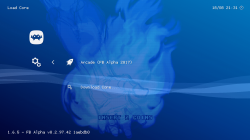
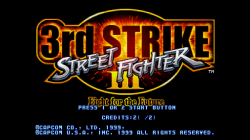
    RetroArch_PS3.png RetroArch_PS3_2(1).png RetroArch_PS3_1.png

  • Why do this? I can play FB Alpha on RetroArch
    • Yes, you can search for a ZIP file in your HDD / External device, etc, and hope you have the right one. But FB Alpha RL has the original FB Alpha method to handle drivers, that means, that it will scan the ROMs, get all the info from the embedded FBA database generated by my custom windows FBA build (unreleased), then filter out non-working games, get max players, year, manufacturer, etc. Having the database allows me to handle libretro core properly, and not treat it like a generic emulator.

  • Why "Light", what happened to the old FB Alpha RL v1.04 ?
    • I have the code here in my HDD, but it is C++, and I wanted to rewrite it as C, plus this time I'm using PSL1GHT, instead of PS3 SDK. I had a hard time porting a few things but its fun xD, and I can do many things I couldn't with PS3 SDK.

  • What are the current features?

    Not much right now:
    • Latest FB Alpha core (2017) (v0.2.97.42) (my build fix available at my GitHub repo)
    • In sync with MAME 0.187 romset (older or newer romset might work but could give problems)
    • FB Alpha driver information embedded database (v0.2.97.42).
    • Preview images for FB Alpha drivers.
    • Uses Tiny3D library for video.
    • Configurable (.ini)
    • Themes (background music (mp3), sound effects for ui (wav), fonts (.TTF), etc)
    • Misc features like: Temperature, time, date, HDD space display, etc
    • some other things xD

  • Why not release it?
    • I will, as soon as I get more free time to work on the final touches for the initial release. Then in the future I will keep adding features as I find time.

    SeeYa!
    :D
 
Last edited:
CaptainCPS-X, kadorna2 Sou do Brasil, nossa língua nativa é o Português, mas como na maioria do foruns é utilizado o inglês eu com a ajuda do google translator, tento fazer o melhor possível na tradução, mas o google translator, ainda tem muito que melhorar.

El portugués es portugués, pero como en la mayoría de los foros se utiliza el inglés yo con la ayuda del google translator, intento hacer lo mejor posible en la traducción, pero el google translator, todavía tiene mucho que mejorar.
Well, I'm from Argentina, so you are technically my neighbor :D
 
Guys please use only English language here. :) Thanks in advance. :)

Sorry didn't know it was required to write only English at PSX-Place, my bad.

@kosarovv I'm from Puerto Rico a pleasure to meet you, I have colleages from work that are from Argentina.

@antonioks Nice to meet you too, I understand your language too it seems like spanish a bit :)

Guys I will keep in touch with you so you can beta test FBARL before I release it, then I can fix any issues you find or any recommendations you might have. Thanks again for you support!

SeeYa
:D
 
Sorry didn't know it was required to write only English at PSX-Place, my bad.

Just because there is so many that do speak different languages, it makes it easier to have some sort of standard in place, however we do not mind posting in other languages (sometimes can be easier), we just ask that English (even a google translation) be added in the post as well (even in a spoiler). But its not 100% forbidden just needs some english attached with it.
 
Just because there is so many that do speak different languages, it makes it easier to have some sort of standard in place, however we do not mind posting in other languages (sometimes can be easier), we just ask that English (even a google translation) be added in the post as well (even in a spoiler). But its not 100% forbidden just needs some english attached with it.

I understand, no problem man! :D

SeeYa!
:D
 
Hiyas everyone! I haven't stopped working on FBARLL, in the recent days I added a few more things and improved the code. Some of the new things are:

Scanning of ROMs


Scanning of ROMs will verify contents of found ZIP archives for proper NAME + CRC32, ensuring the proper FBA romset is available.

Handling of romsets with prefix


Drivers with prefix on their romset name (Example: md_sonic2, gg_sonic2, sms_sonic2) to differentiate from different console system are properly handled when looking for ROMs. First the scan will check for the ZIP without the prefix (Example: md_sonic2.zip --> sonic2.zip), if not found, then it will check for the ZIP with prefix (Example: md_sonic2.zip).

The NAME + CRC32 check will avoid adding duplicate games to the list, since the official 'Full FBA Romset' have romsets with same ZIP name on different sub-directories, for example:

fba_full_romset/megadriv/sonic2.zip
fba_full_romset/gamegear/sonic2.zip
fba_full_romset/sms/sonic2.zip
...

That is how the standardized full FBA romset is structured that can be found online (~13GB / 10,000+ files).

FBARLL ROM path options

When I release FBARLL users will be able to select only ONE path from a list of supported paths, for example:

Path 1 - /dev_hdd0/roms/
Path 2 - /dev_hdd0/game/FBAROMS00/USRDIR/roms (would make it possible to make PKG of ROMs to be installed / uninstalled on this location easily)
Path 3 - /dev_usb00x/roms (available when USB drive is connected)
Path 4 - /dev_bdvd/roms (could be real disc, mounted locally or from net server)

Note: NTFS drives will be supported as well when connected.

The reason of only allowing to use ONE path is because FBA Romset is BIG, and scanning through all those paths and looking for 10,000+ drivers and verifying them is painful for the PS3 LOL xD.

Smart ROM Scan

Since ROM scanning could take some time to complete, it will be done at first launch, then it will create a gamelist cache with all the results. Then everytime you launch FBARLL it will read the gamelist cache and if for example, the ROMs path directory is not present (like USB drive, NTFS, BD Drive) it will prompt the user to re-scan the roms or connect the device. If the path is found but when trying to launch the game from the list, the file is not found, it will prompt the user to re-scan the ROMs.

Well thats it for now, I just wanted to let you all know about this, since it could get confusing for some of you on how FBARLL handle the ROMs.

All of this will be included as documentation when I release FBARLL.

SeeYa!
:D
 
CaptainCPS-X marveling my darling, it seems that you have read my thinking I have the Retroarch roms for ps3, inside the external hd, the ROMS folder, and inside it's sub folders with the name of each console, and its separate roms within them , Something that would be interesting, would be to support cheats, native in FBARLL the person would select the game, and would have a menu cos the cheats for that game, being able to select those that they like, the same as with mame , And now being implemented in the latest versions of retroarch, I do not know if it would be possible the same. Always a hug and success.
 
Hello everyone! I have been dedicating a few hours to FBARLL everyday, after coming from work, and it's getting closer to a release :). I wish I had the more time to work daily so I'm sorry its taking me so long.

This is the progress from the recent days:

- Speed up the ROMs scanning process by only looking for specific drivers on specific directories, for example FBARLL will not try to find MegaDrive ROMs in the "coleco" directory, only on "megadriv" directory.
- System filter by pressing ([L1] - Previous filter / [R1] - Next filter) while on the Gamelist section.
- 7zip archive support when verifying ROMs / CRC32. Mixed 7z and ZIP support is disabled, it works, but would take DOUBLE the amount of time to scan ROMs and is not ideal, you have the ZIP romset or you have 7zip, one or the other. In the options you will be able to specify if you want FBARLL to scan for ZIP (default) or you want it to look for 7zip files.

Before I release I want to finish adding these:

- Gamelist cache (to avoid scanning ROMs every time)
- Options section

This first release won't have everything I have planned, but at least everyone will be able to start enjoying all the latest updates and fixes of FBA for PS3.

Some have asked if there will be support for cheats, I currently don't know if libretro has cheat support for PS3 build at all. I honestly don't have any experience working with cheat modules, so I will leave that to another and concentrate on my current objectives with FBARLL that I mentioned in my previous posts.

Take care everyone! I'll be back in the next few days! hopefully with a release!

SeeYa!
:D
 
Hello everyone! I have been dedicating a few hours to FBARLL everyday, after coming from work, and it's getting closer to a release :). I wish I had the more time to work daily so I'm sorry its taking me so long.

This is the progress from the recent days:

- Speed up the ROMs scanning process by only looking for specific drivers on specific directories, for example FBARLL will not try to find MegaDrive ROMs in the "coleco" directory, only on "megadriv" directory.
- System filter by pressing ([L1] - Previous filter / [R1] - Next filter) while on the Gamelist section.
- 7zip archive support when verifying ROMs / CRC32. Mixed 7z and ZIP support is disabled, it works, but would take DOUBLE the amount of time to scan ROMs and is not ideal, you have the ZIP romset or you have 7zip, one or the other. In the options you will be able to specify if you want FBARLL to scan for ZIP (default) or you want it to look for 7zip files.

Before I release I want to finish adding these:

- Gamelist cache (to avoid scanning ROMs every time)
- Options section

This first release won't have everything I have planned, but at least everyone will be able to start enjoying all the latest updates and fixes of FBA for PS3.

Some have asked if there will be support for cheats, I currently don't know if libretro has cheat support for PS3 build at all. I honestly don't have any experience working with cheat modules, so I will leave that to another and concentrate on my current objectives with FBARLL that I mentioned in my previous posts.

Take care everyone! I'll be back in the next few days! hopefully with a release!

SeeYa!
:D

Yes, my dear, it's going to look fantastic, I've never really seen cheats with FBA Alpha, at least remember, I use it with mom, a cheat.zip file that goes in the main folder of the mame, the retroarch cheats I'm not sure if I'll be able to use the NeoGeo Unibios, but I'm not sure if I'll be able to do it. (Coin + Start) at boot time, it's interesting that it looks in the external Hd because I have the games inside the ROMS folder in the external hd root, to use with retroarch, so I would not have to play the games twice, The games in the same partitions that I already have now, I even have separated the roms by folders with the name of each console, and those of cps1, cps2, cps3 and neogeo are besides folders with the name of the console, sub folders with the name of Every game, but it's worth the test, it's easier to find A game with a zip code name, some chance of it running NeoGeo cd, because I remember that the version of windows, had support for Neo Geo Cd. A hug and success always.
 
Yes, my dear, it's going to look fantastic, I've never really seen cheats with FBA Alpha, at least remember, I use it with mom, a cheat.zip file that goes in the main folder of the mame, the retroarch cheats I'm not sure if I'll be able to use the NeoGeo Unibios, but I'm not sure if I'll be able to do it. (Coin + Start) at boot time, it's interesting that it looks in the external Hd because I have the games inside the ROMS folder in the external hd root, to use with retroarch, so I would not have to play the games twice, The games in the same partitions that I already have now, I even have separated the roms by folders with the name of each console, and those of cps1, cps2, cps3 and neogeo are besides folders with the name of the console, sub folders with the name of Every game, but it's worth the test, it's easier to find A game with a zip code name, some chance of it running NeoGeo cd, because I remember that the version of windows, had support for Neo Geo Cd. A hug and success always.

NeoGeo CD is not implemented in libretro yet.

NeoGeo Unibios cheats work fine since they are embedded in the BIOS itself.

You will have to move the arcade roms accordingly, if you want FBARLL to find them.

And yeah external usb hard drive is supported, you go to the options menu and select your device .

SeeYa!
:D
 
CaptainCPS-X Thanks for the answers, how much do you have, do not have problems, because I can edit the folder name, and go to retroarch settings, and change the directory to the roms manually, and a question will be able to have the official Retroarch and FBARLL installed On ps3 working simultaneously, or will they use the same data folder? An embrace.
 
NeoGeo CD is not implemented in libretro yet.

NeoGeo Unibios cheats work fine since they are embedded in the BIOS itself.

You will have to move the arcade roms accordingly, if you want FBARLL to find them.

And yeah external usb hard drive is supported, you go to the options menu and select your device .

SeeYa!
:D
Any news on this bealty?
 

Featured content

Trending content

Latest posts

Back
Top