
Version 0.3 of HAN Toolbox has now been released by developer's @DeViL303 & @pink1 (whom also released PKG Linker recently as well) leaving the BETA tag behind and now this is considered the first STABLE release. HAN Toolbox is a XMB Modification for PS3Xploit HAN ( the unofficial companion) and provides some extra features like the XMB File Explorer to name one of several features, Checkout all the details provided by the developer;s for this XMB Mod for PS3Xploit HAN user's.

-
Here is the latest update to the HAN Toolbox - v0.3
Thanks to Team PS3Xploit we have got lots more features at our disposal and we also added some of our own to the toolbox this time around.
New features in this version
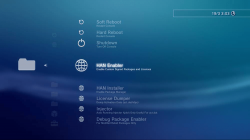
- Soft Reboot added
- Hard Reboot added
- Shutdown Added
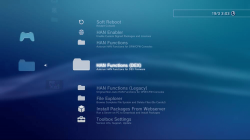
- File Explorer Added (browse and delete (unlink) files)
- New auto running links for all Xploit options (no buttons to push)
- Moved all Xploits except "HAN Enabler" into sub categories
- Submenu added for DEX Firmware Xploits (NOT for Normal HAN users)
- Original manual start Xploits still available under legacy menu
- Built in Toolbox Updater (Update from the XMB in future)
- HAN Installer
- HAN Enabler
- License Dumper
- License Injector
- Debug Package Enabler
- Support Forum
- Install Packages From Webserver (PKG Linker Required)
Important Note:
- It doesn't matter which order you do this in, but you should run HAN Installer again with freshly downloaded han support files to add support for Toolbox v0.3 either before or after installing the pkg, after installing the pkg you can go to Game Data Utility and delete the v0.2 data. If you don't do this things, v0.3 will not show, and you will still have 0.2 showing. Its ok if you have v0.2 and v0.3 showing at the same time, just delete v0.2 Game Data and reboot to clear it.
We are now removing the "beta/poc/wip" tags for v0.3 of the Toolbox. Still lots of work to do before a v1.0 release though.
Auto Running Xploits
- Now the main HAN Enabler button will link up to the official page for the Auto running version of the Xploit, So its a quicker process. The original versions of the Xploits with webpages are still accessible through a subcategory along with Auto running versions of all. Also added is a File Explorer feature feature that allows the PS3 file system to be browsed to check if files exist, and you can also delete files of folder by pressing the triangle button and selecting Unlink/Unlink Folder, Use the delete function carefully and don't delete important files or else you might need to reinstall FW or format HDD.
Future Toolbox Updates
- Also you will no longer need to update HAN Toolbox via pkg anymore after installing this update, when the next updates comes out you will be update it fron the XMB just like a game.See the new setting item inside the HAN Toolbox.
Package Linker
- Since the last release we have also released PKG Linker v1.0 For Windows that serves as an all in one package server, Its going to become more important over the next while, So make sure to check that out too HERE.
More updates to come soon from @pink1 and @DeViL303, we have not forgotten about Demo Downloader either. Special thanks to @esc0rtd3w from Team PS3Xploit for his extra help with everything. Thanks to all the staff and devs at PSX-Place too.
Download & Source: http://www.psx-place.com/resources/han-toolbox.628/
Last edited:


 nice one. I could do the same for Dex options. Why didn't I think of that!







