PS3 PS3 PRO MOD Release/Information Thread

Status
Not open for further replies.
I dont remember your post right now, but i have that SST fonts you uploaded. I was trying them with ManaGunZ btw, looks good :)

The missing characters in the PS2 emu i guess it happens because the official fonts have a massive amount of characters (like, several thousands each)
The fonts we can find in dafont or other webs specialized in fonts usually only have a few characters
In this case is better to use a font from, google, android, microsoft, linux, etc...
Something very well supported where they used a "failproof" font able to display a lot of characters

*You can use charmap.exe in windows to see the character maps and all characters with his groups etc...
I guess we could use a font editor (not sure if exists this kind of apps) to use one of the sony fonts as a base and then overwrite the characters present in our custom font (taken from dafont or whatever)
Great! .. I think this can be solved the way you mentioned .. but I do not know how I would do it ... besides .. these fonts I downloaded was not from the dafont, was a site that I do not remember the name..but I only know that it took a lot of work to download them .. there are the SST Family used on Sony smartphones, but they are not the same used on the PS4 ... and these were the ones that gave me work to find. ..the same ones that are used on PS4! ... but with a little patience and time .. one time or another you find them
 
Last edited:
I dont remember your post right now, but i have that SST fonts you uploaded. I was trying them with ManaGunZ btw, looks good :)

The missing characters in the PS2 emu i guess it happens because the official fonts have a massive amount of characters (like, several thousands each)
The fonts we can find in dafont or other webs specialized in fonts usually only have a few characters
In this case is better to use a font from, google, android, microsoft, linux, etc...
Something very well supported where they used a "failproof" font able to display a lot of characters

*You can use charmap.exe in windows to see the character maps and all characters with his groups etc...
I guess we could use a font editor (not sure if exists this kind of apps) to use one of the sony fonts as a base and then overwrite the characters present in our custom font (taken from dafont or whatever)
But it would be better if someone who has a PS4, could access the system files and extract all the system fonts ... then convert them to TTF and do the test on PS3 ... I think that would solve this problem of missing text in Emulations menu. Because the ones I downloaded are not from the PS4 system ... but the same model used by the system.
 
Last edited:
@LuanTeles for your PS3 mod to look even better ... how about using the SST Family fonts ... the same ones used on the PlayStation 4 .. I had made a pack of them and added some thread here (I don't remember which one exactly). ..but I can leave them here for the next update you add them to further improve your mod ... but first ... I have to say something that I had forgotten to mention to @sandungas ... happen that if you use this font as the main font (for the whole system not only in the user XMB) when emulating PS1, PS2 or PSP games ... you will have a little problem..pressing the Ps button to configure or exit the game ..not appearing the options ... in other words ... not having their text ... I don't know if it occurs only with this font or if it can happen to others too..but I only know that this problem occurs..
but if you only want to use in the user XMB..so you won't have problems with them..will work like any other font ;)

It would be awesome, but first we will have to make all the characters to show, i don't want to have a lot of comments about this issue.
If we sort it out, of will be a great addition
 
But it would be better if someone who has a PS4, could access the system files and extract all the system fonts ... then convert them to SST and do the test on PS3 ... I think that would solve this problem of missing text in Emulations menu. Because the ones I downloaded are not from the PS4 system ... but the same model used by the system.

Hm, i never messes with the ps4 system files, but i can take a look via ftp, but i'm not at home for the couple of next days =S
 
It would be awesome, but first we will have to make all the characters to show, i don't want to have a lot of comments about this issue.
If we sort it out, of will be a great addition
okay ... I'll see if I can find the files ... but we have @sandungas if I can't find the font files (I have several on PC) .. it has the fonts I downloaded.
 
Hm, i never messes with the ps4 system files, but i can take a look via ftp, but i'm not at home for the couple of next days =S
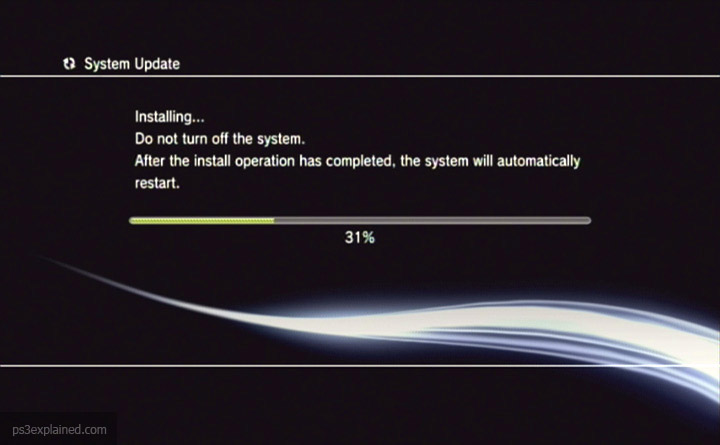
Okay ... no problem ... I also wanted to ask you something ... is it possible to change the color of the progress bar? the one that appears when we install or download something. if possible ... you could make it white .. just as it is on PS4 ... not only for that but I think it's more "modern".
 
Okay ... no problem ... I also wanted to ask you something ... is it possible to change the color of the progress bar? the one that appears when we install or download something. if possible ... you could make it white .. just as it is on PS4 ... not only for that but I think it's more "modern".

It is a thing that i'm trying since v1.2 , no progress so far, there is a image of the green procress bar, but no matter what i do with it, it doesnt change, maybe is it set in sprx? @DeViL303 @sandungas @pinky
 
if you mean multiman emulators, it uses its own TTF, and I think it can use the system's as well.
It's not the multiMAN emulator (I don't know if it uses the same system emulator or if it has its own ... or maybe I don't know what I'm talking about) ... it's the system's own emulator ... the fonts are already in TTF the problem is that they do not appear in the emulators menu.
 
Last edited:
ah, if you mean the ps1/2 emulators, they use their own. they're inside the elf. same way as with the recovery menu. they can't be changed.
 
V3.6 Changes so far..

- Added: PS4 Font Style Thanks to @Danxx444.
- Added: Podcast Player by @DeViL303 Translated to All Languages inside the Rco.
- Added: PS3 PRO/4K Logo in System Information.
- Added: Firmware Version Pro in System Information.
- Added: Pro Mod Base Version in System Information ( To Identify Which Version of The Mod is Installed).
- Improved: Rewritten Sysconf_plugin.rco ( Animations Has Been Rewritten and Renamed to Take Less Space).
- Improved: Settings Item Animation Now is Hidden in Info Pages ( Thanks for The Space Saved by Renaming The Animations)
- Improved: About Game 4K Pro Custom Logo.
- Removed: Red Settings Animation Recolor in Side Menu Options (Due to Recent Implementations and Size Limit of The Rco).


I need someone to help me with:

- Changing the Progress Bar Color
- Changing Keyboard

(I'm trying to edit those ones, from the beginning of the mod).


And please since the mod custom strings are translated to all languages using Google Translate and I know some of them are wrong, i need a feedback of those errors.
 
Last edited:
And please since the mod custom strings are translated to all languages using Google Translate and I know some of them are wrong, i need a feedback of those errors.

I can translate for french if you need.

BTW, is there an updater inside your mod ? I did not test it yet...
 
I can translate for french if you need.

BTW, is there an updater inside your mod ? I did not test it yet...

Thanks, I will be glad

Just lemme fisinish the upload, and please check the Advanced Reboot Settings, The System Fonts Names, The Impose Screen, The About System Information Screen, The Debug Option Text, Update Option Texts...
 
V3.6 Changes so far..

- Added: PS4 Font Style Thanks to @Danxx444.
- Added: Podcast Player by @DeViL303 Translated to All Languages inside the Rco.
- Added: PS3 PRO/4K Logo in System Information.
- Added: Firmware Version Pro in System Information.
- Added: Pro Mod Base Version in System Information ( To Identify Which Version of The Mod is Installed).
- Improved: Rewritten Sysconf_plugin.rco ( Animations Has Been Rewritten and Renamed to Take Less Space).
- Improved: Settings Item Animation Now is Hidden in Info Pages ( Thanks for The Space Saved by Renaming The Animations)
- Improved: About Game 4K Pro Custom Logo.
- Removed: Red Settings Animation Recolor in Side Menu Options (Due to Recent Implementations and Size Limit of The Rco).


I need someone to help me with:

- Changing the Progress Bar Color
- Changing Keyboard

(I'm trying to edit those ones, from the beginning of the mod).


And please since the mod custom strings are translated to all languages using Google Translate and I know some of them are wrong, i need a feedback of those errors.
Check this it may help i will see self maybe we can handle it

https://www.psdevwiki.com/ps3/RCOXML_Objects#.280x807.29_Progress
 
okay ... I'll see if I can find the files ... but we have @sandungas if I can't find the font files (I have several on PC) .. it has the fonts I downloaded.
You posted them here :encouragement:
https://www.psx-place.com/threads/ps3xploit-v3-han-system-font-replacer-ttf.17259/page-2

I posted a couple of interesting infos too :)
-The list of official PS4 fonts
-An online web converter otf to ttf


We are missing a program to "rebuild" then as i mentioned before though, to "merge" characers from different fonts
This way we are sure out custom font have all the characters needed by the PS3
 
It is a thing that i'm trying since v1.2 , no progress so far, there is a image of the green procress bar, but no matter what i do with it, it doesnt change, maybe is it set in sprx? @DeViL303 @sandungas @pinky
What a coincidence, i was taking a look at them yesterday, the official codenames (used by the images related) is: progress (for the horizontal bars), and scroll (for the vertical bars)

In latest firmwares (since 4.70 or so ?) they changed his location, previouslly was stored inside explore_plugin_full.rco but now are added inside other rco's
I think are inside system_plugin.rco
 
don't know what bar you're referring to, but the bars/lines on the screen are called separators I believe. upper and lower or top and bottom (can't recall which).
 
don't know what bar you're referring to, but the bars/lines on the screen are called separators I believe. upper and lower or top and bottom (can't recall which).
This one:
p1cNSvdpIrYyMCDchjE-S4wA0c9oe9zAM4U2luBnzetCsuseufrV3x4W270ntbeBZKFUhSPaBuT_kIy8OBki4ZTJ1Zccc_kGkJ3aEDWXdoQ3D5C5DVTkLlCxNQ
 
Status
Not open for further replies.

Similar threads

Back
Top