Advanced Power Options v1.11 (CFW & HEN)

PS3 [RELEASE] Advanced Power Options v1.11 (CFW & HEN) v1.11

https://www.psdevwiki.com/ps3/Recovery_Menu#4._Rebuild_Database

https://www.psdevwiki.com/ps3/Talk:Recovery_Menu

And yes, booting into recovery mode is done by changing an eeprom flag:

0x48C611Recover Mode Flag
https://www.psdevwiki.com/ps3/SC_EEPROM

There is also HDD Copy mode.
This have one serious issue. Since is dedicated to boot create_process_emer_init_self_vflash_recovery, using that to boot normal recovery cause loop :(

I edited jump to use create_process_emer_init_self, instead of create_process_emer_init_self_vflash_recovery when flag is detected, but that make only option 5,6 work correctly. Since normal recovery not clean that flag, options 1,2,3,4 just reboot to recovery.

Calling create_process_emer_init_self (0x29C6BC on 4.46 r3 = proc_obj r4 = shutdown 0/1) directly can be a way.
 
CFW Power Option v1.06

New features:
  • Have the added NAND recovery mode option from v1.05 as official feature now, delete strviewer_plugin.rco to enable that feature.
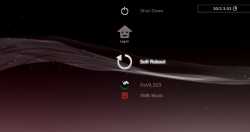
  • This adds Turn off (without confirmation) and Soft reboot to the user login screen.
  • The installer is now a package that installs files directly to dev_flash so dev_blind must be mounted prior to install.
  • Its now only 330kb which is 60% reduction approx. It could even be included on dev_flash in rebug/packages/ if you so wished. :)
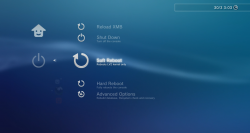
Current XMB items are laid out like this:

Power Options:


  • Reload XMB (Optional package built in, install to add)
  • Shut Down (no confirmation)
  • Soft Reboot
  • Hard Reboot
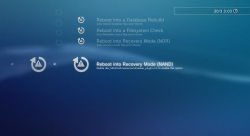
  • Advanced Options
  • >> Reboot into a Database Rebuild
  • >> Reboot into a Filesystem Check
  • >> Reboot into Recovery Mode (NOR)
  • >> Reboot into Recovery Mode (NAND)
  • >> Boot into OtherOS (Optional package built in, install to add)

Thanks to @aldostools and @lmn7 for research on the "force install to" packages. I think I am going to be using them a lot from now on. :)

The only reason it is nice to use an installer, is to have the warnings, and to not have to worry about the user mounting dev_flash.


Hmmm. The shut-down option should work at least - since HAN Toolbox has the same method for power-off (poweroff_plugin) and it works.

*

Oh, it's normal it does not work, all files are copied to dev_flash. :)

*

Edit :

How it it now :

dev_blind\vsh\module\videodownloader_plugin.sprx
dev_blind\vsh\resource\videodownloader_plugin.rco
dev_blind\vsh\resource\explore\icon\power.png
dev_blind\vsh\resource\explore\icon\restart.png
dev_blind\vsh\resource\explore\icon\restart_warning.png
dev_blind\vsh\resource\explore\icon\shutdown.png
dev_blind\vsh\resource\explore\xmb\category_psn.xml
dev_blind\vsh\resource\explore\xmb\category_user.xml
dev_blind\vsh\resource\explore\xmb\category_user_login.xml

How it should be :

(NO, doesnt work)...
 
Last edited:
Yes shut down work do u know how to uninstall

1. Enable HAN + mount flash : http://**ps3xploit.com >Domain no L...ploit.me =new)/hen/blind/han_flash_mount.html
2. Install this : https://www.dropbox.com/s/zh5jmzvwd86i810/restore_xml.pkg?dl=0 - it will restore your xml files that were replaced by the mod ;
3. Delete - using a filemanager or Toolbox filebrowser :
dev_hdd0\packages\Boot_into_OtherOS_v1.00.pkg
dev_hdd0\packages\Reload_XMB_v1.01.pkg

Optionnal (it won't hurt if your leave them here) : delete (BE VERY CAREFUL ABOUT WHAT YOU DELETE) :
dev_flash\vsh\module\videodownloader_plugin.sprx
dev_flash\vsh\resource\videodownloader_plugin.rco
dev_flash\vsh\resource\explore\icon\power.png
dev_flash\vsh\resource\explore\icon\restart.png
dev_flash\vsh\resource\explore\icon\restart_warning.png
dev_flash\vsh\resource\explore\icon\shutdown.png
 
1. Enable HAN + mount flash : http://**ps3xploit.com >Domain no L...ploit.me =new)/hen/blind/han_flash_mount.html
2. Install this : https://www.dropbox.com/s/zh5jmzvwd86i810/restore_xml.pkg?dl=0 - it will restore your xml files that were replaced by the mod ;
3. Delete - using a filemanager or Toolbox filebrowser :
dev_hdd0\packages\Boot_into_OtherOS_v1.00.pkg
dev_hdd0\packages\Reload_XMB_v1.01.pkg

Optionnal (it won't hurt if your leave them here) : delete (BE VERY CAREFUL ABOUT WHAT YOU DELETE) :
dev_flash\vsh\module\videodownloader_plugin.sprx
dev_flash\vsh\resource\videodownloader_plugin.rco
dev_flash\vsh\resource\explore\icon\power.png
dev_flash\vsh\resource\explore\icon\restart.png
dev_flash\vsh\resource\explore\icon\restart_warning.png
dev_flash\vsh\resource\explore\icon\shutdown.png
thanks dev
 
Back
Top