PS3 [Research] Modifying the Gaia Visualization (custom_render_plugin/earth.qrc)

You are only thinking about extraction because you have never injected. Renaming all my 24 textures to 7 letter names in 6 folder is just not going to happen here. Its way too much work., You do it your way and I'll do it mine.

I do not need to stick to Sonys system as its crap, we never need the filenames etc.

I am serious, do 10 planets (240 unique images) and you will have a different system when you are finished..you need hands on practical experience here..
 
Think in how rcomage works, in the xml generated by rcomage appears the paths where the files has been extracted (so this gives some freedom about where to extract files and filenames), but this is an advanced feature

In .rco format there is not a subfolder hierarchy inside the container though, but for .qrc you really need to keep a record of the path at extraction time because otherway is going to be imposible to rebuild it
In the tools we have to deal with .qrc format there is xml support in the CXML decompiler but in the tool pink1 is doing initially is not going to have xml support... so the only way to keep a record of the hierarchy is by extracting the files into that same hierarchy (is the simple approach btw)
I dont expect the initial version of any tool to do a rebuilding, but it could the goal in long term, is better to keep this in mind

You can insist as many you want but i dont see what im going to learn by renaming the files and patching the .qrc in a hexeditor, is something i made lot of times in other file formats and im used to it
As said, if you explain me where is the challenge or the annoyance i will understand it (or i will suggest you other approach to solve the problem, like i did several times but you seem to ignore)

You are insisting me in spending time in doing that patching like if i was not doing anything here... just for your to know, i spend tenths of hours in in the last days working with this, some of that hours was wasted trying to imagine how to generate the distortion patterns manually in photoshop and i failed but that doesnt changes much that i been a bit stressed working with this last days, now that im done with the distortion patterns i will take a look at other things
Anyway, i think pink1 is going to have the rebuilding functions working in 1-2 weeks :P
 
I have explained it enough, we just see it different I guess, I want to make it user friendly, you want to be exact technically and use sonys system. filenames mean nothing to me and I don't need them. Maybe you do.
 
Last edited:
I'm slowly moving along & about to start getting to some of the fun stuff :eagerness:
Capture.PNG
 
You are insisting me in spending time in doing that patching like if i was not doing anything here...
Not at all.. I know you did a lot with that, the thing is , I have not done anything about trying to figure out the distortion pattern like that, I am happy with the tools we have and do not need to know the exact distortion, I can apply textures without knowing it. But I would not try to tell you the best way to figure it out. Similarly you have not injected 1 jpeg into earth.qrc yet, so you do not know the best way to do that yet.

You want to use an upside down cubemap compared to every other, with backward grid references that start at bottom right, and long complicated filenames. You do not know how much extra work that makes for the modder who wants to make 24 custom images..
 
Cool, btw, for the tests use raf.qrc as guinea pig... it just have 10 files inside as much

Lets me rewrite this... extraction in 1 week and rebuilding in 2-3 weeks ? :D
Extract all is working and won't take much to get extracting individual files done.
I have the code for Zlib ready to add so we can work with QRC or QRCF files.
As soon as those are done I'll start working on replacing files and if that goes good I'll start on trying getting building from folder working.

I don't want to get to confident but if everything keeps going well I'm hoping to be able to start testing replacing files in a few days.
 
@DeViL303 I'm with @sandungas here because what You want to achieve is a problem of Windows to bind file extensions to apps, not mime types to apps like *everywhere* outside. ^^ And things which You want is easy, just bind i.e *.mnu extension to application which understand language by few syntax probe from file (i.e like EditPadPro, Programmer Notepad, SublimeText etc.). There is no reason to "shadowing" *.mnu as *.js, even if it is literally java script (I don't know that, guessing).
 
@DeViL303 I'm with @sandungas here because what You want to achieve is a problem of Windows to bind file extensions to apps, not mime types to apps like *everywhere* outside. ^^ And things which You want is easy, just bind i.e *.mnu extension to application which understand language by few syntax probe from file (i.e like EditPadPro, Programmer Notepad, SublimeText etc.). There is no reason to "shadowing" *.mnu as *.js, even if it is literally java script (I don't know that, guessing).
I have never once mentioned renaming any filetype.

I'm not talking about renaming any file types. I am talking about making applying textures user friendly. I'm talking about not using upside down non standard cubemap compared to every cubemap available on the net, which causes backward grid references etc (0,0 is in bootm right) . I am talking about not making every modder rename all his textures to 24 complicated names in 6 folders just to apply them in logical way.

I am also not talking about extracting at all, I do not care what you call extracted files. I do not care about extracted files. I already have a copy of the extracted files with correct names. They are of no use to me any more really.

I am not saying we need to forget the real names exist, What I am saying is for a new user, who has an image and wants to apply, I do not want them to have to learn some complicated backwards system.

If you both had actually done this, you would see that all that complicated stuff slows down workflow loads. please both of you, do 10 planets and see if you have a different system by the end of it.
 
Last edited:
@DeViL303 I'm with @sandungas here because what You want to achieve is a problem of Windows to bind file extensions to apps, not mime types to apps like *everywhere* outside. ^^ And things which You want is easy, just bind i.e *.mnu extension to application which understand language by few syntax probe from file (i.e like EditPadPro, Programmer Notepad, SublimeText etc.). There is no reason to "shadowing" *.mnu as *.js, even if it is literally java script (I don't know that, guessing).

It was me who suggested it, and for reasons. And the fact that windows will bind MNU to Photoshop if the user has it installed as MNUs in this app are used for menu customisation.

MNU is also used by 3D apps such as 3DS Max. So adding .js (or even just plain .txt) make sure this file type is NOT binded to an app that use's them in other ways that you would not want.

MNU is also used in Sat nav software.

So here we have one file extension .mnu creating a conflict on windows across multiple apps, this is not good for people to edit them. And may cause issues for people with these apps installed....

The same goes for .path files.

SO at the end of the day I suggested it for good a reason.... and there is a reason to shadow these extensions
 
We need to sort this out, the one or two people who are interested in doing this are losing interest because its not getting simpler.

in99NN6.jpg


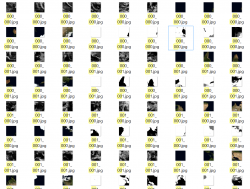
@sandungas, please look at your map again and tell me what info can I take from that when I want to inject an image?

There is absolutely no information in that image that will help me? I actually looks like some images on the poles are applied the other way around compared to the others.

The jpeg name is not used anywhere in the real world, and the earth textures applied to it is of no use to anyone.

Can you not see how your image is useless compared to mine for modders?

All the important info is missing, offset, position in qrc, filesize, relationship to the standard cubemaps or output from generator..

Think in how rcomage works, in the xml generated by rcomage appears the paths where the files has been extracted (so this gives some freedom about where to extract files and filenames), but this is an advanced feature

That is one of the most badly designed least user friendly applications in the whole scene and you want to use that as an example...??

Do you not see how many issues people have with RCOmage due to its bad design?

No. We are not making this like rcomage in any shape or form.. :) I have no interest in working on anything that will be using ideas from rcomage.
 
Last edited:
Im not going to spend another 30 posts discussing with you when you are at full denial of everything i say, that negativity is contagious
 
I think you just dont get it because you have not done it.

If i have an image like this:

upload_2020-1-25_11-13-4.png


And I have this map:

in99NN6.jpg


I would not have any information to allow me to inject it, that is my point.
 
I think I will just make 2 BATs that can rename&move 1.jpg to 24.jpg into 6 x 000_000.jpg , 6 x 000_001.jpg , 6 x 001_000 and 6 x 001_001.jpg and one to rename back the other way. This way its the best of both worlds. If people need the official names they can just use the bat on 1.jpg to 24.jpg. If the official names and having 6 images with the same name is too confusing for some people they can use 1 to 24 instead.
 
Last edited:
This will take jpgs named to "01.jpg" to "72.jpg" and create the official structure to match the QRC. 01 to 72 refers to the "slots" or 72 position in the QRC file.

1 to 24 = Cloud layer (this is the one I am using mostly so far -1.27MB space available)
25 to 48 = ground layer (Not using much due to only 277KB space available for these images)
49 to 72 = specular layer (even less space available - approx 150kb)

Click this bat file in a folder of images named xx.jpg and you will make a copy from this type of structure. Start with ALL jpgs in one folder. It does not matter if you have less than 72 files, it will do just do what it finds.
upload_2020-1-25_14-26-13.png


It will convert to the official folder structure which is like this and has 44 folders and four times 18 files with the same name:

upload_2020-1-25_14-27-52.png

upload_2020-1-25_14-42-45.png

Code:
if not exist "earth\flashrom\clouds\0\1\" MkDir "earth\flashrom\clouds\0\1\" && copy "01.jpg" "earth\flashrom\clouds\0\1\000_000.jpg"
copy "02.jpg" "earth\flashrom\clouds\0\1\000_001.jpg"
copy "03.jpg" "earth\flashrom\clouds\0\1\001_000.jpg"
copy "04.jpg" "earth\flashrom\clouds\0\1\001_001.jpg"
if not exist "earth\flashrom\clouds\1\1\" MkDir "earth\flashrom\clouds\1\1\" && copy "05.jpg" "earth\flashrom\clouds\1\1\000_000.jpg"
copy "06.jpg" "earth\flashrom\clouds\1\1\000_001.jpg"
copy "07.jpg" "earth\flashrom\clouds\1\1\001_000.jpg"
copy "08.jpg" "earth\flashrom\clouds\1\1\001_001.jpg"
if not exist "earth\flashrom\clouds\2\1\" MkDir "earth\flashrom\clouds\2\1\" && copy "09.jpg" "earth\flashrom\clouds\2\1\000_000.jpg"
copy "10.jpg" "earth\flashrom\clouds\2\1\000_001.jpg"
copy "11.jpg" "earth\flashrom\clouds\2\1\001_000.jpg"
copy "12.jpg" "earth\flashrom\clouds\2\1\001_001.jpg"
if not exist "earth\flashrom\clouds\3\1\" MkDir "earth\flashrom\clouds\3\1\" && copy "13.jpg" "earth\flashrom\clouds\3\1\000_000.jpg"
copy "14.jpg" "earth\flashrom\clouds\3\1\000_001.jpg"
copy "15.jpg" "earth\flashrom\clouds\3\1\001_000.jpg"
copy "16.jpg" "earth\flashrom\clouds\3\1\001_001.jpg"
if not exist "earth\flashrom\clouds\4\1\" MkDir "earth\flashrom\clouds\4\1\" && copy "17.jpg" "earth\flashrom\clouds\4\1\000_000.jpg"
copy "18.jpg" "earth\flashrom\clouds\4\1\000_001.jpg"
copy "19.jpg" "earth\flashrom\clouds\4\1\001_000.jpg"
copy "20.jpg" "earth\flashrom\clouds\4\1\001_001.jpg"
if not exist "earth\flashrom\clouds\5\1\" MkDir "earth\flashrom\clouds\5\1\" && copy "21.jpg" "earth\flashrom\clouds\5\1\000_000.jpg"
copy "22.jpg" "earth\flashrom\clouds\5\1\000_001.jpg"
copy "23.jpg" "earth\flashrom\clouds\5\1\001_000.jpg"
copy "24.jpg" "earth\flashrom\clouds\5\1\001_001.jpg"
if not exist "earth\flashrom\ground_cm\0\1\" MkDir "earth\flashrom\ground_cm\0\1\" && copy "25.jpg" "earth\flashrom\ground_cm\0\1\000_000.jpg"
copy "26.jpg" "earth\flashrom\ground_cm\0\1\000_001.jpg"
copy "27.jpg" "earth\flashrom\ground_cm\0\1\001_000.jpg"
copy "28.jpg" "earth\flashrom\ground_cm\0\1\001_001.jpg"
if not exist "earth\flashrom\ground_cm\1\1\" MkDir "earth\flashrom\ground_cm\1\1\" && copy "29.jpg" "earth\flashrom\ground_cm\1\1\000_000.jpg"
copy "30.jpg" "earth\flashrom\ground_cm\1\1\000_001.jpg"
copy "31.jpg" "earth\flashrom\ground_cm\1\1\001_000.jpg"
copy "32.jpg" "earth\flashrom\ground_cm\1\1\001_001.jpg"
if not exist "earth\flashrom\ground_cm\2\1\" MkDir "earth\flashrom\ground_cm\2\1\" && copy "33.jpg" "earth\flashrom\ground_cm\2\1\000_000.jpg"
copy "34.jpg" "earth\flashrom\ground_cm\2\1\000_001.jpg"
copy "35.jpg" "earth\flashrom\ground_cm\2\1\001_000.jpg"
copy "36.jpg" "earth\flashrom\ground_cm\2\1\001_001.jpg"
if not exist "earth\flashrom\ground_cm\3\1\" MkDir "earth\flashrom\ground_cm\3\1\" && copy "37.jpg" "earth\flashrom\ground_cm\3\1\000_000.jpg"
copy "38.jpg" "earth\flashrom\ground_cm\3\1\000_001.jpg"
copy "39.jpg" "earth\flashrom\ground_cm\3\1\001_000.jpg"
copy "40.jpg" "earth\flashrom\ground_cm\3\1\001_001.jpg"
if not exist "earth\flashrom\ground_cm\4\1\" MkDir "earth\flashrom\ground_cm\4\1\" && copy "41.jpg" "earth\flashrom\ground_cm\4\1\000_000.jpg"
copy "42.jpg" "earth\flashrom\ground_cm\4\1\000_001.jpg"
copy "43.jpg" "earth\flashrom\ground_cm\4\1\001_000.jpg"
copy "44.jpg" "earth\flashrom\ground_cm\4\1\001_001.jpg"
if not exist "earth\flashrom\ground_cm\5\1\" MkDir "earth\flashrom\ground_cm\5\1\" && copy "45.jpg" "earth\flashrom\ground_cm\5\1\000_000.jpg"
copy "46.jpg" "earth\flashrom\ground_cm\5\1\000_001.jpg"
copy "47.jpg" "earth\flashrom\ground_cm\5\1\001_000.jpg"
copy "48.jpg" "earth\flashrom\ground_cm\5\1\001_001.jpg"
if not exist "earth\flashrom\specular\0\1\" MkDir "earth\flashrom\specular\0\1\" && copy "49.jpg" "earth\flashrom\specular\0\1\000_000.jpg"
copy "50.jpg" "earth\flashrom\specular\0\1\000_001.jpg"
copy "51.jpg" "earth\flashrom\specular\0\1\001_000.jpg"
copy "52.jpg" "earth\flashrom\specular\0\1\001_001.jpg"
if not exist "earth\flashrom\specular\1\1\" MkDir "earth\flashrom\specular\1\1\" && copy "53.jpg" "earth\flashrom\specular\1\1\000_000.jpg"
copy "54.jpg" "earth\flashrom\specular\1\1\000_001.jpg"
copy "55.jpg" "earth\flashrom\specular\1\1\001_000.jpg"
copy "56.jpg" "earth\flashrom\specular\1\1\001_001.jpg"
if not exist "earth\flashrom\specular\2\1\" MkDir "earth\flashrom\specular\2\1\" && copy "57.jpg" "earth\flashrom\specular\2\1\000_000.jpg"
copy "58.jpg" "earth\flashrom\specular\2\1\000_001.jpg"
copy "59.jpg" "earth\flashrom\specular\2\1\001_000.jpg"
copy "60.jpg" "earth\flashrom\specular\2\1\001_001.jpg"
if not exist "earth\flashrom\specular\3\1\" MkDir "earth\flashrom\specular\3\1\" && copy "61.jpg" "earth\flashrom\specular\3\1\000_000.jpg"
copy "62.jpg" "earth\flashrom\specular\3\1\000_001.jpg"
copy "63.jpg" "earth\flashrom\specular\3\1\001_000.jpg"
copy "64.jpg" "earth\flashrom\specular\3\1\001_001.jpg"
if not exist "earth\flashrom\specular\4\1\" MkDir "earth\flashrom\specular\4\1\" && copy "65.jpg" "earth\flashrom\specular\4\1\000_000.jpg"
copy "66.jpg" "earth\flashrom\specular\4\1\000_001.jpg"
copy "67.jpg" "earth\flashrom\specular\4\1\001_000.jpg"
copy "68.jpg" "earth\flashrom\specular\4\1\001_001.jpg"
if not exist "earth\flashrom\specular\5\1\" MkDir "earth\flashrom\specular\5\1\" && copy "69.jpg" "earth\flashrom\specular\5\1\000_000.jpg"
copy "70.jpg" "earth\flashrom\specular\5\1\000_001.jpg"
copy "71.jpg" "earth\flashrom\specular\5\1\001_000.jpg"
copy "72.jpg" "earth\flashrom\specular\5\1\001_001.jpg"
 

Attachments

Last edited:
So adding .js (or even just plain .txt) make sure this file type is NOT binded to an app that use's them in other ways that you would not want.

But this is Windows family problem, and users which don't know anything about their computer (if they have more than one cell in brain, they will use "open as..." from context menu). ;) Changing filename is extremely confusing and I'm against it. Anyway, just my three cents.
@DeViL303 Sorry, I mislead You with Cypher. I wrote this comment yesterday at ~4:00 A.M, so You know... :D
 
I have made a bat that takes a 4096x3072 "cubemap.jpg" and makes it into all the required jpegs at the correct size and rotation and naming, it:
  • Rotates thecubemap.jpg image 180 degrees and saves a copy
  • Cuts out the 6 faces named face0.jpg to face5.jpg from the rotated cubemap
  • Cuts face0-face5 into 01.jpg to 24.jpg
  • Optimizes 01.jpg to 24.jpg to the correct sizes for each of the 24 slots
  • Creates the earth.qrc file structure
if not exist "Cube_faces" MkDir "Cube_faces"
if not exist "Tiles\optimized" MkDir "Tiles\optimized"
for %%p in ("Cube_faces\cubemap.jpg") do (
jpegtran.exe -rotate 180 "cubemap.jpg" "Cube_faces\cubemap_rotated.jpg"
jpegtran.exe -crop 1024x1024+0+1024 "Cube_faces\cubemap_rotated.jpg" "Cube_faces\face0.jpg"
jpegtran.exe -crop 1024x1024+3072+1024 "Cube_faces\cubemap_rotated.jpg" "Cube_faces\face1.jpg"
jpegtran.exe -crop 1024x1024+2048+1024 "Cube_faces\cubemap_rotated.jpg" "Cube_faces\face2.jpg"
jpegtran.exe -crop 1024x1024+1024+1024 "Cube_faces\cubemap_rotated.jpg" "Cube_faces\face3.jpg"
jpegtran.exe -crop 1024x1024+2048+0 "Cube_faces\cubemap_rotated.jpg" "Cube_faces\face4.jpg"
jpegtran.exe -crop 1024x1024+2048+2048 "Cube_faces\cubemap_rotated.jpg" "Cube_faces\face5.jpg"
jpegtran.exe -crop 512x512+0+0 "Cube_faces\face0.jpg" "Tiles\01.jpg"
jpegtran.exe -crop 512x512+512+0 "Cube_faces\face0.jpg" "Tiles\02.jpg"
jpegtran.exe -crop 512x512+0+512 "Cube_faces\face0.jpg" "Tiles\03.jpg"
jpegtran.exe -crop 512x512+512+512 "Cube_faces\face0.jpg" "Tiles\04.jpg"
jpegtran.exe -crop 512x512+0+0 "Cube_faces\face1.jpg" "Tiles\05.jpg"
jpegtran.exe -crop 512x512+512+0 "Cube_faces\face1.jpg" "Tiles\06.jpg"
jpegtran.exe -crop 512x512+0+512 "Cube_faces\face1.jpg" "Tiles\07.jpg"
jpegtran.exe -crop 512x512+512+512 "Cube_faces\face1.jpg" "Tiles\08.jpg"
jpegtran.exe -crop 512x512+0+0 "Cube_faces\face2.jpg" "Tiles\09.jpg"
jpegtran.exe -crop 512x512+512+0 "Cube_faces\face2.jpg" "Tiles\10.jpg"
jpegtran.exe -crop 512x512+0+512 "Cube_faces\face2.jpg" "Tiles\11.jpg"
jpegtran.exe -crop 512x512+512+512 "Cube_faces\face2.jpg" "Tiles\12.jpg"
jpegtran.exe -crop 512x512+0+0 "Cube_faces\face3.jpg" "Tiles\13.jpg"
jpegtran.exe -crop 512x512+512+0 "Cube_faces\face3.jpg" "Tiles\14.jpg"
jpegtran.exe -crop 512x512+0+512 "Cube_faces\face3.jpg" "Tiles\15.jpg"
jpegtran.exe -crop 512x512+512+512 "Cube_faces\face3.jpg" "Tiles\16.jpg"
jpegtran.exe -crop 512x512+0+0 "Cube_faces\face4.jpg" "Tiles\17.jpg"
jpegtran.exe -crop 512x512+512+0 "Cube_faces\face4.jpg" "Tiles\18.jpg"
jpegtran.exe -crop 512x512+0+512 "Cube_faces\face4.jpg" "Tiles\19.jpg"
jpegtran.exe -crop 512x512+512+512 "Cube_faces\face4.jpg" "Tiles\20.jpg"
jpegtran.exe -crop 512x512+0+0 "Cube_faces\face5.jpg" "Tiles\21.jpg"
jpegtran.exe -crop 512x512+512+0 "Cube_faces\face5.jpg" "Tiles\22.jpg"
jpegtran.exe -crop 512x512+0+512 "Cube_faces\face5.jpg" "Tiles\23.jpg"
jpegtran.exe -crop 512x512+512+512 "Cube_faces\face5.jpg" "Tiles\24.jpg"
)
copy "Tiles\*.jpg" "Tiles\optimized\*.jpg"
jpegoptim --size=60k "Tiles\optimized\01.jpg"
jpegoptim --size=50k "Tiles\optimized\02.jpg"
jpegoptim --size=47k "Tiles\optimized\03.jpg"
jpegoptim --size=50k "Tiles\optimized\04.jpg"
jpegoptim --size=50k "Tiles\optimized\05.jpg"
jpegoptim --size=41k "Tiles\optimized\06.jpg"
jpegoptim --size=45k "Tiles\optimized\07.jpg"
jpegoptim --size=47k "Tiles\optimized\08.jpg"
jpegoptim --size=61k "Tiles\optimized\09.jpg"
jpegoptim --size=45k "Tiles\optimized\10.jpg"
jpegoptim --size=43k "Tiles\optimized\11.jpg"
jpegoptim --size=37k "Tiles\optimized\12.jpg"
jpegoptim --size=51k "Tiles\optimized\13.jpg"
jpegoptim --size=54k "Tiles\optimized\14.jpg"
jpegoptim --size=47k "Tiles\optimized\15.jpg"
jpegoptim --size=52k "Tiles\optimized\16.jpg"
jpegoptim --size=60k "Tiles\optimized\17.jpg"
jpegoptim --size=55k "Tiles\optimized\18.jpg"
jpegoptim --size=54k "Tiles\optimized\19.jpg"
jpegoptim --size=45k "Tiles\optimized\20.jpg"
jpegoptim --size=54k "Tiles\optimized\21.jpg"
jpegoptim --size=48k "Tiles\optimized\22.jpg"
jpegoptim --size=52k "Tiles\optimized\23.jpg"
jpegoptim --size=53k "Tiles\optimized\24.jpg"
if not exist "earth\flashrom\clouds\0\1\" MkDir "earth\flashrom\clouds\0\1\" && copy "Tiles\optimized\01.jpg" "earth\flashrom\clouds\0\1\000_000.jpg"
copy "Tiles\optimized\02.jpg" "earth\flashrom\clouds\0\1\000_001.jpg"
copy "Tiles\optimized\03.jpg" "earth\flashrom\clouds\0\1\001_000.jpg"
copy "Tiles\optimized\04.jpg" "earth\flashrom\clouds\0\1\001_001.jpg"
if not exist "earth\flashrom\clouds\1\1\" MkDir "earth\flashrom\clouds\1\1\" && copy "Tiles\optimized\05.jpg" "earth\flashrom\clouds\1\1\000_000.jpg"
copy "Tiles\optimized\06.jpg" "earth\flashrom\clouds\1\1\000_001.jpg"
copy "Tiles\optimized\07.jpg" "earth\flashrom\clouds\1\1\001_000.jpg"
copy "Tiles\optimized\08.jpg" "earth\flashrom\clouds\1\1\001_001.jpg"
if not exist "earth\flashrom\clouds\2\1\" MkDir "earth\flashrom\clouds\2\1\" && copy "Tiles\optimized\09.jpg" "earth\flashrom\clouds\2\1\000_000.jpg"
copy "Tiles\optimized\10.jpg" "earth\flashrom\clouds\2\1\000_001.jpg"
copy "Tiles\optimized\11.jpg" "earth\flashrom\clouds\2\1\001_000.jpg"
copy "Tiles\optimized\12.jpg" "earth\flashrom\clouds\2\1\001_001.jpg"
if not exist "earth\flashrom\clouds\3\1\" MkDir "earth\flashrom\clouds\3\1\" && copy "Tiles\optimized\13.jpg" "earth\flashrom\clouds\3\1\000_000.jpg"
copy "Tiles\optimized\14.jpg" "earth\flashrom\clouds\3\1\000_001.jpg"
copy "Tiles\optimized\15.jpg" "earth\flashrom\clouds\3\1\001_000.jpg"
copy "Tiles\optimized\16.jpg" "earth\flashrom\clouds\3\1\001_001.jpg"
if not exist "earth\flashrom\clouds\4\1\" MkDir "earth\flashrom\clouds\4\1\" && copy "Tiles\optimized\17.jpg" "earth\flashrom\clouds\4\1\000_000.jpg"
copy "Tiles\optimized\18.jpg" "earth\flashrom\clouds\4\1\000_001.jpg"
copy "Tiles\optimized\19.jpg" "earth\flashrom\clouds\4\1\001_000.jpg"
copy "Tiles\optimized\20.jpg" "earth\flashrom\clouds\4\1\001_001.jpg"
if not exist "earth\flashrom\clouds\5\1\" MkDir "earth\flashrom\clouds\5\1\" && copy "Tiles\optimized\21.jpg" "earth\flashrom\clouds\5\1\000_000.jpg"
copy "Tiles\optimized\22.jpg" "earth\flashrom\clouds\5\1\000_001.jpg"
copy "Tiles\optimized\23.jpg" "earth\flashrom\clouds\5\1\001_000.jpg"
copy "Tiles\optimized\24.jpg" "earth\flashrom\clouds\5\1\001_001.jpg"

So in one step it goes from :

cubemap.jpg


To this:
01.jpg 02.jpg
03.jpg 04.jpg
05.jpg 06.jpg
07.jpg 08.jpg
09.jpg 10.jpg
11.jpg 12.jpg
13.jpg 14.jpg
15.jpg 16.jpg
17.jpg 18.jpg
19.jpg 20.jpg
21.jpg 22.jpg
23.jpg 24.jpg

It does not inject the files or anything like that, it just prepares the jpgs. Needs more testing but seems to work.

Result after manual injection with HxD
preview.jpg


Note: it keeps copies of files at all stages, and it leaves the files to be injected in the "Tiles/optimized" folder as 01.jpg to 24.jpg, and it also makes a copy in earth/flashrom with official names. I have an example "cubemap.jpg" in the zip, just extract the zip then click the bat to test it out.

This might help you @pink1 if you were planning on adding any image preparation stuff. Not sure, you might have a better way.

This site can convert flat maps to 4096x3072 cubemaps

https://matheowis.github.io/HDRI-to-CubeMap/

This one is good as you can get them all in one image or separate.
 

Attachments

Last edited:
This might help you @pink1 if you were planning on adding any image preparation stuff. Not sure, you might have a better way.
I was working on splitting the images and converting them from png to jpg. I had a good start on it but then I started playing with the QRCs & haven't touched it :cower:
 

Similar threads

Back
Top