PS3 What can I do if my PS3 is on OFW 4.83

There is some people that confuses "PS3 Slim" with "PS3 SuperSlim", and im wondering if you are having the same mistake
When someone asks you about your PS3 model you need to mention the model printed in the sticker at the back of the PS3. Is one of this (from the "retail" group). sarting always with CECH-????
http://www.psdevwiki.com/ps3/Console_Information
Here is my opinion, if someone cant read instructions or even know the difference between slim and super slim then exploiting and hacking a console is not for them.
I do not speak English, I'm using a translator, I just do not know exactly what they're saying.
 
On a semi-related note, does anybody know what CECH stands for, if it's actually an acronym? In fact, does anybody know of a thread which lists some of the technical terms and their meaning? I've tried using the search function to find such a thread, but to no avail.
 
@Coldheart2236 CECH "doesn't" mean nothing (well, the lettters at least). Let's say it's their internal reference to a model of a product. Like SCPH was for PS1/PS2 models, PCH for the vita and CUH for PS4 (despite the PSP was just PSP and the revision model in front like 1000 series and so on). Each manufactor has a product reference for a particular model (e.g. Samsung galaxy S8 = SM-G950xxxxxxx) so those are $ony ones. After that "reference" it comes the revision (PS3's fat had plenty revisions, slims had like 4 and superslim a few also) and region code for the model (well, back in PS1/PS2 days the region was a seperate reference, if not mistaken).

So your best bet is searching for ps3 SKU models on the psdevwiki. Think theres more than enough info there. Another note, if you (or anyone else) are looking for information on downgrade possible models some CECH25xx models can have the new metldr and therefore cannot be installed CFW (you can only install till 3.56 min fw version) Despite some with min version 3.60 had the old metldr (only saw like 2) and could have noFSM way to install CFW (to know this, you had to dump and inspect the backup).
 
You missed the window. What you are asking for was possible through software exploit up to 4.82. First, start by telling us your model number, cech??? And what the minumum firmware version is? All of this information is located in our forums.
i updated to 4.83 wrongly what to do
 
Depends on your model number, and minimum firmware version. You have 2 options, wait for an update to ps3exploit tools for compatibility with 4.83, or buy a hardware flasher and downgrade.
 
If for CFW, and your on 4.82, you all good to go.
If for CFW, but your on 4.83, then you need hardware flasher (e3, teensy ++).
If for HAN and your on 4.82, you all good to go.
If for HAN, but your on 4.83, your half good... Need to activate console via proxy method.


I'm on 4.81
 
It will take as long as it takes. various things have to be tested, code has to gone though to find new vulnerabilities where sony has patched them. then the original xploit has to be edited to work again or a whole new xploit may have to be started from scratch. you may want to look here for updates:

http://www.psx-place.com/threads/ps...sers-stay-tuned-for-more-info.20951/#comments

(Please let the the other dev's do their work and be patient)


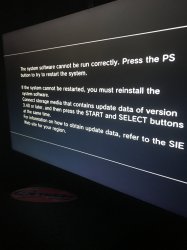
I need help with this problem. I remember I switched to DEX and back to CEX then back to DEX and it bypassed this message. But not anymore
 

Attachments

  • image.jpg
    image.jpg
    1.5 MB · Views: 199
Reinstall your current cfw from usb device, no disc in the drive. If it continues to happen you hard drive may be at its end. Consider an upgrade before that happens. Make sure you dump the eid root key through rebug tool box before upgrade so you can read it from a pc and clo e it to the new one
 
Reinstall your current cfw from usb device, no disc in the drive. If it continues to happen you hard drive may be at its end. Consider an upgrade before that happens. Make sure you dump the eid root key through rebug tool box before upgrade so you can read it from a pc and clo e it to the new one


It displays the message everytime I pot a disc in the system I don't know how it was bypassed before it randomly popped up playing a game called bo2 and now everytime I launch a game I get it
 
I wasn't aware of this, but maybe the system downloaded the update and it's nagging you like the switch does? that is assuming you have auto update enabled. what's odd is that the description for that feature makes no mention of system updates. in fact, it says game updates and trophies when the system boots up. I know someone managed to get rid of it by formatting the hdd..
 
It displays the message everytime I pot a disc in the system I don't know how it was bypassed before it randomly popped up playing a game called bo2 and now everytime I launch a game I get it
Hmm...

It is likely there is an issue with your BD drive or with the ribbon cable connecting it to the motherboard.

Can you please try inserting a CD or a DVD to see if it does the same thing as with a BD?

The only alternative issue I can think of is hdd related. To fix that kind of issue, you could

1. Try reinstalling the fw.

2. If it does not fix it, try removing the hdd, connect it to PC & use a partitioning tool to wipe the first few sectors of the hdd with 00s, put it back in the ps3 & install the fw as instructed. (a quick reformatting on the PC is usually not sufficient, to solve the issue the entire partition table must be completely erased with 00s)

3. If still not fixed, you will probably need to change the hdd.
 
Last edited:
I wasn't aware of this, but maybe the system downloaded the update and it's nagging you like the switch does? that is assuming you have auto update enabled. what's odd is that the description for that feature makes no mention of system updates. in fact, it says game updates and trophies when the system boots up. I know someone managed to get rid of it by formatting the hdd..


It corrupts the hard drive and I have to restore file system. And it doesn't do anything
 
@Xx_Tawwqeerr_xX that messages usually pops for DEX users. I did had a issue with a game (think it was BF4 or other...don't recall right now) that time to time it pop up and i had to turn off the system or the system power off and on start it shows that message. Like it happened to that game i delete the game data of that game and reinstall it again. I didn't get more messages (also i just power off the system, when it prompt to restore file system i just hit O to cancel (if the option was available) and get back to XMB).
You can also reinstall the CFW (think that you are on DEX, so rebug D-REX, because we never know, might have a "bug" or something that wasn't properly installed or got corrupt upon instalation). If nothing fixed the problem, i would backup the saves or what you want and format the HDD and see if you got bad sectors (that could corrupt your file system/database) and then restore everything back. You won't loose the CFW, you just will end up with a empty HDD and you have to restore/install everything. Or if you don't want to loose nothing and you have a spare HDD that you can use to test if everything will install and run properly (that game you are having problems) so you can discard if the problem is from the HDD, the game itself (or some file corruption).

PS: not HDMI, but HDD (PS3 hard disk)...was what was written on previous post :)
 
I have 2 doubts about cfw.
I have a ps3 fat of 160 gb with han in 4.82, should I format it to remove han before starting the exploit to install cfw ferrox 4.83?
The other question is what security measures can I take to avoid banning CFW ?, I do not plan to use hacks or mods menu.
 
Depends on your model number, and minimum firmware version. You have 2 options, wait for an update to ps3exploit tools for compatibility with 4.83, or buy a hardware flasher and downgrade.
I have a HD with files from 4.82, can I pass these files to my ps3 HD?
 

Similar threads

Back
Top