
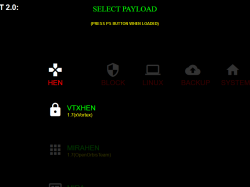
Developer KiiWii (aka defaultdnb) has released a new project called X-Project (XMB SELF HOST PROJECT) for PS4-5.05. This All-in-One Toolbox contains all your payload needs in a XMB type of environment. The toolbox offers alot of customizing ability to its theming and also the payloads you wish to include. The XMB Themed style toolbox contains 10 categories (columns) as follows: HEN, BLOCK, LINUX, BACKUP, SYSTEM, TOOLS, CHEATS, MENUS, CACHE, ABOUT. Learn more about X-Project and all the features its contains in the details from KiiWii release docs.
-
If you're reading this then I finally got my ass in gear and got a release out the door!
X-Project (XMB SELF HOST PROJECT) aims to be the AIO customizable tool box for all your payload needs. Something the community can dissect and adapt, improve and contribute to: for the good of everyone! This project was the evolution of my now discontinued 4.55 self host packs, updating to something for 5.05 which was far more dynamic.
FEATURES:
- Material styled "XMB" design
- In page sound/music POC with play/pause toggle (swap it out easily for your own music!)
- Easy customization (colors, font, sizes, icons, number of categories/payloads)
-
40+ Payloads:
- VTXHEN 1.7, Mirahen 1.7, Mira, Bin Loader, Mira+Bin Loader, blocker + ftp, unblocker, blocker EX, unblocker EX, Kexec, EepLinux, Linux, VTXDUMP 1.8, DB_SG, APPTOUSB 3.0, APPTOUSB1, USB FPKGS, Eversion (Kdump), KernelDumper, FS_Dumper, VR_Enabler, VTXFTP, FTP+R/W, ReactPSPlus, UnReactPSPlus, ReactPSPlus Moddable, PS4Trainer, JKPatch, PS4Cheater, PS4API, APII Intense EU 1.27, Lamance, Psyc0s, APII Intense 1.00, WildeMods, Trainer, NotAnotherMenu, ArabicGuy, Lamance 127, COD: ONLINE, VTX+COD: ONLINE, HOST_CACHE, USBCacheInstall, CacheInstall, ApplicationCache & HistoryBlocker!
-
All Payloads up to date as of today (July 21)!
- Easily up-gradable payloads (or await updates)
-
10 distinct categories:
- HEN, BLOCK, LINUX, BACKUP, SYSTEM, TOOLS, CHEATS, MENUS, CACHE, ABOUT.
- Page within page loaders where possible.
- AIO VTXHEN 1.7 + Latest version of GTAV Mod Menus (and non HEN version included).
- AIO VTXHEN 1.7 + BO3 COD: ONLINE (and non HEN version included)
- Caching from offlinexmb.cache file (NOTE: it's huge: seriously I timed it: it takes 5 full minutes!
- Tried and tested browser "stability" through spawned tabs (It just works better!)
-
CONTROLS:
- Left Stick: Mouse
- Left Stick click: Zoom out
- Right Stick: Scroll
- Right Stick Click: Zoom in
- PS button: Minimize browser.
-
KNOWN QUIRKS:
- Stick throttle is a little touchy if you accidentally push up/down+direction (possibly more so on DUALSHOCK 4 V2)
- Some payloads have to spit out an OOM error before it runs, its how Specter built the loader (bin loader or mira for example)
- VTXHEN+GTAV Mod Menus spits out 1 OOM error before loading, but they work fine

- VTXHEN+BO3 COD: ONLINE spits out 2 OOM errors before loading, but works fine
- Once any payload is loaded, you must hit the PS button to close the browser, then you can reopen X-Project main page to load the next payload.
- If you get excessive OOM errors, restart your console, then once at XMB restart it again, to clear the memory.
- If you get any kernel panic crash, reboot your console, then once at XMB restart it again, to avoid another crash when loading the next payload.
- For some reason you cannot cache the MP4 video used for sound.
-
Frequently Asked Questions:
How do I put this on my ESP: You cant, its not designed for ESP devices. It's designed for any other method of self hosting as mentioned in my AIO PS4 EXPLOIT GUIDE.
There are too many payloads: Remove the ones you don't want from index.js, and from the payloads folder (edit .cache too).
My right-analog stick goes crazy: Some pads may have a throttling issues, however its rare. The interface has a knack to it, it may jump if its still loading, and unfortunately I cant swap navigation to the D-PAD or Left Analog stick.... yet.... (PS4 API is in my sights).
I cant load a second payload: Press PS button, and re-enter the web browser between each payload, unless its an AIO where it will load 2 in a row for you. Then press the PS button when loaded. This is a known problem with the web browsers limitations.
I get KP (Kernel Panic): Start up the console: reboot it TWICE, then start from cold boot.
I get OOM errors: If you get more than 3 there is an issue, hold O to close every open tab, PS button back out the browser, reboot, then start from cold boot.
Caching takes so long: It's because you're caching every payload of the X-Project: it will take a few mins! You can always remove payloads from the index.js, and edit the cache down to just what you need.
It's not perfect: Please contribute! Rewrite any parts that can be optimized or adapted and DM or @ mention me to update the main project! I wont be offended, in fact: I want it to be community driven!
I don't like the music: Mute it or change it, it's super simple! Alternatively rename the xproject.html page to index.html to skip it altogether.
If you think somethings missing: please @ mention me and let me know, I will add it in the next update or hot fix! -
SPECIAL THANKS:
- @fenwick67 XMB based on his codepen.io.
- @Leeful who is an absolutely legendary tester and coder.
DOWNLOAD: mirrored.to
V1 (MD5: 2ACFA8C8C0060CCE8D2186BB00DF17A1)
OFFLINE CACHE FIX: zippyshare.com/v/gUt0mNqB/file.html
(replace offlinexmb.cache with this one) Thanks @Leeful
V1 (MD5: 2ACFA8C8C0060CCE8D2186BB00DF17A1)
OFFLINE CACHE FIX: zippyshare.com/v/gUt0mNqB/file.html
(replace offlinexmb.cache with this one) Thanks @Leeful
Last edited:







