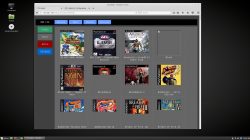
PS3 sMAN v1.10n (by deank): New features & improved performance & stability

A couple of new updates aiding in the evolution of the sMAN plugin has been seen in recent days as developer @deank continues to add functionality and as you see in the screenshot additional eye-candy as well. Following up on v0.08n, deank officially labled v1.09 as a Beta Release as several new things were implemented and went through some testing phases. Deank has stated he has almost re-written sMAN so much that it now almost differs from webMAN v1.47n by nearly 50% according to the guy who know (the developer of both plugin) deank. Also thanks to freddy38510 NTFS drives will show the actual time & date stamps in both FTP & the file explore in web-browsers. v0.10n was recently released as well and officially moved from Beta to the next Stable update , that did just that improve the stability & performance of things like the www client . This plugin keeps improving and new features continue to impress as deank's continues to put his magically touches on this ps3 plugin.​


sman_setup.jpg

  • sMAN v0.10n
    In the latest sman.sprx update the internal web server will use threads to serve files/images content. It will no longer hold the whole www client thread and will release the resources immediatelly greatly improving performance and stability. Until now if you download something big via the web interface and then try to browse games or refresh sman would lock, but not anymore..

    There were some issues with displaying images/files from network locations (ps3netsrv) using the webbrowser but it is now ok. There are also some other minor fixes.

    Update to sMAN 1.10n: http://deanbg.com/sman.sprx | http://deanbg.com/sMAN_1.10.zip

    Network/ps3netsrv locations should now support about 3200 files (1600 ISO games + 1600 images for example).

    p.s. sprx is updated again. If someone with a lot of network games can test it - let me know. I tested it with a folder with 9000 files and it handles 3200 to 3300, so it works. :)

    http://www.psx-place.com/threads/sm...on-sfo-scanning-more.12984/page-10#post-75905


  • I updated sman.sprx - it now has a separate option for dev_blind. sman_res.exe is changed to support .htm resource files. The source is also updated. Web content is now in external .htm files in wmtmp/res folder. It is still work in progress, but at least you can see how it is progressing.

    The web-pages are still ugly, but now someone can help with improving them. The external files are:
    • www_head.htm - this is present in each generated page and can be edited by a web-designer
    • www_setup.htm - the setup page (only the form)
    • www_foot.htm - the footer
    • www_file.htm - some javascript needed for table sorting (doesn't work on the ps3 browser)

    The dynamic content is generated after www_head and before www_foot.

    I made some changes to the layout... should be something like this at the moment:


    It should look much better now. You have a very early build. It now doesn't use tables, but I rewrote everything with css. Not really gorgeous, but still simple and lite. Shows 99% the same on the PC and on the PS3 now. Also it fits perfectly even in SD resolution (720x576). :)


    Without Javascript the Setup page cannot be used (because js is used to set current options/values), but all other functions are ok.

    This option was never clickable. The checkbox was always disabled and its "ticked" state just indicates whether the lowest speed will be applied (which happens only in "auto" mode). I added back the "tick" when in auto-mode - it is purely cosmetic checkbox just to make the options look more ordered on screen. :)

    I updated sman.sprx. Also game listing in the web-browser on the PS3 now looks properly (game names are centered as they should be - same as on the PC).

    http://deanbg.com/sman.sprx (now up to 1.09n - resource files will be updated and you'll also get a new background for sMAN GUI).
    sMAN updated (http://deanbg.com/sman.sprx)

    I hope this 1.09n version is the last "beta"/"unstable" before the official 1.10. It seems very stable at the moment. I optimized a lot of functions and rewrote a lot of the code - probably over 50% is now completely different compared to webMAN 1.47n.

    In this update the optimizations lead to another memory usage decrease - you should now have 2324KB free memory.

    FTP browsing is faster - both for hdd/usb and ntfs drives, which means copying a lot of folders will be much faster compared to any wM/sM version.

    Along with all the other changes since 1.08 (external web content/additional xmb info tags/code optimizations) 1.09n should be the version to update to without worries.

    Dean

    Post Source: psx-place.com/

    -------------------------------------------------------------------------​
    Thanks to @freddy38510 the ntfs library now supports proper date/time stamps for files/folders. sMAN is updated to show actual date/times in FTP and web-browser for NTFS drives.
    http://www.psx-place.com/threads/li...ilation-with-cellsdk.11906/page-11#post-75770

    Thanks @freddy38510

    p.s. libntfs_prx.a is also updated in sman_1.09.zip

    Post Source: psx-place.com
    -------------------------------------------------------------------------​

Download:

Source: psx-place.com
 
Last edited:
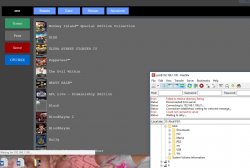
Just redownloaded sprx then and it seems to be getting stuck every now and then during a "refresh"

Stuck at this point a few times and refused any connections via ftp. (waited a while before trying to connect, led was solid green on ps3 - not flashing yellow any more... so must of finished refresh on its end?)

Capture2.JPG

Or sometimes it gets past that point and sorted the games, but stopped loading game images and refusing ftp connections again.

Manually going to 192.168.1.100/restart.ps3 still got through somehow, although it did the beep 3 times thing before restarting. So was definitely stuck doing something.

It's always had a problem loading all game images via the webpage... Sometimes it displays them all (rarely), other times it just hangs like it's waiting for the ps3 to send more data, but it just never gets through. Or page stops loading, but various covers appear with the broken image icon.

Never the same covers that fail to show... always varies.
Shows fine through xml or sman everytime though, so appears to be a network related issue.

I don't really use the web view anyway, so it's never really bothered me.

Edit: Doesn't appear to be any issues on the console side of things, Only remotely. Everything seems to be... in orrrderrr. :)

Gotta say, sman looks stunning on the big TV. Very impressive considering how little resources it uses.
 
Last edited:
For now it will only show the game names and not the icons. If you can check with the updated sprx if it gives you the same problem let me know. Yesterday it never failed with 1000 games+images so I don't know.
 
Yeah not sure why the covers don't always show.
Just tried latest sprx and it refreshed fine every time, but still the same old deal cover wise.

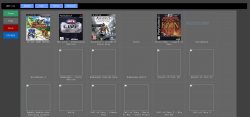
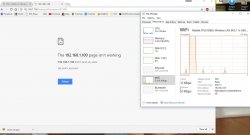
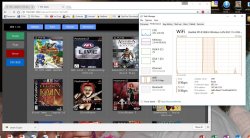
Loads so many covers then sometimes it will just sit there with a spinning icon (website loading - waiting for 192.168.1.100 etc.) for around a minute or so.. sometimes it just keeps waiting, sometimes it just stops instantly and goes with what it has.

Capture.JPG

When it eventually stops loading, most images that were completely blank show up, but whatever it gave up on to start with still just shows as a broken image.

Capture2.JPG

Different every time as to what covers show and what doesn't.
Got almost none of them this time round, other times almost all of them show up.

Capture3.JPG

No pattern or reason behind it... Random as hell.
Using WiFi at the moment, might try ethernet one day and see if it's still the same.

Everything works fine in sman and webman style view so I've never paid much attention to it.

All covers were converted and resized using picresize.com at 260x300 or 300x300 ~30kb each. So I don't think it's an issue with the covers themselves as such... Maybe random packet loss over the Wi-Fi? Browser might just be waiting for the ps3 to resend the missing packets, but never getting them? No idea to be honest.

Although the PS3 browser does similar, but generally to a lesser extent.
I just assumed memory restrictions on that one.

All screenshots above using chrome and windows 10.
 
Last edited:
It could be the WiFi - I'll switch to wireless later to test. I updated the sprx with some more speed-ups and couple of fixes.

What browser do you use? I tested on Firefox and Chrome (+ the PS3 browser itself) and images always load.

* Tested with wifi - works fine on my side.
 
Last edited:
hey deank, sorry to be a constant pain. im still having the same problem even with the newest version ill try break it down as easy as i can. with sman on the PS3 i can load all games unmount and remount no issues. but what i used to be able to do is during gameplay on the PS3 i could load a multidisc ps1 game for example final fantasy 7 and at the end of the disc it would ask to switch to disk 2. from here i would load sman on my PC browser and i could used to unmount disk 1 and then mount disk 2 and the game would continue no problems, but lately i can unmount games during gameplay but when i try to mount the next disc/iso for said game it freezes my pc and locks me out of sman on my pc untill i hard reset.... this is really bothering me as it used to work perfect and even when i try this method on webman it works fine. if you require any further info let me no and i hope you can help. Thank you
 
I confirm the same issue as @self_slaughter with refreshing the games page in a browser.
Even with as little as 30 games, sMan keeps displaying all the covers usually for half a dozen page refreshes, then eventually some covers get missed in a seemingly random (?) fashion...
On a handful of occasions, I also got an error page saying "no data was sent" when refreshing.
If I stop refreshing for a long while then the next refresh loads all covers...

I am not sure but it looks like refreshing cannot be done too quickly because the server is still busy with something somehow... But even then, it is not really consistent because on occasion in the middle of 2 "bad" refreshes I get a successful one...
And I haven't tested this yet but it's possible that the more games you have, the longer you should wait before refreshing...
 
Just using chrome here... I'll try switching to Ethernet at some stage tomorrow to see if its just a sketchy wifi connection.

Also, I think you may of just semi broken ntfs scanning in the last update (~last 10-20 minutes or so - md5 e4656a959eb2d53efee415fbbaf75cdd). Creates the ntfs files and copies images into wmtmp, but not showing ntfs games in sman, xml view, or web view.

Backtracking a version gets them showing again.
 
@deank @self_slaughter
I was using Chrome as well so I just launched Firefox to confirm the issue with another browser.
Firefox seems slightly better at it or maybe it's just an impression because it doesn't deal with the issue in the same way, the covers that haven't finished downloading show up but only in part & the rest of the cover is white...

I don't have the ntfs scanning problem though..
 
Yeap, ntfs games are working again now. Was just that sprx with the md5 I listed above that had the issue.
Very small window of opportunity for anyone to have gotten that one!

I noticed since you removed the game icon during the scan process it only shows the first game in the un-ordered list when refreshing now, until the scan is virtually complete then you briefly see the full un-ordered list flash up a split second before the normal view shows. :)

Edit: Rapid fire updates... Testing now. :P

Edit 2: Nah, images are still semi-broken on my end. (tested *885 and *655 md5s)
First 200 or so appeared to show fine on first load after a reboot, then a few random ones missing here and there.
Reloading the page (Just clicking on green games box again, not actually refreshing list) breaks almost all of them again.
 
Last edited:
sorry @deank for the late reply bc the laptop was not that good and need some repair and i need to go to the work,but now i just repairing the laptop and the good news it didn't have any problem in the memory, i tested with the previous samn and ps3netsrv_debug with 260 ISO games, and laptop has windows 10 32-bit + AMD sempron 2.10 GHz + 3GB of RAM.

now i will test the new sman and ps3netsrv_debug with my pc and will update my post with the results


EDIT: the new ps3netsrv_debug did't increase my memory until it reach the game 99-104 (i'm not sure what is the number bc the name go fast in the cmd), then my memory got full but every few sec it get down a little like 10-20 MB 100-200 MB, but the bad news is, it hangs after it try to scan the first game from the HDD number 4 ( i forget to say that i have my games in 5 HDD but i put them all in one PS3ISO by adding there link with "Link Shell Extension" program, bc i don't like to add more than one ip in the sman). so i think it's the delay time that make ps3netsrv stop or something like it, this last msg from ps3netsrv:
....
Read 24800 800
file closed
open D:/PS3ISO/Rush'N Attack Ex-Patriot [NPUB30112].iso
File size: 2c070000
Read 8000 8000
Read 8000 800
Read 8800 800
Read 9000 800
Read b800 800
Read 20000 800
Read 20000 800
Read 20000 800
Read 20000 800
Read 20000 800
Read 20000 800
Read 20000 800
Read 20000 800
Read 30000 800
Read 20000 800
Read 20000 800
Read 20000 800
Read 20000 800
Read 20000 800
Read 20000 800
Read 20000 800
Read 20800 800
Read 20800 800
Read 20800 800
Read 20800 800
Read 20800 800
Read 20800 800
Read 20800 800
Read 20800 800
Read 20800 800
Read 4e000 800
Read 20800 800
Read 20800 800
Read 20800 800
Read 20800 800
Read 20800 800
Read 20800 800
Read 40000 2000
Read 42000 2000
Read 44000 2000
Read 46000 2000
Read 48000 2000
Read 4a000 2000
Read 4c000 1800
Read 4d800 800
file closed
open D:/PS3ISO/Sacra Terra Kiss of Death [NPEB02048].iso
File size: 4b790000
Read 8000 8000
Read 8000 800
Read 8800 800
Read 9000 800
Read 11000 3000
Read 140000 800
Read 140000 800
Read 140000 800
Read 140000 800
Read 140000 800
Read 140000 800
Read 140000 800
Read 140000 800
Read 290000 800
Read 140000 800
Read 140000 800
Read 140000 800
Read 140000 800
Read 140000 800
Read 140000 800
Read 140000 800
^C
D:\ps3netsrv_debug_001>

i have to stop the ps3netsrv manually after it's stop loding anything.

i'm goning now to clean my pc from any program that i think it monitor my ports or any program i don't know a lot about it, and i will test again.

great work @deank thanks

EDIT2: i want to write 100-200 MB not 10-20 MB Sorry
 
Last edited:
@self_slaughter Can you please do one final update and test. I switched from HTTP/1.1 to 1.0 which doesn't allow persistent connections and it seems to make the browser behave differently. Now all images get solid green 200OK on my side, whereas before some didn't. Redownload the sprx and check it please.
 
Last edited:
Nah, Still randomly missing images... All network traffic seems to stop pretty quick despite the page still "loading" and whatever doesn't make it in the first burst, generally doesn't make it at all.

Got one of those "didn't send any data" pages @bguerville mentioned as well, that eventually opened up, without hitting reload or anything. (was still missing images further down though) You can see it was still "loading" in the 2nd screenshot by the spinning blue circle next to the pages tab, despite no network traffic.

Capture.JPG Capture2.JPG

It's as if the server itself becomes unresponsive... and even when it's supposedly finished loading it can take a while before it will respond to any requests still.

Really is quite random as to what makes it and what doesn't.
First go generally gets the best results, trying to reload usually ends up in 90% of the images not showing. (Having a crack over 300 games probably exaggerates the problem compared to @bguerville)

I can try set up a debug cobra later if you want me to see if it spits out anything useful?

Everything else works fine, just the web view game list that struggles for some reason... Pretty sure even webmanmod has similar issues for me.

Edit: Fired up a live usb to see how it behaved in a different environment and it looks like it stalled part way through loading some images (waited until page had finished "loading" before taking screenshot), yet some were broken completely.... Dunno if that gives you any clues as to what is going on or not. :/

Screenshot from 2017-03-18 12-44-12.png
 
Last edited:
Really weird... I can't make it happen on my side. Anyway, I updated sman.sprx for one last time about this issue. If it isn't fixed I won't waste any more time on it for now. I upped the backlog for tcp and added some delays before each www thread is invoked, so hopefully it will make a difference.
 
I like the low resource usage of sman/slaunch, but the holding of l2/r2 for 2-3 seconds is slower to me than just going into the folders and selecting that way. Launchpad is pretty nice too, but it looks kind of like the old cobra ode way of doing it.

Great work, though! Keep it up :)
 

Featured content

Trending content

Back
Top