PS3 Super Nintendo (SNES Station) Emulator for PS3Xploit HAN (via PS2 Emulation)

Recently @DeViL303 & @Joonie shared a video demo of a Super Nintendo (Ps2 Homebrew) Emulator working via the unlocked PS2 Classic emulator from the Ps3Xploit HAN (v3.0). During some the previews leading up to the release we showcased the video before now developer HABIB has released the emulator in ISO form and instructions how to add your own ROMs. The question now becomes what other homebrew and emulators can we get running on these console's?
-STLcardsWS​

capa do jogo.jpg


We have added an official thread in the Ps3Xploit Support forum for tracking and discussing Homebrew through the emulators unlocked by PS3Xploit's etHANal (v3.0) hacks. >>>> LINK
 
Last edited by a moderator:
Yeah I meant the iso of a DVD. I was just saying that since it doesn't increase the size significantly and lets us add all roms, it'll be more convenient. But yeah you can just make your own DVD iso and that's what I did but most people will not know how to do that so that's why I said upload a dvd iso
Oh, I thought when it was converted to pkg you could just fill it up to any size. So you saying its limited to 700MB in its current form?
 
Oh, I thought when it was converted to pkg you could just fill it up to any size. So you saying its limited to 700MB in its current form?

Yeah it is less than 700mb. I made a 4.7gb DVD using ultra iso. The pkg is around 1.13 gb with only Usa roms but if you are someone who wants to add all languages, you still have plenty of space to play around.
 
Am I doing something wrong?
I've downloaded ISO with emulator.
Opened it with UltraISO.
Added my roms.
Saved it as new ISO.
Transferred it through PKG Linker.
And it doesn't work. With Han enabled I've got a black screen and then error 80028f17
and with debug enabled, I've got 80029530 error. I've tried many things like unpacking it with 7Zip and repacking with ImgBurn but nothing works.
 
Am I doing something wrong?
I've downloaded ISO with emulator.
Opened it with UltraISO.
Added my roms.
Saved it as new ISO.
Transferred it through PKG Linker.
And it doesn't work. With Han enabled I've got a black screen and then error 80028f17
and with debug enabled, I've got 80029530 error. I've tried many things like unpacking it with 7Zip and repacking with ImgBurn but nothing works.

try to extract the iso and make a new one yourself
 
Am I doing something wrong?
I've downloaded ISO with emulator.
Opened it with UltraISO.
Added my roms.
Saved it as new ISO.
Transferred it through PKG Linker.
And it doesn't work. With Han enabled I've got a black screen and then error 80028f17
and with debug enabled, I've got 80029530 error. I've tried many things like unpacking it with 7Zip and repacking with ImgBurn but nothing works.


Can someone help us?
I have the same problem
What are we doing wrong?
 
I do not get what I'm doing wrong
1. Download ISO
2. Download UltraISO
3. Open ISO in UltraISO and add ROMS in the ROMS folder.
4. Save ISO
5. Open PS2Classics GUI
6. Select file ISO, CD/CEX
CID: 2P0001-PS2U10000_00-00001111222233
KLIC: E4E54FD67C16C316F47829A30484D843
7. Encrypt.
8. Make PKG, select ISO.BIN.ENC of the ISO I just encrypted.
9. Move PKG to rifgen folder
10. Sign PKG using IDPS in Habib's tool

On the PS3
Run HAN Enabler
Install PKG
Run PKG
-> 80028F17

Seriously, I followed the guide and I'm still doing this wrong somehow?
 
I do not get what I'm doing wrong
1. Download ISO
2. Download UltraISO
3. Open ISO in UltraISO and add ROMS in the ROMS folder.
4. Save ISO
5. Open PS2Classics GUI
6. Select file ISO, CD/CEX
CID: 2P0001-PS2U10000_00-00001111222233
KLIC: E4E54FD67C16C316F47829A30484D843
7. Encrypt.
8. Make PKG, select ISO.BIN.ENC of the ISO I just encrypted.
9. Move PKG to rifgen folder
10. Sign PKG using IDPS in Habib's tool

On the PS3
Run HAN Enabler
Install PKG
Run PKG
-> 80028F17

Seriously, I followed the guide and I'm still doing this wrong somehow?

As I said, you should try rebuilding the ISO by extracting it, adding your roms, and making a new one.
 
I do not get what I'm doing wrong
1. Download ISO
2. Download UltraISO
3. Open ISO in UltraISO and add ROMS in the ROMS folder.
4. Save ISO
5. Open PS2Classics GUI
6. Select file ISO, CD/CEX
CID: 2P0001-PS2U10000_00-00001111222233
KLIC: E4E54FD67C16C316F47829A30484D843
7. Encrypt.
8. Make PKG, select ISO.BIN.ENC of the ISO I just encrypted.
9. Move PKG to rifgen folder
10. Sign PKG using IDPS in Habib's tool

On the PS3
Run HAN Enabler
Install PKG
Run PKG
-> 80028F17

Seriously, I followed the guide and I'm still doing this wrong somehow?
Rif file? Do you added/installed it?
 
Got it to work but with really retarded way.
So you need to find UlaunchELF ISO (SLUS_46651)
Then open it with Ultra ISO.
Also open ISO with emulator.
Paste roms inside roms folder.
Copy everything except DUMMY and SYSTEM.CNF to UlaunchELF ISO.
Save it.
Convert it to PS2Clasic.
Resign it with resigner.
Install.
Then you will see UlauncheELF so just press O and go to cd folder and launch SLUS_200.90.
You should see SNES Station launching.
That's all. Personally, I have a graphical glitch but it's working.
Also, you need to inject rif file.
 
You need to create it from rap file of ps2classic app. PS2classic app is included in ps3tools that you can find in our resource section.

Follow standard rap to rif procedure to make it.
yes, i active act.dat wig the rif ( 2P0001-PS2U10000_00-0000111122223333.rif ) And when i run emulator black screen and error...

start the emulator, the black screen remains, then the Hdmi connection between the ps3 and the television is disconnected, then the Hdmi signal returns and the screen remains gray and finally the XMB menu appears and gives an error,
does not give an error immediately when pressing X, but takes a few minutes
 
OK, I founded a way to fix the glitch. Just turn off interface in options. Also maybe it's possible to run other homebrew with this method
 
Yeah it is less than 700mb. I made a 4.7gb DVD using ultra iso. The pkg is around 1.13 gb with only Usa roms but if you are someone who wants to add all languages, you still have plenty of space to play around.
Why just don't create DVD by yourself? Is easy with files from CD version from first post.
  • Extract files
  • Add roms
  • Open ImgBurn
  • Select Create Image from Files/Folders
  • Drag all files to imgburn window

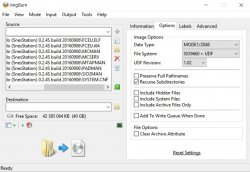
In option tab set:
ps2-57d197e25f9b5829f43ab689.jpg

In labels tab put SNES in both ISO and UDF.

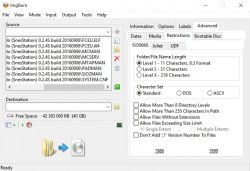
In Advanced tab, go to Restrictions tab and select:

background.jpg
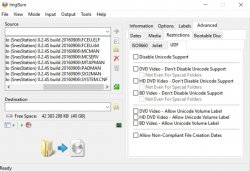
and
29440c344295bb2amed.jpg

Then just click Create Image icon. Remeber to select DVD type in ps2classic app. ;)
 
Why just don't create DVD by yourself? Is easy with files from CD version from first post.
  • Extract files
  • Add roms
  • Open ImgBurn
  • Select Create Image from Files/Folders
  • Drag all files to imgburn window

In option tab set:
View attachment 11031

In labels tab put SNES in both ISO and UDF.

In Advanced tab, go to Restrictions tab and select:

View attachment 11032
and
View attachment 11033

Then just click Create Image icon. Remeber to select DVD type in ps2classic app. ;)

well this is what I did. its actually much easier with Ultraiso as there is a built in feature for ps2 iso
 
Definitely with the steps described here does not work you always get the same mistakes.
we need this UlaunchELF ISO (SLUS_46651)? if the developers have not specified it.
all right but when the game is executed jumps error
 

Similar threads

Featured content

Trending content

Back
Top