webMAN MOD

PS3 webMAN MOD - General Information Thread 1.47.48q

webMAN MOD 1.47.25 by aldostools.

Changelog:
  • Added icons to common file types in File Manager
  • Home URL setting now can set default /app_home/PS3_GAME icon on start up
  • Added support for external wm_custom.xml in webMAN's game list on XMB
  • PS2 Classics: Added support for PIC1/PIC2 and SCEVMC0.VME per game
  • .BIN.ENC extensions now are case insensitive
  • Fixed autoplay when PS2 Classics are mounted
  • Fixed bug parsing title id of PS2Classics & PS2ISO
  • Fixed issue #236 blank checks in /setup.ps3 when Sylk engine is used.
  • Fixed fan control issues #227 #228 #233
  • Fixed detection of rom extensions: .GB, .GG, .SG, .WS, .VB (issue #232)
  • Fixed Refresh XML when remote net host is offline / not responding
  • Merged @NvrBst's fork of ps3netsrv: now supports encrypted ps3 isos (3k3y / redump)
  • Updated Mamba 8.2 with support for CD sector sizes: 2328 & 2340 and non-PLAYSTATION CDs
  • Removed encoded PS2 config files from installer. Use PS2CONFIG.pkg for 946 ENC files

@aldostools about this situation:
https://github.com/aldostools/webMAN-MOD/issues/234.

It may happens (I think) when you:
  1. Installed webMAN mod.
  2. Rebuild database:
    ps3_recovery_02.jpg
  3. You'll be getting:
    webman-corr.png
  4. When you delete it, webMAN stops working.
In my config (I'm on CFW not HEN) after deleting corrupted data, reboot console,
webMAN should work (at least when I'll press START+SELECT, temps and other info will be displayed).
However I do not fully understand why after installing webMAN & rebuilding database, corrupted data appears?
Tried it on 1.47.25.

Thank you for your feedback... this may take me some time to investigate (I cannot dedicate time to this in a while).
Maybe one of the PARAM.SFO installed by webMAN is recognized as "corrupted" and result in "corrupted data" after rebuild the database.

We first need to identify what folder is deleted when the corrupted data is removed.

I suspect it could be caused by this file /dev_hdd0/game/XMBMANPLS/PARAM.SFO

EDIT:
You can try replacing /dev_hdd0/game/XMBMANPLS/PARAM.SFO with the one in the attachment, then rebuild to check if the corrupted data still happens.
 

Attachments

Last edited:
EDIT:
You can try replacing /dev_hdd0/game/XMBMANPLS/PARAM.SFO with the one in the attachment, then rebuild to check if the corrupted data still happens.

I do know how I can wrote it...

So let's start from beginning.
  1. I've unpacked PARAM.SFO.zip = PARAM.SFO.
  2. Deleted "old" PARAM.SFO from /dev_hdd0/game/XMBMANPLS.
  3. Uploaded "new" PARAM.SFO into /dev_hdd0/game/XMBMANPLS
  4. Rebuild database.
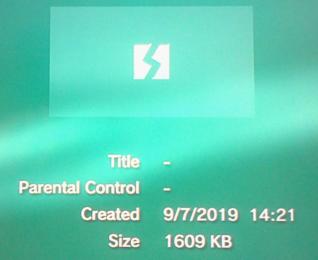
  5. I was still getting:
    corrupt-web.png
  6. After deleting corrupted data, reboot, rebuild it once again,
    everything is fine (I mean I've no corrupted data after 2nd Rebuilding database).
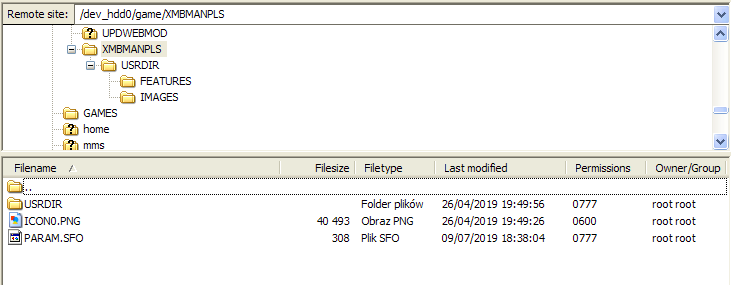
After deleting corrupted data, PARAM.SFO was still out there:
file.png


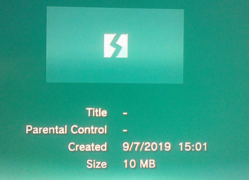
Here is also something interesting, XMBMANPLS folder takes ~1 MB,
while the size of corrupted data was ~10 MB.
  1. If I launch "launcher" from XMB:
    XMB-web.png
  2. Rebuild database
  3. I'll have corrupted data once again
Is there is an another place where webMAN mod will be installed?

To be add, I've made these tests on ver 1.47.23.2, because of a this problem:
https://www.psx-place.com/threads/disconnected-from-server-on-win-xp-10.25019/.
 
Last edited:
I do know how I can wrote it...

So let's start from beginning.
  1. I've unpacked PARAM.SFO.zip = PARAM.SFO.
  2. Deleted "old" PARAM.SFO from /dev_hdd0/game/XMBMANPLS.
  3. Uploaded "new" PARAM.SFO into /dev_hdd0/game/XMBMANPLS
  4. Rebuild database.
  5. I was still getting:
    corrupt-web.png
  6. After deleting corrupted data, reboot, rebuild it once again,
    everything is fine (I mean I've no corrupted data after 2nd Rebuilding database).
After deleting corrupted data, PARAM.SFO was still out there:
file.png


Here is also something interesting, XMBMANPLS folder takes ~1 MB,
while the size of corrupted data was ~10 MB.
  1. If I launch "launcher" from XMB:
    XMB-web.png
  2. Rebuild database
  3. I'll have corrupted data once again
Is there is an another place where webMAN mod will installed?

]To be add, I've made these test on ver 1.47.23.2 because of a this problem:
https://www.psx-place.com/threads/disconnected-from-server-on-win-xp-10.25019/.

Thank you for your feedback... Apparently the corrupt data is a different folder... maybe /dev_hdd0/game/UPDWEBMOD
or perhaps it is /dev_hdd0/game/PS2CONFIG


These are the paths that webman use:
/dev_hdd0/game/UPDWEBMOD <- Installer
/dev_hdd0/game/PS2CONFIG <- database of PS2 CONFIG files
/dev_hdd0/game/XMBMANPLS <- xmb settings menu / XMBM+
/dev_hdd0/xmlhost/game_plugin <- html files
/dev_hdd0/plugins <- where the plugin is stored
/dev_hdd0/tmp <- where wm_config.bin is stored
/dev_hdd0/tmp/wm_lang <- TXT files with translations
/dev_hdd0/tmp/wm_icons <- icons
/dev_hdd0/tmp/wm_combo <- custom combos (text files)
/dev_hdd0/tmp/wm_res <- addons (sprx & pkg)
/dev_hdd0/tmp/wmtmp <- cache for ntfs, xml, etc.


I'll have to test when I get some free time...
 
Thank you for your feedback... Apparently the corrupt data is a different folder... maybe /dev_hdd0/game/UPDWEBMOD
or perhaps it is /dev_hdd0/game/PS2CONFIG

I think it has to do something with "/dev_hdd0/game/PS2CONFIG".
I mean after I'll delete corrupted data, I cannot only access this folder although it is showing normally.
When I'll try to access it from ftp I'll get:
Response: 550 File unavailable
Error: Failed to retrieve directory listing

Size of this folder when I'll download it on HDD is 14,5 MB (Size on disk),
while normal size ~8.5 MB (Size).
I forgot to take screenshot, so here is an example:
size-2.png


Probably cluster size is different on PC than, it's on PS3.
 
Last edited:
I think it has to do something with "/dev_hdd0/game/PS2CONFIG".
I mean after I'll delete corrupted data, I cannot only access this folder although it is showing normally.
When I'll try to access it from ftp I'll get:
Response: 550 File unavailable
Error: Failed to retrieve directory listing

Size of this folder when I'll download it on HDD is 14,5 MB (Size on disk),
while normal size ~8.5 MB (Size).
I forgot to take screenshot, so here is an example:
size-2.png


Probably cluster size is different on PC than, it's on PS3.

You can try installing this PKG after install webMAN MOD
https://store.brewology.com/get/homebrew.php?id=310&fid=2178
or this https://github.com/aldostools/webMAN-MOD/releases/download/1.47.25/PS2CONFIG.pkg

I updated the PKG with a new PARAM.SFO
 
You can try installing this PKG after install webMAN MOD
https://store.brewology.com/get/homebrew.php?id=310&fid=2178
or this https://github.com/aldostools/webMAN-MOD/releases/download/1.47.25/PS2CONFIG.pkg

I updated the PKG with a new PARAM.SFO

Bullseye!
I've uninstalled\installed v1.47.23.2, run PS2CONFIG.pkg, reboot the console...
Rebuild database and... everything is fine... no more corrupted data!

I've notice that you've blank avatar logo...
Recently when I was messing around my neighbourhood, I've notice this "restaurant":
Da-Aldo-pizza.png


Here are 200x200 icons:
  • Da-Aldo-200.png


  • logo-da-aldo-img.png
Maybe you'll find it useful? ;)

Can you somehow send me WebMAN mod from 1.47.23.3 to 1.47.23.5?
 
Can you somehow send me WebMAN mod from 1.47.23.3 to 1.47.23.5?
Thank you for your feedback... So the corrupted icon was the PARAM.SFO in PS2CONFIG... I'll complete the fix tonight when I get home.

What do you mean with send you "webMAN MOD" from 1.47.23.3 to 1.47.23.5?
If you mean the changelog, you can view the changes in https://github.com/aldostools/webMAN-MOD/commits/master

If you mean send you the PKG files... I'm not sure if I keep these packages.
If you need to test a previous version of the sprx, go to github, click on the link to see the details of the commit. Then click the button "Browse files" to navigate the folder structure and files of the project at the moment of that commit.
Then go to _Projects_/updater/pkgfiles/USRDIR and download the files that you need (download the whole folder and rebuild the pkg)

webMAN MOD from 1.47.23.3 beta
https://github.com/aldostools/webMA...0972c17121/_Projects_/updater/pkgfiles/USRDIR

webMAN MOD from 1.47.23.4 beta
https://github.com/aldostools/webMA...8bd6df15fe/_Projects_/updater/pkgfiles/USRDIR

webMAN MOD from 1.47.23.5 beta
https://github.com/aldostools/webMA...208a135eaf/_Projects_/updater/pkgfiles/USRDIR
 
Thank you for your feedback... So the corrupted icon was the PARAM.SFO in PS2CONFIG... I'll complete the fix tonight when I get home.

That's great.
It was quick fix btw.

If you mean send you the PKG files... I'm not sure if I keep these packages.

My bad, I wanted PKG files.
If somehow you still got it, can you send me them via PM?
I don't know if I'll find "energy" to rebuild the pkg.
 
My bad, I wanted PKG files.
If somehow you still got it, can you send me them via PM?
I don't know if I'll find "energy" to rebuild the pkg.

I have to check in my laptop. If I still keep these packages I'll send you them by PM...
 
webMAN MOD 1.47.25 by aldostools.

Changelog:
[*]Merged @NvrBst's fork of ps3netsrv: now supports encrypted ps3 isos (3k3y / redump)
The 3k3y encrypted iso's are supported only by network ?
...because the PC is doing the decryption and sending the decrypted data to the PS3 ?


But what happens when trying to boot a 3k3y encrypted iso from dev_hdd0 or dev_usb ?
 
The file is created when the plugin scans for content. Disable the option that scan on start up in /setup.ps3

You can set a custom icon adding or replacing the file /dev_hdd0/tmp/wm_icons/icon_wm_root.png
 
How can you turn off the system beeps? Is it the option named "BEEP" in the settings? I unticked it but it still beeps.
I have sMAN 1.12n installed, and was able access the Webman Mod setup by editing boot_plugins.txt. Can this be done without actually opening the Webman Mod plugin? Because I can't open it, I have just access to the setup.

Thanks in advance for the help!

(I'm on Ferrox Cobra 4.84)
 
How can you turn off the system beeps? Is it the option named "BEEP" in the settings? I unticked it but it still beeps.
I have sMAN 1.12n installed, and was able access the Webman Mod setup by editing boot_plugins.txt. Can this be done without actually opening the Webman Mod plugin? Because I can't open it, I have just access to the setup.

Thanks in advance for the help!

(I'm on Ferrox Cobra 4.84)

sMAN and webMAN MOD should not be run together... you should use only one.

Be aware that sMAN and webMAN have similar GUI. It is easy to get confused if you have both plugins installed.

In /setup.ps3 of webMAN MOD you should uncheck the option BEEP and save the setting to remove the beeps.
It removes almost all the beeps... some events will have beeps.
 
@aldostools The screenshoot of the xmb feature (present in vsh menu) can be implemented in Weman Mod? to incluse a combo to take a screenshot


and work anywhere? cuz i'm trying to save same screenies of my mod, but it only allow me in the xmb itself, not in a menu like settings or etc

and the files go to the Picures folder
 
@aldostools The screenshoot of the xmb feature (present in vsh menu) can be implemented in Weman Mod? to incluse a combo to take a screenshot


and work anywhere? cuz i'm trying to save same screenies of my mod, but it only allow me in the xmb itself, not in a menu like settings or etc

and the files go to the Picures folder

Try SELECT+START+L2+R2
or try the web command /browser.ps3$screenshot_xmb

Remember to use the full version
 
@STLcardsWS i have a problem I downloaded my game GTA V form disk to HDD in Mulitman I load it from Webman mod from HDD without disk and it display update messenge 3.20 or higher when I'm on 4.81 REBUG DEX. ? Any fix
 
@STLcardsWS i have a problem I downloaded my game GTA V form disk to HDD in Mulitman I load it from Webman mod from HDD without disk and it display update messenge 3.20 or higher when I'm on 4.81 REBUG DEX. ? Any fix

There are 2 kind of updates: system updates and game updates.

3.20 is the version of the game update. Accept the download and let it install the update.
 
Back
Top