PS3 4.84 FERROX COBRA ( 7.55) CFW by Alexander

PS3 Custom Firmware developer @Alexander has now released his 4.84 FERROX COBRA (7.55) CFW adding a new flavor to the 4.84 Custom Firmware mix. This Cobra CFW comes equipped with the latest Cobra 7.55 payload (which should perform like 4.83 FERROX Cobra) and allows for all the usual Cobra (v7.55) CFW features. Some of those features include Plugin Support (like webMAN), as well as ISO Support (Ps1/PS2/PS3/PSP/BD/DVD) are just a few abilities that Cobra adds to a firmware. Also developer Alexander includes an optional MOD Installer for some extra features and eye candy (see tab for more info). For full feature set and details checkout the included (translated) release notes provided​

if you have any feedback you can find @Alexander at his home site of Cybermodding.it and also here in our psx-place forums.

ferrox2017_2.png

Checkout other 4.84 related releases in this thread here.


  • Features of 4.84 FERROX COBRA (v7.55)
    • Built on the base of OFW 4.84 SONY.
    • PSN / SEN Enabled.
    • Ability to Update from any CFW (CEX).
    • Possibility of Update from OFW 3.55 "And from original firmware 4.82 [PS3Xploit exploit - compatible consoles only]"
    • Possibility of Downgrade from any CFW with active QA Flags.
    • QA Flags active if previously enabled.
    • FEATURE - COBRA Patches 7.55 added
    • FEATURE - New Look of the XMB (See FERROX Mod Installer (next tab)).
    • FEATURE - PS2 Games compatibility.
    • FEATURE - PSP Games compatibility in ISO / Minis / Remaster format.
    • FEATURE - Compatibility with the latest version of ReactPSN.
    • FEATURE - RSOD Screen Bypass for Consoles affected by RSOD.
    • FEATURE - Keys 4.84 to start Games signed with keys 4.84
    • FEATURE - App_home / PS3_GAME.
    • FEATURE - XMB In-Game Screenshot - find the option in the Photos column of the XMB In-Game.
    • FEATURE - Remote Play support.
    • FEATURE - Integrated Package Manager replaces the classic Install Package Files.
    • FEATURE - Addition of Temperature display in XMB In-Game on PS2 Games. Thanks to 3141card.
    • PATCH - LV1: Patch to remove LV2 protection.
    • PATCH - LV1: Patched the coreOS Hash Check to prevent the Brick on a non-Dehashed Downgraded Console.
    • PATCH - LV1: Peek & Poke.
    • PATCH - LV2: Peek & Poke.
    • PATCH - PS3 BT Remote Patch.
    • PATCH - PS3 BluRay Disc Patch.
    • PATCH - Disabled Epilepsy Message at the Boot.
    • PATCH - CINAVIA protection Disabled completely.

  • FERROX Mods Installer
    UNSR.png

    If you like our Homebrew Store, or the Graphic Mods seen in the FERROX 4.80, this Installer is for you.

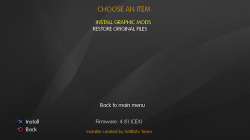
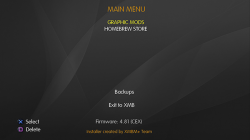
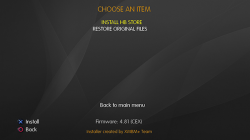
    This Installer was created on the basis of the XMBM + Team installer and inside it you will find the possibility to install or uninstall the Mods and the Homebrew Store. The installer was introduced into the Custom Firmware. This means that you will always have it available, without having to use a USB stick
    .​

    To install the PKG, simply go to the "Package Manager", and navigate to Install the File Package - Internal Storage of the PS3 system. The installer will always be there, but if you want you can delete it via File Manager from the dev_blind / ferrox / pkg directory.

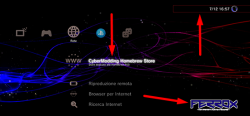
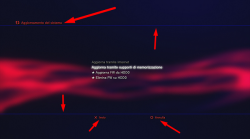
    Below are some screens:
    HVGU.png I8YX.png I8ZU.png

    Use is really simple, there is not much to explain. You can install the Mods, and you can always reinstall the original files from the installer at any time. Ditto for the Store.

    Below I leave a video demonstration


    Mod Graphics by MiZiO90
    .
    FrxMods1.png
    BVYI.png 04HM.png

    CyberModding Homebrew Store
    .
    In addition to the Graphic Mods you see, the installer integrated into the CFW gives us the possibility to install the Cybermodding homebrew Store. I think now all of you Cybermodding users know our store. We have recently added and updated lots of mods for GTAV.

    If you want to take a look at our post on the latest version of the Store, here is the Link: Click HERE!


Downloads: 4.84 FERROX COBRA (7.55) v1.00 CFW
MD5: BEEFC45ADD365E6DA5C12976AA802F19

Source: cybermodding.it
 
Last edited:
Hey guys, maybe you can help me. I had a CFW 4.75 working on my PS3 but the HDD went wrong, so I had to replace it... searching the web I found a CFW 4.82, so I put it in a usb drive and installed in the new HDD, however the ..install/package folder does not appear...
I then downloaded this version, placed it in the usb drive and tried to update the system but it says the data is damaged (error code 8002f2c5)
Any idea on how to solve it so I can have my PS3 back to what it was?
Thanks!
 
I might, yes... so I went ahead and installed the 4.84.2 HHHFW but still no luck. I am sure there is something else i have to do after the install of this HHHFW, but I´m lost...
Any idea, anyone?
If you're jailbreaking from 4.84, then follow this guide carefully. It tells you everything you need to do from the point of installing HFW all the way through to installing CFW.
 
If you're jailbreaking from 4.84, then follow this guide carefully. It tells you everything you need to do from the point of installing HFW all the way through to installing CFW.

Hey Coldheart, thanks... I am working with this but there is something I did not understand:

..."Press the exploit initialization button..."
..."Trigger the exploit"
..."On sucess, load the dumper"

I did this using /dev_usb000/flash_484.hex and it failed. Then I refreshed, I selected /dev_usb001/flash_484.hex and it inmediatelly gave the success initialization...
Now... 2 questions:
1) Trigger the exploit -> That does mean pressing on the Patch NOR Flash Memory?
2) load the dumper -> I have in my pc the .zip unzipped with the dumper release 2.0.1 ... but, how do I load it? Should I place them in my miniweb server? Should I upload it to my usb driver? or how do I do it?

Thanks a lot!
 
Hey Coldheart, thanks... I am working with this but there is something I did not understand:

..."Press the exploit initialization button..."
..."Trigger the exploit"
..."On sucess, load the dumper"

I did this using /dev_usb000/flash_484.hex and it failed. Then I refreshed, I selected /dev_usb001/flash_484.hex and it inmediatelly gave the success initialization...
Now... 2 questions:
1) Trigger the exploit -> That does mean pressing on the Patch NOR Flash Memory?
2) load the dumper -> I have in my pc the .zip unzipped with the dumper release 2.0.1 ... but, how do I load it? Should I place them in my miniweb server? Should I upload it to my usb driver? or how do I do it?

Thanks a lot!
You must have had the USB drive in the left-hand port, since usb001 is the left and usb000 is the right. To answer your questions.
1. Yes, the flash writer patches the PS3's existing flash with flash_484.hex which is the crux of the jailbreak process.
2. After flashing, you then use the flash dumper NOR page (http://**ps3xploit.com >Domain no L...(ps3xploit.me =new)/hfw/dumper/index_nor.html) and dump your now patched flash to USB. Then on PC, check the dump with PyPS3checker (use the "standalone-package" zipped archive) before restarting your PS3 to make sure you still have a valid, working dump.

Once your dump has been verified as good, you can then restart your PS3 and install CFW.
 
You must have had the USB drive in the left-hand port, since usb001 is the left and usb000 is the right. To answer your questions.
1. Yes, the flash writer patches the PS3's existing flash with flash_484.hex which is the crux of the jailbreak process.
2. After flashing, you then use the flash dumper NOR page (http://**ps3xploit.com >Domain no L...(ps3xploit.me =new)/hfw/dumper/index_nor.html) and dump your now patched flash to USB. Then on PC, check the dump with PyPS3checker (use the "standalone-package" zipped archive) before restarting your PS3 to make sure you still have a valid, working dump.

Once your dump has been verified as good, you can then restart your PS3 and install CFW.

Sorry to bother again... the page you mentioned asks for a dump.hex to be in the usb drive... where do I get that from?

(and by the way, let me ask... if I do the whole process with the 4.85 HFW, with the 4.85 writer and dumper... can I install anyway a 4.84 CFW?)

Thanks once again!
 
Last edited:
and by the way, let me ask... if I do the whole process with the 4.85 HFW, with the 4.85 writer and dumper... can I install anyway a 4.84 CFW?)

You will first need to install a 4.85 CFW after jailbreaking, install a pkg called QA Toggler to enable QA flags then you can install a lower CFW like a 4.84 CFW over the 4.85 CFW.
 
You will first need to install a 4.85 CFW after jailbreaking, install a pkg called QA Toggler to enable QA flags then you can install a lower CFW like a 4.84 CFW over the 4.85 CFW.

Hey Cypher! Thanks! is there a link where I can get a real 4.85 CFW? Any idea?

Never mind. I found it here.

Thank you guys!!!
 
Last edited:
Sorry to bother again... the page you mentioned asks for a dump.hex to be in the usb drive... where do I get that from?
It's all in the guide I posted earlier, including the link with flash_484.hex in it.
Release ZIP: http://**ps3xploit.com >Domain no L...e/NOR_NAND_writer_release_2.0.1_PS3Xploit.zip
flash_484.hex- MD5: AB2B3A2E23FA731301260F5702FC4101

Make sure to follow all of the information, including making sure the MD5 matches the one posted - check it once flash_484.hex is on the root of the USB drive you intend to use.
 
Any clues if we can expect a 4.85 CFW ferrox version
Cant find a SEN enabler to go back online on my 4.84

Thanks in advance

Sent from my SM-N960F using Tapatalk
 
https://store.brewology.com/get/homebrew.php?id=283&fid=2193

this is the latest sen enabler. I used it in 4.81 for a while, so it should be good for you too.


What about your standard cex, are you still working on it?
i make it and make cobra one but i sell my Elgato HD60 to buy new HD60 Pro for low latency & instant view so at the moment i don't have capture card so i can demonstrate cfw and test every format for community to be sure no issue for users to have :
  • PS1 ISO/PSN Official
  • PS2 ISO/PS2 Classic Official/Home Made PKG
  • PS3 ISO / PS3_GAME Format
  • PSP ISO
  • BDISO
So :
  • 1- i make the cfw with official RCO no visual mod (clean)
  • 2- seperate pkg [Anonymous Mod Installer] that add Blackih Theme,Wave,PSN Store Icons... (for those who like that because i see most of users seems to not like that )

so the cfw will be clean as ferrox,habib and seperate pkg link for those who want black theme
 
thanks for replied, normally need to update to OFW 4.86, then HFW 4.86 and last HEN it. u mean can skip OFW 4.86 direct HFW 4.86?
 

Featured content

Trending content

Back
Top